January 2016 update

Two issues are highlighted here, one is Sucuri Malware Auditor and the other is Simple Firewall. Both are security plugins used on sites.

Sucuri Malware Auditor

Sucuri Malware auditor is used on pretty much all of the sites. It had a bug during the first half of January causing a white screen to come up with an error message from Sucuri. An example is below:

Sucuri:(1452098269) Send_log:SSL connect error

Warning: Cannot modify header information – headers already sent by (output started at/home/cwj1214/public_html/wp-content/plugins/sucuri-scanner/sucuri.php:6929)in/home/cwj1214/public_html/wp-admin/post.php on line 197

Refreshing your screen would normally get rid of the problem.

These messages appear when you are editing something and relate to a security plugin attempting to send a message to a log file on another website. A fix was created, and the problem occurs much less frequently. I do not believe it affects users at all.

If it is getting in your way, go to Plugins, and looks for Sucuri in the list of plugins and deactivate it while you are working on the site. When you have completed your edits turn it back on.

The developers behind this plugin will eventually release a version where Sucuri just becomes invisible again working in the the background.

WordPress Security Firewall

************************************************************************

Update: 24th January 2016

This is the latest information on this bug:

The developer is aware that all sites using the WordPress Security Firewall (formerly known as “Simple Firewall”) are sending back messages about checksum errors. This is because a new feature has been added, but not adequately tested.

I have checked a few sites and there is not a problem on the sites I have checked. As we are generally very secure (provided we keep our passwords both tough and secret), I am not concerned about this problem. 

Most of you will not see the error messages because they come to me. For those that also see them, do not worry about them for now. Do come back and check this page in a week’s time to see if anything has changed. 

I have posted a message to the developer, and the developer is working on solutions with a small group of Beta Testers (advanced testers that check something before it is released to the public). 

There is a fix that could be employed, where the plugin that detects the problem repairs it by downloading the new file from the source repository. This is not currently enabled. I recommend that for now we wait and see if this is resolved automatically. 

*********************************************************************

Original post

A new feature in this plugin is throwing up errors on index.php files reporting a checksum error on two files. I have had two cases reported and in each case I have investigated it and the problem in both of these cases were no cause for concern.

The errors that have been appearing are reproduced below:

The MD5 Checksum Hashes for following core files do not match the official WordPress.org Checksum Hashes:

 – wp-content/themes/index.php

 – wp-content/plugins/index.php

However if you get that error on your site, do let me know and I will check and confirm. Do not ignore it because an index.php file is a great place to hide something nasty. The index.php files in question hide the contents of the directories they are in.

The Simple Firewall does a check sum on the files in the system to see if any have been modified from the original files. The process is much more complicated than this but if you had a file with the values 10, 5, 13, 21, 16, 20,000, 14, 2, 7, 8, 15 and 61, the checksum algorithm adds them up and creates a sum of the values, in this case it would be 20,172.

If a hacker compromised the website and added in his code into the file, let’s say the hackers code was 13,4,5, then the checksum would be different. In this case the modified file would be 10, 5, 13, 21, 16, 20,000, 14, 2, 8, + 13,4,5 which would equal: 20,194.

The checksum program knows the value should be 20,172, but the calculation it has performed results in 20,194 indicating that there may be something wrong with the file.

It is better to have this feature turned on rather than off.

Some people may look at my description and think it is easy to work around. And you would be right!  I have over simplified the explanation, the result is encrypted, and there are other parameters which are measured as well as the sum of the values in the file. But hopefully most people could follow the explanation.

I checked the plugin author’s support pages and he is introducing a fix for the problem, with regards to these two files. So it is quite possible by the time you read this that the problem no longer exists.

Hacked Site

While nobody wants to have a hacked site, and we all take lots of precautions; one occurred in December. We are unable to establish what precisely had happened, but it looks as though the hacker got into the hosting space rather than into the website.

There are several ways to get into the hosting space, via the hosting provider, through my master account which can access everywhere, or through a username and password combination to something called cPanel. This controls the hosting and email.

In this case the hack was fortunately benign and quite clever. Around the website were additional menus that related to the content on the site. So to someone arriving on the site, it looked a little odd but related.

There were menus that related to families and young children, and these invited you to go to other related sites. What is happening here is that the hacker will probably receive referral fees by steering people to these other sites. This would be the motivation for doing it. So it was not a more typical defacement. Continue reading Hacked Site

Sucuri Plugin – Slow site?

All of the sites use a Sucuri plugin which monitors and hardens the site against security threats. I have had several reports and have witnessed myself that editing the sites are slower than normal, and you may see an error like this:

Sucuri: (1452076628) Send_log: SSL connect error.

This message is indicating that a message was sent to a site that logs activity on your site. When you edit something, I generally get a message to indicate at a high level that something has happened on the site. 99.999% of the time it is normal activity, so I dismiss the items. It is this function that does not seem to be working predictably.

If you site is slow to respond to editing, and/ or you see a message from Sucuri, then go to the Plugins menu item. Locate the item (see image below) and temporarily deactivate it.

sucuri

This will stop the problem from occurring. When you have finished your editing turn it back on.

Continue reading Sucuri Plugin – Slow site?

Post Launch – things to do

What I have provided

The following guide is just an opinion on how to handle the propagation of your site to your target market. There are many ways of doing this, and you can spend a lot of money doing this through a third party. The approach below is targeted at the local charity with little to no budget, so it assumes that you are spending nothing except time in doing this and perhaps a few phone calls.

The following steps will have been taken by myself in the late stages of developing the site and publishing it under your domain name.

  • Site map generation
  • Registering with Google and Bing search engines
  • Google Analytics account set up
  • Useful Links page creation
  • Newsletter*
  • Social Media*

(*optional)

The first two items are processes which firstly create an index of the content of your website in a series of files that are held on the server and used by search engines when they visit your site. The importance of registering with Bing and Google ensures that these search engines visit your site and learn about the content on the site. Once this process is completed you will start to appear in searches on the Internet.

There are some things you can do which require only a small amount of effort, but can make a big difference. Read the full guidance here.

Example Brute Force Hacking Attempt

How strong are your keys?

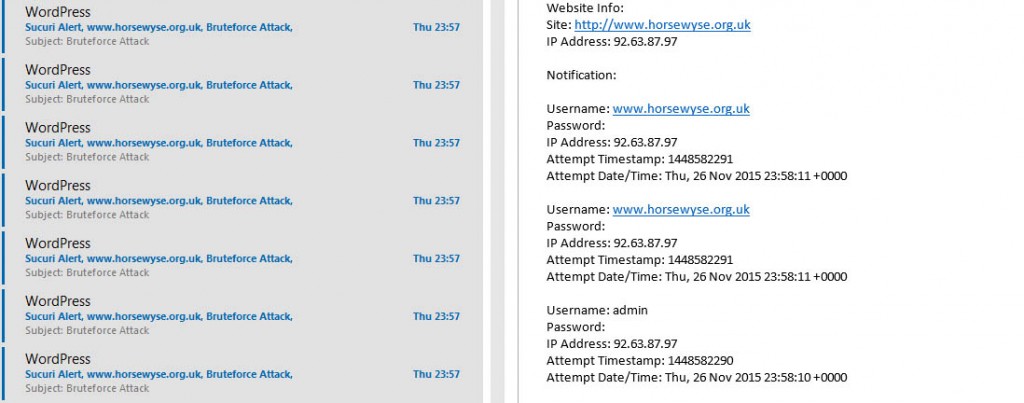
As you are all probably aware I get messages from all of the websites I look after that advise me of certain things that are happening on them. It may be an administrator logging in, or someone editing a post or page. I generally ignore them unless they are occurring at strange times of the day, or it is an account name I do not recognise.

brute force attacks
A small selection of the emails I get each day and night!


Continue reading Example Brute Force Hacking Attempt

Using MailPoet

The following is of interest if your site has a newsletter application built in called Mail Poet.

If you have an email address list containing more than 70 subscribers for your newsletter please do take care with the last step before you send out your newsletter. Generally speaking shared hosting providers do not like bulk mailing applications running in their hosting. They use a variety of methods to detect mail being sent from the hosting which includes monitoring the volume per second/ minute and the number of error messages received such as “recipient account does not exist”.  Continue reading Using MailPoet

Redirecting unwanted email

While I consider myself to be fairly IT literate I sometimes get it wrong,  in this case I could have set up my administration differently. This post covers one such example. It was an irritation more than anything else, but a mistake I will not make again before heading on a vacation!

I have many different email addresses, but use one primary one, and have several others forwarded to that email address. The others are used for backup purposes because they use different servers and different infrastructures.  Prior to going on vacation I limited the volume of emails being sent to me from websites mainly because I had emails coming in which held important vacation information from resorts, services, car hire etc. I did not want to miss them.

Taken near Ayres Rock, central Australia. A bit of fly problem in this area! (fortunately they were not the biting kind.
Taken near Ayres Rock, central Australia. A bit of fly problem in this area! (Fortunately they were not the biting kind).

Preparation before heading on vacation

I backed up all of the sites and checked them in September 2015 making sure everything was up to date and functioning.  Continue reading Redirecting unwanted email

The Favicon and it’s friends

What is a Favicon?

favicon generation

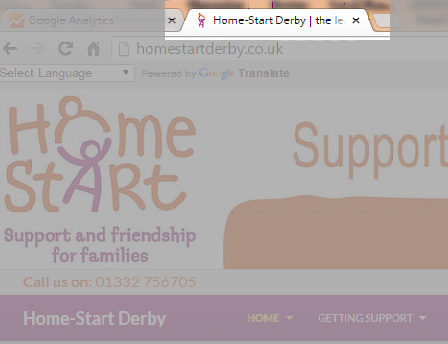
A Favicon is a small image which may appear in the browser tab as in the example above to the left of where it says Home-Start Derby…. It is created from a logo. I have created these for many sites in the past, they are nice to have but not essential.

However there are other related icons that are requested from a website for “favourites” on devices such as the iPad and iPhone. These are larger, but can be based on the same image. They frequently come up as “page not found” in error logs on websites. I do not generate these because it has not been particularly important to do so. Most of you will be unaware of them.

Part of the issue is how long these things take to create and add to a site, which is why I have not created all of them in the past. Continue reading The Favicon and it’s friends

Changes in WordPress

Some of my videos are now out of date following some changes made by the WordPress development team in the latest version of WordPress.

All of the sites I have built should update themselves to the latest version. There are one or two exceptions where I have a template that has not been upgraded, but for the rest of you, you should be on the latest version now.

The key changes that I have noticed are listed below. They are all improvements on the way WordPress works, so do check them out.

Password changes

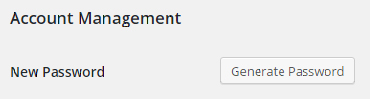
You used to have to create your own password in WordPress. This was a weakness because people could enter password123. (Which is obviously a weak password!). One of the plugins I use forced any new passwords to be strong, which got around the problem. WordPress has gone a step further.

If you wish to change your password you now get a screen like the one below.

newpassword1

Continue reading Changes in WordPress

Understanding how to use this site

I have added a page under the main menu that shows you how to use this site. There are currently over 350 news/ self help/ information items on the site with hints and tips and 34 fixed pages. I realised that some of you visiting here may not be aware they are there because they cannot be located directly through the main menu.

They are news posts that are accessed through the news and alerts page. Each is categorised according to the content in the page and it’s relevance.

To help you get as much information as possible from the information on this site please see this page for more an explanation of how the site works. How to use this site. 

For clients of Wingrove-Media

If you have recently been working with me, and I have developed a site for you, or I am hosting your site you can sign up to a monthly newsletter using the form below:

After clicking Subscribe please check your email account and confirm your subscription

Please note that if you are not recognised as a client you will not be added to the mailing list. Most general articles on this site are freely available to everyone, I have made this available in the same spirit of many other developers who wish to help people, if only in thanks to those that have helped me in the past when I first started. The purpose of the content in this site is primarily targeted at my client base who have a specific implementation or are using specific services to support their website and email. 

Please check the sidebar for a list of articles, or search the site for something using the methods described in the sidebar. There is a category cloud in the side bar which is used to categorise posts. You can use this to narrow down your search.

Wingrove-Services
Privacy Overview

This website uses cookies so that we can provide you with the best user experience possible. Cookie information is stored in your browser and performs functions such as recognising you when you return to our website and helping our team to understand which sections of the website you find most interesting and useful.

You can adjust all of your cookie settings by navigating the tabs on the left hand side.

My privacy policy can be located here: Wingrove Media Privacy Policy (opens in a new window)

My Cookies Policy can be found here: Wingrove Media Cookies Policy (opens in a new window)