Social Media Strategy or just winging it?

During my business career, from around the mid 1990’s there was a phrase that used to be passed around in “Marketing Speak” which was “Work Smarter not Harder”. 

This article and the corresponding PowerPoint attached below is really all about this. I have come across examples where there is either a lot of effort going into administering and keeping a social media feed up to date, and nobody is paying attention to the website, or both are working independently. 

The discussion looks at the problem from a number of angles, and asks several relevant questions in terms of what you think you are trying to achieve. For example if you have a facebook group, do you realise that this facebook group is similar to a congregation and you are preaching to the converted?  Really what you want to be doing is extending the reach of your organisation and growing the interest in your website (and facebook group). 

It is not difficult to do, but it does encourage you to stand back, see what is happening and then ask yourself is it yielding dividends for the organisation, or are you just doing what you think everyone else is doing without understanding why. 

The Social Media Strategy ppt explores ways of helping you to reach further, and grow your viewers. The website is central to everything and is like the Oracle, it contains all knowledge about your organisation and news. You copy links from your site to social media. That means you do not have duplicated effort, so you can now work more efficiently. 

Anyway enough of my marketing, if it encourages you to think out of the box and ask why, it was worth putting together. Drop me a line if you have any questions or seek clarification. 


Support via Zoom

Like most of you I have become a Zoom convert and have taken out s subscription. I can provide ad hoc support if you are stuck, free of charge, just drop me a line and I can give you a hand. Training is also available delivered via Zoom if you need a refresher, or never got any training because of the coronavirus pandemic. So no excuses for not knowing how to do something. 

Remember no such thing as a silly question. So if something is bugging you, stopping you from updating your site let me know. 

Ripping off Charities

I was approached by someone requesting help with their charity’s website. She was the chair of the organisation. As with most of my connections with people it was largely word of mouth and recommendations. They connected through my website.

This was also significant in that I was using the Tawk.to app on my website and cell phone, and while sitting watching TV they popped up and started to ask questions.  (Check out Tawk.to on your site).

Anyway it transpired that this organisation had their website rebuilt by a commercial organisation. The fees were high, and it was very difficult to edit the site, and they were seeking more control.

I offered to look at the site to get a feel for what might be involved before making any commitment.

It turns out that the developer had charged them £750 for a FOUR page website. Plus there was nothing notable about the design, it was based on a template that cost around $28. There was more….   The developer had a minimum charge of £105 whether it was a 5 minute job or a 3hr one. (They charged £35 per hour).  In correspondence it was clear that the developer was offering to update the website as it was running on old plugins and an older version of WordPress. They would not click on the update button for free, they would charge the client for that service.

I requested access to the website to find that all of the editors had “AUTHOR” rights and were very limited on what they could do. This would mean they had to go through the developer to get anything done. And of course pay a fee.

This is one of the reasons I work with Charities. I thought it was absolutely appalling that a developer could charge £750 (for an at best £100 website) and the website could be locked down in this way, with the client having practically no control and having to do everything through a developer whose charges started at £105.  This is the worse example I have come across in the past 9 years of doing this.

Solution

This charity is my most recent addition to my client list. As I did not have full access to their website I rebuilt it externally, using a new template in my hosting. I increased the pages to incorporate GDPR, Terms and Conditions, Accessibility and a few other things. The site is now around 12 pages and has a more robust structure and is more mobile friendly than the former site.

All of the editors now have Administrator level access and can see all of the site and change it all. They also have multiple 10GB mail accounts available, training built into the webiste, and I will run a Zoom session with them shortly to show them how to develop the site further.  The cost?  £0 for the development work and £60 per annum for the hosting. I cannot do that for everyone that approaches me, but this was an awful case of a small charity being ripped off by a commercial and allegedly professional developer. I have spent a lot of my time in the commercial world, some of it in very high margin businesses, but even based on my experience, this was an excessive case of profiteering.

You should always be in control

My philosophy is very simple. I give you the same level of access rights as I have. Which also means you can break the site if you do not know what you are doing. All of my clients are free to take their websites somewhere else and have access to the hosting control panel and domain name. I provide free training to ensure that you can edit your site and not incur any editing expenses if you wish to do that. Which ultimately means you can spend more of your budget on the services you provide to your clients.


Coronavirus image for posts

For those of you with Divi based websites, your posts are best displayed with an image to conform to the newspaper layout you see on your news page. But where do you get an image from?

I originally thought this image was made from dried flowers inserted into a ball, but reading the small print it is actually a 3D generated image of a measles virus.

To use it, place your cursor on top of the image and right click and save the image to your local computer.

The image source is from https://unsplash.com and was created by CDC

Generic virus image

Here are some others so you can create your own.  All of the links below go to the Unsplash.com website where there are thousands of free images covering all sorts of subjects.

https://unsplash.com/photos/bkc-m0iZ4Sk

https://unsplash.com/photos/w9KEokhajKw

https://unsplash.com/photos/rnr8D3FNUNY

Did Nominet contact you?

(Date March 23rd 2020)

I have recived several enquiries about messages from Nominet contacting domain name owners telling them that their domain name is about to expire, do they want to renew it?

This applies to anyone using a domain name ending in .uk. First point is if I am looking after your domain name, it will auto renew even if I have not raised an invoice for it yet. So continuity is always assured. The only exception to that is where you have told me that you are moving, or you are closing. 

With regards to the messages from Nominet, if you read them carefully they are not actually for your domain name, but they are genuine messages from Nominet, here is what has happened:

myorganisation.org.uk vs myorganisations.uk

A year ago Nominet started issuing free domain names to anyone that held a .org.uk or .co.uk domain name. These were issued and added to your accounts without your (or my) permission by Nominet; the body which manages these things. I guess it was an initiative for making money, if we had used it, then people would have been coming to your site at the location, and now they would be asking you for money!

The domain name was the same as the start of your current domain name but just ended in .uk  (so no .co.uk or org.uk). 

I never used any of them, but had to go through my master account and set every one of them to auto expire, otherwise I would be charging you for two or more domain names. 

Do I need it?

Short answer is no, you do not, and don’t feel you have to protect your brand by securing it. As things stand all domain names are well established in Google and Bing already. If some third party picks up your equivalent domain name but ending in .uk vs .org.uk or .co.uk and starts pretending to be you, then you can take legal action against them. I have never heard of it happening, but I guess you can never tell. 

If you do want to secure it, let me know very quickly.  

Exact Metrics!

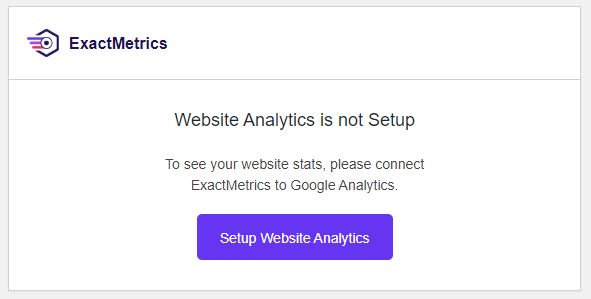
On many websites I have previously installed a plugin called GADWP which allows you to view Google Analytics data within your dashboard. It is a very useful plugin which once set up provides an instant insight into the performance of your site and how many people are reaching it.

But…..

All good things come to an end. It looks like the author of the GADWP plugin sold it to a company called Exact Metrics. I suppose they were purchasing a very large base of registered users. It does happen from time to time. It is a relatively quick way of reaching a lot of people who share a common interest.  Exact Metrics look as though they want to monetize the GADWP plugin, there is nothing wrong with that, however what they appear to have done is removed a lot of the free functionality and now charge a fee. When I first came across this, I set up the new version which replaces GADWP and registered on their site. However all of things I could do before (which btw are free anyway within the Google Analytics account) I now have to pay for. Which is a shame. I think their installed base has shrunk considerably. As you are all charities or not for profit organisations, I know that this is functionality you would not be willing to pay for. I certainly would not either when it is already free. 

But there is another but……

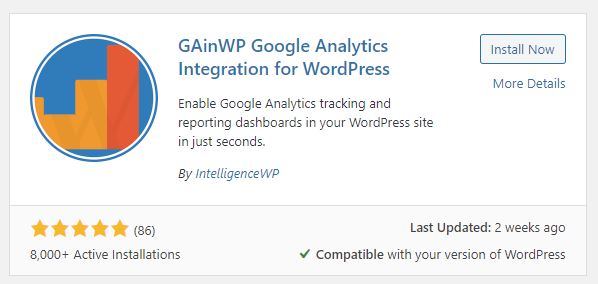
It appears that the original author, or at least the original code is available under a new plugin called GAinWP. While going around websites I have been removing the Exact Metrics plugin, replacing it with GAinWP.  It works in the same way as the old plugin and gives some very simple views into the Google Analytics Data.

If you want to see Google Analytics data on your site dashboard and have the Exact Metrics panel there now, please do the following:

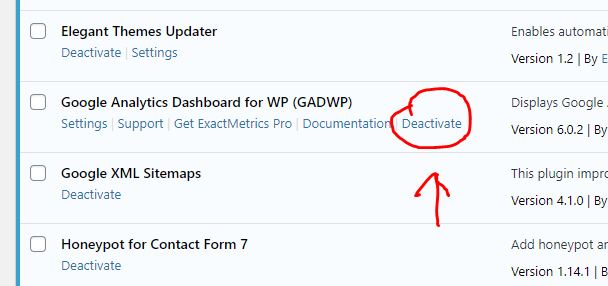
Go to the Plugins page. Locate GADWP and deactivate it. On the next screen choose other, then deactivate it. This will return you to the plugins page, click on delete to remove the plugin from the installation. 

Next, at the top of your plugins page you have an “add new button”. Click on that. In the search box enter GAinWP. You will see two things come up. One is the plugin you are looking for, the other you can ignore. Click on Install Now.

Click on install now.  Once it has installed, activate it. If you have independent access to your Google Analytics account for your website you can enable it yourself. If you are not sure, drop me a line and tell me you have installed it, and confirm your website and I will get it back up and running.

Coronavirus and working remotely

Right now it is worth considering if you had to work remotely, could you access your email and other systems? It is likely at some point in the near future, if the virus takes hold people may be asked to work from home. Now might be a good idea to give that some consideration. 

The following is specifically for those people that access their website and email through my hosting. However it applies to anyone. Some of you I know use Outlook 365 too.  What might you need to effectively work from home, and where do you get it from?

Communications

Email

Most email systems offer an online version through a browser as well as through an application like Outlook. The first things you need to know is how to access these systems from a remote location. If your organisation has assigned a laptop, then it is easy, just hook up to the internet at your new location. But if you have a desktop you are probably not going to take that away from the office.  To access your email on a different system you need to know the portal or web address for email.  For the websites I have built, if you are using the email systems I provide then just go to your website and look in the footer, you will find a link there to webmail.  Go there, then you need to enter your full email address and your account password.  This will give you access to the same account you used on your office computer.  

Other considerations

The email accounts I provide are all 10GB in size. With such a large inbox, you can create folders and move important email into the folders. If you do that on your desktop, those folders are also created on the server if your email is set up as an IMAP account (this was the recommendation I made when issuing instructions). It means the folders you set up are visible on all devices that connect to the same mailbox.  If you know you are going to be out of the office, set up a folder and write yourself a few emails with important info on such as:

  • IT support person and telephone number
  • Colleagues email addresses, telephone numbers
  • Important documents
  • Whatsapp Group (good idea to set that up now). 
  • Key procedures if those are not available online

Think about what you take for granted today because it is to hand. Save a copy locally in your email. 

Website

Is your login tied to your browser at work? If it is then you may have difficulty logging in from home. Passwords can be recovered from WordPress websites provided you have access to the email account tied to your login. Make sure you know these three things:

  • Your user name in the wordpress website
  • The email address which is tied to your account
  • Optionally keep a copy of your password discretely without noting in the file name or content what it is for. You do not need to do that if you can access your email account.  Because you use your email account to recover your password. 

GDPR

Don’t forget about GDPR and your responsibility to keep confidential and personal information safe. This aspect is also worth considering before a crisis forces everyone to work remotely. While in the office you are within a controlled environment. When you are working from home, particularly if the data you are accessing is no longer on the organisation’s equipment, additional care will need to be taken to keep the information secure.  An annex to whatever policy is in force to cover such circumstances might be worth considering including the responsibilities of employees and volunteers.  Once we are the other side of coronavirus all of the data which may may have been more distributed than normal needs to be brought back under local control.  

Portable Drives

While it may be possible to use Cloud based storage, or even remote access to the usual data you access at work, you could also consider portable hard disk drives or USB memory sticks. If you use these make sure they are encrypted. If a drive or file is encrypted then if it falls into the wrong hands it will be virtually impossible to decrypt. 

Make sure a nominated person is issuing passwords, and these are recorded somewhere centrally and securely with access provided to the chair or another backup responsible person. This ensures you do not get locked out of your own systems. 

Remote Access

For any remote access to your systems make sure the passwords are changed regularly, and you know who has access. Personally I find the idea of having a backdoor into a system dangerous. But they are frequently used, and often left open, particulary where you have a remote IT support person. Make sure you have a policy where access can be turned on and off when required, passwords and user combinations are under very tight control, and used on a need to know basis.  You should be in control, not your external IT support company. Your organisation is ultimately responsible for the safeguarding of your data. 

Processing Form Data

I was asked if it was possible to add a form to a website for an event dinner, collect the responses and place them into a website to reduce the laborious activity of copying feedback in forms by hand. Other examples of where you might want to do this are with a census, or survey. In the past I have helped to set these up and created the associated form, the responses come back as emails. These then need to be processed by hand. 

Having given this some thought, there is another way you could do this to simplify the data collection and processing. The problem is getting the responses into a spreadsheet. Once it is in a spreadsheet, then it is relatively easy to write formulae to process it, or extract the data you need. 

There are several aspects to this, some may not be that obvious:

1). The form data can present the options, and the form can only respond with a single selected option. So for example we can say you have a menu choice: Rolled Pork, Rolled Brisquet, Vegetable Stack. You can only select one of them. What is selected and returned in the form is the precise choice of words. If it is precise, then it is unique. You can process it in a spreadsheet. 

2). While you can have forms that say Enter A,B,C,D, E, F where A is strongly agree, and F is Strongly disagree. What you get back is A, B, C, D, E, or F. But this is not easy to process. Whereas “Strongly Agree” is easy to process. So use the language that humans understand. You can abbreviate it later in a spreadsheet. This is of much greater importance if you are not a computer programmer, or software engineer. Those people can think in terms of variable names, and values. If you are not used to thinking that way, keep it simple. 

3). If the website uses Contact Form 7 (one of the most popular contact form plugins and one I have been using for several years now), you can build the response email up very precisely. So much so that you can create the top part of the email in a human readable format, and the bottom part in a computer readable format which you can use in a spreadsheet. 

4). Send a copy of the response back to the person that sent it to you. It is good manners really, and in the case of a Dinner Dance, you have a hard copy of what you ordered for dinner. 

Processing the Data

You will see examples later in this article, let’s assume that I am collecting feedback on dinner choices. I have created a form which I can collect information from people. In this case I have received the following:

Starter: Smoked Salmon with Celeriac and Prawn Salad

Main Course: Slow-cooked Rolled Brisquet with gravy

Dessert: Summer Pudding

I can format the responses in the email which comes back to the organisation like this for human consumption, and like this for adding to a spreadsheet:

Smoked Salmon with Celeriac and Prawn Salad,Slow-cooked Rolled Brisquet with gravy,Summer Pudding

You will hopefully agree that the first version is easy to interpret, but the second version on a single line you have to look more carefully at to interpret.  So we provide both. 

CSV

The second version is the data presented in a CSV format or Comma Separated Value format. If you look closely the three values are separated by commas. 

I can paste that second CSV formatted row into a spreadsheet row for later formatting. 

Wait while collecting form data

If I use a special email box for all of those responses, I can set up the form and forget about it until I need to do some processing. All of the data will go to a special email account. I just work my way down, open up each one and paste the CSV formatted line to a new row in the spreadsheet. 

Convert the CSV rows to columns

Next I choose Data in the spreadsheet, highlight the rows of responses and convert the rows of CSV data to columns. After this is done, all of my First Course, Main Course and Desserts are all in aligned columns. 

Plus I know that the content in the columns is predictable and finite, I am not going to find Jelly under Dessert because it was not an option to start with. 

Add in some formulae

Choose a location at n+1 rows down your sheet where n is the maximum number of responses you were expecting. 

If I choose a range for say the Dessert column on the spreadsheet and I carefully look at the available options I will find that there can only be four possibilities. In this case none, Summer Pudding, Chocolate Tart or Lemon Cheesecake. I can now set up a formula which will count the total number of instances of “none”, “Summer Pudding”, “Chocolate Tart”, “Lemon Cheesecake”.  In other words I have created an automatic way of counting the instances of a given response in a single column. 

Summary

If you have something moderately complex you wish to achieve, it is possible to build CSV based response and paste these into a spreadsheet, convert them to data in columns, and then process the columns. It can make the tedious steps of processing information a lot easier.  

I am looking at this right now as an example for someone, so I will come back and provide a downloadable guide here once I have progressed it further. (January 2020). 

Update Feb 12th 2020: This system has been implemented and is in use with a client. It is now very very easy to collate all of the responses and run some analysis on a spreadsheet to identify, total income, total number of attendees, total plates of each type for the kitchen, and also identify special dietary needs. If the user had to paste each value from every email it would have taken a considerable longer period of time. 

Contact me to discuss further if you want to do something like this. 


Are you tied to your service provider?

If your primary email address for your website does not end in your website name, then the chances are you are tied to one of the email addresses issued by your service provider, or perhaps you are using a gmail, hotmail or yahoo free address? Here are some things to think about…

If your email address is one issued by your broadband supplier, this means your organisation is tied to your broadband supplier, you cannot move to a lower cost provider because you will lose your email address. Then how do people contact you? You may be paying extra for additional email addresses. Those default email accounts issued by BT tend to be 1GB in size too which is not a lot of email.

What should you do?

If you have a website and it is your intention to retain the website address, and it is associated with the business or charity then you should use your domain name for your main and any subsequent email addresses. For example if you have a website called www.mycoolsite.co.uk then you can have an email address called info@mycoolsite.co.uk. If you do this and I am hosting you, you can have 10GB email boxes, as many as you need and at no additional cost. It also means you can review your broadband supplier prices and see if there is anything better around. I changed from BT to John Lewis, a better package and saved over 30% of the cost just over a year ago. I could only do that because my primary email address was not a BT one.

Continue reading Are you tied to your service provider?

Artwork for a banner

I sometimes receive requests for artworks for printers. Examples are business cards, banners, flyers, posters, even headed notepaper. Because I have created your website, I am familiar with the colours and designs that have been used, and have these to hand. If there are some dominant images, I will have these too, generally in high resolution.

Quick Case Study

The owner of Fighting-Fit.org.uk; Peter, contacted me to ask if I had any advice on creating a roll up banner. I have had one recent bad experience with one company local to me, who managed to screw up a £120 flag artwork (after 20hrs of development of an artwork with multiple iterations for a white flag, they printed it with a massive black border on one side). So my experience todate has not been good. However I know through the graphics programs I use (Affinity Photo and Affinity Designer) that I have the capability to produce large print ready artworks so offered to help. I also gave him some advice on questions to ask.

I suggested that he shop online to find out where he could source one from. There are many places you can go to. He came up with this company: Solopress (website is here).

Peter had an idea for what he wanted, provided it to me in a Powerpoint file. I built it using my graphics program. These things are never right first time, so we went through three iterations. It took me personally about 1hr to take the concept, build the first iteration and then develop it from there. Below is a small version of the artwork, and the final product.

Remarkably the turn around time was incredibly quick, and the total cost was around £40! The artwork to produce this was 2 metres high and 800mm wide at 300 dots per inch. This generates very large files. Continue reading Artwork for a banner

Wingrove-Services
Privacy Overview

This website uses cookies so that we can provide you with the best user experience possible. Cookie information is stored in your browser and performs functions such as recognising you when you return to our website and helping our team to understand which sections of the website you find most interesting and useful.

You can adjust all of your cookie settings by navigating the tabs on the left hand side.

My privacy policy can be located here: Wingrove Media Privacy Policy (opens in a new window)

My Cookies Policy can be found here: Wingrove Media Cookies Policy (opens in a new window)