Home-Start Resources Page

I currently host around 40 Home-Starts with a couple more in the pipeline. I also started working with Matt Hann and Tanya Freedman (HSUK) and look after another 40 sites there on a three month rolling contract. The additional 40 sites are based on one promoted by Rutland Online who are no longer developing sites for HSUK. These sites are also in the same hosting you are in, just in a different account. My role is to maintain them each month. 

I have hit quite a few problems in the way these new sites were set up. To help people there is a page you can also use here https://wingrove-media.uk/hsuk/ which lists those websites, but of greater importance, at the bottom of that page are some self help guides. You are free to use these if you wish. Some relate to the way that the hosting works, some relate to specific issues in that design of website. Many are relevant to you as well.

#BehindTheMask

I have just added one which contains a specially built slider to add the existing slides used on the Home-Start home pages to help promote #BehindTheMask. Please do help yourselves and download your copy of the pre-built slider and the instructions. It only takes 5 minutes and I have done the hard work for you. Note that the dimensions of the sliders used on your sites are different to the ones used on the HSUK sites. I have done two sets, just take care to pick up the right one. 

I also have a couple of posts prepared which you could also import and publish including the graphics. Contact me for more information. 

Effective Use of Social Media with WordPress sites

I thought I would kick of 2021 with a reminder to everyone, or perhaps this is totally new to you; how to use your site effectively with social media.

Many of you already understand this and “get it” but as I work around the 130+ sites I am hosting I see examples where there is little activity on the site, but lots of activity in Social Media. So, social media has basically replaced your website as the means of conveying information and raising interest.  The reason why this is not a great approach is you are preaching to the converted.

The problem

Some people find adding things to social media really easy, and adding things to your website takes longer. While this is true, the benefits of adding things to your website in terms of news is of much greater importance than adding it to your social media feed. So it is worth taking the effort to do it. There is no excuse, because if you have forgotten how to edit your website there is a guy in Buckinghamshire who will be glad to run an online Zoom session, and show you how. From around June of 2020 I started to run online editing sessions over zoom and recording them and adding them to your site. I also now add Editor pages into sites with guidance built in. So all the help you need is there, just ask. 

Why posting only in Social Media is not a good idea

Many organisations have their own Facebook, Twitter, Instagram accounts. This is good. But think about your audience. Your audience (people that have signed up to join your feed) are already fans or interested in what you do. They have already bought in to your value proposition. So you are preaching to the converted. But are there any new people coming along. Probably not. 

There is so much social media around now, probably in excess of 100 outlets you are unlikely to stumble across a feed which will be of interest to you. It is more likely you will locate a feed through a website with a link to it. That is important, people find social media feeds largely through visiting websites. This is because search engines mainly refer to websites, and people are used to browsing websites. Think about those feeds you have signed up to, how did you get there in the first place?

Think Website First

This is the approach I recommend you take, and how to measure it. Firstly plan, what is it you want to say? How do you want people to respond? Hold those thought at the back of your mind when you create a post for your website. 

You have the benefit that you can say a lot in a blog (news page) on your website. So get those messages out crisp and clear. Add an image or two to keep it interesting. You have already exceeded what you can show easily on Facebook and Twitter. 

Avoid Text in Images

Some people go to great lengths producing graphically rich content. Which is fine for humans. But the internet infrastructure works on Text. Computers cannot read what is in an image. Also accessibility standards state you should not put text in images because people with visual impairments cannot read them. (Their computers read text, but cannot read images). By all means show an image, but make sure the key points are in text in the post. Then search engines will be able to pick it up. 

Assign any relevant categories to your post and publish it. 

Turing to Social Media

Now that you have your full message on your website, you can now turn to Social Media. Pull your website up in your browser, navigate to your news page and open the new item so it is full screen. Copy the URL (Web address) for the page. 

Now switch to Twitter, Facebook etc and paste that link into the feed. You do not need to write everything again. But you could put a short note there. Usually what happens is social media will pick up some of the text and images from your website. 

Check GA in a few days

All of my sites have Google Analytics added to them, so you can go to your GA account (contact me if you need access and have not been there before), and check what has happened on your website.  You should anticipate a big spike in visitors, because they have been referred from Facebook, Twitter, et al. 

But……

You are still only reaching the converted. So how do you spread the net wider?

This needs a little research, but is definitely worth the investment of time. You could start by looking on a map at the major regions around your location. Then look on Social Media to see if there are interest groups in those areas. For me, there is Your Prestwood and Great Missenden. It is generic, and designed to connect people together. Unfortunately many of these feeds are cluttered with adverts from businesses. However you are different. You are a charity in need of help and promotion. It is likely that the moderators and admins will look sympathetically at your case. 

Join some groups locally around your location and when you are looking for volunteers, or looking for donations, or simply wish to promote your work, you create a post on your site, publish it. Take the URL for the post and paste it in these newsfeeds. Now you are preaching to an audience that may not be aware of you. Not everyone will come, but you should get a significant blip in interest. 

 Spreading the net wider

So, start to think bigger, how can you reach out to a wider audience and bring people into an inner circle of “friends of your organisation”. You will find this approach can yield big dividends in establishing your presence, value and needs. 

Don’t forget the search engines

Another advantage with this approach is you have generated back links (links back to your website) which are vitally important in your ranking with Google and other search engines. The more you have, the more important your website is perceived to be. Also the content has been indexed, and may come up in searches. So you have increased the possibility of being found. 

Working Smarter not Harder

I think if you adopted this approach, you will see results, and unlike just using your social media groups, you are exposing what you do to a larger audience. That will ultimately bring more people to your site, and that may increase your supporters.  In this process you only created the post/ news item in one location. So you did not have to do it multiple times. All you posted in social media was a link back to your news item. The only other thing you needed to do was check on the social feeds in your local communities. 

Capture and Retention Strategy

You could all take this a stage further. Many of you have a newsletter function built into your website using MailPoet. If you regularly publish news on your website, then this news can very quickly be built into a newsletter (it takes less than 5 minutes). You send the newsletter out to subscribers to your website.  Maybe once a month, or once a quarter. Here you are taking your website out to the subscribers rather than waiting for them to come back. This too will cause a huge peak in website visitors. 

Putting this all together, you have these classes or groups of people. 

    • Group A: Those that have never heard of you  (Millions)
    • Group B: Those that have heard of you and watch your social media feeds (50-100)
    • Group C: Those that visit your website (80-400 per month)
    • Group D: Those that are subscribers (50-100+)

Group D are the most loyal and most attentive group. Your goal is to grow this group by measuring the number of subscribers on your website. 

Group C will contain regular fans, and passers by. Prominently advertise on your site that you have a free subscription. Convert Group C members to Group D members. 

If you are treating Social Media (Group B) as a separate thread to your website, then the chances are those watching Social Media are not looking at your website. By posting links to your site from Social Media, you can change that. If you can drive Social Media watchers to your website, then you can get some of them to sign up to Group D (subscribers).  Remember you can measure that.

Group A is where the gold is. In B, C & D those people are already aware of you, you need to reach out to those that are not aware of you to grow your numbers and levels of interest. This is where you should be placing as much effort as you are on your own social media channels. In group A are donors, volunteers, prospective employees, trustees, subject matter experts, the list in endless. They just don’t know about you yet. 

Put a Marketing Plan together

A marketing plan can and should be larger than this activity, but just focusing here for a moment. Set your self some goals to get more hits on your website. Most local charities with a few exceptions get around 150 site visitors a month. Give yourself the goal of growing it by 50%. 

If you have a subscriber list and newsletter in your website aim to get that to 100 (which should be relatively easy to do). 

The point here being that these are things that the average person can do, and better still you can measure whether it is having an impact or not. So you are not working blind. Use the statistics on your site through Google Analytics, and the subscriber list to provide the assurance that you can make a difference, and drive it relentlessly throughout the year. 

It is not all theory

Here are three examples of why I believe this can work for you. 

1). Prestwood Village Association (https://prestwoodva.org.uk) this organisation is based in my village. I joined them in 2011 and built the original website. It is now on it’s third iteration. We added the newsletter to the website and used Social Media outlets to market the site. Using the same methods I have mentioned above. Prestwood in Buckinghamshire has around 2,500 homes.  The website has over 1000 subscribers. That means Prestwood Village Association at any time can reach out to 1000 people in a matter of a few hours. 

2). Horsewyse CIC  (https://horsewyse.org.uk) is an equine facilitated learning school for children with special needs. They raise additional revenue during school terms by holding day care/ supervision for children for one to five days a week. Coronavirus pandemic excepted; through out the year adverts are placed on the website to say when the next set of dates are coming up. I send out a newsletter to a growing number of subscribers, in the newsletter I ask people to share it with their friends, so more people sign up. That subscriber list has gone from nothing to over 140 people in a couple of years.  Here again the messages are taken out directly to people that interested to know what is happening. 

3). Home-Start Cotswolds (https://home-start-cotswolds.org.uk) I was working with one of the members of the Home-Start Cotswolds team in January answering some questions. I noted that there was an unusual peak of activity on their site over the Christmas period. Bringing around 60+ people to the site in 2 days. I commented that is looked like the site had some unwelcome attention from hackers probing the site. But happily it was not the case. The website editor had posted news on Facebook which directed people back to the website where they were seeking volunteers. You could track the number of accesses to the volunteering page as well. – Well Done Home-Start Cotswolds, that is the way to go!

Got some ideas, not sure what to do?

Drop me a line. Happy to help get you started. 

Home-Start and John Lewis Partnership Christmas Appeal

For Home-Start Website Owners Only

How this works out is currently dependent on how HSUK responds, but I will put it on the table so you are aware of it.

(Update 17th of November we are good to go and this is now being rolled out across my sites.)

A Christmas appeal has just been launched with matched giving by John Lewis for the benefit of Home-Start and Fareshare. I have had a few enquiries about this, and some hints that something is happening, but not sure what yet.

I met with Home-Start UK around 18 months ago in Leicester, in that conversation I mentioned that I look after 30+ HS sites, and there should be a way to help magnify any promotions by working together. Sadly it was never followed up by HSUK.

Setting an Example

In an effort to rectify this and demonstrate what could be achieved, I have the following offer to any Home-Start Divi based site that wishes to bathe in the publicity being generated in this initiative. This is all subject to HSUK agreeing btw.

You will need to be quick to see this, in case it gets removed. I have taken the HSUK promotional page which explains what it is, and how it is implemented and how to contribute. I have not changed the text, it is all generic, and I did not wish to alter the positioning. I have used their graphics, and referenced the videos which are on YouTube. The only changes I have made are with respect to where the About Us button goes to, it will go to your organisation’s About Us page so brings this down to the local level. The Volunteering button goes to your Volunteering page, so brings this down to the local level as well.

I have merged two posts on the HSUK website to do this. You can see an example here: https://homestartraw.org/give-a-little-love/

My theory is a national campaign, can benefit the local offices too. The fundraising portal and instructions are all at the National level, so none of that changes.

Why might this help?

It will help to raise your organisation’s profile, and now rather than just the HSUK site carrying something it could be magnified 30x. So rankings will positively affected.  There are also 30+ (more) links back to to the national fundraising portal, so helping that too.

What will I do?

I will add in the post to your site and change the links for volunteering and about us to point into your website. The videos will appear to run in your site, but are actually running on YouTube, where the source videos are located. The links and instructions on how to raise money are unchanged and promote the national campaign.

I will also add in a special slider to the home page which uses the heart logo. I have done this on the HS RAW site, but it looks too busy and clumsy at the moment and needs to be simplified.

How much will this cost?

Nothing, it is my Christmas present to you, for all of the great work you do throughout the year, and particularly this challenging year.  The only issue currently is HSUK buy in because it is their ad and content I am redistributing. I am waiting to hear back on that.

If you are interested in joining in please send me a message.

This Plan is now being executed

See this article if you are interested in seeing examples, or wish to sign up for the free offer. https://wingrove-services.co.uk/give-a-little-love-campaign/ I am now rolling it out wef: 17th November 2020. The post lists the sites I have already updated and if you are on the list, what the eta is for your site. 

Support via Zoom

Like most of you I have become a Zoom convert and have taken out s subscription. I can provide ad hoc support if you are stuck, free of charge, just drop me a line and I can give you a hand. Training is also available delivered via Zoom if you need a refresher, or never got any training because of the coronavirus pandemic. So no excuses for not knowing how to do something. 

Remember no such thing as a silly question. So if something is bugging you, stopping you from updating your site let me know. 

Covid-19 coronavirus support messages

Covid-19 coronavirus support messages

I have received quite a few messages requesting support for adding in messages relating to offices are now closed, or other guidance relating to the Covid-19 pandemic. I have carried out all of those free of charge.

If you do not have a message on your website about it, maybe because you have forgotten how, let me know and I will help get something on the site.

My only request to you however is please provide me with the message you want visitors to read. While I can certainly be creative, the message really needs to come from you, not me. It also helps me to just concentrate on the mechanics of getting a message on to the site.

The best way to tackle this is to create a post or short article with your detailed statement in. You may edit this later as circumstances change. I add a bouncing box on to your home page in a prominent location which advises people that you have an important message. I connect the box on the home page to your post, or I can add both of them in.

If you do it that way, you are not placing a huge notice on your home page, just a small one with the detail in the site.

Contact me for more help or guidance.

Keeping parents sane!

I will also extend this to include a single page or post with help for parents (or your clients) with tips on how to keep the children busy as well. But I need you to do the legwork and present me with the text and links to the appropriate sites. My role is pasting the content into your site, not being creative editing it. If you wish to do that, I will also create a page on my website as a resource that others can copy, as everyone is facing the same set of problems.

Online Training

If you need a break from the garden or cooking during these times of social isolation, why not consider a training session online? I normally visit people after they have had a new website launched or a substantial rewrite and provide training. But right now much as I am suffering from cabin fever, I cannot do that. However we could do something online. Contact me if you are interested, especially if you have training outstanding at this time.

How does it work?

Right now, I could not tell you, but I will speculate. I will identify a free application (probably VNC) which will allow screen sharing. I will set up the training in your website, we will both go online at the same time. You will need to install VNC or some other screen sharing application. I will connect to your computer (with your permission). I will provide instructions on where to get the application and what to do to install it, how it works, and most importantly how to remove it completely afterwards. I know a lot of remote IT support specialists use these types of programs, or consoles to remotely access computers. It is also a massive security hole if you leave them there ready for access. So I will tackle this with that in mind. You install it, and you remove it afterwards.

We will also need an audio channel open, so either a landline, skype, whatsapp or other method can be used. I can do this in a variety of ways, so it is really down to you and what works for you on the audio side.

I will talk you through the tutorial, as I can see what you are doing, I can advise you if and when you need guidance.  When I run these things onsite, they are normally 2.5hrs. Online, we can split it into two sessions.

Interested?

Firstly, I would like an expression of interest. Because I will need to do some legwork to figure out how to do this if there is enough interest. For those of you who have not been trained, the sessions are free. It is part of the package that I provide.  For those of you I have already trained, the cost will be £40 for a refresher unless I have recently upgraded your website. In which case it is free. 


Questionable Advice?

I have had several requests over the past two months to add “DONATE NOW” buttons onto all pages on a website. One request in particular came via a voluntary advisor which seemed totally flawed to me. However I can appreciate that most of you are dependent on “external voluntary experts” of which I guess, I fall into that category too.  So here is my take on it, like all gifts, you can choose to accept it or not. It is just an opinion. 

When you look around the web, particularly on charity sites you tend to see the Donate buttons plastered everywhere. The advice given to my client was to add a link under the button which goes directly to a preferred fundraising portal. Say for example Virgin Money Giving. That sort of sounds ok, but I disagree, for several reasons:

1). Let us assume I have arrived on your website, I am not that familiar with it, I have looked around and now I wish to make a donation to help you. So I click on the Donate Now! button. What happens?

It takes me to a completely different website, it may have your logo there, but it has someone elses logo there too, I am not sure if this is a scam or not, so I leave. Did you get your donation? No. 

There is a web standard called WCAG2.1 which states that a link that opens in a new window, or takes the person off of the website needs additional text to advise the user before they click. Think of it as a best practice. You cannot do that here. Let us look at another case:

2). I am familiar with your organisation, I have visited several times, and I can read (!). I want to make a donation. If I want to make a donation, which page would I go to?  Chances are you have a Fundraising page at the top of your menu. That is where I would go. I did not need a button plastered everywhere.  

The Donate Now button is not dissimilar to someone on the street asking you for money; they have not established a compelling case why you should give them money, but they are asking anyway. Chances are most people will ignore it. 

It is much smarter to sprinkle Donate Now buttons within the content on your site AFTER you have just made a case for why it might be a good idea to donate. It is more subtle, less “in yer face”. While I have no firm evidence to support this, I suspect it will be more successful than the former method which has the subtely of a sledgehammer. 


If you must, do it this way…

If you must put a Donate Now button everywhere, it should really link to the fundraising page, or the page in your website which lists the various methods of raising funds. In this way the user is still on your website. So within the page you can explain that by clicking on a link or icon on this page you will be sent to the fundraising partner page, specifically to your account on that page, and it will open in a new window. 

By doing it this way, you conform to best practices in WCAG2.1, and you are holding the hand of the donor and reassuring them as you take them to the appropriate website. 

I personally would be more likely to donate that way rather than the sledgehammer approach. 

Why the sledgehammer approach…

I am being disingenuous really, I don’t think people really mean to use the sledgehammer approach, but I think there is a reason why they propose to do it this way. Fundamentally the person making the recommendation is making an assumption: they love your charity, everything about what you do, and as such they are already bought into the value you provide. So in their case you do not need to engage into a sales pitch, they are already sold. So the button is all they need. Well that is fine for them.

But your adviser is not your average donor!

However the people you are hoping to donate to your organisation are not bought in yet, so you have to do that as a separate activity. Taking them to the fundraising page first is vitally important. Of even greater importance, sprinkle those donate now buttons within your content, say after a moving testimonial from one of your clients, or a case study. I think you will have much greater traction with your market. 

Do you have a Social Media Editor?

From a marketing angle, you may consider social media to be very important to your organisation, and it is of course. However it is a bit like preaching to the converted if you think about it. It is not likely someone will find you on social media unless they already know about you. So that means the audience you are sharing your social media stories with are already fans and followers. It is a way of keeping in touch.

Many organisations I work with have strong social media presence, but not such a strong presence in the news on the website. Is this a problem?  Well yes, I think it might be. Here’s why:

Do you want more people, or the same people?

Ask a marketing professional and they will always want more people exposed to a story or message. Particularly that group that is not currently engaged with the organisation. Within that group might be future; donors, contributors, volunteers, members etc. That is really what is important. Of course you do not ignore those people that have signed up or following you already. We are talking about a superset of people, not just regular engaged fans.

Work smarter not harder

So, let’s be clear here, this takes a little more effort, but over time it will be much less effort, and you will reach far more more people.

Without exception, if I look at the statistics of those sites that have a rich and varied news feed, they also have high numbers of visitors. There are some technical reasons for this in terms of how the website works. But let’s keep this simple.

Here is a new strategy

Get your social media guru to add things to the website first. Do what they were intending to do in a post on your website rather than Facebook, Twitter or Instagram.

That in itself gives you an advantage over twitter because you are not restricted on your content.  When you have added the item to your website post. Display the post in isolation from the news page. (When you view it on the news page with other posts, you need to click the image, title or read more link to open it). Now copy the URL or web address for the item in your website.

Next go to Twiter, and paste it there. Then go to Facebook and paste it there. Both systems will try to grab something from your website. So you don’t have to rebuild it all in Facebook, Twitter et al.

Now you have met the requirement to keep your fan base in touch with what is going on. However it will also drive up your website visitors as a result. For those people that happen to come across you while surfing the web, they can see it too. They would have missed it before if it is exclusively on social media. 

Check your results

Most of you have a Google Analytics panel on your dashboards, you can see and monitor the results of this change if wish. The net result in terms of effort, is you create it in one place only (your website) and do not need to recreate it any where else.  Everywhere else including feeds you simply add to, you just paste the URL. When you do this, you will see a big spike on the number of visitors to your website. Many of those will be first time visitors. Some of those will also become fans too. 


Newsletters and MailPoet 3

I have been a fan of Mailpoet (integrated newsletter plugin) in sites for some years now. Around 18 months ago MailPoet changed from version 2 to version 3. Development work stopped on version 2. I have upgraded, or some of you may have upgraded yourselves to Mailpoet3. One significant change is the presence or absence of images in Newsletters.

Featured Images in Posts

When you create your newsletter you add existing posts into the newsletter. Mailpoet 2 used to pick up the first image and include it your newsletter. Mailpoet 3 does not work that way. It means that you may have had vibrant interesting newsletters before, but now they are all text.

Continue reading Newsletters and MailPoet 3

Auto remove old posts

From time to time people ask if it is possible to automatically remove old posts. While it is possible to add a post in the future by setting the publish date in the future, I am not aware of anything that allows them to be automatically removed. At least not without adding something to your website to enable that to happen.

Post Expirator

This is plugin which is developed by Aaron Axelsen. You can find out about it here:https://wordpress.org/plugins/post-expirator/. I generally look at the star ratings and number of installations to judge whether something is any good. In this case it scores 4.5 stars (out of 5) and 90,000+ installations. 

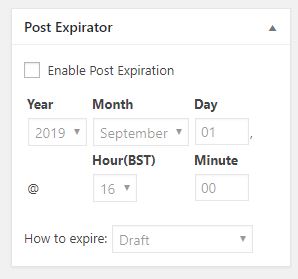
I have installed this on several sites now, and will use it as standard with the plugins I normally use. Once installed the plugin adds a field to pages and posts which allows you to set an expiry date and time. 


With the plugin enabled, everything in the site has this panel in the editing view from the dashboard. To get it to work all you need to do is check the box Enable Post Expiration and then set a date and a time. 

There are different ways of expiring a post. I recommend you leave it on the default which will hide it from view by changing the status from Public to Draft. That way you do not lose it if you make a mistake. 

The only problem with this approach is you have to remind the editors to set the parameter. But if you do that the site will ultimately look cleaner. You might only wish to do this for events that have expired. 

How do I add it in?

Log in, go to Plugins in the side menu. Go to Add new, and search for “Post Expirator” by Aaron Axelson. Install it and activate it. Then take a look at a post and will see the new field added. 

Wingrove-Services
Privacy Overview

This website uses cookies so that we can provide you with the best user experience possible. Cookie information is stored in your browser and performs functions such as recognising you when you return to our website and helping our team to understand which sections of the website you find most interesting and useful.

You can adjust all of your cookie settings by navigating the tabs on the left hand side.

My privacy policy can be located here: Wingrove Media Privacy Policy (opens in a new window)

My Cookies Policy can be found here: Wingrove Media Cookies Policy (opens in a new window)