From time to time people ask if it is possible to automatically remove old posts. While it is possible to add a post in the future by setting the publish date in the future, I am not aware of anything that allows them to be automatically removed. At least not without adding something to your website to enable that to happen.
Post Expirator
This is plugin which is developed by Aaron Axelsen. You can find out about it here:https://wordpress.org/plugins/post-expirator/. I generally look at the star ratings and number of installations to judge whether something is any good. In this case it scores 4.5 stars (out of 5) and 90,000+ installations.
I have installed this on several sites now, and will use it as standard with the plugins I normally use. Once installed the plugin adds a field to pages and posts which allows you to set an expiry date and time.
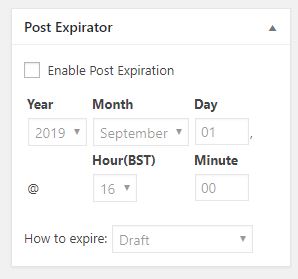
With the plugin enabled, everything in the site has this panel in the editing view from the dashboard. To get it to work all you need to do is check the box Enable Post Expiration and then set a date and a time.
There are different ways of expiring a post. I recommend you leave it on the default which will hide it from view by changing the status from Public to Draft. That way you do not lose it if you make a mistake.
The only problem with this approach is you have to remind the editors to set the parameter. But if you do that the site will ultimately look cleaner. You might only wish to do this for events that have expired.
How do I add it in?
Log in, go to Plugins in the side menu. Go to Add new, and search for “Post Expirator” by Aaron Axelson. Install it and activate it. Then take a look at a post and will see the new field added.