I send spam (Subject Line)

Wouldn’t it be great if spammers would mark their junk mail as spam when they send it?  Then we could waste less time reading it.

Well, I may have a solution, the only question is if a genuine person sends an email that they remember to set the subject line to something else. Here is what I have observed over the past month:

I have contact forms on websites, and most of these have anti spam measures built in, but there is still a steady trickle of spam messages. As some of the anti spam measures require a human to look at an image and identify it, the chances are that the spam is being sent by people and not by bots. It is also likely that the people sending the spam are doing so quickly and for a few cents per email.

On a form I have created I have a pre-programmed subject line with 4 or 5 choices depending on the nature of the site. So you cannot enter your own subject line. You have to choose one. They might be for example;

  • I wish to volunteer
  • I wish to make a donation
  • I need help
  • Something else

I normally default to “Something Else”.

What I noticed is spam messages continued to arrive, but instead of “Something Else” being used as the default subject line, the spammers always chose the first option. Without fail.

So I changed the list to the following:

  • I send spam
  • I wish to volunteer
  • I wish to make a donation
  • I need help
  • Something else

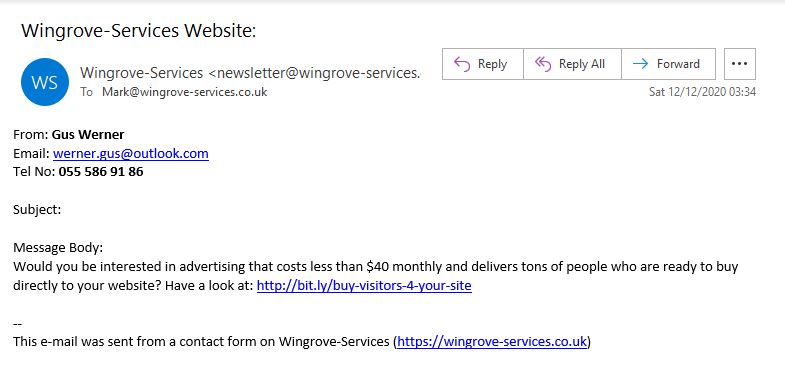
Now my spam messages arrive neatly labelled as spam. See below for an example. (click on it to enlarge it).

Email Filtering

The next step is to auto file any incoming messages so that they are sent to a special folder. That is very easy to do because you can redirect emails based on the content in the subject line. In this case “I send spam”. 

I have not taken that step yet, but I will do over the coming month. 

The only problem with this approach is somebody might click on it by accident. That is unlikely but cannot be ruled out. So it would be wise to check the folder from time to time. 

Filtering your email box, may be possible in Outlook, but it is definitely possible in your email box via https://stackmail.com. It is quite easy to detect strings of characters in the title, email address, or the body of the email and take action when they are detected. 

If anyone is being bombarded by junk email let me know and we can try this out to see if it helps. Unfortunately spammers seem to target some sites and not others, how or why they do this, I am not sure. 

BTW this method only works with messages that originate through your contact form. It would not work with general messages because it is unlikely a spammer is going to label the subject line “I send spam”. 
Phishing case 1 – what happened

Over the course of the summer I have witnessed the outcomes of three phishing attacks. It is worth reflecting on these, because the same thing could happen to you, or someone in your organisation. If it did how would you handle it?

Case 1. 

A company that I have had a long relationship with, who provided a residential security service would invoice me once a year. In this case I anticipate an invoice, and from time to time contact the company to discuss account changes or servicing. Everything was fine for 24 years until June of this year. 

The timing here is probably significant. On a Saturday morning I receive a message from the company that appears to have originated from the company and it carries some previous correspondence including my account, my bank details and a new invoice attached to the document.

I say the timing is significant because it is Saturday and they are closed, the office is only manned during the week. 

I use an Anti-virus/ security program called ESET Smart Security. It does more than monitor for viruses. It warned me that the email with the invoice carried a virus. I had not tried to open it, the program monitors mail as it comes in  and checks it. 

I looked at the email more closely and found that while the message appeared to originate from the company, it was actually sent by someone else. Checking the email headers, it was clear it did not actually come from the company at all. 

How did they get my personal information?

It was clear that a data breach of some form had happened at this company, and now someone was working through old email threads and trying to propagate a virus payload hidden in the invoice. 

I rang the company support line and asked them to escalate this to the directors of the operation because I was concerned that other people with less adequate protection might actually download and install the virus by accident.  I tried three times and even wrote a letter.  Nothing happened for around 6 weeks!  In the meantime I received several more invoices carrying the same virus payload. 

No security breach here!

I received a very poorly worded broadcast newsletter that had not been checked by the company stating that an incident had happened which had been traced to the administrators computer. A virus had been installed on it, which had permitted a third party to read email on the computer. One can speculate that the “bad actor” copied the administrators email box and could see threads for all sorts of things, and could subsequently continue those threads by spoofing the email address.  It does not take a rocket scientist to appreciate that the administrator in question probably had access to all sorts of systems through her email account, so you do not really know what happened, or how much information escaped. 

The newsletter reporting the incident played it down, assured everyone there was no problem, and everything was under control. They provided an email address if you had any questions. 

Naturally I asked one. The email bounced!  So I called and asked to speak to a director. I was assured that there had been No Security Breach, all that had happened was an email account was compromised.  I challenged this because the email in question that I had received contained my name, address, bank details and other information on. I also pointed out that possibly many of their customers now have viruses on their computers. 

Conclusion

I don’t think this incident was taken seriously by the organisation, or reported to the ICO. Ironically the company in question specialism was “security”. They had little knowledge of IT security, and inadequate protection on their computer systems.  The main thing I took issue with was they did not inform their client base of the potential risk of clicking on an attachment allegedly from them carrying a virus. This virus, no doubt just extends the problem to affect more people. 

The company in question is no longer providing services to me. I cancelled the contract renewal and have gone elsewhere. 

What would you do?

Within the policy framework of your organisation how would you handle something like this? Would you be proactive and inform your correspondents about the problem, or would you keep it all quiet and hope nobody notices?

Could you cope if this happened when your main office was closed?


Many of the organisations I work have comprehensive and online policies. Most don’t though. When I look at some of the activity in this area with one client group who seem to be adopting security measures more aligned with MI5 than a small regional charity, this type of problem is more likely to happen than a laptop being stolen. 

Thoughts for 2021

As we begin to close on 2020 with a new year heading towards us, here are some things you could give some thought to in 2021.

Marketing

If you spend more time on Social Media for your organisation than you do on your website, remember that your website is where all of the detail is. Don’t be tempted to just use Facebook and Twitter because it is easy. A much better strategy which will help to promote your organisation further while still engaging on social media is to publish your content on your website first, then save it, and view it. When you view the item, grab the web address and paste it into the social media feed.

Why?

You only need to write it once, share the URL (web address) and everyone reading it will be taken to your website. Your website numbers will increase, and you are likely to achieve greater traction with your viewers.

Also paste your URL into other related social media feeds. This will definitely drive more traffic to your website. However do make sure your post is not overtly “selling or seeking money” if it is of human interest, say a story, it will be far more likely to be accepted by those that manage the social media feeds.


Editing your website

If you are not editing your website, ask yourself why? If you have forgotten how, or need some help, just ask. The whole reason I got into supporting charities was to help them to manage their own presence. I would much rather you come back to me and seek some support.

I can now handle training online and set up some exercises for you to increase your confidence. I also add guides into all new websites now.  A moderate proportion of my time is spent training people online each week. The Zoom session is recorded and added into your site as a video.

Why

Because your site is your online brochure, it is where people will make a decision to support you, volunteer for you, seek your services or help. It is also where local authorities and other funding sources will look before giving you a grant.

A website is never complete. It is a living document which acts as a window on your organisation. If nothing has changed on it for 12 months, it will not give an impression of an active or successful organisation.

Be Provocative in a nice way

Think about how you can more effectively position your value proposition, and enumerate the value you have currently provided to your community.

Some people ask me to add fundraising buttons here and there. Usually from trustees, probably because they can see someone else has them. What does not tend to happen is equal or greater attention is given to providing a narrative on why you need to fundraise. Often because those in the charity are very much aware of the problems. However the public is not. So tell them, and in true marketing parlance; tell them again. Take a look at this fundraising page. It states at the top of the fundraising page the dilemma they face. Probably not unlike yours. But you may be more likely to help if you know the funding gap, rather than just “send us some money”.

Add some button in but go to the fundraising page

Do not direct people off of your site to another site without telling the first. You will be more likely to lose them. All fundraising buttons need to lead to the fundraising page which lists the ways in which you can help. The narrative can also provide guidance to the reader that they are about to leave your site and visit your account on anther site. This is a much better way than jumping directly.

Consider a pop up 

A pop up message inviting people to do something is a powerful way of reaching out provided it is not done too aggressively. Pop-up plugins are available in WordPress. Contact me to find out more. 


Help promote Remote Working

We have all been dealing with the Pandemic this year, and it is likely that once we are out of the pandemic, things will not return to quite how they were. Management have often been the main obstacle to remote working; largely because of trust, and lack of control. The Pandemic has removed those barriers, and managers have had to just “suck it up and live with it” because there has not been any alternative way of working.  That said remote working has been proven to work, and some reports suggest people are actually more productive. Large premises may no longer be required. People that used to attend an office, may be encouraged to continue to work from home. 

Password protected pages

Note that you can have hidden pages in your website which are password protected, or you could have a membership based website that is indepedent from your main website which contains procedures and policies, a virtual noticeboard, a diary and other things that are necessary for the running of an operation. There are lots of things you can do to help promote a distributed operation. Some of you may already be signed up to Sharepoint and other cloud based sharing. If you are a smaller organisation and have some particular requirements drop me a line, I can point to some free systems which might help.  

Facelift, or major surgery?

I am probably going to use this one as theme for next year. If you feel that your website has become stale, which can happen if nobody is actively keeping it alive, then it may be worthwhile exploring the business goals of the organisation, how you intend handling communications, and marketing, and how the website can help. 

Based on those factors, we can critically look at how closely the website ties in with the new direction and look at some nips and tucks in places rather than a radical new redesign. 

Part of this work may also lead to analysing Google Analytics data on your site to establish which places people are reaching or not reaching, and whether those are important or not. 

Scammer and Phishing Example

I received the following two unrelated emails and thought it would be worth highlighting the stupidity of one and the implications of the other. One is clearly a phishing example very poorly executed, a blind person could see this one is a scam, the second one illustrates people’s obsession with numbers of visitors. Let’s take a look at the United Nations and World Bank first. 

The UN owes you some money

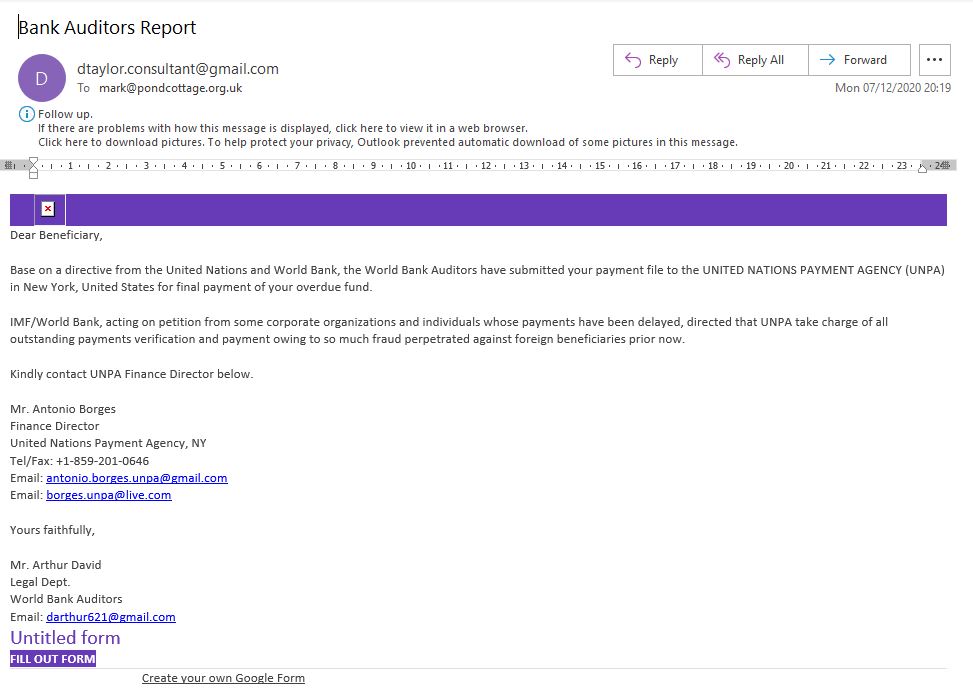
This is the really stupid phishing attempt. Here what jumped out at me within 3 seconds of opening it. 

  • Senders email address: “dtaylor.consultant@gmail.com”  Would any self respecting “consultant” be using a gmail address?
  • Would the Finance Director at the United Nations (Antonio Borges) be using a gmail address?
  • Would the World Bank Auditor legal department representative Mr. Arthur David (darthur621@gmail.com) be using a gmail address?
  • Better than all of that, the UN and World Bank need soemthing from me in a “Google Form”. They could not be bothered to try to hide form or dress it up as something official looking. The form is called “Untitled Form”. 

So how does this work?

I am speculating here, as I would never click on anything like this, or even download the images associated with the email. The form will ask you to identify yourself, tell you it is going to send you some money and ask you for details about your bank. It may even offer a form that looks like a log in to your bank. Either way, whatever you add to the form is sent back to the scammers. Depending on how much detail you have provided, they may contact your bank and pretend to be you, or contact you, in the latter case there are all sorts of ways the scam can unfold. 

My recommendation for anything like this, if it looks to good to be true, it probably is. Delete it, don’t be curious about it, don’t click on anything, or even download the missing images. Remove it from your system.  The email is below. Click on the image to see a larger version of it. 


UN Scammer

Obsession with numbers

I tend to see the following a lot, it highlights a method of cooking the books for a website to give the appearance that it is more popular than it really is. 

Firstly this message may get beyond spam filters. It has probably been entered by hand and not an automated message. So any spam detection in the form that picked this up will be defeated. It does not carry a lot of links either. What it is referring to is not strictly illegal, although it may distort the truth significantly. 

Click on the image below to see a larger image. 

Should you “buy” visitors to your site?

I am intrigued with whom this is aimed at. A web developer will place a website online, and the client will expect visitors to flood to the site. In practice that does not happen. You also need to market the site through various channels to establish your value proposition, and get visitors to the site. You then have to maintain that level of interest. 

However it occurred to me that either as the website developer, or perhaps the marketing manager behind the website, may be tempted to drive the numbers higher by paying for visitors to a site in order to meet some metric placed on them by the management of the organisation. What I do not understand though is more visitors does not mean more business, or greater engagement. In this case those visitors may be working from India or the Philippines, being paid $20US per day to visit lots of websites and generate traffic. Of course these people have no interest in your website or organisation. They also have no money to pay for products or services. 

In some cases the apparent visitors are not actually real. It is manipulated by a computer running a script, or a network of computers which will visit a site and appear to come from another website. If you run Google Analytics on your site you can sometimes tell where someone came from. 

I read a report a few years ago about Referral Spam. This can be detected in your Google Analytics reports where a visitor was on your website for 0 seconds. Practically speaking that visitor was unlikely to be human. It was a computer that visited your site, or perhaps never even visited your site but was able to fool another site that they came from your site. 

I have multiple examples of websites that have been taken down, but I have not removed the google analytics token, and the site is still reporting visits! Which of course is not practically possible. 

Why?

If site B receives a visit from site A, in some cases site B may pay a referral fee back to site A to acknowledge the lead or business. Fundraising sites like EasyFundraising.co.uk legitimately use this to raise funds for charities. But there are also scammers who use it, create traffic, and receive payments back for generating traffic. In the latter case, the traffic may not be real, and almost certainly will not be generating any interest or business in your website. 

Bottom line is work hard on your website and your marketing, review your content regularly and get some fresh and interesting news on your site at least once a month. It is all work, there is no quick and easy answer which costs very little and will yield the same results. 

The people who visit your site who say; “I have just visited your website, it could have a lot more visitors…….”  have no idea how many visitors you have in the first place, so they cannot really comment on whether you could have more.  At the end of the day it depends on whether you are a regional charity, national charity, what your value proposition is, how much effort are you placing in communicating with your visitors through your website, and more importantly through channels such as social media to drive traffic to your website. These are the factors for success.

WordPress Site Health Check

Some of you may have noticed while logging in a small panel in the dashboard called Site Health Status. It first appeared around six months ago and is part of the core WordPress installation, which has gone through several major changes over the past six months.

What is it?

It performs some tests when you visit your website and gives you a summary on the home page. You can also locate the detail by going to Tools, and then Site Health.

Over the past 2 months I have been working my way around all websites and have noticed some trends with this health check. It often shows critical errors and needs improvement. I asked the hosting provider for optimised settings for a WordPress website to get the best performance. You may find that question a little odd, but sometimes there can be wide variances in performance, and whenever I see this I go back to the hosting provider and start asking questions. Which is why I have opened around 380 support tickets over the past 3 years. I asked for a set of changes to apply to every account to get them all to the same level of performance. 

There are often things that need to be done in addition to the parameters configured by default. Anyway I will not bore you with the details, but I have found a set of parameters to be added in the hosting which achieves a generally faster website, and that is what I have been doing in the background. I am about 3/4 of the way through and anticipate I will have been through all sites by the end of September.

Below is the dashboard panel summary for the Site Health Status.


The image below is an example from a live site, viewing the detailed Site Health Page. 

WP Health Screen

Is my site sick?

Well, I have been asking that question, because the health check provides some unexpected results. There is also a wide variance in the results on successive tests.  So I raised the question with the hosting provider to ask……

Then I entered the longest support thread I have ever had with them. Well over 1 month going back and forth. We are not done yet, and when I finally get this resolved I will let you know. But this is what I have found out. Some of it I knew already. However the bottom line for me is a health check provided by WordPress in the core functionality should simply pass every time. If it does not work predictably, or throws an error then it should be investigated. 

Initial observations

While working around sites and optimising them (more memory, more PHP variables, buffering turned on, site optimisation turned on, CDN turned on….) I noticed that the health check often showed up as “requires attention”. 

However there were no indications from the outside of the site (the users view) that anything is wrong. The site functions normally, and is quite quick. However the health check reports there is something wrong. 

Most likely a false positive

It looks like the results WordPress is reporting are “False Positives” this means an error is being incorrectly reported. They are often inconsistent on subsequent tests, and clearly the site is not broken. So why are they occurring?

WP-Cron

WP-Cron is a house keeping function built into the website. It is triggered whenever someone visits a page. What should happen is any tasks that are due to run, start when WP-Cron is spawned.  However this presents a problem to hosting companies. (Not just the one you are with, but most of them). WP-Cron can be processor intensive if there are lots of page views. If it is processor intensive, it will limit how many websites can be placed on any given server. One way to reduce that load is to disable it, which is what I have been doing, and replace it with a call from the control panel which is executed every minute to check to see if there are any housekeeping functions required. This is not a standard WordPress installation, this is extra, and leads to a more efficient site. Especially as it turns out that if you leave the installation as a standard WordPress installation, then the naturally occurring WP-Cron events are throttled back by the hosting anyway. Something I had to find out and was not published.

WP-Cron is restricted to executing once per minute by the hosting company. If you try to execute it more than once a minute it will not work. If there are several tasks, maybe only one of them is completed. When you visit the health check screen or trigger it you are doing this asynchronously, it is quite possible that the request has already been triggered for that period. This is reason why there are occasional failures.

My opinion

I am not happy that these are failing. The position I have put to the hosting company is that these tests have been applied by the WordPress developers and are indicative of the performance of the hosting platform that WordPress is running on.  While I can accept from an engineering point of view that the native WP-Cron in all WordPress websites may not be efficient, or take up too much processing power, it is how it was designed. If the hosting company claims that their hosting is WordPress optimised then it would not be unreasonable to expect that a health check passes consistently. That is a very difficult argument to defend from a hosting company point of view.

What they have said

They understand the position I have represented, and are currently looking into applying methods in handling WP-Cron requests to get around the problem, such that all sites indicate a pass. That work is ongoing.

Reality Check

Based on the feedback I have had and various tortuous explanations and going back and forth, I am reasonably content that the failures are not real. I also want to stress here that, you would not be aware of any problems from the outside users view of the site, and therefore would be unlikely to be looking for any problems. This whole area is pretty deep in the bowels of how WordPress works.  But I am not letting the hosting company off of the hook, because it is their hosting implementation is showing the problem.

Looking around the internet, lots of people are raising the same thing. This may lead to pressure being applied to the WordPress development team by Hosting Companies to reconsider how these tests run to ensure they run in all environments. Even those that rate limit WP-Cron.

So inconclusive right now, so we watch and wait.

But, if you see anything else wrong with your website, or the perfomance is very sluggish, always raise it to my attention and I will check to see if there is some other problem present. As always please contact me through the usual channels.


Coronavirus image for posts

For those of you with Divi based websites, your posts are best displayed with an image to conform to the newspaper layout you see on your news page. But where do you get an image from?

I originally thought this image was made from dried flowers inserted into a ball, but reading the small print it is actually a 3D generated image of a measles virus.

To use it, place your cursor on top of the image and right click and save the image to your local computer.

The image source is from https://unsplash.com and was created by CDC

Generic virus image

Here are some others so you can create your own.  All of the links below go to the Unsplash.com website where there are thousands of free images covering all sorts of subjects.

https://unsplash.com/photos/bkc-m0iZ4Sk

https://unsplash.com/photos/w9KEokhajKw

https://unsplash.com/photos/rnr8D3FNUNY

Coronavirus Resources page

Helping parents to keep their children occupied.

The following is not my work, it is compiled from several sources (Currently Home-Start Watford and North Somerset) and contains a set of useful links to external 3rd party websites that may be of interest to children.

To use it click on the button at the bottom of this page, and you can download an MS Word document with some notes in it with links to 3rd party websites. You can use this as the basis of a page on your website that you can promote for parents.

I provide this without any warranty, or statement as to whether it is fit for purpose. You need to review it and use what works for your organisation. You also MUST check the links to the websites and take responsibility that the content on those sites is appropriate for your audience.  Hopefully you will find it useful.

As I am introduced to more sites that may be useful I will add them to this document. If you know of any please let me know. Then we can help each other in these difficult times.

You should be able to copy the text and paste it into a web page and it will all work. However, do test it first before you publish it.

If you are stuck and not sure what to do, drop me a line or give me a call.

Domain name scam

One of my Home-Start clients received a message today from an apparent UK based company informing them that their client wished to take out a domain name that could conflict with theirs. To keep that group anonymous let’s assume the entity was “Home-Start Prestwood”, and their domain name is “home-startprestwood.org.uk“.

They were offered the opportunity to reserve: http://home-startprestwood.net for £199.95 for 10 years. The message is positioned that the company making the offer is doing them a favour and helping to protect their brand because they know a 3rd party that wishes to take out a competing domain name. It is a con, don’t fall for it.

A new version of an old con

A couple of years ago someone kept popping up based in Hong Kong doing the same thing. But they were assuming that they could protect your brand internationally by taking out a number of Asian based domain names all starting with home-startprestwood.com.xx where xx was a country in Asia. Their offer was £155 per year for around 10 domain names. This one was easy to see through because you do not have or need a market presence in Asia.

Continue reading Domain name scam

Windows 10 Snipping Tool

Just to prove I don’t know everything, I was out visiting a client and I saw them using a Windows Snipping Tool to grab a screenshot of something. I have always used “Print Screen” which grabs everything, then opened an image editor to crop the resultant image to what I need. Probably because I have upgraded from XP to Windows 7, then to 10.

Windows Snipping Tool

It might not be immediately apparent where it is in Windows 10, as in my experience it never revealed itself without any help.

Why it is useful for web development

The biggest problem is people loading large images into websites. Much larger than can be actually displayed in the website. It slows the sites down, and mobile users pay for the additional bandwidth with no tangible benefit.

Continue reading Windows 10 Snipping Tool

Goodbye Adobe, hello Affinity

What does not kill you makes you stronger!

I decided to upgrade my main computer system to support VR (Virtual Reality) in preparation for my birthday when I was anticipating a Virtual Reality headset.

All went well, large sums of money were exchanged to improve the graphics capability of my system. I installed it all and on my birthday, added in the VR headset, and started to have a play. All very impressive, but then disaster struck.

One of my “hobbies” is learning to fly, I have always wanted to give it a go, and I am now learning in a real plane when the weather is good, and when my very patient and brilliant instructor is available. Not being someone to let the problem of not having a plane be a set back I bought a flight simulator package (Xplane) which is excellent. This was the reason I bought the VR headset because then you are virtually sitting in a plane and everything is in the right place. But most importantly you can look around, and not use a “pointer”.

Cessna 152

So this part is possibly the straw that broke the camel’s back. I will probably never know. To make the flying part as realistic as possible I have a flight yoke (control column) a set of levers to simulate the mixture, throttle and propeller pitch, and foot controls for the rudder and steering. These plug into several USB ports.

A whiff of smoke?

I tried XPlane VR for a while and after I figured out how to make it work, I decided to plug in the yoke, foot pedals and other gear. That went ok, I took off had a virtual fly around and it really is very realistic, the only thing missing is the chair moving in empathy with the aircraft movements. After around 20 minutes of this the computer crashed. No problem, restarted it. Did some more and the computer crashed again. After a further reset, and another 10 minutes, this time a pop, a whiff of smoke followed by blank screens and silence.

Continue reading Goodbye Adobe, hello Affinity
Wingrove-Services
Privacy Overview

This website uses cookies so that we can provide you with the best user experience possible. Cookie information is stored in your browser and performs functions such as recognising you when you return to our website and helping our team to understand which sections of the website you find most interesting and useful.

You can adjust all of your cookie settings by navigating the tabs on the left hand side.

My privacy policy can be located here: Wingrove Media Privacy Policy (opens in a new window)

My Cookies Policy can be found here: Wingrove Media Cookies Policy (opens in a new window)