Complex Forms are now Available

Mainly for Home-Starts

I switched over to Contact Form 7 several years ago and am now familiar with several plugins which extend the functionality, particularly in the area of complex forms.

I now have available:

  • Professional and Self Referral Forms (£130 for both)
  • Volunteer online diary (£80)
  • Volunteer Application Form (£80)

The first professional referral form took 1 week to create from scratch. I start with an off the shelf copy of one of the forms, and take feedback to modify the form for your organisation.

The form has two major components; what you can see online, and a formatted email which is returned to the organisation with all of the data in it. It is also possible to include the data as a CSV string of characters which you could import into a spreadsheet or database. The email is human readable and annotated to clearly list the data submitted by the user. 

You can see some examples on this site and have a play: https://wingrove-media.uk

Contact me for more details. I can also point you to live examples which are currently in use by various organisations. 

Home-Start Volunteer Diary Form

Over the years I have been asked several times if I can build a Home-Start Volunteer Diary form online. To do a one off is prohibitively expensive, and I have not bothered to look at it in any detail in the past. 

I have had a recent request, and based on my experience using Contact Form 7 and the layout manager plugin I have built a demonstrator. You can try this form out for yourself. It will send a message back to your email address with up to 122 different items of data formatted in an email. 

You can locate the page here:  https://wingrove-media.uk/vol-diary/

If this is of interest to your organisation (most likely a Home-Start) then please send me an email letting me know, and I will keep you in the loop as it develops. 

There is already 6.5hrs work in this form and over 870 lines of code. It is outside of mainstream website development and maintenance, but if there is significant interest, I can share the development cost across multiple organisations which would make it more attractive as a development project. 

Page Redirect crashing some websites

On most websites I use a plugin which redirects a user to a Thank You page after they complete a form. This is a trivial function, and not one you might think could bring a website down.  I have had six cases over the past week where sites have stopped working due to an upgrade of this plugin.  It appears that the authors have substantially rewritten it, and there is probably a bug in there somewhere causing the problem. Can you all check your websites and let me know if you have a message about a critical error has occurred. 

That is the symptom. It is easy for me to fix and will take a few moments to do so, but right now I have not been through all of the websites.  You can help me to help you. 

Normally this type of incident is very rare, and it is clear that not all sites are affected either, so it is probably a combination of things. Around a year ago WordPress made some changes to error monitoring, where a site may have continued to work in the past with some issues, they seem to stop working now.

You may occasionally see a 500 error on your website, these are transient and indicate that the server cannot respond. They will clear themselves. You should never see CRITICAL ERROR. If you see that flag it to me immediately and I will sort it out for you. 

Website unavailable and other messages

Over the past six months there have been around 4 or 5 cases where websites have stopped working. This can invoke panic if you have never seen it before. There will be a white screen and some short message on it which will not mean a lot to you. 

Firstly do not panic

Your website is still there, but cannot run. WordPress introduced some measures around six months ago which ran some diagnostic and other tests and reported on the health of the website. It is since this change some sites have failed, probably because one of the trapping mechanisms trying to identify problems has kicked in. 

Generally what has happened is the website may have been upgrading itself, the upgrade has caused a temporary conflict, and this or some related event has caused it to crash. What you see is the white screen. It can sometimes be falsely triggered by security plugins. 

How bad is it?

The first thing to check is whether you can still log in to the site. Try to login as an administrator. If you can get into the site, there may be a warning message there. If the problem is down to a plugin (it normally is) try turning some of them off and see if the website returns. If the site does return, delete the broken plugin, and try reinstalling it. 

If you cannot login and have access to the hosting

Normally the way I have to handle these problems is to log into the control panel, use a file manager to locate the plugin directory for the website. I then work my way down the list renaming the directories by adding some text at the end of the directory name. For example if the directory was called wordfence, I will rename it wordfence-off. When I do this, the plugin can no longer load. If it was the one causing the problem, then the site will return. 

I would then delete the plugin and reinstall the latest version, that normally fixes it. 

Can’t fix it?

If you cannot resolve the problem, send me a message, better still call me on the phone, and I will take a look as a priority.  But you may find you can resolve this yourself. 

Why?

I use a very limited set of proven plugins across the websites I build. They are all well maintained, and if a problem exists, and I can identify it (usually takes around 30 mins), so far removing and reinstalling them has resolved the problem.  You may however have added in your own selection of plugins. Not all plugins are equal. Yours may be causing the problem. 

If you are stuck, and have refreshed your browser, or tried a different browser and get the same result alert me immediately and I will try to get it resolved for you quickly provided I am near a computer. 

If the worst happens

We always have a weekly backup we can rely on for website recovery if we run into a problem that cannot be resolved. 



Support via Zoom

Like most of you I have become a Zoom convert and have taken out s subscription. I can provide ad hoc support if you are stuck, free of charge, just drop me a line and I can give you a hand. Training is also available delivered via Zoom if you need a refresher, or never got any training because of the coronavirus pandemic. So no excuses for not knowing how to do something. 

Remember no such thing as a silly question. So if something is bugging you, stopping you from updating your site let me know. 

Plugin Conflict

I recommned that everyone checks their contact form each month to make sure it is still working. It is effectively sending yourself a message. Particularly if things seem quieter than usual.

Why?

Mainly because from time to time something may conflict with what was formerly a stable installation. Each week there are three or four new software releases that will be available for your website. Because of the choice of plugins I use (they are generally used in the 100,000’s and they are well supported). Occassionally something may go wrong, it is usually transient, and fixed quickly due to the number of people using them.

Mailpoet 3 & Contact Form 7

These are two very popular plugins used on thousands of sites. I have come across an issue where both are installed. However it does not seem to affect all websites where both of these plugins are used which is unusual. At the moment the problem seems to occur on new sites only. 

It can be identified in the following way. Firstly go to your contact form and send yourself a message. Did you receive it, or did you see an error message?  If you received it ok, then nothing more to do here. 

If you did not receive the message, go into the plugins page and deactivate MailPoet 3. With MailPoet 3 deactivated go back to your contact us form. Send yourself a message. If you now receive it, it indicates that there is an interaction between MailPoet 3, Contact Form 7 and the sending service. If that is the case please drop me a line and I will sort it out for you. I have a workaround which is already implemented on many sites. 


Online Chat App

I have recently come across an online chat feature which you can install on your website(s) and chat with visitors. It does not cost anything and is entirely free. The company that provides it make their money through additional services should you need them such as providing a chat agent for you. If you go for the basic package then it is an excellent way of “being their” virtually for your website visitors.

You don’t have to sit at your computer and wait, you just leave it running in the background, and if someone clicks on the button, then you will get an alert, and they can talk to you using a local instant messenger type interface.

At the time of writing (21/03/2020) I have been using it a couple of days and have installed it on 4 websites and been on two chats in that time.

There is a further way of using this, if you install the app on your smart phone or tablet, you can chat at any time.

Now, I know that this system could be quite intrusive, especially if there was only one person acting as a chat agent. However if you had multiple people, or volunteers on this system, then it could be quite a powerful tool enabling you to continue to provide advice, guidance and support online in these difficult times with Covid-19 prevalent at the moment, and social distancing in place.

How do I install this?

First you need to go to this website: https://tawk.to  and take out an account. All they need is an email address, a name and a password. For first time users they will also ask for a website address where you intend to install the other end of the solution. This is known as a “Property” in their language. You can be signed into more than one.

Somewhere in this process you need to acknowledge an email they will send to the email address you provided to them as a means of verifying you are the right person.  As you work through this check your mailbox for an email from them and acknowledge it. Mine came in quite late in the process. 

Login to your website and go to the Plugins option. Click on add new and search for Tawk.to  you will find there is more than one. The one you need looks a bit like this:

You can follow this link to find out about the plugin: https://en-gb.wordpress.org/plugins/tawkto-live-chat/ When you have located it in your plugins selection, install it. Then activate it. Once activated there is an option to access settings. All it needs to know is your account name and password. (Email address and password you used on the main Tawk.to website) and you will need to select the website you are using as well in a box for the settings.

Once enabled, switch your view so you are looking at the live website rather than the dashboard.  You will see there is a message in the bottom right of your website. If you are online and logged into the tawk.to website and have their dashboard running in another browser window, anyone visiting your site can chat to you.

Extending the service

Being dependent on one person is going to be a bit of a drag, and if it comes to that, they will disengage. From a practical standpoint, you can leave this running in the background on a computer (or smartphone / tablet) do something else, and only engage when there is someone to chat too. That may or may not be convenient.  However you could invite volunteers to be your chat agents. If there was a group of people, willing to be online as a pool of resources on your behalf, you are more likely to be successful with this system.

Anyway if you are even remotely interested, it is worth taking a look. With everyone socially isolating currently this would be a useful tool to continue a service remotely, even if it is at 15% of what you were doing before, that will be a huge help to those that have no help whatsoever, and are now feeling more isolated than ever.

Online 24 x 7

Not necessarily recommended for just one person, but it is possible to put the Tawk.to app on your smart phone or tablet and be logged in 24 x 7. So you do not need to be sitting in front of, or near a computer all of the time.

Interested but not sure what to do?

Drop me a line and I will get you set up on it.


Exact Metrics!

On many websites I have previously installed a plugin called GADWP which allows you to view Google Analytics data within your dashboard. It is a very useful plugin which once set up provides an instant insight into the performance of your site and how many people are reaching it.

But…..

All good things come to an end. It looks like the author of the GADWP plugin sold it to a company called Exact Metrics. I suppose they were purchasing a very large base of registered users. It does happen from time to time. It is a relatively quick way of reaching a lot of people who share a common interest.  Exact Metrics look as though they want to monetize the GADWP plugin, there is nothing wrong with that, however what they appear to have done is removed a lot of the free functionality and now charge a fee. When I first came across this, I set up the new version which replaces GADWP and registered on their site. However all of things I could do before (which btw are free anyway within the Google Analytics account) I now have to pay for. Which is a shame. I think their installed base has shrunk considerably. As you are all charities or not for profit organisations, I know that this is functionality you would not be willing to pay for. I certainly would not either when it is already free. 

But there is another but……

It appears that the original author, or at least the original code is available under a new plugin called GAinWP. While going around websites I have been removing the Exact Metrics plugin, replacing it with GAinWP.  It works in the same way as the old plugin and gives some very simple views into the Google Analytics Data.

If you want to see Google Analytics data on your site dashboard and have the Exact Metrics panel there now, please do the following:

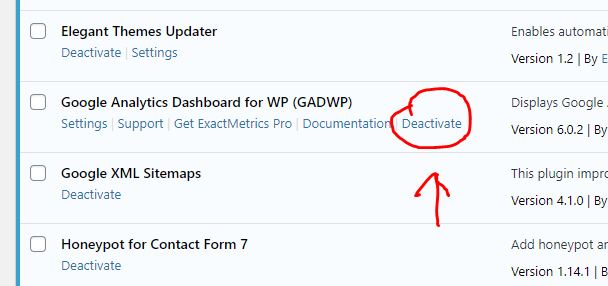
Go to the Plugins page. Locate GADWP and deactivate it. On the next screen choose other, then deactivate it. This will return you to the plugins page, click on delete to remove the plugin from the installation. 

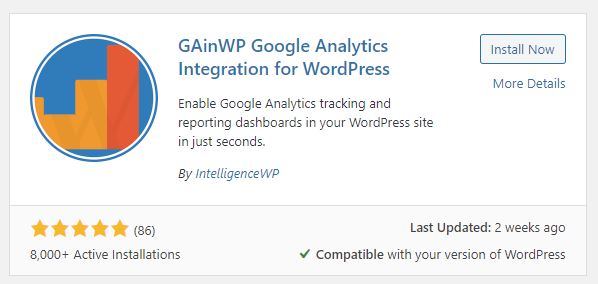
Next, at the top of your plugins page you have an “add new button”. Click on that. In the search box enter GAinWP. You will see two things come up. One is the plugin you are looking for, the other you can ignore. Click on Install Now.

Click on install now.  Once it has installed, activate it. If you have independent access to your Google Analytics account for your website you can enable it yourself. If you are not sure, drop me a line and tell me you have installed it, and confirm your website and I will get it back up and running.

Anti Spam Measure for Forms

I have used a variety of Form Managers on sites over the years. The majority of you should have Contact Form 7 on your site. I have used a standard feature in Contact Form 7 which  is a hidden field. Computers can see it, but humans cannot see it, so they do not fill it in. If the form is submitted and the hidden field has data in it, it is not accepted becasue it has been added by a computer so the form is rejected. 

It certainly helps in most cases, but I am also aware that some of you seem to have websites targetted from time to time. Here is another simple addition to your forms which may help. It is a simple quiz which will prevent submission unless the answer is correct. 

There are standard forms of recaptcha used by Google. It relies on a human interpreting what is in a picture, or pictures. It can be particularly tiresome on some websites. I have also noted a difference in operation of Google Recaptcha with different types of browser. It works very well with Chrome, less so with other browsers. 

The following is a simple addition to your Contact Form 7. Download the file by clicking at the bottom of this post and copy the text and insert it just above the entry for the Enter button. 

Here is an example:


I have inserted another form control between the message area of the form and the Enter button. Here is what it looks like in the Contact Form 7 Layout. Highlighted in yellow below. 

It may look complicated, but it isn’t really. There is a short explanation at the start and a series of questions, each with the response expected like this:

“1 plus 2 =|3”

You can build your own questions for example:

“What is the capital of France?|Paris”

Anyone submitting a message can see the question, but not the answer.

Of course none of this should be really necessary. But unfortunately there is a large group of people that must see some success from sending spam messages otherwise it would not be worth effort.

Will this solve the problem?

I honestly do not know. I am pretty sure with some of the anti spam measures which are often defeated, there must be people who are paid to paste messages into forms. In which case none of these methods will work. But if you are currently plagued with spam messages coming in via the website, this may be worth a try.

Do It Yourself

Locate your contact form by logging in and locating Contact in the side bar. Look for the form(s) and open one. Towards the bottom of the form you will see the text:

[submit “Send”]

Place some line breaks between this and the content above it. Then click on the download button to download the example code. Then paste it into the space you have made. Save the form and then go to your contact us page and test it. Make sure it works and you still receive a message through your website before leaving.

Any problems drop me a line or call me. Click on the button below, you should see the text, copy it, and paste it into the form as described.

Changes in WordPress

There has been a recent upgrade to WordPress over the past month. I am not sure if the “new features” in this release, or whether it was the one before have introduced some monitoring functions on the installation. WordPress continues to improve all of the time. There is a large network of people across the world who develop and test new releases. 

Careful with that axe Eugene

I have some websites which are centrally controlled. I hit an update button and the websites update. It is not perfect, it sometimes stalls and often leaves a trail of error messages that I need to follow up. After coming back to the UK following a 4 week vacation, I opened the application and ran it and got a screen full of errors. It is fortunate I did not do this while I was on holiday. Starting at 4am on the 11th of November when I hit the button it took me 5 hours to go through 15 sites which had now broken. (I started at 4am because my head was still in a differnt time zone!). 

What happened?

When I went around to look at each site, some or all of the updates had failed to update. The controlling program had reported that the websites were “unresponsive”. I logged into them and checked them, then ran the updates from within the website. I updated the plugins first. Then the template. After updating the plugins I received a message that “The site is experiencing technical difficulties……”  It turns out there is also an email which outlines the technical difficulties. I had not seen this before. The message in the email turns out not to be directly related to the cause. In all cases the sites eventually came back online. 

New Health Checking Features

It looks like I had triggered a recently introduced function in the wordpress core which monitors exceptions (crashes) of processes. It had identified something was wrong and halted the site. While it is good to have such features, it turns out they were not wholly reliable in identifying the problem. 

It looks like an upgrade in some but not all cases may trigger this event to happen. What follows is a white screen for around 5-10 minutes with a message on it saying this website is experiencing technical difficulties. It will eventually clear down. If you initiate your own updates and see this, don’t panic. In all cases where this happened to me, it was resolvable. I have already taken action to upgrade the PHP Scripting language the websites run on to the latest version (a possible reason).

I am talking to the hosting company about this as well, as it is not entirely clear why it is happening. It may be because of some housekeeping function which has not triggered, and that needs to run before the website becomes stable again. It may just be a new “feature” in wordpress.

If you see a white screen at any time with just one line of text in it, send me a message and note the time, and what you did at the time. I will check it. These should only be transient events. All sites are set up to upgrade themselves, they usually do this without any problems, but they do not do it immediately the upgrade is detected.  

Wingrove-Services
Privacy Overview

This website uses cookies so that we can provide you with the best user experience possible. Cookie information is stored in your browser and performs functions such as recognising you when you return to our website and helping our team to understand which sections of the website you find most interesting and useful.

You can adjust all of your cookie settings by navigating the tabs on the left hand side.

My privacy policy can be located here: Wingrove Media Privacy Policy (opens in a new window)

My Cookies Policy can be found here: Wingrove Media Cookies Policy (opens in a new window)