Newsletters and MailPoet 3

I have been a fan of Mailpoet (integrated newsletter plugin) in sites for some years now. Around 18 months ago MailPoet changed from version 2 to version 3. Development work stopped on version 2. I have upgraded, or some of you may have upgraded yourselves to Mailpoet3. One significant change is the presence or absence of images in Newsletters.

Featured Images in Posts

When you create your newsletter you add existing posts into the newsletter. Mailpoet 2 used to pick up the first image and include it your newsletter. Mailpoet 3 does not work that way. It means that you may have had vibrant interesting newsletters before, but now they are all text.

Continue reading Newsletters and MailPoet 3

New Divi Guidance PPT

For the past six months I have been building in help pages into the websites to enable novice editors to manage their sites themselves without having to seek external help. Following some recent changes in the way Divi works, I have revised that guidance to include new methods of editing.  I am going to use the attached guidance from now on, and develop this futher with accompanying videos.

For now, if your site is based on Divi (If I built it over the past three years, it probably is), then this is for you. Please take a copy. But do note that unless I have already done so, there is something you need to change in your site before you can follow the revised guidance. The PPT contains a link on what to change.

Don’t procrastinate, these changes are significant and will make your casual editing process much easier, so it is worth doing now. Click on the button below to download your copy.  If I make any changes I will note the revision on this page and update this page. So come back if anything looks broken.

Auto remove old posts

From time to time people ask if it is possible to automatically remove old posts. While it is possible to add a post in the future by setting the publish date in the future, I am not aware of anything that allows them to be automatically removed. At least not without adding something to your website to enable that to happen.

Post Expirator

This is plugin which is developed by Aaron Axelsen. You can find out about it here:https://wordpress.org/plugins/post-expirator/. I generally look at the star ratings and number of installations to judge whether something is any good. In this case it scores 4.5 stars (out of 5) and 90,000+ installations. 

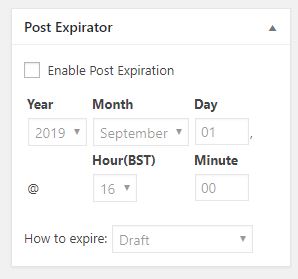
I have installed this on several sites now, and will use it as standard with the plugins I normally use. Once installed the plugin adds a field to pages and posts which allows you to set an expiry date and time. 


With the plugin enabled, everything in the site has this panel in the editing view from the dashboard. To get it to work all you need to do is check the box Enable Post Expiration and then set a date and a time. 

There are different ways of expiring a post. I recommend you leave it on the default which will hide it from view by changing the status from Public to Draft. That way you do not lose it if you make a mistake. 

The only problem with this approach is you have to remind the editors to set the parameter. But if you do that the site will ultimately look cleaner. You might only wish to do this for events that have expired. 

How do I add it in?

Log in, go to Plugins in the side menu. Go to Add new, and search for “Post Expirator” by Aaron Axelson. Install it and activate it. Then take a look at a post and will see the new field added. 

Divi Visual Builder

Around six months ago Divi introduced a Visual Builder button in the black menu bar which runs across the top of your screen when you are viewing a page (and logged in). 

I think it is the view of the developers of this templating system that everyone builds their website using this system. Most professional web editors still prefer to design from the inside, finding the visual builder a bit too cumbersome. and depending on some external factors it does not always give you a true “visual representation” of the content. 

That said, however it is very useful if you need to do some tweaks to the existing content on your site. In truth I am starting to use it more and more, largely because the developers have hidden parameters in some elements which are only accessible through the visual view of the website. 

What is a Visual Editor?

The concept of a Visual Editor is you get to actively edit the layout and content as the user sees the site. So all of the formatting is retained, and accessible. To the extent that you can also manage the spatial relationship between editable blocks as well as the content within the block. 

Why should I be interested in this?

It is intuitive to use, and is probably the easiest way to make minor changes on your website. Given that you are not editing every day, or every month for most of you, editing skills will be lost. This method is easy to remember. I have created a short video tutorial on this. 

Video

The video I have created is very short, and shows me opening up a page on a website, turning on the visual editor, locating a block of text, opening it and editing it, closing the visual editor and saving the changes. On this video there is no sound. I found that many of my clients were using old computers with no speakers of headsets available in the office. So I have omitted a soundtrack on this one. Text is used on the screen to tell you what you need to know.  Give it a try and let me know how you get on with it. 

I have added the video to the Video Tutorials page, but I will also give you a link to it here. 

Divi Visual Builder Demonstration (opens in a new window) at YouTube.


Check Your Forms

A reminder to check your forms from time to time. 

Once a form is set up and tested it should continue to work without any issues. However it is worth being proactive in case a problem has been introduced into the website through the plugin(s) associated with the function, wordpress upgrading, a migration that has recently happened, or your email has recently been changed by a third party. 

Email can get quite complicated because most email in circualtion, some speculate more than 90% is unsolicited junk mail. Much of it never reaches your inbox because it is filtered out at various locations as it transits the internet. 

But sometimes things do break for all sorts of reasons, and you might not know about it. If you normally receive email every day and your website contact form has not sent anything, please do go to your website and check the form by sending yourselves a message. It is very easy and quick to do. 

Here are two recent examples of failed systems

Introduction of Office 365 by a local installer. 

Mail goes into a junk mail folder, or is deleted before it reaches the inbox. 

Client “X” had a website which had a contact form on it, and it performed without issue for several years. Someone on the management team decides that they wish to move over to Office 365. They seek a third party specialist, the new mail system is set up everyone is happy, but nobody checked the website after the move to Office 365. 1 year later, someone raises a flag on it and tells me they never get messages from the website. Or in another case, why do all of the website messages go into my junk mail folder? 

Here is what happened; the Microsoft approved third party installer was either not told about the website, and the fact that it sends messages, or missed it. They installed Office 365 on the client computers, made changes to the DNS settings in the hosting (some of you have independent access to this area, it is available to all on request). One of the changes is for something called SPF or Server Policy Framework. It contains information about the name (IP Address) of the legitimate sending mail server(s). In this case it was changed to an Outlook server. Rather than incrementally adding to the current information in the SPF record which states your website can send messages legitimately, they overwrote it with only Microsoft Outlook Servers can send messages. 

This means that when a message came in from the website, the receiving server checks (it is actually an anti spam measure) who sent it. It was not the Outlook server specified so the message was continually rejected.  I would not know about this unless someone told me. It was done without my knowledge. 

In a second and more recent case and the reason I am flagging it here I found errors in the database on a site. 

I often use a staging area, and copy your current website to it, and rebuild it, then move it back. Within this process the database for all of the parameters which contain the address of the website are changed to the new location. I then rebuild the site, set up a new form and ask you to check it and approve it. 

Once approved I write the site back to the original location. I also ask people to check their forms when I do this. While I can add my name to your forms, I prefer you to check and confirm that you receive the forms rather than me check them 100% on your behalf. Technically, I cannot test your receiving system, so there is a risk you may have something locally blocking email. 

I found out that when writing the website back to the old hosting location, not all of the data is updated to the new address. There is a risk that your website forms are still being sent from the following address “wordpress@wingrove-staging.uk”  If that is the case, it is highly likely the form will not work. There are examples where I have asked people to check, they have not, and therefore this problem has not been detected for some time. 

I have worked my way back through the most recent 9 sites and checked them. Where I found the problem I corrected it. But the easiest thing for you to do, for peace of mind more than anything else, is check your form. Make sure it is working, and if it isn’t for any reason, let me know and I will take a look. 


Online Referral Form

From time to time I am asked about whether it is possible to add an online referral form. While anything is possible they can get very complicated and if you wish to add conditional elements into the form as well, the complexity rises further. If one also considers making some fields mandatory, then the complexity rises further and you run the risk that the form cannot be submitted because some element is missing.

Just for the record

I have looked at a number of solutions, but so far have not found one that universally works for all. But if there is significant interest I can look again.

Form Using Standard Form Plugin

I currently favour Contact Form 7 as a contact form plugin. It is one of the most popular ones out there. I also use several add on plugins as well. I know there are some additional plugins which can be used to control the formatting and make conditional entries into the form. But for a newbie (i.e. you), it is going to be a bit difficult to get your head around all of the things the form can do.

But it is possible, however the form would likely be submitted in several parts for very complicated forms.


Adobe Form Solution

I am aware that if you subscribe to one of the Adobe products relating to PDF management that it is possible to embed a PDF form in your website which a user can fill in online. However this solution is very expensive (for charities), so I have not looked at this in any further detail.

Google Forms

Here there are several choices, but from my earlier experience there were limitations which might affect your users. Google offers a suite of programs available to people with gmail accounts. If you are a chrome book user (very simple low cost computer), you will know that while you cannot run MicroSoft Applications on your chrome book, you can run equivalent applications which are compatible with the popular Office Apps. All of this is free. But you need to be using Chrome as a browser. Not all computers will have Chrome installed. So this may block this path.

G-Suite

There is a business version as well of G Suite, which is not particularly expensive. There is the basic version of G Suite at 6$ per month, Business at $12 and Enterprise at $25.  It includes secure communications, office type apps run online, calendering and various other things. Find out more here: https://gsuite.google.com/

The detail about Google Forms can be found here: https://gsuite.google.com/products/forms/

What I am not sure about is from a privacy standpoint where is the data collected and stored (you need to know this from a GDPR perspective,) whether it is encrypted, and whether copies are held somewhere. But most fundamentally, will it work in FireFox, Safari, Edge, MS Explorer etc, in other words anything apart from Chrome. If it does not, then it is a non starter.

Add a special Form Manager

There are websites that can be built exclusively for collecting data. I know there are some free ones available within the hosting, I have played with one in the past called Lime Survey, but if you are not editing things on a daily basis, then the learning curve might be a bit steep, if you need to edit something.

Use an iFrame

Some of you are now using a 3rd party system in the office to replace MESH (Home-Start users). Some of you will have your own systems. When you view a video on your website, you are looking at an iFrame or a window, through  which you can see another website. In the video case it is YouTube. It is potentially possible to show the form you use to enter data into a system from a form submitted to you, but display the form directly to the user through the website. It largely depends on your form, and whether there is a way of displaying it and limiting what the end user can see of the rest of the system.

But this might be worth exploring if you are interested.

Where to from here?

The fundamentall problem is research in this area, and subsequent development is very time consuming, I am sure there are solutions out there, but so far I have not found one that fits all of the requirements. If you are interested in solving this problem let me know. If I can find enough interested parties I may look into it more detail later this year. Let mew know if you are interested. 

One last point which is also potentially possible

Part of the problem for the back office is processing the incoming form data copying it across from one system to another. There are generally scripts that can be created for the receiving system which will populate a form from a document that is submitted to it.  Contact Form 7 allows very precise formatting of the incoming data. It is conceivable that someone could write a script that takes the incoming form via email, identifies the fields and copies the data across automatically at the touch of a button. I cannot do all of this, but if there was an agreed standard for the submission from your website to your organisation, then someone associated with your organisation could write the backoffice processing script which would overcome the manual re-entry and save a lot of time.


Smart Slider 3

Is Your Slider Too Fast?

On the most recent websites I have been using the Smart Slider 3 plugin to display sliders on the home page. This is particularly applicable to the most recent Home-Start websites, but it also applies to others.

While most people are happy with the default speed of the slider which is currently set at 8000mS  or 8 Seconds, one or two people have commented that it is too fast. This is probably because there are text boxes on each slider.

The following notes and images show you where it is located and how to control the speed of it, so you can tweak your site to get it right for you.

About SS3

The plugin is very comprehensive, the most important aspects allow you to add items on top of the background image, including patterned boxes, text, logos and even buttons. The combination of these elements are also responsive, which means the layout adapts for different screen sizes. Since April I have been using more of the features built into the slider which is one of the best ones out there.


Where is it located?

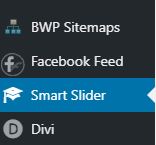
Log into your website and look down the left hand side of the dashboard, if your site uses it you will see the following in the side bar. 

Smart Slider 3 in the menu

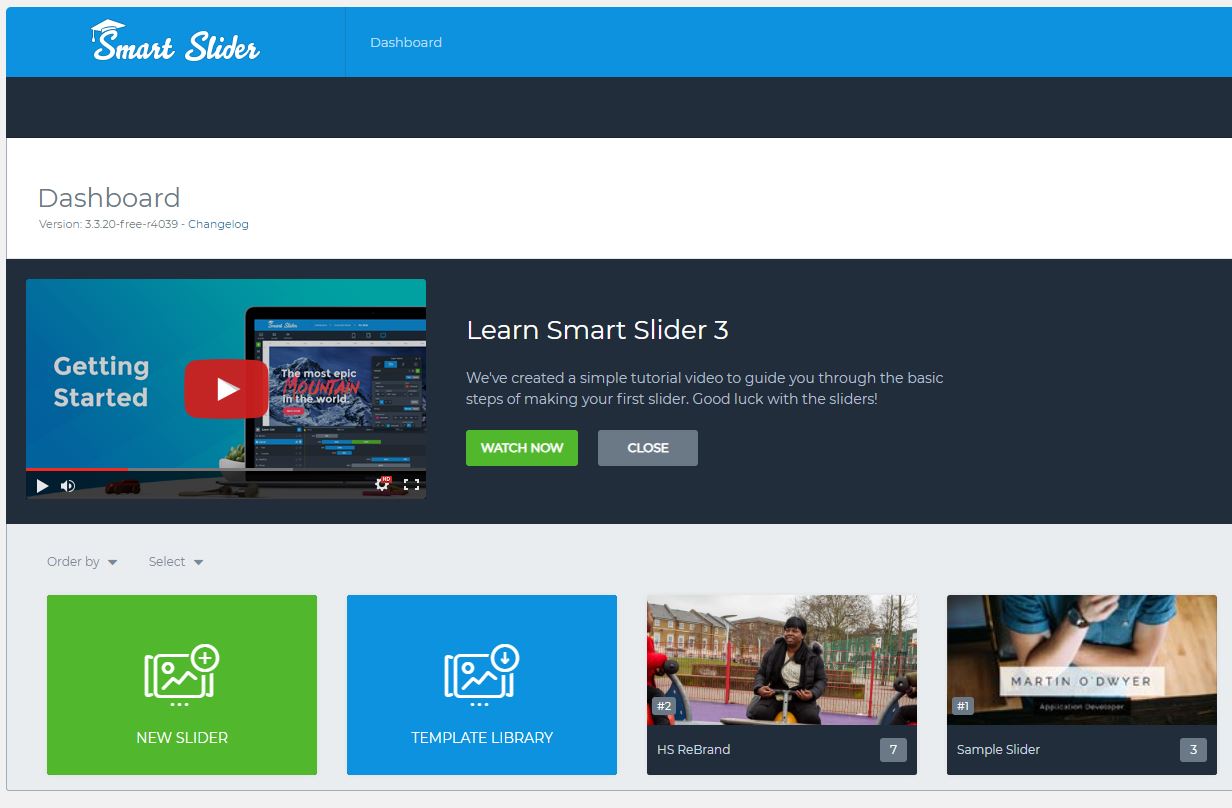
If you click on the menu item it will expand to reveal the interface. Within this you will see a couple of demo sliders and the one I have added. In this case below it is the slider for the Home-Start rebranding exercise I am currently working on. 

Smart Slider 3 view

Look at the thumbnails and identify the slider I have created for you and click on it. It will expand to show you the slides in use in the slider and other parameters which control the display and operation. 

The image above shows one slider opened in edit mode. Below the sliders are a series of menu items. One of them says AUTOPLAY. Click on this one to edit some parameters. 

SS3 Image

The highlighted parameter in the image above controls how long a slide is visible on the screen before it is replaced by the next one. This parameter affects all slides. It is recorded in mS or milliseconds. There are 1000mS to 1 second. So it you want your slider to be set at say 10 seconds change the value to 10,000.

When you have made your changes, scroll to the top right of your screen where you will find a green button with SAVE written on it. Click on this to commit your changes. 

Close the plugin settings and return to your website and review the home page. Check that the slider is still working, and also check the speed is appropriate. 

That’s it. All you need to know is there. 

Stuck? Drop me a line.


Home-Start Rebranding

Around 50% of the Home-Start sites I host, or have built are either in a rebranding queue, or have been upgraded and released. If you don’t know anything about this, then you have missed some of my messages reaching out to you. I have only responded to those that replied and currently not chased anyone else up. 

As of 6th July, the following sites have been through the rebranding exercise. Most of these sites were in the Divi framework anyway, a few are more substantial upgrades from previous versions moving them to the latest version of the website.

If you don’t know about any of this, and need to be added to the list please get in touch with me ASAP. My queue of upgrades currently goes out to the end of July 2019. 

This is a list of example sites that have been through the process.

Home-Start Lisburn Colin
Home-Start North Down
Home-Start Spelthorne
Home-Start Bracknell Forest
Home-Start Stroud District
Home-Start Chichester
Home-Start Surrey Heath
Home-Start Guildford
Home-Start Southwark

All of these sites have retained the local messaging and content from the respective original website. I have concentrated on changing the colours, logo, images and incorporating other latest thinking on the development of these sites which also covers taking out old plugins and replacing them with new more up to date plugins. In many cases it has been a bit more than just changing the wallpaper. I have cleaned things up as well. 

Need to know more?  Contact me.  

Wordfence

Is it worth it?

I have always been a great fan of Wordfence which is on most of my sites, but I am concerned that it may be starting to bloat websites and take up a lot of server resources. It is certainly a heavy weight these days compared to four years ago.

Of greater concern I keep visiting sites and finding Wordfence in a stalled state because it is waiting for user input following an upgrade, or some new feature. That condition is highly undesirable as most sites automatically upgrade themselves without user input, and if you have that sort of scheme in place, you don’t want to reconfigure it every month or so.

Hosting Protection

I have been talking to our hosting company which we all use. I have noted that when overseas and try to log into sites from another location additional protection pops up. The hosting company monitors site accesses and looks for certain behaviours and traps them. Their view is a plugin like WordFence is resource hungry and places a high load on the hosting, and does not provide any significant protection above that provided by the hosting company. It is also worth noting that not all hosting companies are the same. I am referring to my experience with our hosting company.

I have also used remote updating procedures, where I think Wordfence may be blocking uploads, or getting in the way. It is a pretty rare occurrence where it is deactivated for no apparent reason, or other things are broken on a site such as missing plugins. However it is highly undesirable.

The hosting company also detects multiple attempts at logging into sites one of the most common methods of accessing sites by hackers, so there is protection there as well. The hosting also scans all websites automatically, and you can initiate a scan from the dashboard of the hosting. File & Folder permissions can also be checked and verified from the hosting dashboard.

Two pieces of advice….

Continue reading Wordfence

Accessibility and Websites

There are some accessibility standards for websites that can be quite stringent. The majority of websites do not get anywhere near 100% compliance to the most complex variants, and there are generally very large price tags around developing websites like this.

While I have not seen any yet, I am sure there are lots of people out there that can help you given a suitably large wedge of cash.

Look up WCAG 2.0 or WCAG 2.1

Guidelines from central government are tending to require that local government websites need to conform to these standards. It is likely to roll out further than that over time.

Some years back I worked as a volunteer for three months on a project for a visually impaired group. I tried really hard to meet all of their needs with customised CSS. It was the project from hell for me, especially as it was all free. We got there in the end, however it was a big learning point for me to keep away from specialist groups. Right at the end, the punch line was each member of this group had special (non standard web browsers) that did most of the functions anyway. 

Accessibility standards can mean = ££££

Because you are likely to end up with a highly customised website with a lot of special code in it. This will ultimately become a support problem for the client, and a business opportunity to the supplier!

I work on the basis that the amount of customised code is at a minimum, so 99.9% of the website is standard. I also try to use some standard (popular and at least 4* rated) plugins to provide additional functions.

Can you crack the WCAG standard with plugins?

Continue reading Accessibility and Websites

Wingrove-Services
Privacy Overview

This website uses cookies so that we can provide you with the best user experience possible. Cookie information is stored in your browser and performs functions such as recognising you when you return to our website and helping our team to understand which sections of the website you find most interesting and useful.

You can adjust all of your cookie settings by navigating the tabs on the left hand side.

My privacy policy can be located here: Wingrove Media Privacy Policy (opens in a new window)

My Cookies Policy can be found here: Wingrove Media Cookies Policy (opens in a new window)