Is Your Slider Too Fast?
On the most recent websites I have been using the Smart Slider 3 plugin to display sliders on the home page. This is particularly applicable to the most recent Home-Start websites, but it also applies to others.
While most people are happy with the default speed of the slider which is currently set at 8000mS or 8 Seconds, one or two people have commented that it is too fast. This is probably because there are text boxes on each slider.
The following notes and images show you where it is located and how to control the speed of it, so you can tweak your site to get it right for you.
About SS3
The plugin is very comprehensive, the most important aspects allow you to add items on top of the background image, including patterned boxes, text, logos and even buttons. The combination of these elements are also responsive, which means the layout adapts for different screen sizes. Since April I have been using more of the features built into the slider which is one of the best ones out there.
Where is it located?
Log into your website and look down the left hand side of the dashboard, if your site uses it you will see the following in the side bar.
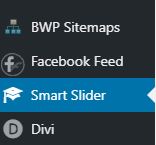
If you click on the menu item it will expand to reveal the interface. Within this you will see a couple of demo sliders and the one I have added. In this case below it is the slider for the Home-Start rebranding exercise I am currently working on.

Look at the thumbnails and identify the slider I have created for you and click on it. It will expand to show you the slides in use in the slider and other parameters which control the display and operation.

The image above shows one slider opened in edit mode. Below the sliders are a series of menu items. One of them says AUTOPLAY. Click on this one to edit some parameters.

The highlighted parameter in the image above controls how long a slide is visible on the screen before it is replaced by the next one. This parameter affects all slides. It is recorded in mS or milliseconds. There are 1000mS to 1 second. So it you want your slider to be set at say 10 seconds change the value to 10,000.
When you have made your changes, scroll to the top right of your screen where you will find a green button with SAVE written on it. Click on this to commit your changes.
Close the plugin settings and return to your website and review the home page. Check that the slider is still working, and also check the speed is appropriate.
That’s it. All you need to know is there.
Stuck? Drop me a line.