
I have been a fan of Mailpoet (integrated newsletter plugin) in sites for some years now. Around 18 months ago MailPoet changed from version 2 to version 3. Development work stopped on version 2. I have upgraded, or some of you may have upgraded yourselves to Mailpoet3. One significant change is the presence or absence of images in Newsletters.
Featured Images in Posts
When you create your newsletter you add existing posts into the newsletter. Mailpoet 2 used to pick up the first image and include it your newsletter. Mailpoet 3 does not work that way. It means that you may have had vibrant interesting newsletters before, but now they are all text.
How to include images in MailPoet 3
This comes with a health warning because other things may happen to your website depending on the template you are using. So as you try this, do critically look at your website and make sure nothing else has happened, or if it has, it is acceptable to you.
Divi users (more than 60% of my clients) need not worry about this btw. But for everyone else, turning on a featured image may also cause it to appear on the home page.
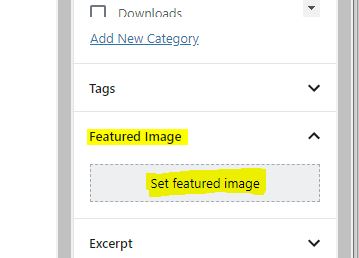
Featured Image and where to find it
A featured image is a special section in the post layout page. It is in the bottom right hand corner of the page (see image above). You click on link, and then go to the media library to add an image, or upload one.
When you do that it is not going to be immediately obvious that it is attached without checking the bottom right of the editing page.
Once it has been added, the featured image will always appear at the top of post when viewed, or if the post is in a summary format it will appear there too. For Divi based users the use of a featured image is critical to getting a magazine style layout.
Mailpoet 3
When you create a newsletter based on post which have a Featured Image assigned, the newsletter will also include the images rather than just be text.
If you are new to this, you don’t need to add a featured image on every single post, but maybe one in three. It will lead to a more interesting newsletter.
But……
If you turn it on, do make sure you check the layout of posts and pages when viewed as a user. It may not always look that great. The more recent templates built over the past four years work better than older ones.
Stuck for images?
Some great free sources of images can be located here: http://unsplash.com and http://pixabay.com