The following is of interest if your site has a newsletter application built in called Mail Poet.
If you have an email address list containing more than 70 subscribers for your newsletter please do take care with the last step before you send out your newsletter. Generally speaking shared hosting providers do not like bulk mailing applications running in their hosting. They use a variety of methods to detect mail being sent from the hosting which includes monitoring the volume per second/ minute and the number of error messages received such as “recipient account does not exist”.
When a hacker tries to get into your site, one of the things they may wish to do is use the hosting for sending bulk unsolicited email. For this reason hosting companies monitor the volume of email to and from accounts. They do this as a proactive step to ensure that the server is not blacklisted by one of the many independent blacklisting services across the Internet. Many of these are used to filter mail, particularly for government related email accounts. Once a server is blacklisted, the mail will not be accepted by the recipient’s server until the blacklisted server is removed from the blacklist if those checks are carried out. My experience indicates that many UK based local government servers will filter out mail from blacklisted servers. I would imagine that UK government services use similar methods.
After you press the Send button it goes to a screen which tells you how many will be sent and over what period of time. The screen will appear to be static, and the emails are not instantly sent. Just leave it at this stage, and over the period of time indicated it will send all of the emails. You can close the screen and say check a couple of hours later to make sure they all went out or are being sent out.
Do not click on the Don’t wait & send right now link. I think this will attempt to send all of the emails in one batch. (See screenshot below).

If you do that and exceed the limits set by the hosting company they may close down your site. This appears to have happened to one site (a large one) in October 2015. I managed to resolve the situation in this case and the site was suspended for less than 24hrs. The site was suspended according to the hosting company because it was consuming a lot of the server resources at the time. (Something that might indicate hacking activity on a server).
When I set up MailPoet for you, there is a limit in the volume of emails that can be sent in one hour. It is set to 70 emails. This means MailPoet will send out 70 emails and then wait until the current sending period has expired before sending a new batch. This works fine with large mailing lists running in shared hosting. The largest so far has a mailing list of 850 names and works without any issues.
Sanity Check
If the number of newsletters opened or clicked is low (say under 10%), then the reason for this is the hosting company has detected them and blocked them. So while WordPress may indicate they were sent, they did not actually leave the hosting network. See the screen shot below. Note the top statistics and compare them with the other newsletters below.
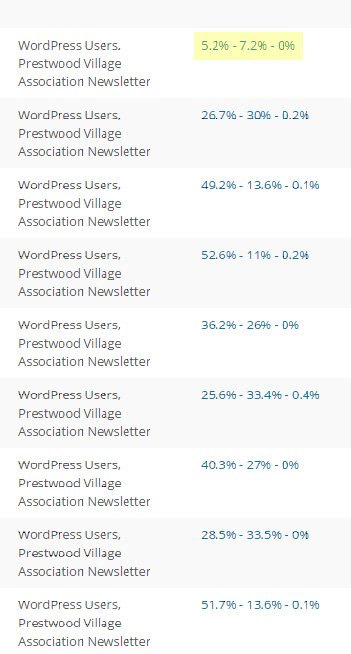
In this case the hosting indicated that all of the newsletters were sent. However a very small percentage were opened and clicked. This indicates that most of them never left the hosting.
The three percentages relate to Opened, Clicked and Unsubscribed. Generally speaking if your mailing list has been created organically, meaning that your subscribers subscribed themselves, rather than you manually created the mailing list, you should expect around 50-60%+ being opened or clicked. From my research, it does not accurately indicate how many people actually open newsletters (it is more than the number indicated), it is just an indication. However be aware if the numbers you see are very low. This indicates a problem. If you are stuck here, contact me and I will see if I can help.