While I consider myself to be fairly IT literate I sometimes get it wrong, in this case I could have set up my administration differently. This post covers one such example. It was an irritation more than anything else, but a mistake I will not make again before heading on a vacation!
I have many different email addresses, but use one primary one, and have several others forwarded to that email address. The others are used for backup purposes because they use different servers and different infrastructures. Prior to going on vacation I limited the volume of emails being sent to me from websites mainly because I had emails coming in which held important vacation information from resorts, services, car hire etc. I did not want to miss them.

Preparation before heading on vacation
I backed up all of the sites and checked them in September 2015 making sure everything was up to date and functioning.
I was heading to Australia for a 3.5 week vacation, I needed to reduce the volume of emails I receive on a daily basis. The only “IT” Tools I would have in the case of a problem was an iPhone, and an iPad, and an independent secure memory device with account details on. With these I anticipated I could resolve most of the likely problems. – I was wrong.
Typically I receive around 100 – 150 emails a day. 60% are informational (fyi) emails coming from websites indicating activity on these sites. They tell me when someone logs in, what they have edited at the highest level. I scan them and delete them. What I am looking for is unusual activity, like editing at 2:50am in the morning. I also get messages about “Brute Force” DDoS attacks. This is a Distributed Denial of Service attack where a hacker points lots of computers to a site and then attempts to guess the password and the username to get in. As each computer fails another one takes over. This is very common. In extreme cases the volume of attempted logins can slow down a server. I look for these in case there is a subsequent problem.
All this means is if a problem is going to occur, I have some idea about the history prior to the problem occurring and which site may have been affected, and some information about the source of the attack which is not always useful, however the same IP addresses frequently come up.
Memory constraints = limited email storage
The iPhone and iPad have a very small memory compared to a computer. Here it is critical to minimise email coming in as it pushes out older email. This turned out to be a massive problem. In 25 days while away from home I received 10,000 emails from a particular WordPress plugin called WordFence. This is present on all of the sites I have created. I had to delete emails 2 or 3 times a day in order to read the 1% of useful emails I get otherwise I would miss them. It was rather like searching for needles in a haystack.
What went wrong?
I have used WordFence for around 3 years on all websites. It offers a comprehensive range of services around security. The options screen allows you to set up when it sends you a message about something. I had systematically gone around all of the sites and minimised the messages to critical events . I turned off the high volume warnings about wrong password used which occurs every time a hacker tries to get in. They happen all of the time.
It turns out that around 2-3 days after I left the UK the majority of sites changed the parameters for reporting. I still don’t know why this happened and am trying to find out with the authors of the plugin. If an upgrade occurred it is conceivable that the default settings were applied rather than restoring the ones set up prior to an upgrade (poor programming practice). The effect of this problem was to send out an email to me on every single hacking attempt. That was why I got 10,000 of them.
How to tackle a problem like this
As I did not want to tackle a better solution while on holiday, I just lived with it. However, it does beg the question; if you get annoying email on your email address what can you do to reduce it, or eliminate it?
Around 30% of what I receive in a “normal day” is junk email. In my case through my research, I know that much of this comes from the same person/ group in the USA. Throughout a day they pretend to be many different and diverse organisations sending me a “newsletter” on subjects like Walk In Baths (I am not ready for one of those yet), to Private Jet hire (while I might be interested in that, I could never afford it anyway!) They all feature a common layout, and while the wording changes, some of the keywords come up all of the time. The domain name they are sent from regularly changes. They also feature a common URL for any link in the email, which no doubt will download something I don’t want or remove something from my PC (address book) if I click on it.
For most of you that use an info@mydomain.org.uk or similar address, you will receive a lot of email on that too. Most of it will be junk.
If you are using my hosting for your email there are a couple of ways of filtering email, and redirecting it somewhere else. This is how to use it:
Case Study
In my case the sending source of emails was any one of around 60 websites. So I cannot filter on a domain name. It is not a good idea to filter on a domain name because it will also filter out legitimate email.
What was common in the 10,000 emails I received was they all carried this text, some of the information was different, but much of it was common. Below is an example:
This email was sent from your website "South Gloucestershire Child Contact Centre"
by the Wordfence plugin at Sunday 25th of October 2015 at 03:21:21 AM
The Wordfence administrative URL for this site is:
http://southgloucschildcontactcentre.org.uk/wp-admin/admin.php?page=Wordfence

A user with IP address 171.25.193.132 has been locked out from the signing in or
using the password recovery form for the following reason: Used an invalid username
'admin' to try to sign in.
User IP: 171.25.193.132
User hostname: tor-exit6-readme.dfri.se
User location: Sweden
This message tells me that someone using a computer in Sweden tried to log into a website using the user name “admin”. It also tells me the IP address of the computer.
Looking for a common string
In this case I need to locate a common string (sequence) of text. I used the sequence “by the Wordfence plugin“. This is common in all messages.
What I wanted to do is redirect any messages coming into my main email address to a separate email account. So in this case I just need to put them somewhere, but not fill my main inbox. This means that I can check them later, and do some bulk deleting. However, my main inbox will not be polluted with these messages, because they are sent somewhere else. If I had known how to do this while in Australia, it would have saved a lot of time and hassle.
If you login into your cPanel account and look for the group of icons covering email, one of them is called Account Level Filtering.
Below is a screen shot of the filter which identifies any messages containing the text “by the WordFence plugin” and redirects them to a special email account called wordpress@wingrove-media.com.
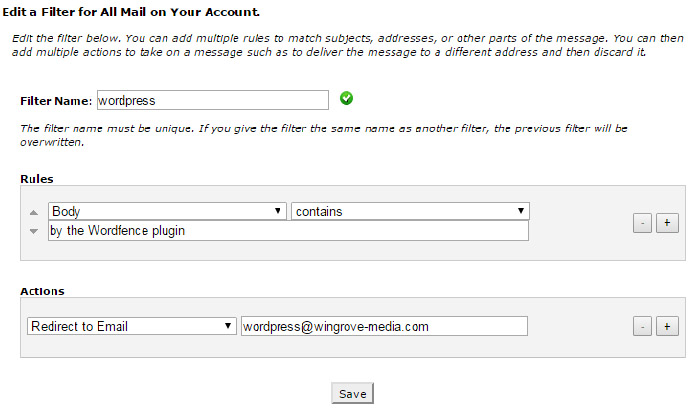
(Note I had to set up a temporary email account called wordpress@wingrove-media.com to get this to work.)
In the section called Actions, I could discard the email. In which case it would simply be deleted.
Take Care
If you wish to use this facility do take care, I would always recommend setting up a temporary email account as the destination rather than simply deleting them. Use this to make sure it works, before setting the filter to deleting them.
Of course if you start redirecting junk email to a special email account, remember to check it from time to time to make sure it does not get too large.
WordFence
In my case this is a temporary solution, I am going to remove WordFence from all of the sites over the next 2 months. So the messages in my case will stop. I use two other security plugins that offer more useful reporting and protection than WordFence.
I had one other problem with WordFence while I was away, it caused a site to be taken offline by the hosting company because it was using too many resources on the server (basically hogging the bandwidth of the server). I had to resolve that remotely as well, the site was offline for 24hrs. In my experience, while it is a useful tool for knowing who is attempting to do what on your site, it is less useful as a prevention mechanism.
I have seen 3 sites hacked which have WordFence running on them, WordFence did not report the problem. There are all sorts of reasons for this, if a hacker has independent access to the hosting (cross hosting) then they can circumvent all of the methods that run at the application level in the hosting. This is common to all plugins. You would need a dedicated server (= expensive) to be able to provide greater protection and control.