Category: WordPress
Promotional Landing Page
Sometimes you need to run a promotion through your website, perhaps you are seeking a new trustee, volunteer, or you are recruiting for an important post. In several recent cases it has been needed to help promote a fund raising campaign.
How do you make sure people see it?
The obvious method of making sure everyone sees something that is both new and important is to modify your site’s home page. Most people land on a home page. However this can make the home page a little messy depending on your website. There will not generally be enough space for you to highlight the event or opportunity without radically altering the home page for the website.
Another very simple way
There is a very easy way of highlighting something to all of your visitors; create a temporary landing page. This means everyone landing on your former home page will instead be directed to a temporary landing page with your key message on it. Apart from delivering your marketing message, you also need to let people know how to get to the real home page. Once on the main website people can navigate normally and would not typically see the landing page again until they choose to go to the root address of your site (the root address of your site is your domain name: http://www.wingrove-services.co.uk without anything after the .co.uk).
How to create a temporary landing page
- Create a new page call it campaign or whatever title you wish to use. I will use campaign in this example.
- Create the content for your page. Keep your messages short, and simple. Limit the text to say one or two paragraphs and have an image on the page as well which is eye catching. A good guide here is that most people do not need to scroll to read all of the content.
- Make sure there is a call to action, for example a link that will take the person to a more detailed explanation of what you are asking people to do or to a fundraising page. More detailed explanations or “sales pitches” can be somewhere else, you don’t want to put it all on the landing page.
- At the bottom of the page add a link to the normal home page. This is so people know where to go to next. It is very important to cater for those that may not be interested in your promotion, or have already seen it.
- Test your page by saving it and viewing it. Does it work? Is it eye catching enough? Make any edits to maximise the impact, and most importantly ask a 3rd party to check it. Many people are too close to what they are trying to achieve, so do check your interpretation of a mini sales pitch on your colleagues and friends.
- Once you are happy with the page the next job is to reconfigure WordPress so that your page called “campaign” becomes the new landing page for the website.
- Go to the menu on the left and choose Appearance, and then select Static Front Page.
- Most sites I have built have a separate Posts page which will be called News or News and Events or something similar. The front page will be called Home or Welcome or something like this. Your screen will look similar to the image below.

- Click on the small triangle to the right of the box marked as Home. From here you can select a new Front page, in my case it would be the page called “campaign“. Once you have done this save your settings.
What has changed?
Your old home page is still on the site and works through the menu in the normal way. However anyone going to your website will now land on the campaign page BEFORE they get to your home page. So they have to read the content on this page before they can read the content on your site. So everyone will read it that visits your site.
Caution!
It is best to run these for short periods, and better still to change this landing page content moderately frequently. Typically marketing campaigns warn people to expect that something is coming up without revealing all of the detail. These messages are often referred to as teasers.
Timeliness
One common problem I see with campaigns run by charities is they often leave it to the last minute. Plan your campaign, and depending on how important it is make sure they you are giving people plenty of notice. If you have a dinner dance fundraising event or a quiz night you should be looking at advising people 2 months in advance with a refreshed message 2-4 weeks before. Remember that your visitors may only visit your site once a month or less. The best campaigns are supported by a communications plan. This includes what you are going to say, and when you are going to say it, and what you expect to happen as a result. It is a document, it does not need to be complicated, but set your expectations here and check that you are meeting them.
Tie in with social media
If you have gone to the trouble of placing a special page on your site do consider using social media too, to connect to it. Simply copy your URL (website home address) to Facebook or Twitter. So people can go directly to it, and share it with colleagues.
Check Success with Google Analytics
All sites I have built are attached to a Google Analytics account. This is free and you can have access to this information. It has been set up for you, not for me. You can use Google Analytics to check how many people have responded to your campaign. This is a very useful step, and one that should be encouraged, because through this method of testing results you can quickly see if a visitors behaviour has changed. If the visitors behaviour has not changed, then check to see why. Amend your solution to get the results you were aiming for.
Removing it
Don’t forget to remove it after the event or the marketing period has elapsed.
Log back into your site. Go to Appearance and Static Front Page and change the Front Page to your normal Home Page.
Help?
If you need help simply contact me and I can check what you have done.
Crunch those images!
Those of you that have worked through my tutorials will know that one of the points I continuously raise is the importance of scaling images down to a size at or near the resolution of the image in the browser screen.
There is no point downloading a 5MB file where a 50kB file would have done the same job, I am not exaggerating here, it does happen frequently.
I go around and back the sites up 4 times a year and some are getting inexplicably large, so I go in and check and find out there are lots of very large images which have been uploaded to the site. Of course the images all look ok. However if you are out and about and using a mobile connection as many people do these days they are downloading 5MB vs 50kB; 100 x more data than they need to download with no additional benefits. However they are paying per MB for their connection!
In addition to costing your mobile users their data allowance for the privilege of visiting your site, your backups are also growing in size.
But I have found a solution!
Go to your Plugins option on the menu of your site and put into the search box WP Smush. This plugin will go through your images and reduce them in size to something that is more appropriate for a website. It can also be set up to resize anything you upload, just in case you forget.
I have used this on a couple of sites this month to work through lots of images which were too big and taking up too much space in the hosting.
Use something like this and your sites will load more quickly.
Google Maps not working?
On the 22nd of June Google changed its policy for Google Maps. New sites that have been created after the 22nd of June seem to be exhibiting some problems with a grey box where the map should be.
I have seen this with the Modern Tribe Events Calendar on one site which was simply moved from a development location to a live URL. It stopped working. Everything else was fine.
Up until June anyone could add a map to a site without having to set up an account with Google and an API key. The API key is associated with the website address. From the 22nd of June it appears that everyone needs an API key for all new sites in order to get map calls to work.
There is a fix available which I have used on one site and this fixed the problem.
Go to here: https://wpgeodirectory.com/this-page-didnt-load-google-maps-correctly-see-the-javascript-console-for-technical-details/ This site explains what has happened and contains instructions on setting up a key for your website and how to install and add it in.
I expect there will be many other workarounds shortly.
If your maps disappear at all, let me know please through the contact us page.
Marketing through your website
We all know that a website is a great place to market what you are doing or going to do. One of the biggest problems is time. It sits there like an elephant in the room, you know it is there, and you have not done anything about it.
Well, don’t despair, here are some tips on how to approach the problem and how to maximise the benefits on your site while using your time efficiently.
Problem #1
You have an event coming up, it is major event will have an audience of > 200 people.
Solution #1
AT LEAST THREE MONTHS BEFORE THE EVENT
- Develop a plan, when is the event and work backwards. Plan at least three releases of information to your news page, say 1 week before, 1 month before and 2 months before the event.
- Three months before the event start collecting all of the information you need to communicate to people.
- Write a document that contains the following information: What it is, Why you are holding it, Where it is, and When it is, Who is participating in it. Those five questions are important. The finer details are not important three months before. Use this as a live document which you update as new information is available and the detail will eventually grow.
- At the point you are ready to communicate this you create a page on your website and link it to one of the menus so users can find it. Copy your live document contents to that page. This now represents the main page for all of the information. If you are seeking sponsors, stall holders, participants you could have sub pages that discuss the requirements for each group and have downloadable forms available from the site, and more importantly contact us links back to your contact page if anyone has any questions.
- At this point you have ALL of the significant details buried in your website.
- If you have a calendar (I recommend the Modern Tribe Calendar plugin if you have not got one), then add your event to the calendar. Within the calendar entry add a link to your page which carries the detail. So anyone finding the calendar entry can be taken to the detailed page by following the link.
- Now add a Post to your news page that is short, contains a summary of the detailed page (say 3-4 sentences). Remember that it is better to have one source of information on a website, rather than duplicate it everywhere. If you duplicate it you need to edit multiple copies and remember where you left them. This is why you do not need to repeat everything that is on the detailed Page. A post is just a summary in this case with a link to the detail.
WordFence reports hacking world
Many of the sites I have built use a plugin called WordFence. This provides a number of methods for protecting your site. It was only when I added this plugin into a site several years ago was I able to see what is really going on. It reveals hackers attempting to get into your site and uses several methods to keep them out.
They have recently carried out a survey with around 870 respondents replying about their experiences of hackers getting into sites. It shows the most common attacks and describes what they are and why hackers use them.
You can read the article here: https://www.wordfence.com/blog/2016/04/hackers-compromised-wordpress-sites/#comment-25733
Getting Social
Social Media is really something we all need to embrace, even though there are some groups I work with that do not want to have anything to do with it. Using social media such as Twitter, Facebook and Linked in is very important, particularly in the 3rd sector. It is essentially free marketing if used carefully.
Some groups, for example those with employees or volunteers in their 20’s and 30’s tend to be more proactive driving facebook than their website. Here is a plugin you can add which puts your Facebook stream on your home page.
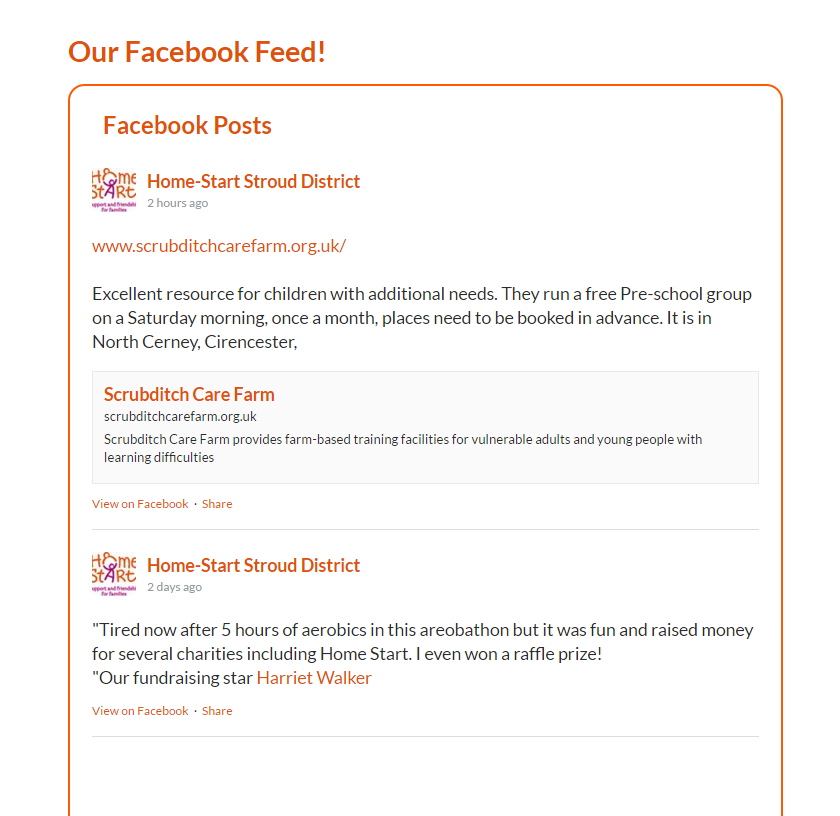
It is quite simple Continue reading Getting Social
New range of premium templates available
Over the course of this year I have had feedback from various sources that there is a new style of website around that is more aimed at mobile users and optimised as such. This class of website is more dynamic and has a lot more features in than the free ones I generally use. I use free ones to keep the costs of production down.
Over the past year there has been a shift from the traditional desktop fixed computer configuration when accessing the web to mobile users. These changes reflect this.
Last year I introduced some responsive templates to some organisations, notably Home-Start users. These adapt the presentation of the site to mobile users Continue reading New range of premium templates available
Creating a Gallery

I have one site that is an archive for around 100 years of photographs. It is a community project and is slowly being built. The site features lots of galleries because this is an efficient way of showing images on a website. It uses a Plugin called Gallery by BestWebSoft. It is perhaps not the most elegant gallery to use, but it is easy to use. In this case I built a multi level site using it just over two years ago so it is not really possible to use a different plugin now.
For those interested in adding a gallery to their website the tutorial below lists the steps in fairly fine detail. I do not cover editing photographs which is part of the process, but I do cover some of things you could do before uploading your images to your website.
You can download the tutorial here.
Adding Tables to WordPress
 I have recently worked with a group that wished to add a timetable for a village hall to their site. It is important to appreciate that where possible you do not want to have multiple data sources containing the same information, and where this is a necessity, then there is only one primary source that everything else is derived from. (The website should not be your primary source for data in case you lose your site!) Continue reading Adding Tables to WordPress