Case Study – Extreme Spam!

I had an email from one of my clients informing me that they had 4000 emails in their inbox which had suddenly appeared. There were more being added every minute. Typically this charity received 3 or 4 a week.

What happened?

It appeared that someone was directing spam messages through the website at a rate of 4 per minute. Analysis of the emails coming in was interesting. They all came in through a contact form which had several anti spam measures included which had been defeated. Perhaps this was their goal to write an automated program which defeated the forms anti spam measures and fill the inbox. Which is a sort of denial of service attack.

Every email was different. They allegedly came from different email addresses, and the payload in the message was also different. So spam filtering could not work on a sender address, or easily by looking for some keywords or domain names.

The message encouraged the viewer to click on an obfuscated link (the destination of the link is coded so you cannot tell where it is going to). The coding for each link was also different.

Meanwhile while looking at this the volume of emails had now hit 6000.  I had seen this once before, but I guess it happens regularly, because much spam traffic is automatically generated through forms.  The question was what to do?

Start by looking at the emails

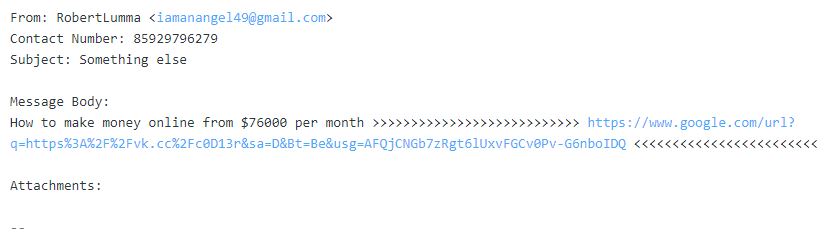
Each email had a couple of common elements in it. There was a brief message followed by a varying number of: >>>>>>>  then a web address (always different) and then a varying number of:  <<<<<<<.

If you look in your hosting, or through your webmail account you can set up filters for incoming mail. The filters work at a very detailed level per email account. I had not used them before.

I logged into the email account via webmail and chose Settings and then Filters and set up a couple of filters.
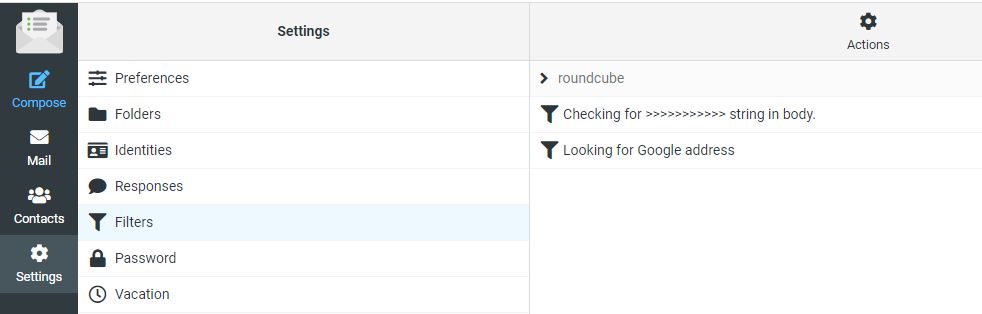
 

In the example above you can see I have set two filters up. Lets look at them to see how they work, and what limitations they may present. 

Filter 1 Looking for this sequence “>>>>>>>>>>”

All of the email had two sequences of greater and less than symbols to draw the viewers attention to a web address they wanted you to click on. 

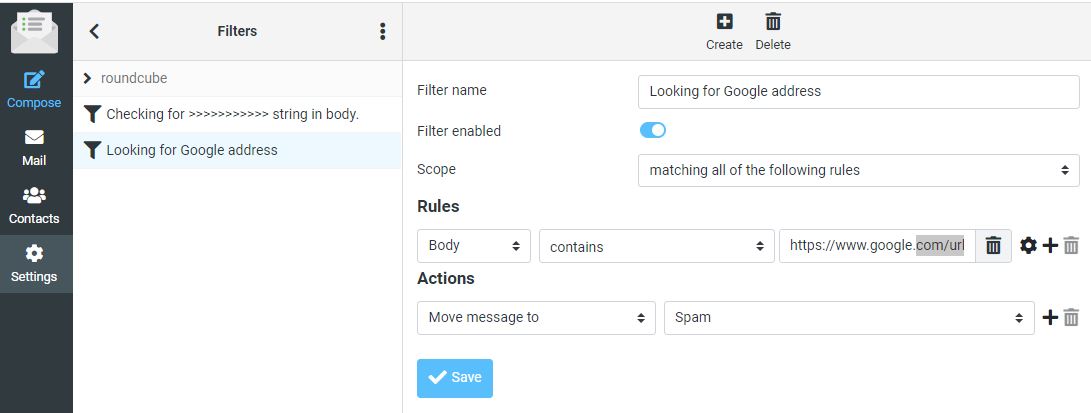
I set up a rule which says check all incoming email to this account and look in the body of the email. If you find “>>>>>>>>>>>>”  as a sequence in this email move the message to the Spam folder.  Here are the settings.

You can see from this layout that you could build a very complex filter and have lots of conditions that need to be met before deciding what to do with the email. I could have refined it further, but I was under pressure at the time to regain control of the account. So I created a second filter on the Web address in each message. 

Filter 2 Catching a web address

In this case all of the messages had a different email address. They all started as https://www.google.com/url?…..     followed by a series of random characters. This is a method of hiding the destination address. But because all of the messages contained this common sequence I could use it. Here is the second filter. 
What happens now?

With these two filters set up any messages coming into the inbox that contained either “>>>>>>>>>>” or more in a sequence OR a message carrying “https://www.google.com/url?” were now automatically sent to the spam folder.  While this might look like success it was not the whole story. 

Messages like the one below were now going into the spam folder, all of them were being trapped. However the computer was still hitting the website 4 x a minute.  While email was now usable, the problem had not gone away. 
The hosting company keeps a log of activity on the website. It is not an endless log, but it will show you maybe the last 3-4 hrs of activity. I decided to take a look there. This would tell me if it was a network of computers from around the world (which has happened before too), or a single computer running some sort of automated program. 

Here is an example log with an access to the contact form highlighted. 
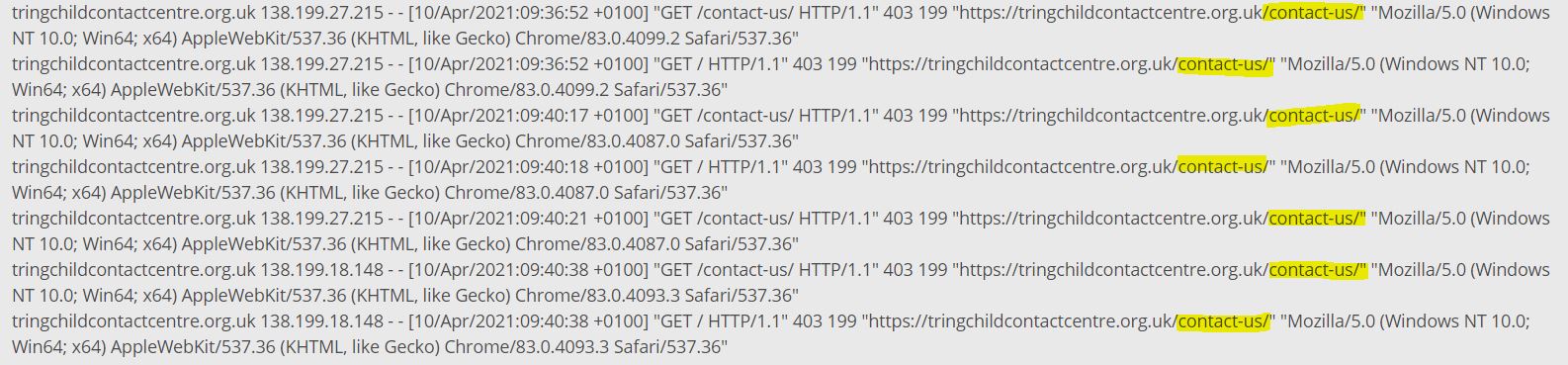
The access log shows that something(s) are constantly accessing the contact us form on this website. The time stamps of the log show as high as 5 time per minute.  These accesses are coming from two sources: 138.199.27.215 and 138.199.18.148.  When I did this the first time through I only saw one IP address. 

In the hosting you can block accesses to the website by country, by IP address or by IP address range. The country block is not fool proof because people can appear through IP addresses which are not listed, or pop up through a VPN somewhere. 

Where is the spammer located?

Can I block by country?  I went to this website and entered the IP address to see what it came back with.  https://www.iplocation.net/  It came back with the following information:

This tells me several things. There are actually several entries from various databases, I have shown 3 here. It tells me the computer is located in France, in Paris at Ile-de-France. It also tells me that the service provider is a UK based company called Datacamp Limited.

Block France and then the whole world!

I next went back into the hosting and looked at the filtering options. This client only has clients local to their area, and certainly in the UK. So there is probably no need to have this website visible in other countries. At least for a short period. So I first blocked France, then blocked everywhere apart from the UK.

This action did not immediately work. Possibly because the block is not instant. The logs showed continuous accesses to the site. There is another reason, just speculation; the account was being served through a CDN (Content Delivery Network) and it might take some time for the content to age and be replaced. I tried clearing the server side cache but it had no effect. So what now?

Block by IP address

As I knew the IP address of the computer sending the messages into the website, it is possible to block based on the IP address which I did.

That stopped some of the accesses but then another IP address popped up. I have been here before, and traced a network of compromised servers around the world that were sending spam several years ago. The new address was 138.199.18.148. So there were either two computers, or more likely one computer with two ports attached to the internet. 

The second IP address is similar to the first (first two number are 138.199) and are also with the hosting company Datacamp Ltd. 

There is another type of block where you can block a series of IP addresses on the basis that hosting companies will acquire blocks of IP addresses which are in sequence. I set up a filter in the hosting which blocks 65,535 addresses all of which start with 138.199.

This blocks any computer working on this range of addresses:  138.199.0.0 to 138.199.255.255.  

Here are the blocks in the hosting control panel. 

In this case the entry 138.199.*   overrides the other two entries which were specific to two locations.

This prevents these computers from seeing the contact form. So if they cannot see it they cannot post data into it. The website is not visible to them.

There is a second log in the hosting which records errors. You can see that each time the automated computer attempts to access the form it receives a 403 response from the website which means “Forbidden”. Their access is denied.
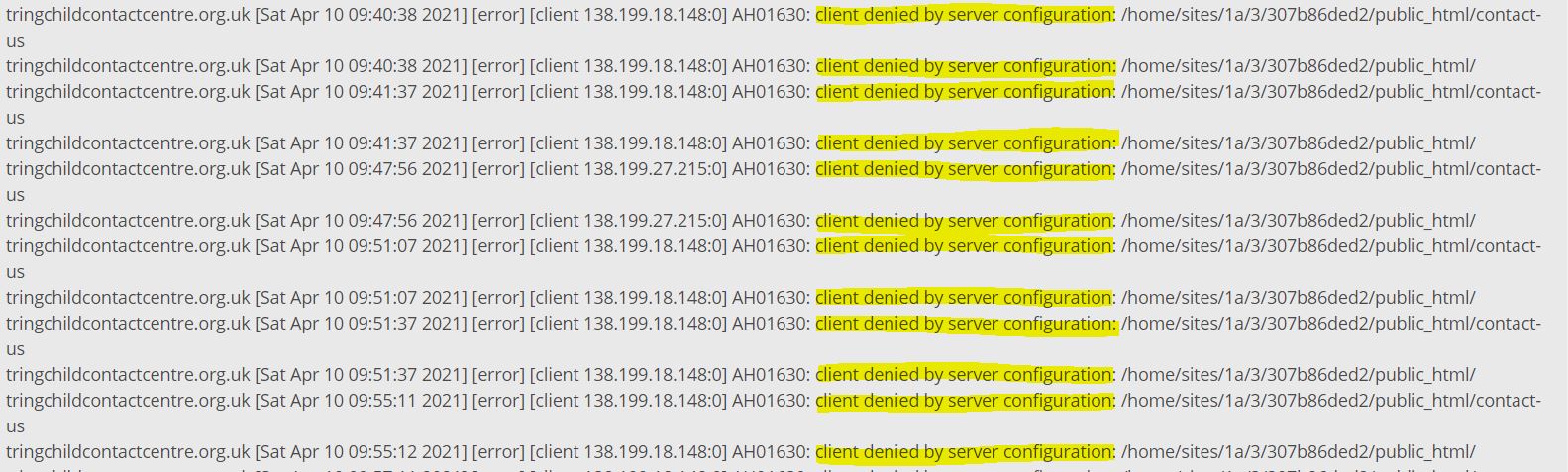
At this point the automated spamming computer cannot reach the website and cannot send any messages through the contact form.  But it is still trying. It is still trying to do this 3 days later. Someone has left it on to keep attempting to hit this website.  So what else can you do?

Contact the Hosting Company

People connect to the internet through a service provider or hosting company. In this case I had strong evidence that the person doing this was accessing the internet through a connection provided by Datacamp Ltd. So I tried to reach out to Datacamp through their website: https://datacamp.co.uk/  The website has a single email address visible and a telephone number. I sent an email to datacamp@datacamp.co.uk to advise them of the problem and request that they shut down the connection. Nothing happened, no response. So then I phoned 020 3808 5949 and left my number. No reply.  I then did some searches on Datacamp Ltd and found that it is a parent company for CDN77. I went on that site and got on a chat with a representative of that company. They gave me another email address: abuse@datacamp.co.uk which finally did get a response. 
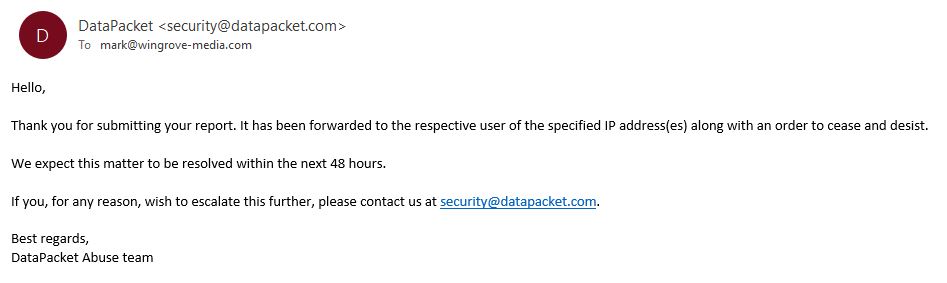
 

At the time of writing the offending computer in France is still trying to hit the website contact form. Tomorrow I will escalate it yet again. 

Whose fault is it?

It is unlikely that we will ever know who was behind this. There was probably no malice or directed attack at this particular charity other than they were testing something.  A similar case a few years ago involved around 20 computers that were around the world doing something similar. They were less sophisticated than this attack, because in this case it defeated some tests in a form. I also changed the tests by replacing some different questions and it was still able to defeat it.  I will look for some alternative methods to keep automated machines out. 

It may well be the case that the computer this process is running on is a highjacked server someone has taken over, or has infiltrated. The owner knows nothing about it, and the service provider has no relationship at all with the people behind the attack. We will never know. 

Sadly dealing with this type of thing is a fact of life. It goes on all of the time. But if it happens to you, we have some tools available in the hosting to minimise any loss of service. 

If anything else happens here, I will update this. 

Update 15/04/21

We are now a week later after this was first reported. The senders IP address has changed twice over the past week, but the messages continue. If it had not been detected, this account would now have 50,000 junk emails in it!

Over the course of the past 5 days I have contacted the service provider’s security team, and they have passed the message on to their customer. Their customer is a VPN provider. People use VPNs to hide their identity or the source of the message. The computer that is sending the messages is an unmanaged system in a data centre which is subcontracted out to their client. It is their client’s customers, or even their customer’s customers causing the problem. Nothing can be traced. Frustrating isn’t it? 

I have contacted Action Fraud, and it seems the only thing I can do short of taking a private legal action against the company under the Computer Misuse Act 1990 for denial of service. There is nothing anyone can do, even though this is obviously wrong. It is also outside of the area that OfCom is responsible for.   I have been advised to raise a case with Action Fraud which I will probably  with the amount of evidence I now have.  

Spring Clean?

How is your website looking?  Does it still do what you want it do?  Is it being used how you anticipated it would be used?  Do you know how it is being used?

Over time sites tend to end up with a few problems, it is inevitable, I have have many years experience building them now, and you are only going in maybe once a month or less and adding things in. You may have forgotten some of the editing basics, or carried out some significant editing on a page and created an imbalance in the columns. 

Anyway I have a broom and a duster and my trusty can of Mr Sheen, so give me a call to visit your site and straighten things out for you again. 

I have had a couple of calls over the past month to add in a Meet the Team page, as an example. Building that from scratch could be a bit intimidating. 

Another angle here, is how are people using it? It is also worth stating how you hope people are using it, and I will go to Google Analytics and tell you how people are using it. Then we can figure out if there is a gap and how to close it. 

Websites are never completed, things change all of the time, don’t let them pile up, I am generally around if you need help. 

Virtual Private Server

Following a request for faster performance, I have taken out a new account in February, and have been experimenting with it. It is called a Virtual Private Server (VPS).

When you look at the range of hosting services available they start off as shared hosting where there may be several hundred, or even over 1000 websites all sharing the same server platform. 

I am a reseller, so I purchase a block of resources on this shared platform and add websites into this system. The hosting company monitors the performance of the servers and makes sure they do not crash, or fail, or run out of hosting resources. 

However this model means that while each website is physically separated from the next, you can be affected by the overall operation of the server. I know from my dealings with the hosting company that they are pretty good at managing this, and it is very rare for a website or server to go down. If it does, by the time I have alerted them, they are generally already aware of the situation and have some remedial process underway. 

I spent a lot of time in January and February trying to identify why some sites ran more slowly than others, and what could be done to speed them up. I have a series of support threads in this area with the hosting company. Your sites have many local tweaks on them to help them to perform well.  But sometimes there are server related issues where a site might be slowing down, or less responsive because of something else going on, on the server. You are also spread across many different servers, not everyone is on the same one.

There are also some complexities with the caching system used and what it does with code used by the website. Sometimes deleting the server side cache (Stackcache in your dashboard) can clear things up. 

Checking out some competition

I took out some hosting with another UK based company in early February to establish if we were seeing “good performance” compared to a competitor. I tried several sites there and recorded the difference in speeds.  It turned out that where we are now for this class of hosting is very good. The cache provided by the server is also effective in giving each site an edge over competitive shared hosting. 

The Next Level

When you look at hosting plans, the next level up from shared hosting is Virtual Private Hosting. This is where an instance of the operating system runs on platform where you have finite resources such as processor cores, memory, disk space, disk input/output and network bandwidth. Unlike the shared model, you are not sharing this model with anyone unless you choose to do so. There are several levels of performance, and you can scale up (or down) as required. 

Wingrove-Media VPS

I have taken out a relatively small configuration, but it is almost as expensive as the shared reseller hosting on an annual basis. It is based on a two core processor, 50GB disk space, 100Mb/s network speed and 2GB of memory. I have been running several websites in this space over the past 3 weeks. 

Site access speeds are notably faster, editing is much faster, which tends to indicate that the Divi editing system is quite processor and memory intensive on the shared platform. 

I can scale this area up from 2 processors to 10 processors and over 400GB of space 1000Mb/s port speed at £250 per month!  Well that is a long way off.  How this all goes is highly dependent on people moving their sites into this space. 

For now this platform is available for the next 3 months and under review. I will provide more information on pricing and terms and conditions a little later.  

If you are concerned about your site speed, and would like it all to run faster, I can demonstrate the benefits by moving your website into my VPS account for 2 weeks.  Contact me for more details. 

Slow site? Check your browser

One notable thing I did find out during this exercise was that Chrome was not as fast as I expected it to be. I ran multiple tests by working my way from left to right loading the top level pages on a website, and timing how long it took to load every page at the top level.  I did this with Chrome (my normal go to browser), Microsoft Edge and Firefox. Chrome produced consistently lower results than Firefox and Microsoft Edge. (This was on a Windows 10 Professional platform). 

I have started to use Microsoft Edge as my go to browser, and this has increased editing and browsing times. I would also add here unlike your Chrome Browser I have a few plugins loaded into mine, so these may have contributed to slowing it down. I did try unloading most of them, it was still slower than MS Edge and Firefox. That all said, I would recommend giving them a try. Unlike MS Explorer, which did have issues in compatibility with Web Standards, MS Edge seems to work fine. 


Need a bespoke CRM system? – Call Graeme Neale

If you have either reached a point where you might benefit from a CRM System (Customer Relationship Management) or your old one has fallen into disrepair or has been withdrawn from the market then you might like to check out Graeme Neale, (Email address: gnh@pmvideos.com )

I have virtually met Graeme through the website redevelopment for Home-Start North West Kent where he has been building a new CRM system for them to replace MESH which is withdrawn later this year.

Graeme charges a flat fee for the development of the system, provides training and maintenance for a year, after the initial period; ongoing maintenance and support is negotiable.

If you are looking around, or considering just using spreadsheets, it might be worthwhile sending Graeme a message to see if he can help.

From website referral form to CRM

Mainly for Home-Start organisations, but it can apply to any group with online referral or application forms. 

I have built a proof of concept which has a referral form online which is quite complicated. 

The user inputs data into the form and then sends it to the recipient. 

The recipient has a very easy form to read. The form formatting can be applied to user requirements. 

Within the form the data is duplicated as a CSV string of characters (Character Separated Value). You can copy this block of text and paste it into an Excel spreadsheet and then apply Text to Columns command. Now each cell has a data field contents in it. You can manipulate it further from here, or even import it into your CRM system. 

To find out more and look at a working example with documentation that you can try online, go to here:  http://wingrove-media.uk/generic-application-or-referral-form/

Follow the link above to visit the page with the form on and try it out for yourself. 

Stackmail

Are you using Stackmail on a regular basis?

I write this because I came across a group this week that was only using Stackmail for their email. I am not sure why. While Stackmail works as a web interface to the 20i hosted email system, it can be a bit slow, and in my experience can be slow to respond on slower connections.  There are however alternatives to accessing email. 

If your sole email system for your charity is through the web interface to Stackmail, I recommend that you use one of the following. 

If you have MS Office and Outlook on your system, you can use Outlook to pick up email. 

If you do not have Outlook on your system, you can install Thunderbird (written by the same group that wrote FireFox), this is free and is a good alternative if you have not got Outlook on your windows platform. 

If you are using a MAC you can download email to your Mac Book or desktop by setting it up in MAC Mail. 

If you are using an iPad or iPhone or any other smart device you can set up email on those as well. 

It’s IMAP not POP3

One of the advantages about the email system is each email account is 10GB in size. That is likely to last you for many years unless the volume of junk to real mail is 100:1. 

If you create folders, and generally keep your mailbox tidy, when you look on the various devices, they all see the same mailbox irrespective of which device you are using. This is because your mail is kept locally on the server, not only on the device. 

In my case I have several windows and several Apple devices all accessing the same email box. I get the same view everywhere.

Need Help?

 There is absolutely no reason why you should only be using StackMail to pick up your email. There is no cost involved if you use Thunderbird, or use Outlook if you already have it on your system. It will save you a lot of time and frustration. 

Contact me if you need any help. 


Annoying Corel Pop Up and How to Fix It

This will only be of interest if you have the problem!

What is the problem?

I use several Corel products on my system.  They are associated with graphics and video production and manipulation. I have used them for years, but much less so now. However they are still on my system, which is part of the problem. 

Corel have decided to tell me exciting news about Particle Shop, Paint Shop Pro, Video Studio et al with a pop up which appears in the bottom right of my screen. Nothing particularly wrong with that except that despite many hours of research and trying; you cannot get rid of it. It pops up randomly. That can be very annoying if you are recording your screen for someone and are 30 minutes into the recording!

I am not alone

Search around forums and you will find lots of people are annoyed with this problem and the lack of guidance on how to get rid of it. The general solution is to go into each application and search for messaging and turn it off. Which I have done, and they still pop up. 

I don’t mind an app telling me that there is an update, or a special offer when I choose to run it. However Corel in their infinite wisdom it turns out has set up a scheduled task which runs every day. Even if I do not run the application. That is too intrusive for my liking. If removes my ability to control my computer.  I guess that is why lots of other people are complaining. 

The Solution

If you have been around the various forums and worked your way through the solutions and are still scratching your head, please review the text below which is recorded from an online chat with Shamili of Corel Support.  It would appear that in some cases you can end up with a command in the scheduler, and that is the reason why the adverts pop up independent of the settings in the applications. 

I do not think this practice is a very smart one, it has put me off acquiring any more Corel Products. 


Nov 16, 2020, 4:57 EST

Chat started: 2020-11-16 09:40 AM UTC

(09:40:31 AM) Mark Wingrove: I have an annoying pop up originating from Corel which I want to get rid of. It is popping up on my screen almost daily now. I have been through all of the corel apps on my system and cannot find the culprit. I have read about the problem and the Corel response. I have tried those, but I am still getting them.
(09:40:33 AM) Corel Customer Support: This chat will be recorded for quality purposes. Terms of Use http://www.corel.com/en/terms-of-use/ | Privacy Policy http://www.corel.com/en/corel-privacy-policy/
(09:41:26 AM) *** Shamili joined the chat ***
(09:41:29 AM) Shamili: Welcome to Corel, My name is Shamili.
(09:41:31 AM) Shamili: Hi Mark
(09:41:38 AM) Shamili: How May I help you?
(09:41:38 AM) Mark WIngrove: Hello
(09:42:02 AM) Mark WIngrove: I want to get rid of the source of a pop up which keeps occurring on my system.
(09:42:20 AM) Mark WIngrove: Currently it says Black Friday Savings.
(09:42:32 AM) Mark WIngrove: I am seeing them daily.
(09:43:24 AM) Shamili: May I know what specific product are you referring to?
(09:43:49 AM) Mark WIngrove: I wish I knew. I cannot tell which product is generating them. I have several corel products
(09:44:34 AM) Mark WIngrove: I have the following, any of them could be the source. However I have checked them all.
(09:45:28 AM) Shamili: May I know for which product You have got the pop up message
(09:46:00 AM) Mark WIngrove: Aftershot, video studio 2019, video studio 2020, painter essentials and corel photoshop pro 2020
(09:46:26 AM) Mark WIngrove: Currently it is promoting Paint Shop Pro 2021. I also keep seeing ads about special brushes as well.
(09:47:17 AM) Shamili: Please hold while I check on that for you.
(09:47:21 AM) Mark WIngrove: I have two version of PSP 32 bit and 64 bit
(09:48:57 AM) Mark WIngrove: PSP Ultimate 2020 has options under Help | Message preferences. Nothing is checked, and it also says do not show me tray messages for this application.
(09:49:39 AM) Shamili: Please try the following steps, to attempt to prevent the messaging pop ups from appearing:

1. Open up a run prompt by holding down the windows key on your keyboard + the letter “r”
2. Type Taskschd.msc and press ok.
3. Once the Task Scheduler app appears highlight the Task Scheduler Library Folder towards the top left.
4. The box on the right will show you what programs have scheduled tasks.
5. Locate the Corel tasks, there should be two of them and right click on it.
6. Choose delete
7. Close the window.
8. Restart the computer

(09:49:57 AM) Shamili: Kindly follow the above steps to get rid of popup
(09:52:01 AM) Mark WIngrove: Ok, I have the scheduler open and can see at least one task in there. How do they get there if I have turned them all off in the apps?
(09:52:16 AM) Shamili: Okay
(09:52:38 AM) Shamili: Here after You will not get any offers from the corel
(09:53:24 AM) Mark WIngrove: Yes but you have not answered the question? These pop ups are very intrusive and annoying. They are not doing Corel any favours here.
(09:55:18 AM) Shamili: Sorry for the inconvenince, I apologize for that If You use any software from the corel If there any offers going on You will get the offers messages If You disable it You won’t get it
(09:56:34 AM) Mark WIngrove: You still have not answered the question Shamili. I should be able to do this within the apps. If Corel is nagging me all of the time I am less likely to use it. Even take it off of my system completely.
(09:57:13 AM) *** Shamili left the chat ***

Watch out for Boris & his friends

This Boris comes from the USSR and other states that have no interest in your website other than abusing it. This is a short case study on why it is wise to remain alert.

Invitation to make some changes

On a few sites where I know there is very little annual activity on the behalf of the website owners, I help out from time to time adding a message here and there. Typically this year it has related to coronavirus shut down/ reopening messages. I received a message from one of my clients and proceeded to make the changes yesterday.

On entering the website there was an exclamation mark next to a plugin warning me there was a problem. I investigated, it related to an SMTP plugin which is used to handle sending messages on behalf of the website. This is usually more reliable than sending via PHP the native method in WordPress. By using an SMTP plugin the website connects to an SMTP (outgoing mailserver) and sends the message out through an email account.

In this case it warned me that error messages had been returned from the mail server. It invited me to send a test message to check it. Which I did. The first attempt returned an error, the second attempt a few seconds later was successful, the third attempt returned an error.

What was happening?

I have been down this path a few times, and suspected that the hosting company was limiting messages coming through the mail box, probably because of spam like activity. I raised a ticket with the hosting company and asked them to check and verify.

They never answered the question but requested access to the website to see the fault for themselves. They missed key points in the questions I had raised to them, so I tried again.

Second time around they blamed the plugin for the problem claiming there were no error messages in the hosting relating to failed email attempts. (But still did not answer the question whether they were blocking it or not).  So I tried again.

On the third request they did find error messages in the email log which also mentioned suspected spamming activity through the contact form on this website.

Website Log

At this point I checked the log of website accesses to see if I could spot anything there. Sure enough something was probing the website 4 times a minute over less than a 2 second period. Humans do not work that fast, so it had to be a bot (computer program running on a compromised server somewhere).

All accesses were from this IP address: 5.188.210.4. Checking that IP address it turns out to a server in Russia. Probably a legitimate server that has been compromised by someone.

Why should you be concerned about this?

From the first time around 7 years ago now, when I started to turn on security monitoring and you could actually see beyond normal website usage, I was surprised to see the volume of illegitimate attempts to access websites.

One of the most common is sledgehammer approach password guessing routines which try to get into your website. 

In this case, something was probing the contact us page and attempting to use it to send spam.  It later turned out that the website owner had received 257 spam messages, but they had all been trapped in the email program they were using. 

Whatever it was trying to do, it was triggering a safety function in the hosting which was stopping or rate limiting messages from this website. So while it may have tried to send thousands of messages, only a few got out. BUT…. it also means that this Russian computer was hitting the website so hard, that it would have affected any legitimate messages coming in through the contact us page. 

When I did my test, it failed, then passed, and then failed for another 10 attempts. 

So, if your junk mail rises for any reason beyond a few messages a day, be suspicious. Someone may be targeting your website, and they may be impacting your website’s ability to send messages. Or said another way, your clients to reach you through your website. The main problem here is there is no warning given, no messages of failed delivery. 

How to fix it

In all of my cases, I work locally in the UK, the audience with a few exceptions are all UK based, and in most cases probably within 50 miles of the location of the entity or charity.  Therefore your website would not be of any interest to someone in India, China or Russia. 

The hosting control panel has some country blocking options. You can block by country. In this case I blocked several countries including Russia from this site.  It is not a bombproof solution, there are ways around it from the attackers point of view, they could return through a VPN or some other path from the dark web. But in most cases it will work. 

In this case some 12 hours later, the server in Russia is still probing the website every minute, which just goes to prove it is a hackers program that is doing this running on a remote server, and probably probing hundreds of sites. However in our case it is blocked at the server before it reaches the website. 


IP address is now blocked from accessing the hosting

If you are affected…

If you suddenly see an uptick in spam messages, and they all seem to be related (Russian or Chinese for example) send me a message and I will check. They are a nuisance, but there are ways of stopping them, both at the hosting, preventing access to the site, and adding spam filtering if there are some common themes if you are affected by direct email.

However do not ignore it. If the spam is originating via your website contact form, this may impact your other users.  Send me a message through the contact us page if you want me to check.

Phishing Woes

I would like to raise everyone’s attention to a series of official looking Phishing attempts on one of my clients. Having alerted the relevant people, one more came forward to say that they had received a message as well.

This is how it works

You receive a short email to say that your email account has been suspended due to security issues that have been detected. Of course you would wish to rectify this so would read it.

The email is personalised and appears to be addressed to you, because the first part of your email address contains your name. They harvest this part and place it as a field in the email. So you might see something like Dear mark.wingrove, ….

Note the lack of capitalisation, and the “.” in the name. That is a giveaway.

Within the message body is a statement which claims the IT/ Support department for your organisation has detected a problem with the security of your email address and you need to act within the next 48hrs otherwise your email address will be permanently disabled.

There is a link you need to click on to resolve the problem.

What is Phishing

Phishing is a method used by hackers and other bored people to present a form to you and invite you to enter your email address and password into the form. I wrote about this a few years back with an example and how it all worked. You can find it here.

You assume the website/page you are taken to is legitimate and enter the information into the form anticipating you will resolve the problem mentioned in the email.

What actually happens is the form data is forwarded to an anonymous (meaning difficult to trace) email account which the hacker is using. They will then use your email address and password to access your account and take it over.


Take care of your security

Once the hacker has got into your email account, now consider how you use your email account and how it is connected to everything else, and you will get an idea why they do it.

I have had examples from a a few years ago where a gmail account was compromised in this way, and the hacker got into a website because the gmail account was associated with a website.

About this particular case

In this instance, it looks like there was a small number of personalised email account addresses on the website. These are under links encouraging people to contact an individual directly. So someone or something had harvested these from the site.

Normally a generic email account is used and mail goes to this mailbox for sorting later.

What to watch out for

If you receive any email, expected or not asking you to follow a link to set up your account, unfreeze your account, or anything to do with entering your account details somewhere do not click on it.

If you were expecting an email like this (for a legitimate reason) then independently go to your account and check it. Do not trust any links sent to your email account in emails especially if they are not solicited. They are likely to be fraudulent.

About your IT department

I am not your IT department, but if I was aware of a problem with your account I would contact you directly. Even if you have a third party looking after your email accounts, they will probably contact you directly, or through their contact in your organisation, it would be very unusual to receive an automated message.

Free Account users

For those of you using Gmail (Googlemail), Yahoo or Hotmail, you are particularly vulnerable. If you loose control of your account, then you will probably lose it for a month or more. Because you are not paying for your email account, it not so surprising that there is not a human you can call to resolve it. You enter an automated process which takes some time to resolve. If that was your only account, or main account, you are now in trouble because you can no longer send or receive mail once the account is suspended. I recommend that if you fall in this category you look at adding 2 factor authentication on your account which will help prevent any third party from taking it over.

If you are using an email account associated with your hosting or domain name, then if it is taken over, it is easy to grab back again. If it happens to you, tell me or your email partner immediately you are aware of the event.

Website Health

WordPress has recently introduced a health widget in the dashboard. It indicates the health of your website. I have been getting questions on it. It looks like this. 

Health Status image

I have not done anything yet on this site (my site) so let’s take a look. First thing is not to wholly believe what it says. But we should check it out. I have clicked on the Site Health Screen link. It takes me to here. 

The first thing to note is at the top. It is now running some tests. Which infers it did not really know what the state of the website is. 

We have 0 critical problems, if you ever find you have one or more in this space alert me immediately. A critical problem could bring your website down. 

The two recommended improvements show that I have one or more themes that are not in use, I should remove them. 

It also says I have one or more plugins loaded which I am not using, I should remove them. Both of these are security precautions. In our case, not that important. 

The last one relates to a function in the hosting which I have never seen anywhere, and is not supported by this hosting. It too is non critical. However it is worth checking by opening the box. 

In the meantime while we have been thinking about this page the Site Health has changed to:

… GOOD. Well I did not do anything to the site. Unfortunately the way this has been implemented is a little alarmist. I don’t mind WordPress mandarins building a stronger and more robust platform, but this feature is not a great implementation as it turns out.

Check for yourselves

When you next login, give it a try and see what the page says. If you see something there after you have loaded it and are concerned, let me know and I will check it out for you.

Wingrove-Services
Privacy Overview

This website uses cookies so that we can provide you with the best user experience possible. Cookie information is stored in your browser and performs functions such as recognising you when you return to our website and helping our team to understand which sections of the website you find most interesting and useful.

You can adjust all of your cookie settings by navigating the tabs on the left hand side.

My privacy policy can be located here: Wingrove Media Privacy Policy (opens in a new window)

My Cookies Policy can be found here: Wingrove Media Cookies Policy (opens in a new window)