Website unavailable and other messages

Over the past six months there have been around 4 or 5 cases where websites have stopped working. This can invoke panic if you have never seen it before. There will be a white screen and some short message on it which will not mean a lot to you. 

Firstly do not panic

Your website is still there, but cannot run. WordPress introduced some measures around six months ago which ran some diagnostic and other tests and reported on the health of the website. It is since this change some sites have failed, probably because one of the trapping mechanisms trying to identify problems has kicked in. 

Generally what has happened is the website may have been upgrading itself, the upgrade has caused a temporary conflict, and this or some related event has caused it to crash. What you see is the white screen. It can sometimes be falsely triggered by security plugins. 

How bad is it?

The first thing to check is whether you can still log in to the site. Try to login as an administrator. If you can get into the site, there may be a warning message there. If the problem is down to a plugin (it normally is) try turning some of them off and see if the website returns. If the site does return, delete the broken plugin, and try reinstalling it. 

If you cannot login and have access to the hosting

Normally the way I have to handle these problems is to log into the control panel, use a file manager to locate the plugin directory for the website. I then work my way down the list renaming the directories by adding some text at the end of the directory name. For example if the directory was called wordfence, I will rename it wordfence-off. When I do this, the plugin can no longer load. If it was the one causing the problem, then the site will return. 

I would then delete the plugin and reinstall the latest version, that normally fixes it. 

Can’t fix it?

If you cannot resolve the problem, send me a message, better still call me on the phone, and I will take a look as a priority.  But you may find you can resolve this yourself. 

Why?

I use a very limited set of proven plugins across the websites I build. They are all well maintained, and if a problem exists, and I can identify it (usually takes around 30 mins), so far removing and reinstalling them has resolved the problem.  You may however have added in your own selection of plugins. Not all plugins are equal. Yours may be causing the problem. 

If you are stuck, and have refreshed your browser, or tried a different browser and get the same result alert me immediately and I will try to get it resolved for you quickly provided I am near a computer. 

If the worst happens

We always have a weekly backup we can rely on for website recovery if we run into a problem that cannot be resolved. 


Speeding up websites

Over the course of the past three years I have raised over 300 tickets with the hosting company to raise technical questions and try to resolve problems. That does not mean they are not very good, far from it, they offer an excellent service, and are based in the UK in Nottingham. 

One of my eternal questions is why is this one website running slowly and the others are ok. That can be for all sorts of reasons, including my local area network as it turns out. I inevitably am told “well it all looks ok from here” but they are sitting on the end of a VPN and not accessing the site in the same way I am doing it. 

Anyway to cut a long story short, I am working my way around all of the website accounts and making some optimisations in the hosting account. I have to do this on a per account basis, and it will likely take the next two weeks as a background activity. It includes increasing the number of variables a website can use, this is important for Divi based sites, increasing the memory the site has available to 512MB. Turning off the standard WordPress Cron job manager and running one CRON job every minute from the hosting. Standard WordPress needs to carry out housekeeping functions, and these are triggered by visitors. If you do not have many visitors the jobs may accumulate, and also the hosting limits the number of jobs to be run to one per visitor.  The fix in the hosting and getting the housekeeping function triggered from the hosting will keep these jobs to a minimum. 

While doing this I am also checking the sites, adding back in the Google Analytics plugin you used to use, it was sold to a third party by the author, and from then on the new owner was asking for money for what should be a free service. It will show a graph on the dashboard after it is installed again. 

Increasing backups to 8 consecutive weeks, and setting up an encryption password to protect the backups. 

If you lost it, I will reinstall the old WordPress editor, some of you have mastered the Guttenburg WordPress editor, but it is a stretch, if you only go into the site now and again. The original editor was much easier to use. 

Checking everything is running on the site. 

Finally turning on a website optimisation function in the hosting and a CDN (Content Delivery Network) function in the hosting. 

Having worked through that lot, your site and page changes should work in a couple of seconds. That seems to be the case with the first 20 sites. 

I am trying to get all of the accounts to reflect the same standard settings. They have not over the years for a number of reasons. 

Any problems drop me a line. 


Support via Zoom

Like most of you I have become a Zoom convert and have taken out s subscription. I can provide ad hoc support if you are stuck, free of charge, just drop me a line and I can give you a hand. Training is also available delivered via Zoom if you need a refresher, or never got any training because of the coronavirus pandemic. So no excuses for not knowing how to do something. 

Remember no such thing as a silly question. So if something is bugging you, stopping you from updating your site let me know. 

Plugin Conflict

I recommned that everyone checks their contact form each month to make sure it is still working. It is effectively sending yourself a message. Particularly if things seem quieter than usual.

Why?

Mainly because from time to time something may conflict with what was formerly a stable installation. Each week there are three or four new software releases that will be available for your website. Because of the choice of plugins I use (they are generally used in the 100,000’s and they are well supported). Occassionally something may go wrong, it is usually transient, and fixed quickly due to the number of people using them.

Mailpoet 3 & Contact Form 7

These are two very popular plugins used on thousands of sites. I have come across an issue where both are installed. However it does not seem to affect all websites where both of these plugins are used which is unusual. At the moment the problem seems to occur on new sites only. 

It can be identified in the following way. Firstly go to your contact form and send yourself a message. Did you receive it, or did you see an error message?  If you received it ok, then nothing more to do here. 

If you did not receive the message, go into the plugins page and deactivate MailPoet 3. With MailPoet 3 deactivated go back to your contact us form. Send yourself a message. If you now receive it, it indicates that there is an interaction between MailPoet 3, Contact Form 7 and the sending service. If that is the case please drop me a line and I will sort it out for you. I have a workaround which is already implemented on many sites. 


Hosting Enhancements

I am on a permanent quest to find out the magical set of values that will help a website perform more quickly. I have noticed at various times that some websites are quite quick, and the same ones can be slow on other occassions. 

I had reason to spend some time over the past month and explore why a site was not particularly quick to find that there are some tweaks that can be added. I was a little surprised about this because the hosting company claims that the hosting is optimised for WordPress. Yet it seems we can do further optimisations as well. 

I am going to list them in this post for those of you that have access to the control panel you will be able to make these changes yourselves. If you site is running slowly, it can be for many reasons, but if you are concerned drop me a line and I will check your site out and if appropriate make the following changes. 

Memory size

I have noted at various times that the memory in use in a large site has been quite small. No idea why other than it appears to be much smaller than the available memory. In our case in this hosting we can reset the default from 128MB to 512MB. It needs to be done in two places. One is in the wp-config.php file as a directive, and the other place is in the PHP settings. 

The additional directive in wp-config.php is: 

define( ‘WP_MEMORY_LIMIT’, ‘512M’ );

Number of Vars

All websites and applications use Vars or Variables to store things. In the default case this value is set at 2,500. Many new sites including those based on Divi may have more than this. I found that we can increase this figure to 6000.  This can be found in PHP settings. 

Output Buffering.

This is set to off by default. It should be turned on. This can be found in PHP settings. 

PHP version

Many of the plugins and templates require PHP to be at version 7.3 or above. This is worth checking as when I started we were at verson 5.6. This can be found in the control panel. 

CDN Turned on

The hosting we use has recently added a feature called a Content Delivery Network which can be turned on. This will offer cached versions of pages available to people wishing to access your site. This can be found in the control panel.

Web Optimisations

There are settings in the site which can be optimised and are low risk by the click of a button in the hosting. This can be found in the control panel. Use the least risk set of options. 

CRON

CRON is a timer that launches functions at certain times. It is a scheduler. WordPress uses a crude type of scheduler triggered by a user or bot visiting the website. That one is called wp-cron,  It works most of the time, however on some sites there may be queues of tasks waiting to be completed. This is particularly true if the site is not visited that frequently. There is another catch in the hosting which limits the time available for execution. So if there were five tasks waiting to complete, only one of them may be completed. You can get around this problem by configuring a CRON job in the control panel which is more reliable and will execute whether people are visiting the site or not. It is easy to do. You set this to run every minute. This means tasks do not queue up due to lack of visitors.  While I do not profess to know a lot of detail here, I suspect that if the queue gets too long the sites slow down because basic housekeeping functons are not being carried out. 

The cron job you need to add (once per minute) is below. Replace the domain name with your domain name. 

wget -O/dev/null https://yourwebsite.org.uk/wp-cron.php


Available for small commercial sites now

If you know of anyone that is looking for a website for a small business, I have just started to develop sites for this market. I have taken three more on over the past month. Two of which needed to be rescued from other hosting companies with higher fees.

I can provide a similar service to the one I provide to charities including training. But if someone is looking for editing and maintenance as well, I can provide that on a PAYG basis, or pre agreed development work.

Just put your friend in touch with me for an informal discussion on where I can help.


Did Nominet contact you?

(Date March 23rd 2020)

I have recived several enquiries about messages from Nominet contacting domain name owners telling them that their domain name is about to expire, do they want to renew it?

This applies to anyone using a domain name ending in .uk. First point is if I am looking after your domain name, it will auto renew even if I have not raised an invoice for it yet. So continuity is always assured. The only exception to that is where you have told me that you are moving, or you are closing. 

With regards to the messages from Nominet, if you read them carefully they are not actually for your domain name, but they are genuine messages from Nominet, here is what has happened:

myorganisation.org.uk vs myorganisations.uk

A year ago Nominet started issuing free domain names to anyone that held a .org.uk or .co.uk domain name. These were issued and added to your accounts without your (or my) permission by Nominet; the body which manages these things. I guess it was an initiative for making money, if we had used it, then people would have been coming to your site at the location, and now they would be asking you for money!

The domain name was the same as the start of your current domain name but just ended in .uk  (so no .co.uk or org.uk). 

I never used any of them, but had to go through my master account and set every one of them to auto expire, otherwise I would be charging you for two or more domain names. 

Do I need it?

Short answer is no, you do not, and don’t feel you have to protect your brand by securing it. As things stand all domain names are well established in Google and Bing already. If some third party picks up your equivalent domain name but ending in .uk vs .org.uk or .co.uk and starts pretending to be you, then you can take legal action against them. I have never heard of it happening, but I guess you can never tell. 

If you do want to secure it, let me know very quickly.  

Exact Metrics!

On many websites I have previously installed a plugin called GADWP which allows you to view Google Analytics data within your dashboard. It is a very useful plugin which once set up provides an instant insight into the performance of your site and how many people are reaching it.

But…..

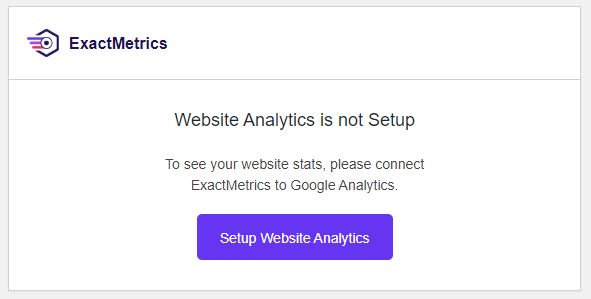
All good things come to an end. It looks like the author of the GADWP plugin sold it to a company called Exact Metrics. I suppose they were purchasing a very large base of registered users. It does happen from time to time. It is a relatively quick way of reaching a lot of people who share a common interest.  Exact Metrics look as though they want to monetize the GADWP plugin, there is nothing wrong with that, however what they appear to have done is removed a lot of the free functionality and now charge a fee. When I first came across this, I set up the new version which replaces GADWP and registered on their site. However all of things I could do before (which btw are free anyway within the Google Analytics account) I now have to pay for. Which is a shame. I think their installed base has shrunk considerably. As you are all charities or not for profit organisations, I know that this is functionality you would not be willing to pay for. I certainly would not either when it is already free. 

But there is another but……

It appears that the original author, or at least the original code is available under a new plugin called GAinWP. While going around websites I have been removing the Exact Metrics plugin, replacing it with GAinWP.  It works in the same way as the old plugin and gives some very simple views into the Google Analytics Data.

If you want to see Google Analytics data on your site dashboard and have the Exact Metrics panel there now, please do the following:

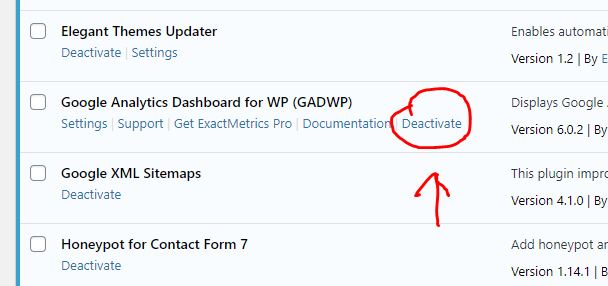
Go to the Plugins page. Locate GADWP and deactivate it. On the next screen choose other, then deactivate it. This will return you to the plugins page, click on delete to remove the plugin from the installation. 

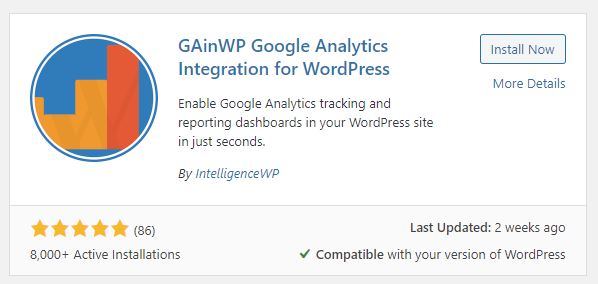
Next, at the top of your plugins page you have an “add new button”. Click on that. In the search box enter GAinWP. You will see two things come up. One is the plugin you are looking for, the other you can ignore. Click on Install Now.

Click on install now.  Once it has installed, activate it. If you have independent access to your Google Analytics account for your website you can enable it yourself. If you are not sure, drop me a line and tell me you have installed it, and confirm your website and I will get it back up and running.

Coronavirus and working remotely

Right now it is worth considering if you had to work remotely, could you access your email and other systems? It is likely at some point in the near future, if the virus takes hold people may be asked to work from home. Now might be a good idea to give that some consideration. 

The following is specifically for those people that access their website and email through my hosting. However it applies to anyone. Some of you I know use Outlook 365 too.  What might you need to effectively work from home, and where do you get it from?

Communications

Email

Most email systems offer an online version through a browser as well as through an application like Outlook. The first things you need to know is how to access these systems from a remote location. If your organisation has assigned a laptop, then it is easy, just hook up to the internet at your new location. But if you have a desktop you are probably not going to take that away from the office.  To access your email on a different system you need to know the portal or web address for email.  For the websites I have built, if you are using the email systems I provide then just go to your website and look in the footer, you will find a link there to webmail.  Go there, then you need to enter your full email address and your account password.  This will give you access to the same account you used on your office computer.  

Other considerations

The email accounts I provide are all 10GB in size. With such a large inbox, you can create folders and move important email into the folders. If you do that on your desktop, those folders are also created on the server if your email is set up as an IMAP account (this was the recommendation I made when issuing instructions). It means the folders you set up are visible on all devices that connect to the same mailbox.  If you know you are going to be out of the office, set up a folder and write yourself a few emails with important info on such as:

  • IT support person and telephone number
  • Colleagues email addresses, telephone numbers
  • Important documents
  • Whatsapp Group (good idea to set that up now). 
  • Key procedures if those are not available online

Think about what you take for granted today because it is to hand. Save a copy locally in your email. 

Website

Is your login tied to your browser at work? If it is then you may have difficulty logging in from home. Passwords can be recovered from WordPress websites provided you have access to the email account tied to your login. Make sure you know these three things:

  • Your user name in the wordpress website
  • The email address which is tied to your account
  • Optionally keep a copy of your password discretely without noting in the file name or content what it is for. You do not need to do that if you can access your email account.  Because you use your email account to recover your password. 

GDPR

Don’t forget about GDPR and your responsibility to keep confidential and personal information safe. This aspect is also worth considering before a crisis forces everyone to work remotely. While in the office you are within a controlled environment. When you are working from home, particularly if the data you are accessing is no longer on the organisation’s equipment, additional care will need to be taken to keep the information secure.  An annex to whatever policy is in force to cover such circumstances might be worth considering including the responsibilities of employees and volunteers.  Once we are the other side of coronavirus all of the data which may may have been more distributed than normal needs to be brought back under local control.  

Portable Drives

While it may be possible to use Cloud based storage, or even remote access to the usual data you access at work, you could also consider portable hard disk drives or USB memory sticks. If you use these make sure they are encrypted. If a drive or file is encrypted then if it falls into the wrong hands it will be virtually impossible to decrypt. 

Make sure a nominated person is issuing passwords, and these are recorded somewhere centrally and securely with access provided to the chair or another backup responsible person. This ensures you do not get locked out of your own systems. 

Remote Access

For any remote access to your systems make sure the passwords are changed regularly, and you know who has access. Personally I find the idea of having a backdoor into a system dangerous. But they are frequently used, and often left open, particulary where you have a remote IT support person. Make sure you have a policy where access can be turned on and off when required, passwords and user combinations are under very tight control, and used on a need to know basis.  You should be in control, not your external IT support company. Your organisation is ultimately responsible for the safeguarding of your data. 

Anti Spam Measure for Forms

I have used a variety of Form Managers on sites over the years. The majority of you should have Contact Form 7 on your site. I have used a standard feature in Contact Form 7 which  is a hidden field. Computers can see it, but humans cannot see it, so they do not fill it in. If the form is submitted and the hidden field has data in it, it is not accepted becasue it has been added by a computer so the form is rejected. 

It certainly helps in most cases, but I am also aware that some of you seem to have websites targetted from time to time. Here is another simple addition to your forms which may help. It is a simple quiz which will prevent submission unless the answer is correct. 

There are standard forms of recaptcha used by Google. It relies on a human interpreting what is in a picture, or pictures. It can be particularly tiresome on some websites. I have also noted a difference in operation of Google Recaptcha with different types of browser. It works very well with Chrome, less so with other browsers. 

The following is a simple addition to your Contact Form 7. Download the file by clicking at the bottom of this post and copy the text and insert it just above the entry for the Enter button. 

Here is an example:


I have inserted another form control between the message area of the form and the Enter button. Here is what it looks like in the Contact Form 7 Layout. Highlighted in yellow below. 

It may look complicated, but it isn’t really. There is a short explanation at the start and a series of questions, each with the response expected like this:

“1 plus 2 =|3”

You can build your own questions for example:

“What is the capital of France?|Paris”

Anyone submitting a message can see the question, but not the answer.

Of course none of this should be really necessary. But unfortunately there is a large group of people that must see some success from sending spam messages otherwise it would not be worth effort.

Will this solve the problem?

I honestly do not know. I am pretty sure with some of the anti spam measures which are often defeated, there must be people who are paid to paste messages into forms. In which case none of these methods will work. But if you are currently plagued with spam messages coming in via the website, this may be worth a try.

Do It Yourself

Locate your contact form by logging in and locating Contact in the side bar. Look for the form(s) and open one. Towards the bottom of the form you will see the text:

[submit “Send”]

Place some line breaks between this and the content above it. Then click on the download button to download the example code. Then paste it into the space you have made. Save the form and then go to your contact us page and test it. Make sure it works and you still receive a message through your website before leaving.

Any problems drop me a line or call me. Click on the button below, you should see the text, copy it, and paste it into the form as described.

Wingrove-Services
Privacy Overview

This website uses cookies so that we can provide you with the best user experience possible. Cookie information is stored in your browser and performs functions such as recognising you when you return to our website and helping our team to understand which sections of the website you find most interesting and useful.

You can adjust all of your cookie settings by navigating the tabs on the left hand side.

My privacy policy can be located here: Wingrove Media Privacy Policy (opens in a new window)

My Cookies Policy can be found here: Wingrove Media Cookies Policy (opens in a new window)