Email Errors

Black lists

I have taken a lot of care in selecting hosting providers where they have systems in place that can detect spam being sent from a server. This means it is unlikely that you can end up on a blacklist. For those of you that have been with me for some time, the previous hosting company (Hostpapa), it used to happen once a month.

In selecting a new hosting partner this was one of the areas where I wanted to reduce the risk of it occurring.

What is a black list?

There are a number of services that monitor mail being sent and receive reports from monitors around the internet. They look for large volumes of mail from the same source (IP Address) on the basis that this may be a hacker who has taken over an account or server. Much of your unsolicited mail comes from sources like this.

Some organisations, in particular local government and government sites, and their agencies subscribe to blacklist checking services.

This means when an email comes into their server (or more likely while it is on the way to the server), a process will check to see where it came from, and perform some checks to establish if the source is listed in a black list somewhere.

If it is then the email is rejected. You will receive a rejection notice normally, although I have seen examples where no response is given. The rejection messages are often written in techno speak (yes, and I struggle sometimes). So not very user friendly.

Check the black lists

If you keep having problems sending emails from your domain to other sites such as council offices then check to see if your domain name is blacklisted. This is step 1.

You can do that by going to here: http://www.mxtoolbox.com

MxToolbox

Enter your domain name and click on MX Lookup. When the result comes back click on the Blacklist check link.
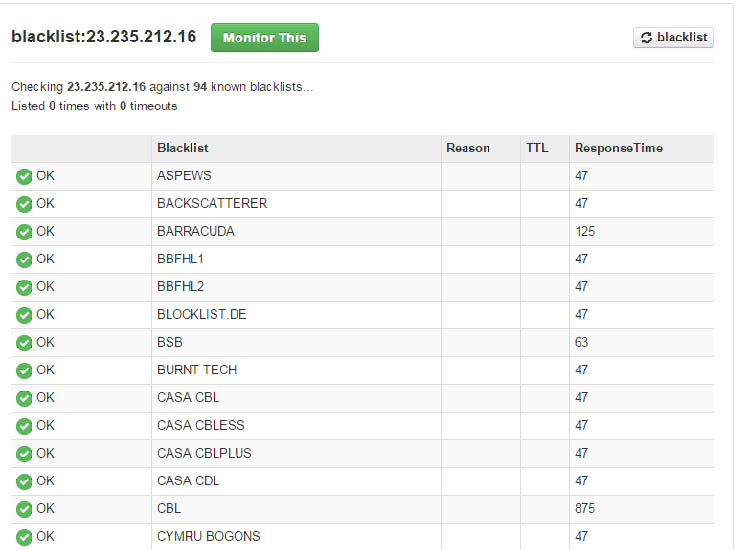
blacklistcheck

The list you get back should all be green. Some may show timeouts. It is not 100% accurate, but if something has happened, it is likely that your domain will be on more than one list.

How do you get off a black list?

Once on a black list, they usually clear in an hour or so. If you find you are on a blacklist let me know. If it is to do with the server in the hosting (some of you source your mail through a third party), I will contact the hosting company and ask for it to be cleared.

What else can I do?

Use a different email address and try to send the same message to the recipient. Sometimes when these events occur they are reported erroneously. In various conversations I have had with technical support they don’t have a clue.

How did I get on a black list?

The chances are that you did not get on it through any action you took. The server is a shared resource, there will be many websites running on it.  It only needs another account to be hacked, or someone using their account for illegitimate purposes and this is what triggers it. If someone is found deliberately sending spam out, then they will probably have their account cancelled.

In both of the reseller accounts I use, they employ mechanisms that detect the presence of high volumes of emails being sent and will flag it to the support team. If the volumes are really large (50,000) then I have seen in one case that the email was prevented from being sent. So it never left the hosting.

Referrer Spam and other ghost statistics

It would seem that the value of having Google Analytics on a website is diminishing. Prior to 6 months ago, the statistics made some sense. Now I see wild peaks in the statistics. The problem is being caused by something called Referrer Spam. This comment which I have taken from a support board for Google Analytics says it all:

“CarolleM said:
I appreciate your feedback AnalyticsEdge…I’ve been here before. So here’s my thoughts on the situation.

I know that we (the general WE) have seen this type of activity before with Semalt, dorador, alibabaexpress, iloveitaly and the list goes on. Here’s my point – we manage multiple websites and use GA as a means to measure whether our marketing initiatives increase awareness, traffic, conversions, funnel as intended, etc. These pings screw up numbers enough to effect reporting to the client. We are now in a position that we need to explain crawling, bots and pings to our clients who may be suspicious of the validity of the system to begin. Once again, this type of activity makes it difficult to track KPIs without this additional static. Since most clients are unfamiliar with reading these types of stats, we provide our clients with reports and explanations that they can appreciate and understand. With these bogus hits skewing the numbers (and I see this only getting worse) it feels more like selling snake oil than proving ROI.
Google if you want people to continue using your product as a means to substantiate website traffic, analyze visitor behaviour, track marketing initiatives, and all the other goodies you can do with this tool, then help us get clean output!!!! And if you look after numerous properties, as I do,  it would be helpful to be able to batch these functions rather than spending a day on creating filters for each and every property individually – that is a total productivity killer. Can anybody explain why we need to put up with this type of spam? Or can we insist that GA find a proper fix?”

Continue reading Referrer Spam and other ghost statistics

Best browsers to use for editing

While any browser can be used for viewing a WordPress website, I have found that Google Chrome, Firefox and Safari (Mac users) are probably the best for editing a site.

The main issue lies around Microsoft Internet Explorer and it’s various versions which have never really fully followed the web standards.

If you are experiencing any issues editing a site, first make sure you are not using Internet Explorer.

If you follow the video tutorials I have placed on this site, there are some of the steps which will not always reliably work with Internet Explorer 8,9, 10 & 11.

You can download Firefox here: https://www.mozilla.org/en-GB/firefox/new/

You can download Google Chrome from here: http://www.google.com/chrome/

Who owns your domain name?

I am not trying to be alarmist here, be assured that despite reading this below; if I set up your domain name for your organisation then you own it. However problems can occur, so I have several examples I have given below to illustrate them, and what happened as a result.

The following article largely applies to .co.uk and .org.uk domain names. I have had direct experience in these cases, ICANN controls other domain names like .com. They will have similar processes in place.

It is possible to look up your domain name using a “whois” service. For .org.uk and .co.uk, these are managed by Nominet. You can go to this page, enter your domain name and see what is recorded about it.

http://www.nominet.org.uk/whois

I generally take out domain names for new clients using one of two accounts. The majority are held with my registrar uk2.net, and I am the registrant. Because I have an account with uk2.net my details are automatically entered against the domain names. However I can edit some of the fields on request.

Why is this important?

The person that holds your domain name, also controls where DNS is located, this is the service that connects a user looking for www.mysite.co.uk to the right web server. It also affects mail as well. So in the wrong hands, you can end up in trouble if you are not careful. Your mail could suddenly turn off along with your website.


Case 1: The registrant passes away

While replacing and moving an existing site I needed access to the domain name. Continue reading Who owns your domain name?

Google Analytics

I have around 75 sites running Google Analytics, I can grant full access to you so you can see your statistics. There is also a video tutorial I have created which gives a very brief overview on interpreting the information.  The video can be found on this page: Video Tutorials

Interpreting the data

There is a great deal you can do with Google Analytics, and there are some specialists that make a living out of using it, and interpreting it. I would encourage everyone to take a peek at it. It will show you how many hits your site receives per month, and what people are looking at. I would not however take it as gospel. It does need some  interpretation, and at best it gives you an indication of how many visitors you had expressed as a range, rather than an absolute value. For example some visitors arrived by accident. They tend to leave from the page they arrived on. These are recorded as “bounces”. What is not clear though is how long they spent on the page, and whether they got what they were looking for.

Doing your bit

There are some organisations I have worked with that have not followed up and checked their sites rankings in Google.  There are things that I can do to improve your ranking through the development of the website, and there are things that you can do. Without both of us working together on this, you cannot benefit from being at the top of an organic search. It is important to point out here that the goal is to be at the top of a google search without paying anything to influence your ranking. Continue reading Google Analytics

They know you know!

I recently acquired an Apple Mac Book and have been learning how to use it. They are renowned for their ease of use. I have several email accounts, and these are accessed by multiple windows platforms, Apple mobile devices and the new Mac Book.

For some time now I have received a form of junk mail that comes from the same source (but through different hosting companies), and in multiple flavours. I know this because the structure of the mail is highly predictable. I can receive 10-20 of them in a day, and they tend to come in a burst from apparently different sources. They all feature an unsubscribe link, which, as I have never subscribed to any of them, it is hoping I will click on it. But I don’t.

Why not?

Continue reading They know you know!

Take care removing things from your site!

I dealt with a situation yesterday where someone needed to remove a sponsors logo from the footer of their site because they were no longer receiving sponsorship from the organisation. They were not sure how to do it, so they located the image in the media library and deleted it.  It solved the problem of removing the image from the bottom of the site, but created a new one. The code was still there, and a little symbol appeared along with the text “footer-logo” next to it.

I have not generally given information out about the footers. There is a reason for this; it generally seldom changes, and in most cases it is specially written code rather than created through the Widget menu option under Appearance. So it is not easy to edit, and with current security running on most of the sites, you cannot edit it anyway without compromising the security.

So if you need a footer changed let me know and I will change it for you. Continue reading Take care removing things from your site!

Email issues: When Forwarding does not work

The following is a bit technical, but bear with me. It is useful to understand how some of the mail protection policies work and the impact they may have on your mail in some circumstances. 

I have a large number of email accounts, I don’t tend to check them all, but consolidate them by setting up forwarding. So any mail coming into say myname@somedomain.co.uk is forwarded to myname@someotherdomain.co.uk. Then I only need to check one email account at “someotherdomain.co.uk“.

Up until a few weeks ago, I had this working ok within a single hosting company. I made some changes when a second hosting company came on line, and moved one of my accounts to hosting company #2. Then I started to see problems.

I am using a forwarder in one of my hosting accounts. This may be relevant to you if you are using forwarders in your hosting. I generally set up one to handle messages posted to your site. These are generally handled through a mail account called info@yourdomain.org.uk which may then be passed to your normal administrative email account which could be xxxx@btconnect.com or another service provider email.  Continue reading Email issues: When Forwarding does not work

Wingrove-Services
Privacy Overview

This website uses cookies so that we can provide you with the best user experience possible. Cookie information is stored in your browser and performs functions such as recognising you when you return to our website and helping our team to understand which sections of the website you find most interesting and useful.

You can adjust all of your cookie settings by navigating the tabs on the left hand side.

My privacy policy can be located here: Wingrove Media Privacy Policy (opens in a new window)

My Cookies Policy can be found here: Wingrove Media Cookies Policy (opens in a new window)