What is it?
We have all read about phishing trojans, but many of you probably do not know what they are or how they work. I came across one over the weekend while backing up a client’s website. My anti virus system prevented me from downloading the backup to my computer and warned me that one was present. As I was concerned about the security of this particular website I took it apart to find out where it was, and what it was doing.
Phishing
Phishing refers to a form of identity theft, it is where credentials like a user name and password are compromised, often without your knowledge. Other than reading about them, I had not come across one before. This one relates to stealing the credentials to access someones email address and email password.
I turned off my anti-virus (not recommended if you do not know the risks) and downloaded the zipped folder containing the files into a special area on my computer and then inspected the files. Two files contained code, one was a web page. Only one of the files was being flagged as the one containing the Phishing Trojan, the file contents were very simple, they packaged up the information and sent out an email to two recipients.
Hidden webpage
This is a screen shot of the hidden web page.
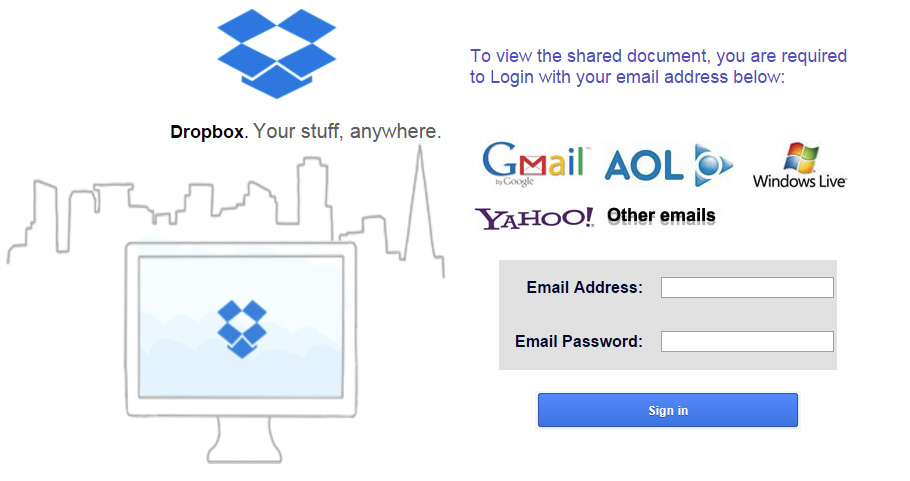 For those of you familiar with DropBox, this looks very similar to the Dropbox login screen. It also carries logos for gmail, windows, AOL and Yahoo. Depending on the context of how a user got to this screen it is conceivable that they were trying to view something and then were directed to this page. So they might innocently enter their email address and password in order to share the document.
Sign In
The act of signing in causes the email address and password to be sent to mart.flames@gmail.com and vmattherwachen@gmail.com when you click on sign in. I am sure it would be very difficult to track down who these people really are.
It generates the following email:
*********************God is able *********************
email: (whatever you entered into the form)
password : (whatever you entered into the form)
IP Address : (The ip address of your computer)
___________________________________________________________
Date: (the date the information was collected)
User Agent: (the type of browser that was used by you)
****************** Urchman ******************************
* Success is Loading… because I deserve it *
Disconnected
It appears that this code and the accompanying screen was not in any way connected to the website in question. It was isolated. So what purpose did it serve? I am speculating but it is quite possible that the page was referenced from somewhere else. So someone on another website may have clicked on something and it would take you to this website with this page.
This is quite a common practice as many hacking attempts on sites come through benign servers. One I tracked back a year ago was from an Italian Engineering company selling large mechanical machinery parts. In this case they were probably unaware that a hacker had compromised their server and was launching attacks from there.
Things to be aware of when surfing
- In this case the URL (the text in the top of your browser that describes the location of the website) would not have been secure, and would not relate to DropBox, or any of the email services.
- If something asks you to login into your email. Don’t do it through any form that is offered to you through a third party. Go directly to your email provider site and log in that way. The method described here is very common.
- If you click on something and the action is not what you expected, or it is asking you for some privileged information ask yourself why the site would need to know that. Something like an email address password is and should always be private to you.
- If you ever fill in a form containing key confidential information and then you have to do it a second time. Immediately change your password by going directly to the site that manages your account. You may have entered your details into a phishing form like this one
Your Email Address
It is highly likely, unless you have many email addresses and passwords, that your primary method of resetting a password for a service is with your email address. Most organisations do not allow you to change a password without you verifying who you are through your email address. So a hacker gaining access to your email account (possibly without your knowledge), can read your mail, see where you are connected and potentially take over accounts. This is the reason why they look for email accounts and passwords.
Use two levels of authentication
Gmail and possibly the other email services can now be set up to use a mobile phone number to authenticate with a server. So for a hacker to take control of your email address they would need your email address, password and your mobile phone. You can also get messages if an access has been attempted through an unauthorised browser. However you need to turn these things on, They are not on by default. But they are there if you want to use them, they add protection to your account.
For Gmail, Yahoo and Hotmail users you also need to bear in mind that these services are free. So don’t expect a lot of support if something goes wrong. In one instance I am aware of a hotmail account that was compromised, and the automated system shut it down for one month before the real owner could get it back. Make sure you use tough passwords and turn on additional authentication where it is available to safeguard your email address.
How did it get onto the server?
This was the question that bothered me over the weekend. I encourage everyone to use tough passwords, the question was whether the website was compromised by a third party, or whether someone had got into the hosting file structure and added the code into the site.
I knew that this code was not in the site in September 2015, so it had been introduced since September. I got the answer the next day. The website owner had their gmail account hacked in November. In their gmail account were all of the details on how to access the hosting. So someone had looked through the emails and found the information on accessing the site and added it in.