Home-Start Branding Update

(I am sending out the form below to my contact list, but I know my contact list may not be accurate. If you have seen this form before, you only need to fill this in once. If you have not seen it before, please just go ahead and fill it in and return it to me and I will get back in contact.) If you are not sure, just fill it in. Better to have two applicants than none.

Home-Start UK upgraded their website on or around the 30th of April and are now featuring new branding and messaging.

If you have a Home-Start website developed by me, I intend to offer a low cost upgrade to enable your site to fall in alignment with the new branding.

The details are in the attached document below. Please download this and if you would like to join the queue for an upgrade please fill in the last page and send it back to me. Costs are anticipated to be in the range of £50 to £120 per Divi (most recent template) design. Work when started will take about 1 day.

Continue reading Home-Start Branding Update
Using Divi Visual Builder

For those of you with Divi based websites as well as the conventional method for editing your website there is another method. You need to log into the website as an administrator, which takes you to the dashboard, then visit the website (top left hand corner). You will see a black line across the top of your browser window to indicate you are logged in. Below this you will see your website.

If you have a Divi site you will also see ENABLE VISUAL BUILDER

Look for Enable Visual Builder

Click on it, and then wait for around 15 seconds. What is happening is an editor is loading in your browser. You may see some things replicated, and some things that you cannot normally see. It really depends what is on your screen. Do not be distracted by anything you were not expecting to see there. Focus instead on what you can see, and in particular the text in your pages.

You will see as you move your cursor over your page layout various dark grey, turquoise or blue lines and or icons appear. Ignore them. what they are for is beyond the scope of this quick guide.

Continue reading Using Divi Visual Builder

Google Search Console

I have had a couple of enquiries about messages coming back from Google Search Console. Before I comment on these, what is Google Search Console? It is a website that is tied in with Google Searches and will confirm the most commonly used terms where it will place links to your website in the results of a Google Search.

If you are interested in how people find your website, this is a good place to look to understand it. However do bear in mind that it is only relevant for Google users, and not Bing and other search engines. So like most things where we may use Google tools to analyse usage, it is a good indicator, but I would not take it as gospel.

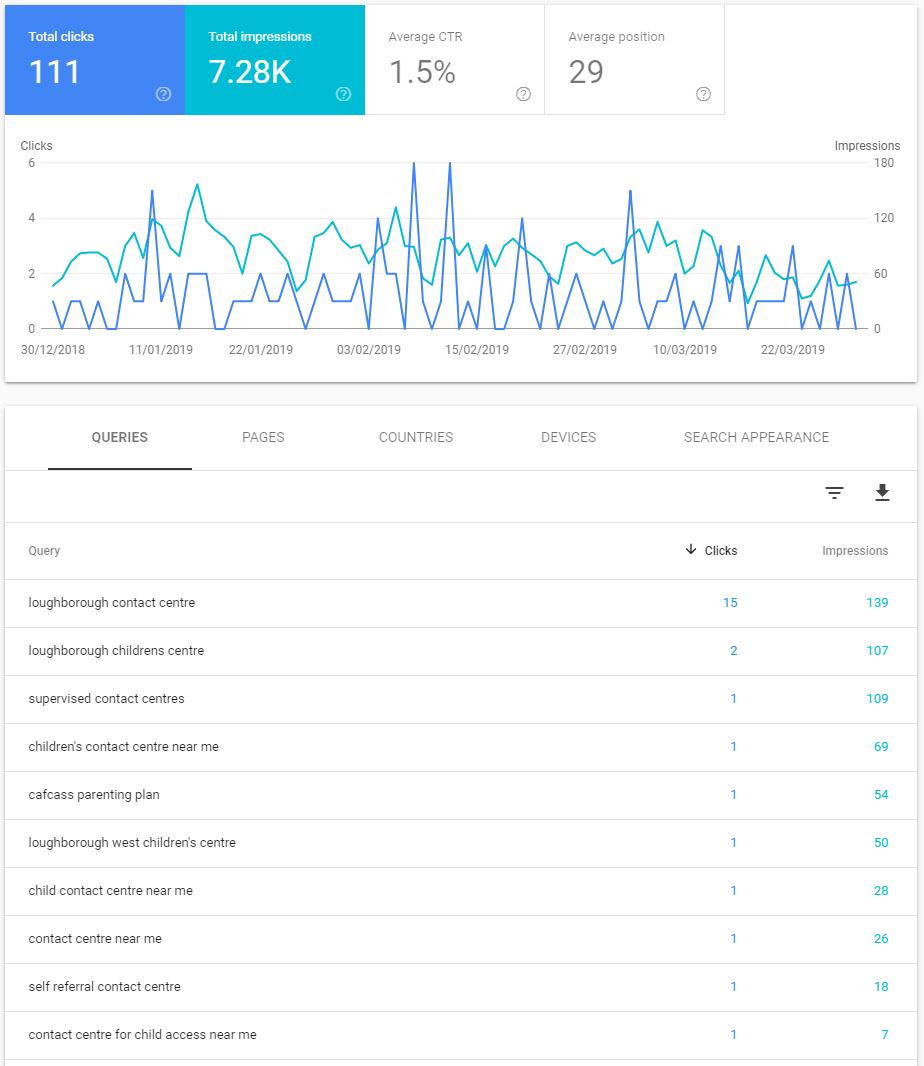
Take a look at the image below for Loughborough Child Contact Centre.

This shows some results over the past 3 months for this site, where it has listed the website in a Google Search results listing. You can see there are three parameters; query, clicks and impressions.

Google Search Console

Query: This is the search term entered by the user when they did a search for your website.

Clicks: This is how many times people entering that search term clicked on the link for your website.

Impressions: This is the number of times that Google has returned your website in a list of potential candidates for the query.

Continue reading Google Search Console

Home-Start Rebranding

For those of you with relatively recent websites based on the Divi template, I will be in a position to offer an upgrade to your site to change the branding once HSUK have launched the new branding. HSUK have been in touch and shared materials with me, and I have updated a copy of one site and have a feel for what is involved. The following is indicative, but not cast in stone yet, but I think I will be able to offer something like this.

For Divi based Home-Start sites only:

  • Change of logo to the new format where it exists in the header, footer space and within pages. It is out of scope to change all old news items
  • Change of colours within the site to the new colour scheme. Affects all pages, header and footer space. Old news items featuring the old colours will be out of scope.
  • Addition of a colour palette into the template so whatever you are doing or editing the correct colours are always available to you
  • A set of new images provided by Home-Start already prepared for web use and added to the library and available to you to refresh imagery where appropriate.
  • Revised slider set with alternative images
  • Buttons and formatted areas within your site which use the old colours will be changed to the new set
  • A set of preformatted buttons, blocks, quote boxes, accordion and other elements will be built and added to the library in your site, so you can construct your own pages based on elements that follow the new colour scheme.
  • A set of new HSUK graphic elements will be added to the library so you can use them in layouts and news items.
Continue reading Home-Start Rebranding

Donate with Virgin Money Giving

I was asked if it was possible to add donate buttons to a Virgin Money Giving charity account with the amounts predefined. I had not done that before, so I did some research and I will comment later on what I found out. First though some thoughts on fundraising.

Some people ask for a donate button that goes straight to the donation portal (external website), ideally this will go to the account page for that charity. I don’t generally recommend doing this from anywhere on your website, because the action associated with the button is to leave your site and go somewhere else. A user may be surprised to see the format and page layout change and clearly be on another site, and may ask themselves the question; “is this the right place, or has someone tampered with the website?”

Why might they think that?

Well, in the first instance, having a donate button everywhere (other than on fundraising page) is rather like thrusting a tin under your nose while out shopping. While I have no doubts that you all represent worthy causes, don’t forget to be successful fundraising you need to establish the value proposition first; why is it a worthy cause? Then you are more likely to receive a donation.

The other problem here is that with no warning you are forcing your potential donor to go to another website. There is nothing wrong with that, but I would always advocate your donation button distributed around your website, perhaps in the header; jumps first to your Donations, Fundraising or Support Us page. Here you make the value proposition; why us, what we do with the money, how far does £20 go, the value of regular rather donations than a single donation etc etc?

Related to this, is the warning that in order to donate you need to do it through your account on a partner website. Then it is less of surprise when they click on a button that it goes to another website.

Continue reading Donate with Virgin Money Giving

QR Codes

Marketing Tip

If you have an event coming up and there is an application form, or greater detail available online, you can use a QR Code which is a graphical symbol which a smart phone or tablet can scan, the scan function seems to be built into most smart phones. Just point your camera at one and it will automatically ask if you want to go to the website. You have probably seen them around, may even have scanned them in the past, but are not sure where to get them from.

I will quote this case, as it is a live example, of where having a QR code can be beneficial for you.

Home-Start Hampshire Charity Golf Day

Home-Start Hampshire are running a Charity Golf Day and asked me to add it to their website. Included in the package of information was a poster and two application forms, one in PDF format and one in MS Word format. (You need both because not everyone has MS Word).

I went to this website which you can create them for free: https://www.qrcode-monkey.com/ There are several QR code sites around, however as I found out some are after your money, so do take care, you can read what happened to me by skipping down this post to QR-CODE-GENERATOR.COM. I do however thoroughly recommend qrcode-monkey.com which is free to use, the codes do not expire, and there is no intermediate translation, and they can be used as many times as you wish.

I placed a wrapper around the QR code and produced the graphic below

Read more

Unable to upload to the media library?

I thought I would flag this again, as it has happened several times now. If you allow Microsoft Word to name a file based on the content of the document there is a small risk that it may have an apostrophe in the file name. 

For example if I created a document and the first piece of text in it said “Fred’s Success Story” and then saved it (without giving the file a name), Microsoft would save the file based on the first few words in the document. It might save it as fred’s success story.docx for example.  Ordinarily there is nothing wrong with this until you try to add it to a WordPress website by uploading it as either a PDF or MS Word document.  The presence of the ‘ in between the d and s will throw an HTML error on upload. 

Continue reading Unable to upload to the media library?

Where is my editor?

Some of you may have found out by now that the standard editor in WordPress 5 has now been permanently removed and replaced with the Gutenberg editor. Now you are stuck and not sure what to do because nothing is familiar. 

For Divi users it is a bit worse because they have changed their interface as well to coincide with the release of WordPress version 5 and if you are not careful you may end up deleting your page altogether if you try to revert back to a standard editor. 

Continue reading Where is my editor?

Divi Colour Palette

When you are editing a website, particularly when carrying out formatting it is useful to have a colour palette handy so you can apply the colours used in your website. 

If you have a Divi based website it is possible to set these up so that they are available whenever you want to do some editing. 

Home-Start Colours

In or around 2007 Home-Start had a very comprehensive guide for styles for websites and printed materials. It has changed over the years, but some of the colours are still commonly in use. 

I will create the palette below with the hexadecimal RGB values and also show you how to add them to the website palette built into Divi. 

Please note the guidance at the bottom of the image. The ultimate source for guidance on Home-Start branding is from Home-Start UK. Not from me. They will frequently change their guidance for branding. If in any doubt contact your sources at Home-Start UK.

Continue reading Divi Colour Palette

Two bugs to watch out for

All of the websites either automatically upgrade themselves, or I initiate an upgrade on most of the Divi based sites once per week through an automatic process. 

From time to time a plugin developer will do something that creates an incompatibility on your site, or impair the performance. 

GDPR Plugin by MOOVE Agency.

Some of you have a GDPR plugin in use from MOOVE Agency. It started off as a very simple and elegant pop up which advised you of the Privacy Statement included in websites following the GDPR regulation coming into force in May. 

It worked very well for several months, and for some reason they started to change things in the plugin, and introduce some bugs. There is one at the moment that is slowing websites down. It depends on the state of the plugin on your website. 

Continue reading Two bugs to watch out for
Wingrove-Services
Privacy Overview

This website uses cookies so that we can provide you with the best user experience possible. Cookie information is stored in your browser and performs functions such as recognising you when you return to our website and helping our team to understand which sections of the website you find most interesting and useful.

You can adjust all of your cookie settings by navigating the tabs on the left hand side.

My privacy policy can be located here: Wingrove Media Privacy Policy (opens in a new window)

My Cookies Policy can be found here: Wingrove Media Cookies Policy (opens in a new window)