Alternative Home-Start Menu

Clikc on the image to see a larger version. 

I have just completed my 30th Home-Start rebranding project for Home-Start North Somerset.  While engaged on this excersise and looking around at some other sites I found a way to remove the normal menu system and substitute it with a customised one. I am still working on this, and it is not as simple as throwing something together because it has to cater for different screen widths. 

I have had a few requests for donation buttons, and have generally placed them in a section below the menu at the page level.  However if you are interested in this solution I would like to know if it is worth pursuing. Right not it is incomplete, I have developed a desktop version (as per the image above) a tablet version which is smaller and simpler, and just started a smart phone version. I think there is a substantial amount of work to refine it, so I am shelving it for now. 

The three new header sections (desktop, tablet and smartphone) are tied to the top of the page and scroll off of the screen. One problem I need to solve is how to keep the menu at the top of the page using this process, or substitute another one when the user scrolls down the site. 

Anyway, if you would like to know more, drop me a line please. If I have enough interest I will provide this for free to all of those people I have upgraded over the past 8 months. 

Newsletters and MailPoet 3

I have been a fan of Mailpoet (integrated newsletter plugin) in sites for some years now. Around 18 months ago MailPoet changed from version 2 to version 3. Development work stopped on version 2. I have upgraded, or some of you may have upgraded yourselves to Mailpoet3. One significant change is the presence or absence of images in Newsletters.

Featured Images in Posts

When you create your newsletter you add existing posts into the newsletter. Mailpoet 2 used to pick up the first image and include it your newsletter. Mailpoet 3 does not work that way. It means that you may have had vibrant interesting newsletters before, but now they are all text.

Continue reading Newsletters and MailPoet 3

Reminder on handling images on your site

There is one recurring theme as I work my way around various websites, handle support issues, or work with new clients on importing old websites to a new framework. It relates to images. To ensure your website runs quickly, and does not waste bandwidth you need to optimise your images before they are placed on the website.

Over the years I have offered various guidelines on sizes, it often depends on the size of your template. But the core guidance remains the same. Do not upload an image to your website without scaling it down first.

Images are getting larger and larger with high resolution sensors. Your camera may well be able to produce an image which is 5000 pixels wide. However your website is only 1000 pixels wide, and the available space for an image in some cases may only be 500px wide.

Please check out this video which I put on the site a couple of years ago. It talks about free image editing software called IrfanView and how to use it.

Get me started Mark…

For the past year I have been building an editing support page which is set to private, so only you can see it. Within this page is a guide for editors and lots of additional resources, all online and built into your website.

With the changes in the Divi template (Visual Editor), I have made some changes to one of the guides I have been placing on sites.

If you are familiar with guide, you can download an updated copy here. This will tie into a template that is built into your site which is the first step for creating a news item.

Get your copy here: Get me started guide (Revised)

For those of you that would like something like this in your site, download a copy and see if you think it would help. Drop me a line and I will see if it is feasible to add in.

If you already have an Editor or equivalent page, locate the page, open it in the editor and attach this version to the button for the Get Me Started Mark guide. If you are one of the recently upgraded Home-Start websites, I have already added it in.

Artwork for a banner

I sometimes receive requests for artworks for printers. Examples are business cards, banners, flyers, posters, even headed notepaper. Because I have created your website, I am familiar with the colours and designs that have been used, and have these to hand. If there are some dominant images, I will have these too, generally in high resolution.

Quick Case Study

The owner of Fighting-Fit.org.uk; Peter, contacted me to ask if I had any advice on creating a roll up banner. I have had one recent bad experience with one company local to me, who managed to screw up a £120 flag artwork (after 20hrs of development of an artwork with multiple iterations for a white flag, they printed it with a massive black border on one side). So my experience todate has not been good. However I know through the graphics programs I use (Affinity Photo and Affinity Designer) that I have the capability to produce large print ready artworks so offered to help. I also gave him some advice on questions to ask.

I suggested that he shop online to find out where he could source one from. There are many places you can go to. He came up with this company: Solopress (website is here).

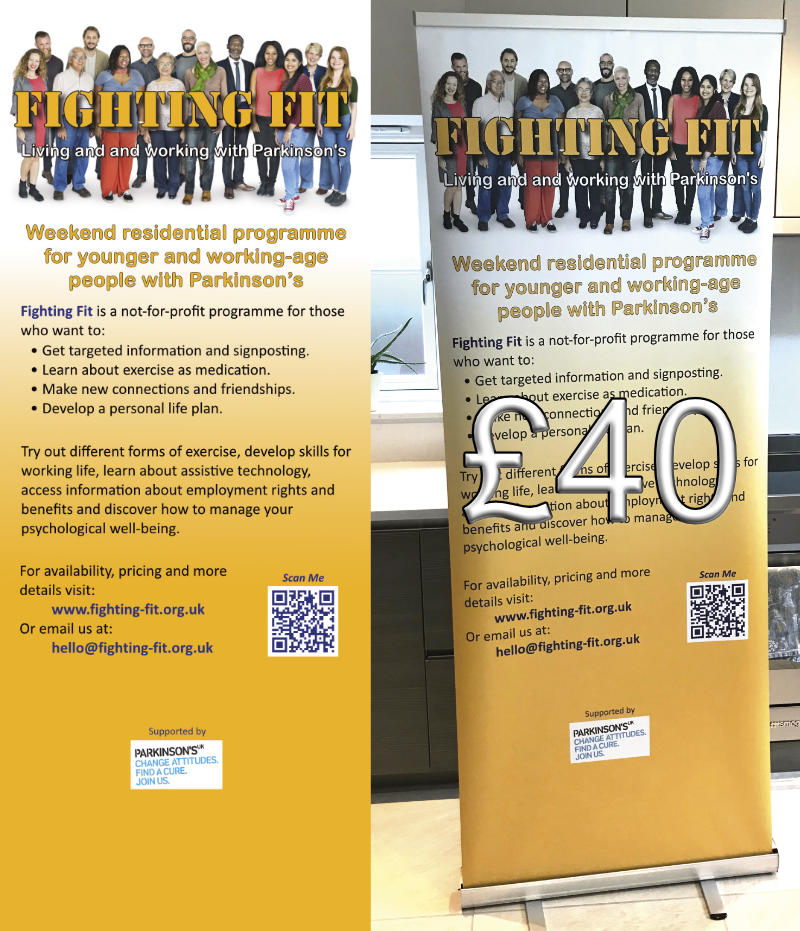
Peter had an idea for what he wanted, provided it to me in a Powerpoint file. I built it using my graphics program. These things are never right first time, so we went through three iterations. It took me personally about 1hr to take the concept, build the first iteration and then develop it from there. Below is a small version of the artwork, and the final product.

Remarkably the turn around time was incredibly quick, and the total cost was around £40! The artwork to produce this was 2 metres high and 800mm wide at 300 dots per inch. This generates very large files. Continue reading Artwork for a banner

Divi Visual Builder

Around six months ago Divi introduced a Visual Builder button in the black menu bar which runs across the top of your screen when you are viewing a page (and logged in). 

I think it is the view of the developers of this templating system that everyone builds their website using this system. Most professional web editors still prefer to design from the inside, finding the visual builder a bit too cumbersome. and depending on some external factors it does not always give you a true “visual representation” of the content. 

That said, however it is very useful if you need to do some tweaks to the existing content on your site. In truth I am starting to use it more and more, largely because the developers have hidden parameters in some elements which are only accessible through the visual view of the website. 

What is a Visual Editor?

The concept of a Visual Editor is you get to actively edit the layout and content as the user sees the site. So all of the formatting is retained, and accessible. To the extent that you can also manage the spatial relationship between editable blocks as well as the content within the block. 

Why should I be interested in this?

It is intuitive to use, and is probably the easiest way to make minor changes on your website. Given that you are not editing every day, or every month for most of you, editing skills will be lost. This method is easy to remember. I have created a short video tutorial on this. 

Video

The video I have created is very short, and shows me opening up a page on a website, turning on the visual editor, locating a block of text, opening it and editing it, closing the visual editor and saving the changes. On this video there is no sound. I found that many of my clients were using old computers with no speakers of headsets available in the office. So I have omitted a soundtrack on this one. Text is used on the screen to tell you what you need to know.  Give it a try and let me know how you get on with it. 

I have added the video to the Video Tutorials page, but I will also give you a link to it here. 

Divi Visual Builder Demonstration (opens in a new window) at YouTube.


Smart Slider 3

Is Your Slider Too Fast?

On the most recent websites I have been using the Smart Slider 3 plugin to display sliders on the home page. This is particularly applicable to the most recent Home-Start websites, but it also applies to others.

While most people are happy with the default speed of the slider which is currently set at 8000mS  or 8 Seconds, one or two people have commented that it is too fast. This is probably because there are text boxes on each slider.

The following notes and images show you where it is located and how to control the speed of it, so you can tweak your site to get it right for you.

About SS3

The plugin is very comprehensive, the most important aspects allow you to add items on top of the background image, including patterned boxes, text, logos and even buttons. The combination of these elements are also responsive, which means the layout adapts for different screen sizes. Since April I have been using more of the features built into the slider which is one of the best ones out there.


Where is it located?

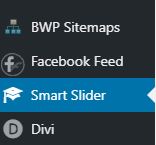
Log into your website and look down the left hand side of the dashboard, if your site uses it you will see the following in the side bar. 

Smart Slider 3 in the menu

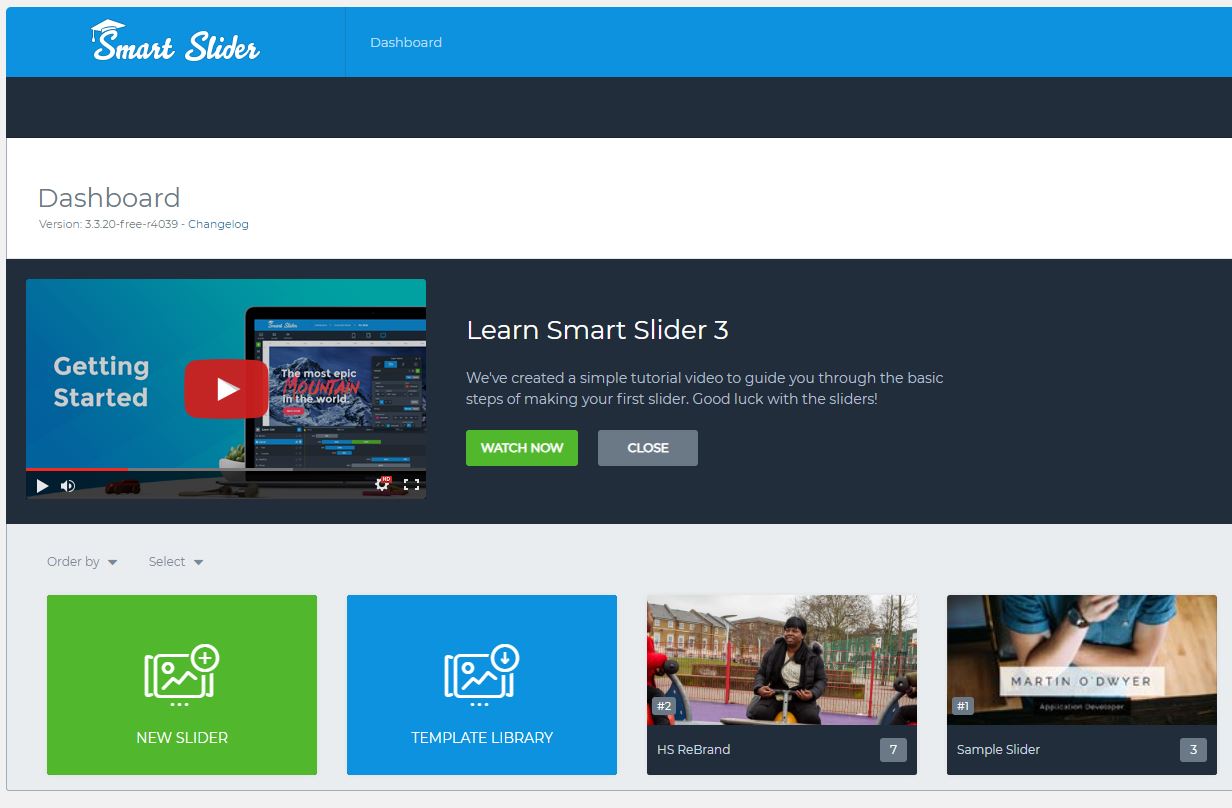
If you click on the menu item it will expand to reveal the interface. Within this you will see a couple of demo sliders and the one I have added. In this case below it is the slider for the Home-Start rebranding exercise I am currently working on. 

Smart Slider 3 view

Look at the thumbnails and identify the slider I have created for you and click on it. It will expand to show you the slides in use in the slider and other parameters which control the display and operation. 

The image above shows one slider opened in edit mode. Below the sliders are a series of menu items. One of them says AUTOPLAY. Click on this one to edit some parameters. 

SS3 Image

The highlighted parameter in the image above controls how long a slide is visible on the screen before it is replaced by the next one. This parameter affects all slides. It is recorded in mS or milliseconds. There are 1000mS to 1 second. So it you want your slider to be set at say 10 seconds change the value to 10,000.

When you have made your changes, scroll to the top right of your screen where you will find a green button with SAVE written on it. Click on this to commit your changes. 

Close the plugin settings and return to your website and review the home page. Check that the slider is still working, and also check the speed is appropriate. 

That’s it. All you need to know is there. 

Stuck? Drop me a line.


Home-Start Rebranding

Around 50% of the Home-Start sites I host, or have built are either in a rebranding queue, or have been upgraded and released. If you don’t know anything about this, then you have missed some of my messages reaching out to you. I have only responded to those that replied and currently not chased anyone else up. 

As of 6th July, the following sites have been through the rebranding exercise. Most of these sites were in the Divi framework anyway, a few are more substantial upgrades from previous versions moving them to the latest version of the website.

If you don’t know about any of this, and need to be added to the list please get in touch with me ASAP. My queue of upgrades currently goes out to the end of July 2019. 

This is a list of example sites that have been through the process.

Home-Start Lisburn Colin
Home-Start North Down
Home-Start Spelthorne
Home-Start Bracknell Forest
Home-Start Stroud District
Home-Start Chichester
Home-Start Surrey Heath
Home-Start Guildford
Home-Start Southwark

All of these sites have retained the local messaging and content from the respective original website. I have concentrated on changing the colours, logo, images and incorporating other latest thinking on the development of these sites which also covers taking out old plugins and replacing them with new more up to date plugins. In many cases it has been a bit more than just changing the wallpaper. I have cleaned things up as well. 

Need to know more?  Contact me.  

Counter with a £ Sign

For those of you using the Divi template there are lots of animated gizmo’s in there. Provided they are used sparingly you can go that extra mile when your site is compared to another one.

When I am putting sites together I tend to use animation sparingly on some images, and some featured blocks, to ensure they attract attention when they load. But having loaded and completed the animation they remain static, otherwise they would be very annoying.

One thing I have been wanting to do (and you may wish to do this as well) is publish articles after a fundraising event and tell the world how much you raised. Many of you do not do this, the website is used to announce a fundraising event, but not report on it’s success afterwards.

Continue reading Counter with a £ Sign

Home-Start Rebranding

Date: 5th of June 2019

I have published a number of site upgrades for Home-Starts during May and early June.

So far the following updated sites have been launched:

I have Home-Start Spelthorne under development along with Home-Start Chichester.

I am about to start Home-Start Cheshire and Home-Start Guildford over the next week.

Today I have sent out costings to a further 8 Home-Starts who expressed an interest in upgrading.

Important

If you have not heard from me, you are not on the list. If you would like to express an interest in an upgrade (non committal on both parties) then I will take a look at your site and advise on what the costs are likely to be.

I expect the next two months to be quite busy, so right now other than those who have expressed an interest to me, I am not chasing anyone else. So if you think you have been missed, or just want to flag up to me that you are interested please contact me to let me know.

Wingrove-Services
Privacy Overview

This website uses cookies so that we can provide you with the best user experience possible. Cookie information is stored in your browser and performs functions such as recognising you when you return to our website and helping our team to understand which sections of the website you find most interesting and useful.

You can adjust all of your cookie settings by navigating the tabs on the left hand side.

My privacy policy can be located here: Wingrove Media Privacy Policy (opens in a new window)

My Cookies Policy can be found here: Wingrove Media Cookies Policy (opens in a new window)