I have had a couple of enquiries about messages coming back from Google Search Console. Before I comment on these, what is Google Search Console? It is a website that is tied in with Google Searches and will confirm the most commonly used terms where it will place links to your website in the results of a Google Search.
If you are interested in how people find your website, this is a good place to look to understand it. However do bear in mind that it is only relevant for Google users, and not Bing and other search engines. So like most things where we may use Google tools to analyse usage, it is a good indicator, but I would not take it as gospel.
Take a look at the image below for Loughborough Child Contact Centre.
This shows some results over the past 3 months for this site, where it has listed the website in a Google Search results listing. You can see there are three parameters; query, clicks and impressions.
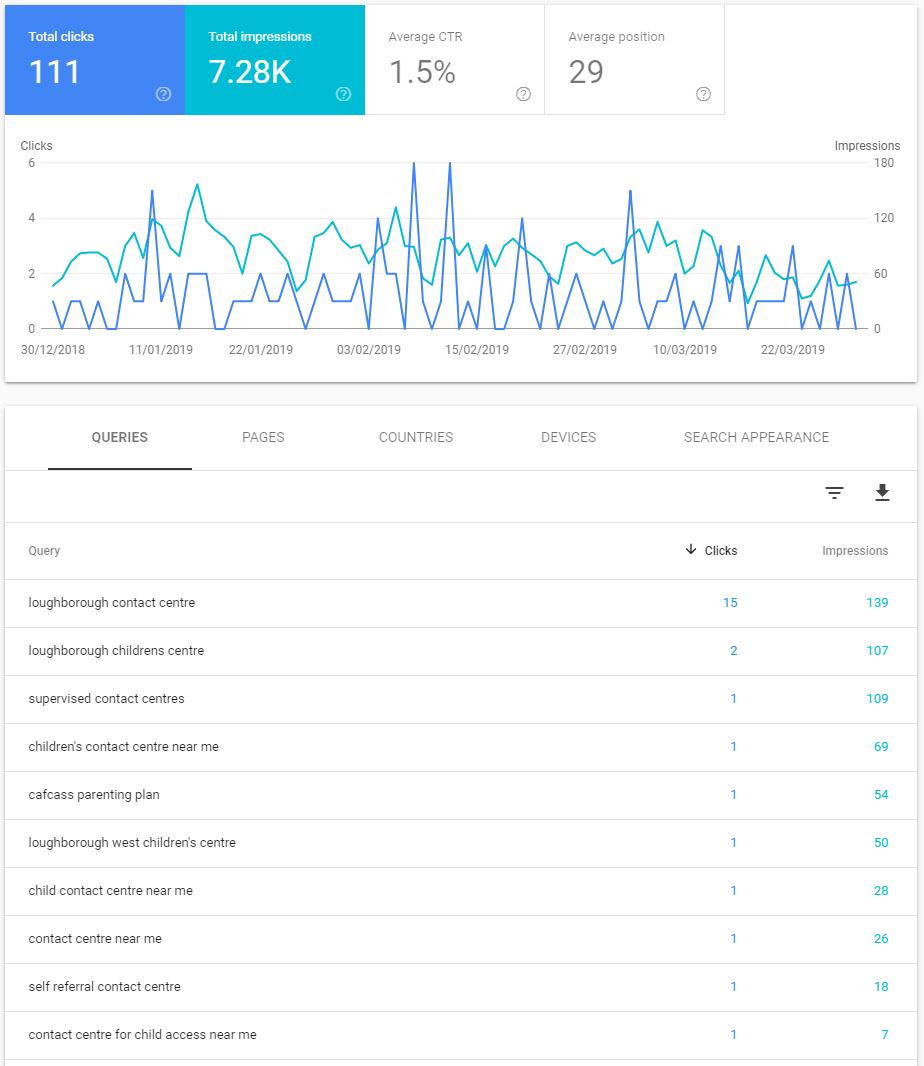
Query: This is the search term entered by the user when they did a search for your website.
Clicks: This is how many times people entering that search term clicked on the link for your website.
Impressions: This is the number of times that Google has returned your website in a list of potential candidates for the query.
So looking at entry 1. The search term: “loughborough contact centre” was entered in a Google organic search 139 times over the period 30/12/18 to 30/3/19 and 15 people clicked on it. (In other words considered the returned result to be a suitable match.)
What else does this tell me
It also shows other search terms people have entered by popularity (impressions column) and how many people clicked through.
Some of these are going to be irrelevant to you because someone was searching for something else. Some however may be directly relevant. So if you know what people are searching for, you can embed that text into a page or two in your website. This is called SEO or Search Engine Optimisation. You can place keywords or short phrases of text in page titles, and headings as well as the body text, and other places. This will raise the importance of your site against the query text and improve the chances of being found.
Recent issues with reporting
I have two sites that use a standard WordPress template called TwentyFourteen whose owners are receiving reports from the Google Search Console. At the time it was an early responsive framework, which means it could detect and display the website content in an adaptive way for smaller screens.
Today responsiveness is very important. Google were one of the first internet companies to indicate that 50% of website accesses were carried out using mobile devices several years ago. That trend has continued, and is of greater importance today.
It appears that one of the things Google Search Console checks on is the suitability of the website for mobile users. As a result of this Google Search Console is sending back messages indicating that there are problems on websites. There are three themes coming up:
- Images exceed the width of the display for mobile devices
- Font size is too small
- Clickable links are too close together.
There are probably more of these, but I will try to explain what each means. They all apply to using a mobile device to view your site: a tablet or a smart phone. So to analyse the problem to see if it is real or not you need to view your site on a mobile device.
Looking at the three items, I think they mean the following for this particular template:
- Images too big: Means that the image is large compared to the viewable area of the screen (on a mobile device). However unless the image has actually exceeded the screen area, it is not a problem because all images generally scale based on the size available. It is worth noting that a narrow and wide strip header on a desktop, does not display very well on a smart phone in portrait aspect ratio.
- Font size is too small: Check a smart phone display, can you still read the text? For most sites I am building today, I am using font size 14. Earlier sites used 12, but these were only designed for use on a desktop. Check a phone screen and see if the text is still readable or not.
- Clickable links are too close together. This means links which we might normally use a mouse pointer for, cannot be easily accessed using a finger on a mobile display. All sites I am constructing today have buttons rather than links where there are lots of options. A button is better suited to a finger than a link under text. If your site does not support buttons, you could put more space between links for mobile users.
What should you?
The chances are you are either using an old template which is not responsive, or a first generation template which started to offer different views of your site depending on the screen size.
Don’t rely on Google to tell you there is a problem and clicking the Fix Mobile Problems button in the email you receive; does not fix anything, it just takes you to some report pages. Even these require some interpretation.
If you get a report, go to the Google Search Console report and check what it is reporting. Note the pages. View the pages on a smart phone and a tablet. Can you see a problem? If yes, contact me and I will take a look. If no, don’t worry about it. Google states these are new issues detected, but they are not. The issues have been there since day one, all that has happened is Google has developed a new test.
I do not know yet whether these problems are being reported back from Divi sites. I suspect not because they are highly supportive of mobile devices and can display a site in three different ways depending on how the site has been built. The best solution, assuming you really need one, is to upgrade to a more up to date template with better support for mobile devices.
But……
But before you consider that route, do be very critical of what Google Search Console is reporting. Make sure you agree with it first, do not blindly accept the results. If it is important, there may be something I can do with the existing site. If not then an upgrade would be the next thing to consider.