EMail Server is on a blacklist

ALERT: 12/02/2016

Update: RESOLVED 12/02/2016

The following case was raised with the hosting provider and resolved at 8pm on the 12th of Feb. Not everyone was affected by this problem, there were 5 cases bought to my attention.


I have received 4 messages from people about error or bounce back messages being returned from some email addresses. They will look something like this:

host homestart-org-uk01b.mail.eo.outlook.com [213.199.154.87]

    SMTP error from remote mail server after RCPT TO:<xxxxxxx@xxxxxxxxxx.org.uk;>:

    550 5.7.1 Service unavailable; Client host [173.247.252.74] blocked using Spamhaus; To request removal from this list see http://www.spamhaus.org/lookup.lasso

(I have obscured the email address, they will all be different). 

The red text offers the clue as to what is happening and what to do about it. Firstly if you see one of these make sure that you send a copy to me, and secondly click on the link in the message which goes to spamhaus.org and declare you are a user on this server and your domain is legitimate.

What has happened?

We are on a shared server, which means that in addition to every one I am hosting there are other people on there as well. If one of these other accounts is compromised somewhere and a hacker gets in, or one of the account holders is a spammer, then thousands of messages can be sent from the hosting. External companies and organisations have “honeypots” that trap spam messages and if they are detected then the spam source, in this case the server, is blacklisted. So everyone on that server is affected.

This is a very rare occurrence, the hosting company also does it’s own monitoring of traffic and generally detects spamming activity and traps it before it becomes a problem.

What have I done about it?

Starting last night I forwarded the error messages that people had sent to me and opened support tickets. I was not sure what the cause was. Having done a bit more research this morning and having been on chat with the hosting provider twice this morning, we have pin pointed the problem to a specific server where our mail is routed through, and confirmed that this server is on a blacklist.

So the hosting company are aware of it and addressing it. I will continue to monitor the situation.

Generally what they will do is switch all mail to another server IP address and then the problem goes away. I am waiting to hear if that has happened.

Who is affected?

Generally most mail will still get through and you will still receive email. However certain sources such as NHS, Government and local government and other large corporations will subscribe to blacklists to limit the volume of spam messages coming in. As most of you are charities then you will all be affected in some way.

I use two reseller accounts, one is based in the UK, if you have not seen any error messages coming back you are not affected by this problem.

Can I get around this problem?

The best approach if this problem is stopping your organisation from functioning is to use an email address not associated with your domain name. For example; hotmail, yahoo, gmail, btconnect, talktalk, etc as a temporary measure. This will allow you to continue to send email in the short term while we wait for this problem to be fixed.

When will it be fixed?

In short I don’t know, it is usually resolved in a few hours. I will chase the hosting company again if this problem is still there at 1pm UK time. I will also put a message at the top of this thread with any more news.

Should I be concerned about this?

Where you use a shared server irrespective of where it is located there is a risk it might be detected as a spam source by third parties if someone has done something either deliberately or by accident on the server. Many of you have come from HostPapa where it occurred regularly for short periods. If your server is at InMotion hosting then it is a very rare occurrence, and I know this company takes matters like this very seriously and monitors traffic entering and leaving the server.

Right now, I am not proposing to change the hosting provider. If you are concerned please contact me through the usual channels.

Some reports relating to gmail addresses

Posted Feb 9th 2016

Over the past 5 days I have had three reports from different people having problems logging into sites. These are people that have been trying to reset passwords, or using two step authentication.

I have logged into these websites and have also tested password recovery and it has worked ok for me. The people concerned were all using gmail addresses. While I have also tried to use my gmail address and not had any problems here either, I do know that gmail is split across many servers, and perhaps there is a problem with gmail currently. I do not know how to test this any further to find out.

If you have tried to login and were not able to do so, or have tried to recover your password, or are using two layer authentication and it is not working let me know and I will check.  Do not at this time assume you are doing anything wrong, just let me know, it is relatively simple for me to check.

Troubleshooting email

Occasionally we do get issues with email, and you need to find out where the problem is occurring. It is not necessarily at your end, it may be at the senders end.

Also if you suspect that there may be something not quite right with email please come back here and check. If I am aware of anything, or am working on it, then my status will be reported on this page.

I have created a troubleshooting guide in PPT that you can find on the News page to step you through what you need to do.

The page Troubleshooting Email and associated downloads can be found here.

January 2016 update

Two issues are highlighted here, one is Sucuri Malware Auditor and the other is Simple Firewall. Both are security plugins used on sites.

Sucuri Malware Auditor

Sucuri Malware auditor is used on pretty much all of the sites. It had a bug during the first half of January causing a white screen to come up with an error message from Sucuri. An example is below:

Sucuri:(1452098269) Send_log:SSL connect error

Warning: Cannot modify header information – headers already sent by (output started at/home/cwj1214/public_html/wp-content/plugins/sucuri-scanner/sucuri.php:6929)in/home/cwj1214/public_html/wp-admin/post.php on line 197

Refreshing your screen would normally get rid of the problem.

These messages appear when you are editing something and relate to a security plugin attempting to send a message to a log file on another website. A fix was created, and the problem occurs much less frequently. I do not believe it affects users at all.

If it is getting in your way, go to Plugins, and looks for Sucuri in the list of plugins and deactivate it while you are working on the site. When you have completed your edits turn it back on.

The developers behind this plugin will eventually release a version where Sucuri just becomes invisible again working in the the background.

WordPress Security Firewall

************************************************************************

Update: 24th January 2016

This is the latest information on this bug:

The developer is aware that all sites using the WordPress Security Firewall (formerly known as “Simple Firewall”) are sending back messages about checksum errors. This is because a new feature has been added, but not adequately tested.

I have checked a few sites and there is not a problem on the sites I have checked. As we are generally very secure (provided we keep our passwords both tough and secret), I am not concerned about this problem. 

Most of you will not see the error messages because they come to me. For those that also see them, do not worry about them for now. Do come back and check this page in a week’s time to see if anything has changed. 

I have posted a message to the developer, and the developer is working on solutions with a small group of Beta Testers (advanced testers that check something before it is released to the public). 

There is a fix that could be employed, where the plugin that detects the problem repairs it by downloading the new file from the source repository. This is not currently enabled. I recommend that for now we wait and see if this is resolved automatically. 

*********************************************************************

Original post

A new feature in this plugin is throwing up errors on index.php files reporting a checksum error on two files. I have had two cases reported and in each case I have investigated it and the problem in both of these cases were no cause for concern.

The errors that have been appearing are reproduced below:

The MD5 Checksum Hashes for following core files do not match the official WordPress.org Checksum Hashes:

 – wp-content/themes/index.php

 – wp-content/plugins/index.php

However if you get that error on your site, do let me know and I will check and confirm. Do not ignore it because an index.php file is a great place to hide something nasty. The index.php files in question hide the contents of the directories they are in.

The Simple Firewall does a check sum on the files in the system to see if any have been modified from the original files. The process is much more complicated than this but if you had a file with the values 10, 5, 13, 21, 16, 20,000, 14, 2, 7, 8, 15 and 61, the checksum algorithm adds them up and creates a sum of the values, in this case it would be 20,172.

If a hacker compromised the website and added in his code into the file, let’s say the hackers code was 13,4,5, then the checksum would be different. In this case the modified file would be 10, 5, 13, 21, 16, 20,000, 14, 2, 8, + 13,4,5 which would equal: 20,194.

The checksum program knows the value should be 20,172, but the calculation it has performed results in 20,194 indicating that there may be something wrong with the file.

It is better to have this feature turned on rather than off.

Some people may look at my description and think it is easy to work around. And you would be right!  I have over simplified the explanation, the result is encrypted, and there are other parameters which are measured as well as the sum of the values in the file. But hopefully most people could follow the explanation.

I checked the plugin author’s support pages and he is introducing a fix for the problem, with regards to these two files. So it is quite possible by the time you read this that the problem no longer exists.

Hacked Site

While nobody wants to have a hacked site, and we all take lots of precautions; one occurred in December. We are unable to establish what precisely had happened, but it looks as though the hacker got into the hosting space rather than into the website.

There are several ways to get into the hosting space, via the hosting provider, through my master account which can access everywhere, or through a username and password combination to something called cPanel. This controls the hosting and email.

In this case the hack was fortunately benign and quite clever. Around the website were additional menus that related to the content on the site. So to someone arriving on the site, it looked a little odd but related.

There were menus that related to families and young children, and these invited you to go to other related sites. What is happening here is that the hacker will probably receive referral fees by steering people to these other sites. This would be the motivation for doing it. So it was not a more typical defacement. Continue reading Hacked Site

Sucuri Plugin – Slow site?

All of the sites use a Sucuri plugin which monitors and hardens the site against security threats. I have had several reports and have witnessed myself that editing the sites are slower than normal, and you may see an error like this:

Sucuri: (1452076628) Send_log: SSL connect error.

This message is indicating that a message was sent to a site that logs activity on your site. When you edit something, I generally get a message to indicate at a high level that something has happened on the site. 99.999% of the time it is normal activity, so I dismiss the items. It is this function that does not seem to be working predictably.

If you site is slow to respond to editing, and/ or you see a message from Sucuri, then go to the Plugins menu item. Locate the item (see image below) and temporarily deactivate it.

sucuri

This will stop the problem from occurring. When you have finished your editing turn it back on.

Continue reading Sucuri Plugin – Slow site?

Spam Emails

A message from Sandra:

Because I set up a lot of sites, I see quite a few of the same messages. Here is one you may have seen. It is not from a human.

Contact Us

On: Nov 27, 2015 @ 12:01 PM
IP: 107.173.160.108

  • Name: Sandra
  • Contact Number: tshmusuebqe@sskdolek.net
  • Email Address: http://www.arvut.org/1/dft
  • I wish to contact you about:
  • Your Message: Hi my name is Sandra and I just wanted to drop you a quick note here instead of calling you. I came to your Contact Us | (your name here) page and noticed you could have a lot more traffic. I have found that the key to running a successful website is making sure the visitors you are getting are interested in your niche. There is a company that you can get targeted visitors from and they let you try their service for free for 7 days. I managed to get over 300 targeted visitors to day to my website. Visit them here: http://ittsy.com/it/3x

Continue reading Spam Emails

Example Brute Force Hacking Attempt

How strong are your keys?

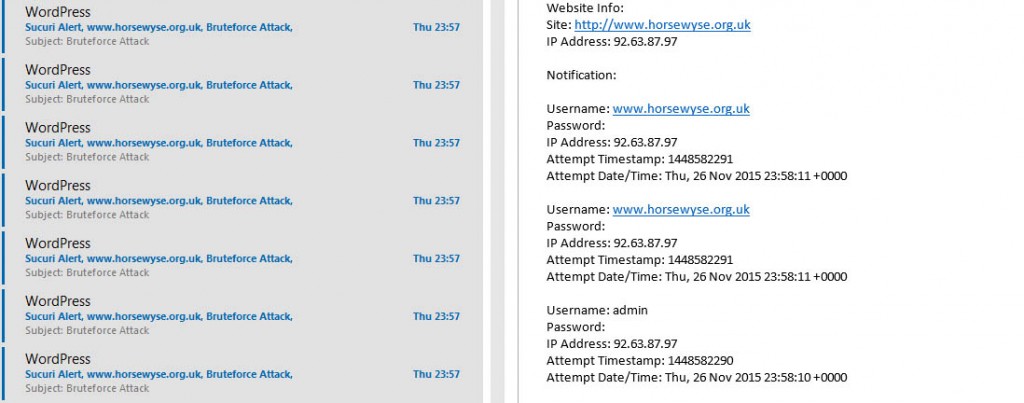
As you are all probably aware I get messages from all of the websites I look after that advise me of certain things that are happening on them. It may be an administrator logging in, or someone editing a post or page. I generally ignore them unless they are occurring at strange times of the day, or it is an account name I do not recognise.

brute force attacks
A small selection of the emails I get each day and night!


Continue reading Example Brute Force Hacking Attempt

Scam for .org users

22nd November 2015

I received this message this morning. (I removed the full domain name)


Domain Notification: MARK WINGROVE This is your Final Notice of Domain Listing – xxxxx.ORG

Requested Reply Before: November 23,2015

PART I: REVIEW SOLICITATION

Attn: MARK WINGROVE

As a courtesy to domain name holders, we are sending you this notification for your business Domain name search engine registration. This letter is to inform you that it’s time to send in your registration and save.

Failure to complete your Domain name search engine registration by the expiration date may result in cancellation of this offer making it difficult for your customers to locate you on the web. Continue reading Scam for .org users

Cyber Safety

Wearing another hat I am chair of a NAG group (Neighbourhood Action Group), they are all over the UK and they generally cover an area of towns or villages and liaise with the local police in the UK.

I did a presentation the 19th of November at my local NAG on Cyber Safety. It is pitched at the home user (so applicable to adults of all ages), and parents and incorporates advice for parents with young children and young adults who are perhaps most at risk.

I have also included a selection of “nasty emails”, (images of them, not the full emails), to show how spammers, hackers and others try to hook people in, and what you should look for.

You are more than welcome to access and share the items on this site, and I can even send you copies localised for your site if you wish. (It represents a useful resource to help people stay safe). Continue reading Cyber Safety

Wingrove-Services
Privacy Overview

This website uses cookies so that we can provide you with the best user experience possible. Cookie information is stored in your browser and performs functions such as recognising you when you return to our website and helping our team to understand which sections of the website you find most interesting and useful.

You can adjust all of your cookie settings by navigating the tabs on the left hand side.

My privacy policy can be located here: Wingrove Media Privacy Policy (opens in a new window)

My Cookies Policy can be found here: Wingrove Media Cookies Policy (opens in a new window)