Google Maps not working?

On the 22nd of June Google changed its policy for Google Maps. New sites that have been created after the 22nd of June seem to be exhibiting some problems with a grey box where the map should be.

I have seen this with the Modern Tribe Events Calendar on one site which was simply moved from a development location to a live URL. It stopped working. Everything else was fine.

Up until June anyone could add a map to a site without having to set up an account with Google and an API key. The API key is associated with the website address. From the 22nd of June it appears that everyone needs an API key for all new sites in order to get map calls to work.

There is a fix available which I have used on one site and this fixed the problem.

Go to here: https://wpgeodirectory.com/this-page-didnt-load-google-maps-correctly-see-the-javascript-console-for-technical-details/ This site explains what has happened and contains instructions on setting up a key for your website and how to install and add it in.

I expect there will be many other workarounds shortly.

If your maps disappear at all, let me know please through the contact us page.

Windows 10 upgrades

There have been several reports over the past month about Microsoft upgrading people’s computers to Windows 10 from Windows, 7, 8 and 8.1. This seems to be happening without the consent of the computer owner.

Windows 10 is a free upgrade, however it appears that in some cases including my own (because I checked) I was going to get it whether I wanted it or not.

MS Office Disappeared!

I helped out a colleague two weeks ago whose computer was upgraded without her permission. She just accepted it after it happened, and then could not find anything because the interface had changed. I think I am correct in saying that Microsoft also download a version of Office onto computers as well as the operating system. It is not activated, just sitting there as an install file. In this case the user clicked on it and started to use the latest version of MS Office. It stopped working 2 weeks later asking for a licence key.

In this case she had an older version (circa 2003) of MS Office on the computer that was licenced, however it appears the installation of the latest one removed the old one! So I could not roll it back. Needless to say nobody had retained the disks for the original version so in this case Microsoft had deleted Office because of operator error and Microsoft installing an operating system that was not required. It can happen to anyone.

An easy solution to this?

In this case I loaded Open Office on her computer and she was able to continue editing Office Documents without MS Office for free. Just bear that in mind if you find yourself in a similar position and don’t know what to do.

GWX in the system tray

I was aware of an application that sits in your tray in the bottom right hand corner of your screen which is called GWX.exe. It is installed by Microsoft during one of the many updates that you need to get as part of the maintenance of any Windows machine. See the image below.

gwx upgrade

Having checked my colleague’s computer and done some research, I thought I would check out my computer. Sure enough an upgrade was scheduled two days later!  I turned it off.

Open and Check

If you go to your system tray and open the icons and click on the Windows 10 Upgrade icon you will see a screen that gives you some options. In my case I declined the upgrade so my screen may look different to yours.

gwx upgrade2

Do you need it?

I prefer to consent to have my computer altered. I have experience of Windows 10 on a non-touch screen laptop. It is really an adaptation of their operating system for touch screens so it does not have any major benefits for me personally on a desktop machine.

If you have Windows 8 or 8.1 installed (which are also touch screen operating systems) then you will benefit from installing it. It looks similar and is an improved version.

If you have Windows 7 installed and you are happy with Windows 7 then I would recommend hanging on for a point in time when you have the opportunity to set some time aside to learn the new operating system rather than have it provided when Microsoft gets around to doing it for you automatically.  There is nothing worse than waking up one morning with a huge list of things to get done and finding you have wasted several hours in relearning how to use your computer.
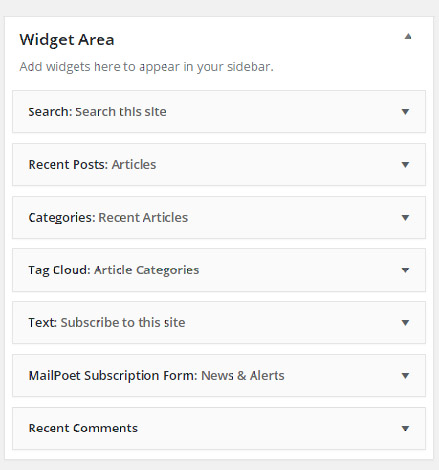
Adding something to a widget area

If you go to Appearance and Widgets you come to a page where you can edit the sidebar and footer areas of your website. Note that the footer area may have been removed by me on some sites, and the sidebar may or may not be present depending on the page template in use.

If you have a sidebar visible on your page you can add something to it, or edit it by taking the following steps.

1). Go to Appearance, then Widgets

widgets1 Continue reading Adding something to a widget area

Lazy Sunday Afternoon

As most of you know I use several security plugins on sites to monitor and prevent certain types of common attacks on websites. This short article shows you what happens all of the time 24 x 7, 365 days a year, and from all around the world. So while you may think you are a small local charity based in a sleepy suburban town; something in Dhaka, Pakistan is trying to log into your website, in fact from all around the world!

This is a 12 hour snapshot

Follow this link to open this map in a new browser window. 40 locations were used in 12 hours. Continue reading Lazy Sunday Afternoon

BT is filtering your mail….

This seems to be true for the past two months, because there is an increasing number of people aware of it, they may eventually do something about it.

The problem

On one of my sites I have an address database with around 900 subscribers. This list has grown organically (people subscribe themselves) over 2 years.

A newsletter is sent out once per month and occasionally there are news alerts when we need to make sure people are aware of an event or meeting. This has worked without too many problems for several years. Until March of this year.

I found that around 17% of the subscriber base had rejected the messages from the server. Closer analysis showed that all of them shared one common attribute, they were all on BT or BT related email addresses. So btinternet.com, btconnect.com, talk21.com, openworld.com etc.  None of the other domains rejected the messages.  Continue reading BT is filtering your mail….

WordFence reports hacking world

Many of the sites I have built use a plugin called WordFence. This provides a number of methods for protecting your site. It was only when I added this plugin into a site several years ago was I able to see what is really going on. It reveals hackers attempting to get into your site and uses several methods to keep them out.

They have recently carried out a survey with around 870 respondents replying about their experiences of hackers getting into sites. It shows the most common attacks and describes what they are and why hackers use them.

You can read the article here: https://www.wordfence.com/blog/2016/04/hackers-compromised-wordpress-sites/#comment-25733

Responsive Menu Fix

There is a minor problem with one of the templates I base WordPress sites on.  If the website is accessed on an iPad in landscape mode the sub menu items cannot be accessed.

Symptoms

The symptoms are if you touch a menu item which has sub menu items on it, then you cannot access the sub menu items (the menu does not drop down, you can only select the top item). Rotate your iPad by 90 degrees and a new menu symbol appears (often referred to as the hamburger) and you can access them. If you use your iPad to view a responsive site in portrait orientation it works fine.

The problem lies in the original template which was based on WordPress’s TwentyFourteen template. I have adapted this and used it on a lot of websites. I am not absolutely sure but there may have been some changes in iOS (Apple’s operating system) that have made it worse. If you have not noticed it then don’t worry about it. It does not happen anywhere else that I am aware of. Continue reading Responsive Menu Fix

No Outlook = No Problem

Many people use Microsoft Outlook for their mail client in their full time jobs. If you are a home user, or your charity has a tight budget you may be relying on web based mail. There is another solution. It is not as feature rich as Outlook, however it is still a good program and it is free. It also runs on multiple platforms.

If you are running email out of your hosting with me there are several ways you can reach articles on this site that explains how to set up your email client.

Follow this link to find out more: No Outlook is no problem.

Slow Internet? A guide for improving network performance.

Or…   the Onion of Discontent

There are many reasons why an internet connection may be slow, some of them will be directly under your control, and others will be under the control of the equipment manufacturers of the devices used that the communications pass through. The extent of which is from the device you are using to the server at the far end of the connection. Various services providers share the responsibility of carrying the traffic. It is a complex picture to reconcile.

Where is the problem?

When trying to establish where a problem exists the first person you call is your service provider (BT, Talk Talk, Virgin etc). They will follow a fixed trouble shooting process which will try to prove that the problem is something you are doing, or have done or is within that part of the network you control. They adopt this approach because if nothing is listed as a fault in your area, then statistically it is most likely to be something at your end.

That will include your router/ hub, your phone wiring, the building materials used in your house, the location of WiFi access points, the list is large. They will not be as direct as that, however those are the implications. Continue reading Slow Internet? A guide for improving network performance.

Email and Blacklists

Bounce back messages

If you try to send an email and you get a message back to indicate that it could not be sent, you may find that either your domain name or the destination domain name is blacklisted.

Blacklist checkers independently identify spam sources on the internet. These are servers where bulk (meaning hundreds or thousands of) unsolicited mails are sent from. Usually from a hacker or someone that is manipulating an account on the server. It does not necessarily mean that the spam has originated from your account.

The black list records where a server has been independently identified as a spam mail source. Somewhere in the mail path between the sender and recipient a process is checking that the mail has come from or is going to a spam source. The message you get back is often cryptic. One of the first things to do is check whether the problem is at your end, not necessarily your domain, but the server your domain is running from. You can do that using a Black List Check.

If your domain name is ok, check the domain name of the person you are trying to send to.

Black List Check

I came across a useful tool for checking to see if your domain is listed on a blacklist. You can go to here to check:

http://www.inmotionhosting.com/support/tools/blacklist-check

If you find your domain name is listed on a blacklist please bring it to my attention by going to contact us

Wingrove-Services
Privacy Overview

This website uses cookies so that we can provide you with the best user experience possible. Cookie information is stored in your browser and performs functions such as recognising you when you return to our website and helping our team to understand which sections of the website you find most interesting and useful.

You can adjust all of your cookie settings by navigating the tabs on the left hand side.

My privacy policy can be located here: Wingrove Media Privacy Policy (opens in a new window)

My Cookies Policy can be found here: Wingrove Media Cookies Policy (opens in a new window)