Redirecting unwanted email

While I consider myself to be fairly IT literate I sometimes get it wrong,  in this case I could have set up my administration differently. This post covers one such example. It was an irritation more than anything else, but a mistake I will not make again before heading on a vacation!

I have many different email addresses, but use one primary one, and have several others forwarded to that email address. The others are used for backup purposes because they use different servers and different infrastructures.  Prior to going on vacation I limited the volume of emails being sent to me from websites mainly because I had emails coming in which held important vacation information from resorts, services, car hire etc. I did not want to miss them.

Taken near Ayres Rock, central Australia. A bit of fly problem in this area! (fortunately they were not the biting kind.
Taken near Ayres Rock, central Australia. A bit of fly problem in this area! (Fortunately they were not the biting kind).

Preparation before heading on vacation

I backed up all of the sites and checked them in September 2015 making sure everything was up to date and functioning.  Continue reading Redirecting unwanted email

Email Errors

Black lists

I have taken a lot of care in selecting hosting providers where they have systems in place that can detect spam being sent from a server. This means it is unlikely that you can end up on a blacklist. For those of you that have been with me for some time, the previous hosting company (Hostpapa), it used to happen once a month.

In selecting a new hosting partner this was one of the areas where I wanted to reduce the risk of it occurring.

What is a black list?

There are a number of services that monitor mail being sent and receive reports from monitors around the internet. They look for large volumes of mail from the same source (IP Address) on the basis that this may be a hacker who has taken over an account or server. Much of your unsolicited mail comes from sources like this.

Some organisations, in particular local government and government sites, and their agencies subscribe to blacklist checking services.

This means when an email comes into their server (or more likely while it is on the way to the server), a process will check to see where it came from, and perform some checks to establish if the source is listed in a black list somewhere.

If it is then the email is rejected. You will receive a rejection notice normally, although I have seen examples where no response is given. The rejection messages are often written in techno speak (yes, and I struggle sometimes). So not very user friendly.

Check the black lists

If you keep having problems sending emails from your domain to other sites such as council offices then check to see if your domain name is blacklisted. This is step 1.

You can do that by going to here: http://www.mxtoolbox.com

MxToolbox

Enter your domain name and click on MX Lookup. When the result comes back click on the Blacklist check link.
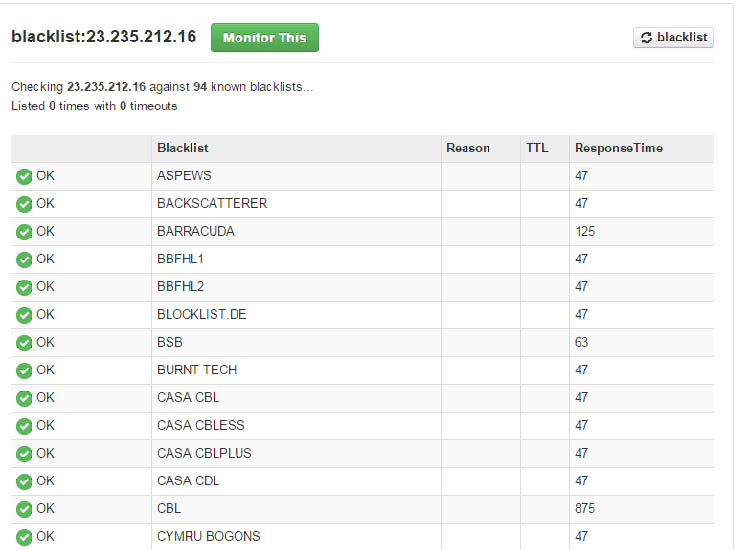
blacklistcheck

The list you get back should all be green. Some may show timeouts. It is not 100% accurate, but if something has happened, it is likely that your domain will be on more than one list.

How do you get off a black list?

Once on a black list, they usually clear in an hour or so. If you find you are on a blacklist let me know. If it is to do with the server in the hosting (some of you source your mail through a third party), I will contact the hosting company and ask for it to be cleared.

What else can I do?

Use a different email address and try to send the same message to the recipient. Sometimes when these events occur they are reported erroneously. In various conversations I have had with technical support they don’t have a clue.

How did I get on a black list?

The chances are that you did not get on it through any action you took. The server is a shared resource, there will be many websites running on it.  It only needs another account to be hacked, or someone using their account for illegitimate purposes and this is what triggers it. If someone is found deliberately sending spam out, then they will probably have their account cancelled.

In both of the reseller accounts I use, they employ mechanisms that detect the presence of high volumes of emails being sent and will flag it to the support team. If the volumes are really large (50,000) then I have seen in one case that the email was prevented from being sent. So it never left the hosting.

Hotmail, Gmail or Yahoo email user?

If you have most of your email transactions going through a hotmail, gmail (google mail) or Yahoo email account then you need to read this!

Many of the organisations I work with use their domain name as the primary email account. Some use their Broadband Service Provider’s domain name, and some others use Hotmail, Gmail and Yahoo.

Whatever you use, have a backup email account. Here is what has happened to one organisation I have been helping this month. As a result of this they have lost their primary email address for at least a month.

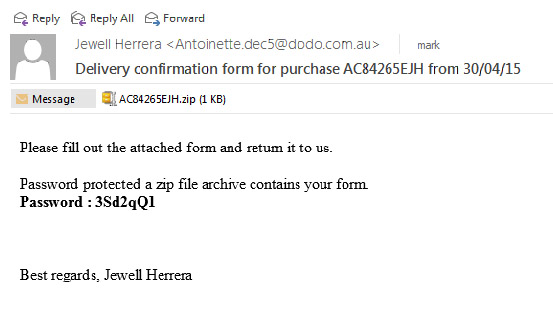
Help I am stuck in Ukraine!

I received a message like the one below, I have seen these before, I have removed the email address in this case. Continue reading Hotmail, Gmail or Yahoo email user?

They know you know!

I recently acquired an Apple Mac Book and have been learning how to use it. They are renowned for their ease of use. I have several email accounts, and these are accessed by multiple windows platforms, Apple mobile devices and the new Mac Book.

For some time now I have received a form of junk mail that comes from the same source (but through different hosting companies), and in multiple flavours. I know this because the structure of the mail is highly predictable. I can receive 10-20 of them in a day, and they tend to come in a burst from apparently different sources. They all feature an unsubscribe link, which, as I have never subscribed to any of them, it is hoping I will click on it. But I don’t.

Why not?

Continue reading They know you know!

Use your domain name for your email

Many of the charities I work with continue to use their broadband service provider email account, rather than an email account associated with the website they have just acquired.

For example if I created a website for www.mycoolcharity.org.uk then email accounts can be created for xxxx@mycoolcharity.org.uk. Then your mail is tied to your domain name.

Many however stick with xxxxx@btconnect.com, or yyyy@talktalk.net because these are the mail accounts they have always used.

Maintaining legacy accounts

Generally I recommend going through a transition period where mail from the old and new accounts run in parallel. You reply from the new email address and over time you will find your “real traffic” will migrate to the new email address as well. The only thing that is left on the old address is junk mail. …. and who wants to keep junk mail! Continue reading Use your domain name for your email

Email issues: When Forwarding does not work

The following is a bit technical, but bear with me. It is useful to understand how some of the mail protection policies work and the impact they may have on your mail in some circumstances. 

I have a large number of email accounts, I don’t tend to check them all, but consolidate them by setting up forwarding. So any mail coming into say myname@somedomain.co.uk is forwarded to myname@someotherdomain.co.uk. Then I only need to check one email account at “someotherdomain.co.uk“.

Up until a few weeks ago, I had this working ok within a single hosting company. I made some changes when a second hosting company came on line, and moved one of my accounts to hosting company #2. Then I started to see problems.

I am using a forwarder in one of my hosting accounts. This may be relevant to you if you are using forwarders in your hosting. I generally set up one to handle messages posted to your site. These are generally handled through a mail account called info@yourdomain.org.uk which may then be passed to your normal administrative email account which could be xxxx@btconnect.com or another service provider email.  Continue reading Email issues: When Forwarding does not work

Reset your email password

When you are initially set up with email I set a password for you, or one is provided by your organisation. If I set up an email password for you, it will generally be a complex sequence of characters which is not easy for you to remember. If you only use Outlook then it does not matter. If however you want to use WebMail, then it is important that you have a memorable password, because you will need it when you login.

There are two ways you can reset your password. One is by asking the person in your office who manages your site to reset it. They will access something called the control panel, and from there they can reset it. Alternatively you can do it yourself. Continue reading Reset your email password

How to set up an Out of Office Email responder

I have added a tutorial under Email in the main menu which covers the steps you need to take to configure an out of office email responder. It is not very difficult to do, and will ease the administrative burden when people are out of the office.

I have indicated to some groups that this feature is not possible in the hosting we are using, it turns out it is. The only issue is that it is not seemlessly integrated with Outlook and MS Exchange Server which is possibly where you may have come across it before.

Go to this page to learn about how it works, and how to set it up. This article is password protected.

Webmail and how to configure it

For most of my client base with a few exceptions you have the ability to set up to 10 email accounts per website. (More are available on request if you need them).

I set these up for you when the website is built and provide you details on how to access them. Because each account is unique to the domain name (your website name), then you have your own private hosting area where you can carry out several email related functions:

  • Create a new email account
  • Delete an old email account
  • Change the password for an email account
  • Change the storage size for an email account
  • Set up one or more forwarders that will send an incoming email to another email address

Continue reading Webmail and how to configure it

Wingrove-Services
Privacy Overview

This website uses cookies so that we can provide you with the best user experience possible. Cookie information is stored in your browser and performs functions such as recognising you when you return to our website and helping our team to understand which sections of the website you find most interesting and useful.

You can adjust all of your cookie settings by navigating the tabs on the left hand side.

My privacy policy can be located here: Wingrove Media Privacy Policy (opens in a new window)

My Cookies Policy can be found here: Wingrove Media Cookies Policy (opens in a new window)