About 10 days ago WordPress released a new upgrade to the WordPress framework. Everyone has an auto-update mechanism that should check for updates to plugins and the WordPress core every day. If a new version of code is detected then the site is automatically moved to maintenance mode (generally for less than 30 seconds), the site is then upgraded and made public again. This happens several times a week because each element or building block on your website is maintained by the authors independently.
The reason I have set it up this way is because there are frequent updates to fix bugs and vulnerabilities. It is essential to always be running the latest code on your site.
Last week I was made aware of one site that had “disappeared”. The admin side of the site was still present and functioning, but the users view of the site was a blank screen. I have seen two other cases like this.
Check your site
Do check your sites from time to time to make sure they are running. Once a month/ 6 weeks use your contact form to make sure that is working too.
What happened?
In the case where the site disappeared there seems to be a relationship between the upgrade of WordPress and the presence of a premium plugin called Updraftplus. In two cases I reinstalled the sites from backups and manually upgraded them and they are ok. I found the 3rd site last night. I noted that in this case UpdraftPlus was not at the latest release, WordPress was. The site had lost a style sheet; this is file that defines how your site looks (that was why it was not visible to users). I suspect that there was a timing issue with the order of the upgrades. In general the infrastructure of the site needs to be deleted before it is upgraded. In this case it appears the sequence did not finish. This is extremely rare, and not consistent across all sites that use Updraftplus, because the rest of the sites were ok. However as demonstrated it can happen. Hence my guidance to check from time to time. Updraftplus authors also did a further release of their code shortly after WordPress 4.2.1 was released, so this may have been a bug.
Any issues, flag them to me.
Manually Upgrading
If you happen to log into your site look at the top of the dashboard screen and see if there are any updates pending. See the image below with the icon to the right of where is says Wingrove-Services. If there is a number there other than 0 it means there is an upgrade waiting to be installed.
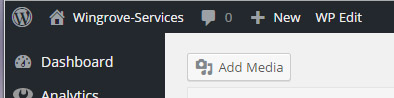
Click on the Dashboard menu item and then choose Updates. Check the boxes and upgrade. The rest of the process is automatic. You may need to wait for up to a minute for the process to complete.