Changes in WordPress

There has been a recent upgrade to WordPress over the past month. I am not sure if the “new features” in this release, or whether it was the one before have introduced some monitoring functions on the installation. WordPress continues to improve all of the time. There is a large network of people across the world who develop and test new releases. 

Careful with that axe Eugene

I have some websites which are centrally controlled. I hit an update button and the websites update. It is not perfect, it sometimes stalls and often leaves a trail of error messages that I need to follow up. After coming back to the UK following a 4 week vacation, I opened the application and ran it and got a screen full of errors. It is fortunate I did not do this while I was on holiday. Starting at 4am on the 11th of November when I hit the button it took me 5 hours to go through 15 sites which had now broken. (I started at 4am because my head was still in a differnt time zone!). 

What happened?

When I went around to look at each site, some or all of the updates had failed to update. The controlling program had reported that the websites were “unresponsive”. I logged into them and checked them, then ran the updates from within the website. I updated the plugins first. Then the template. After updating the plugins I received a message that “The site is experiencing technical difficulties……”  It turns out there is also an email which outlines the technical difficulties. I had not seen this before. The message in the email turns out not to be directly related to the cause. In all cases the sites eventually came back online. 

New Health Checking Features

It looks like I had triggered a recently introduced function in the wordpress core which monitors exceptions (crashes) of processes. It had identified something was wrong and halted the site. While it is good to have such features, it turns out they were not wholly reliable in identifying the problem. 

It looks like an upgrade in some but not all cases may trigger this event to happen. What follows is a white screen for around 5-10 minutes with a message on it saying this website is experiencing technical difficulties. It will eventually clear down. If you initiate your own updates and see this, don’t panic. In all cases where this happened to me, it was resolvable. I have already taken action to upgrade the PHP Scripting language the websites run on to the latest version (a possible reason).

I am talking to the hosting company about this as well, as it is not entirely clear why it is happening. It may be because of some housekeeping function which has not triggered, and that needs to run before the website becomes stable again. It may just be a new “feature” in wordpress.

If you see a white screen at any time with just one line of text in it, send me a message and note the time, and what you did at the time. I will check it. These should only be transient events. All sites are set up to upgrade themselves, they usually do this without any problems, but they do not do it immediately the upgrade is detected.  
New Divi Guidance PPT

For the past six months I have been building in help pages into the websites to enable novice editors to manage their sites themselves without having to seek external help. Following some recent changes in the way Divi works, I have revised that guidance to include new methods of editing.  I am going to use the attached guidance from now on, and develop this futher with accompanying videos.

For now, if your site is based on Divi (If I built it over the past three years, it probably is), then this is for you. Please take a copy. But do note that unless I have already done so, there is something you need to change in your site before you can follow the revised guidance. The PPT contains a link on what to change.

Don’t procrastinate, these changes are significant and will make your casual editing process much easier, so it is worth doing now. Click on the button below to download your copy.  If I make any changes I will note the revision on this page and update this page. So come back if anything looks broken.

Auto remove old posts

From time to time people ask if it is possible to automatically remove old posts. While it is possible to add a post in the future by setting the publish date in the future, I am not aware of anything that allows them to be automatically removed. At least not without adding something to your website to enable that to happen.

Post Expirator

This is plugin which is developed by Aaron Axelsen. You can find out about it here:https://wordpress.org/plugins/post-expirator/. I generally look at the star ratings and number of installations to judge whether something is any good. In this case it scores 4.5 stars (out of 5) and 90,000+ installations. 

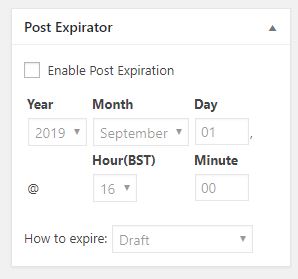
I have installed this on several sites now, and will use it as standard with the plugins I normally use. Once installed the plugin adds a field to pages and posts which allows you to set an expiry date and time. 


With the plugin enabled, everything in the site has this panel in the editing view from the dashboard. To get it to work all you need to do is check the box Enable Post Expiration and then set a date and a time. 

There are different ways of expiring a post. I recommend you leave it on the default which will hide it from view by changing the status from Public to Draft. That way you do not lose it if you make a mistake. 

The only problem with this approach is you have to remind the editors to set the parameter. But if you do that the site will ultimately look cleaner. You might only wish to do this for events that have expired. 

How do I add it in?

Log in, go to Plugins in the side menu. Go to Add new, and search for “Post Expirator” by Aaron Axelson. Install it and activate it. Then take a look at a post and will see the new field added. 

Managing News

With all of my attention on Home-Starts over the past few months, I have been looking carefully at some of the slightly older sites and thinking about how they could be improved. I have also had some specific requests that have come in and based on both those and some of my other ponderings I have come up with the following idea. Depending if and when you were in the Home-Start upgrade cycle you may have this. If you have not, you can request it and I will add it in for you. 

The Problem

When you add news to a website it is generally shown on the news page. Which means someone has to find the news page to see it.

Some websites have the home page featuring news, but then the page can become very messy and confusing for someone landing there.

For this reason I started putting the last three news items on the home page, so anyone landing on a site and viewing the home page could see the latest news. With Divi this is very easy to do, it can also be done on a non divi website, but is more complicated to achieve the same result. 

Then a request came in to control what is on the home page. Up to this point I had displayed the last three posts based on when they were added automatically. 

The Solution

For the blog section on the home page, make it a filtered blog and only show things in a special category. In my case I simply created a category called Front Page and checked the box. All posts with this box checked will appear on the front page of the website. Well the last three based on the published date. So if you publish a fourth item one will disappear. 

This means your key or high profile news items can now be controlled. So you publish it once, and it can appear on the generic news page, and also on the home page. All of this is automatic. 

Extending this further……

When you consider the behaviour of a visitor to the site, they may be looking at say volunteering. Why not add a filtered blog at the bottom of the Volunteering page which only shows news in the category Volunteering. That way your news is still relevant to the topic being viewed. Therefore increasing the chance of it being read. 

Largely driven by the complexity and volume of posts (news items) on some sites I have created micro blogs for Recruitment, Volunteering, Fundraising, Events, and the Front Page as well as the general news page.

Retro Addition

All of this is fairly easy to add to an existing Divi website. If you are interested and would like this let me know.  


Home-Start Rebranding

Around 50% of the Home-Start sites I host, or have built are either in a rebranding queue, or have been upgraded and released. If you don’t know anything about this, then you have missed some of my messages reaching out to you. I have only responded to those that replied and currently not chased anyone else up. 

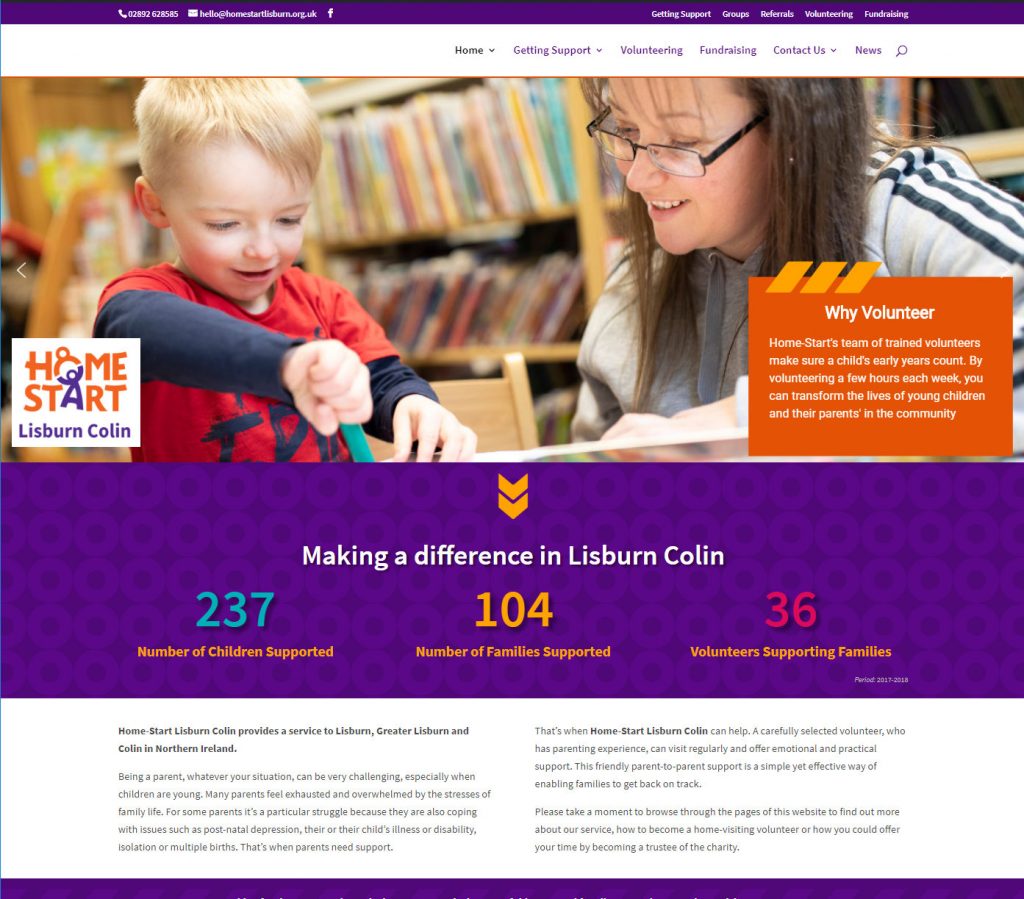
As of 6th July, the following sites have been through the rebranding exercise. Most of these sites were in the Divi framework anyway, a few are more substantial upgrades from previous versions moving them to the latest version of the website.

If you don’t know about any of this, and need to be added to the list please get in touch with me ASAP. My queue of upgrades currently goes out to the end of July 2019. 

This is a list of example sites that have been through the process.

Home-Start Lisburn Colin
Home-Start North Down
Home-Start Spelthorne
Home-Start Bracknell Forest
Home-Start Stroud District
Home-Start Chichester
Home-Start Surrey Heath
Home-Start Guildford
Home-Start Southwark

All of these sites have retained the local messaging and content from the respective original website. I have concentrated on changing the colours, logo, images and incorporating other latest thinking on the development of these sites which also covers taking out old plugins and replacing them with new more up to date plugins. In many cases it has been a bit more than just changing the wallpaper. I have cleaned things up as well. 

Need to know more?  Contact me.  

First Home-Start Rebranded site

I have published the first Home-Start rebranded site this week (15/05/19). Key elements are the change in the colour scheme is rolled throughout the website, new logo and new images added as well.

All upgraded sites will have over 70 approved Home-Start images in the media library pre-prepared for your use and application.

I have completed my preliminary assessment of costs. The following is applicable to Divi based websites only. In these cases they are changes to the existing template rather than the application of a completely new template.

Continue reading First Home-Start Rebranded site

Google Search Console

I have had a couple of enquiries about messages coming back from Google Search Console. Before I comment on these, what is Google Search Console? It is a website that is tied in with Google Searches and will confirm the most commonly used terms where it will place links to your website in the results of a Google Search.

If you are interested in how people find your website, this is a good place to look to understand it. However do bear in mind that it is only relevant for Google users, and not Bing and other search engines. So like most things where we may use Google tools to analyse usage, it is a good indicator, but I would not take it as gospel.

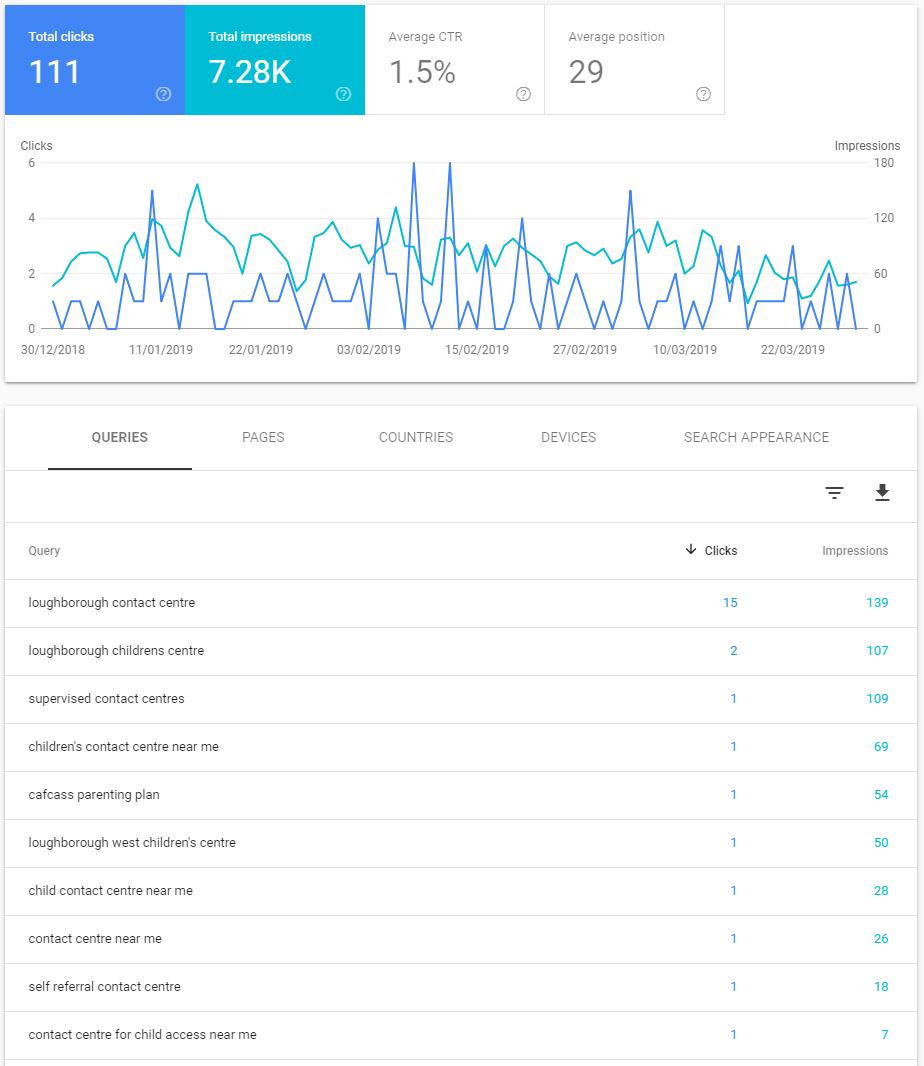
Take a look at the image below for Loughborough Child Contact Centre.

This shows some results over the past 3 months for this site, where it has listed the website in a Google Search results listing. You can see there are three parameters; query, clicks and impressions.

Google Search Console

Query: This is the search term entered by the user when they did a search for your website.

Clicks: This is how many times people entering that search term clicked on the link for your website.

Impressions: This is the number of times that Google has returned your website in a list of potential candidates for the query.

Continue reading Google Search Console

Get a bear

I am adding a link behind this image at the bottom of new sites. Admin’s can click on it to go to a special admin page.

This is especially for Divi based websites. I have revised my training for new websites, and am now running the training for Divi based sites within the template environment. My tutorial is based on an ordinary post or page layout. 

If you think it will be helpful, I can add a special private page and post to your website. These can only be seen by an administrator who is logged into the site, the general visitor cannot see them. 

The Admin page has a general description on the relevance of Sections, Rows and Columns; these are elements within the Divi Template. It also talks about the differences between pages and posts.  There is a section with links back to my training videos and other education resources. 

I also include a Template Post which has guidance built into it to help you to remember what to do. It is explained at a very detailed level, and I would anticipate it would help to ensure you cover every step.  I also include a guide built into the website as well. The guide includes screenshots. You can see a copy here. 

Access to this area is through a small bear in the footer of your website. Or for those of you with more adult rather than family content I can use a different icon. The point being you click on it when you are logged in and it takes you to the Admin page with all of the tips on. 

Continue reading Get a bear

Featured Image Posts in Divi

If you have a Divi website there have been quite a few changes to the template and organisational structure. On new sites I have created a template which can be loaded by the editor. The template contains the instructions and tips on what you need to do to create your news item. 

The guidance is all built in for you. You delete the guidance before publishing. 

It makes it all a bit easier, and will help you to achieve consistency, because you don’t do the editing on the site all of the time. I have also created a cheat sheet which contains the steps in more detail and screen shots. You can download it here:

If you want a template added to your Divi based site to help you, drop me a line, and I will make some additional changes to the way the blog or news sections work to make them more interesting to view. 

Other Divi Resources

The downloadable link below is for a PPT presentation in PDF format which explains how the layout features in Divi work. You may find this useful as well. 

Gutenberg is coming

Wordpress version 5 is due out over the next couple of months, probably within a month. You may be unaware that when WordPress updates it often introduces new functionality.

New editor is coming

We are currently on version 4.9, and the move to version 5 is likely to cause a stir in the community. For the past year the WordPress users community has been complaining about a new proposed editor called Gutenberg. It has been under test for around 1yr, possibly longer.

The current editor in use in WordPress is very simple, and has been around for years. It is called TinyMCE. Gutenberg offers the possibility of taking greater control over the layout space with the ability to create blocks, and add in specific types of media. This level of complexity is possibly a step closer to what the Elegant Themes Divi template does now. Continue reading Gutenberg is coming

Wingrove-Services
Privacy Overview

This website uses cookies so that we can provide you with the best user experience possible. Cookie information is stored in your browser and performs functions such as recognising you when you return to our website and helping our team to understand which sections of the website you find most interesting and useful.

You can adjust all of your cookie settings by navigating the tabs on the left hand side.

My privacy policy can be located here: Wingrove Media Privacy Policy (opens in a new window)

My Cookies Policy can be found here: Wingrove Media Cookies Policy (opens in a new window)