Phishing case 1 – what happened

Over the course of the summer I have witnessed the outcomes of three phishing attacks. It is worth reflecting on these, because the same thing could happen to you, or someone in your organisation. If it did how would you handle it?

Case 1. 

A company that I have had a long relationship with, who provided a residential security service would invoice me once a year. In this case I anticipate an invoice, and from time to time contact the company to discuss account changes or servicing. Everything was fine for 24 years until June of this year. 

The timing here is probably significant. On a Saturday morning I receive a message from the company that appears to have originated from the company and it carries some previous correspondence including my account, my bank details and a new invoice attached to the document.

I say the timing is significant because it is Saturday and they are closed, the office is only manned during the week. 

I use an Anti-virus/ security program called ESET Smart Security. It does more than monitor for viruses. It warned me that the email with the invoice carried a virus. I had not tried to open it, the program monitors mail as it comes in  and checks it. 

I looked at the email more closely and found that while the message appeared to originate from the company, it was actually sent by someone else. Checking the email headers, it was clear it did not actually come from the company at all. 

How did they get my personal information?

It was clear that a data breach of some form had happened at this company, and now someone was working through old email threads and trying to propagate a virus payload hidden in the invoice. 

I rang the company support line and asked them to escalate this to the directors of the operation because I was concerned that other people with less adequate protection might actually download and install the virus by accident.  I tried three times and even wrote a letter.  Nothing happened for around 6 weeks!  In the meantime I received several more invoices carrying the same virus payload. 

No security breach here!

I received a very poorly worded broadcast newsletter that had not been checked by the company stating that an incident had happened which had been traced to the administrators computer. A virus had been installed on it, which had permitted a third party to read email on the computer. One can speculate that the “bad actor” copied the administrators email box and could see threads for all sorts of things, and could subsequently continue those threads by spoofing the email address.  It does not take a rocket scientist to appreciate that the administrator in question probably had access to all sorts of systems through her email account, so you do not really know what happened, or how much information escaped. 

The newsletter reporting the incident played it down, assured everyone there was no problem, and everything was under control. They provided an email address if you had any questions. 

Naturally I asked one. The email bounced!  So I called and asked to speak to a director. I was assured that there had been No Security Breach, all that had happened was an email account was compromised.  I challenged this because the email in question that I had received contained my name, address, bank details and other information on. I also pointed out that possibly many of their customers now have viruses on their computers. 

Conclusion

I don’t think this incident was taken seriously by the organisation, or reported to the ICO. Ironically the company in question specialism was “security”. They had little knowledge of IT security, and inadequate protection on their computer systems.  The main thing I took issue with was they did not inform their client base of the potential risk of clicking on an attachment allegedly from them carrying a virus. This virus, no doubt just extends the problem to affect more people. 

The company in question is no longer providing services to me. I cancelled the contract renewal and have gone elsewhere. 

What would you do?

Within the policy framework of your organisation how would you handle something like this? Would you be proactive and inform your correspondents about the problem, or would you keep it all quiet and hope nobody notices?

Could you cope if this happened when your main office was closed?


Many of the organisations I work have comprehensive and online policies. Most don’t though. When I look at some of the activity in this area with one client group who seem to be adopting security measures more aligned with MI5 than a small regional charity, this type of problem is more likely to happen than a laptop being stolen. 
Dangerous Spam in Circulation

I subscribe to a number of websites that report on vulnerabilities and various scams as they emerge. One in particular caught my eye as we currently have at least one site under constant bombardment  (4 per minute for 8 days now) with a spam email that carries a highly suspicious link. In that case no damage has been done other than wasting a lot of my time. The sending VPN node is blocked (the actual sender is hidden from us) and the content of the email has been analysed and if any get through they are sent to a junk email folder.  The problem here is detecting it when it happens to minimise disruption. 

One such publication is called Hacker News. I get that daily, and there are all sorts of reports of problems in major systems. I want to bring your attention to just one of them. 

IcedID

There is a particular email circulating right now which will come most likely through your contact form, will look official and will advise you that are using images on your site which are subject to copyright. Practically speaking, while I know some organisations are not particularly careful where they pick images up from, I have only ever come across one legitimate case. 

The email carries an obfuscated link (you cannot tell where it is going to take you to) this is really the first warning sign. Never click on anything that does not look right particularly if it is an unsolicited email. In this case the email states that the link will lead to evidence of copyright infringement and you need to take action now or legal action will be taken against your organisation. This type of email is likely to panic someone into clicking on the link.  If you see anything like this relating to your website forward it to me and I will check it. 

If you do click on the link it will lead to downloading “IcedID” an information stealing malware. If you do not have strong security on your system with AV and Security software the download may not be detected. 

You can read about it here: Hackers Using Website’s Contact Forms to Deliver IcedID Malware (thehackernews.com)

Most junk email is easily identified, there are a few around that can scare people into taking action. Don’t become a victim of that. Send it to me, I will check it out for you. 

Case Study – Extreme Spam!

I had an email from one of my clients informing me that they had 4000 emails in their inbox which had suddenly appeared. There were more being added every minute. Typically this charity received 3 or 4 a week.

What happened?

It appeared that someone was directing spam messages through the website at a rate of 4 per minute. Analysis of the emails coming in was interesting. They all came in through a contact form which had several anti spam measures included which had been defeated. Perhaps this was their goal to write an automated program which defeated the forms anti spam measures and fill the inbox. Which is a sort of denial of service attack.

Every email was different. They allegedly came from different email addresses, and the payload in the message was also different. So spam filtering could not work on a sender address, or easily by looking for some keywords or domain names.

The message encouraged the viewer to click on an obfuscated link (the destination of the link is coded so you cannot tell where it is going to). The coding for each link was also different.

Meanwhile while looking at this the volume of emails had now hit 6000.  I had seen this once before, but I guess it happens regularly, because much spam traffic is automatically generated through forms.  The question was what to do?

Start by looking at the emails

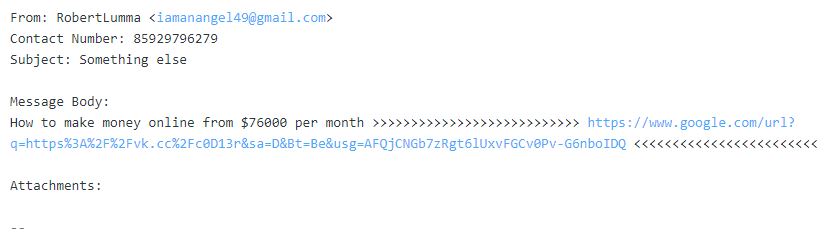
Each email had a couple of common elements in it. There was a brief message followed by a varying number of: >>>>>>>  then a web address (always different) and then a varying number of:  <<<<<<<.

If you look in your hosting, or through your webmail account you can set up filters for incoming mail. The filters work at a very detailed level per email account. I had not used them before.

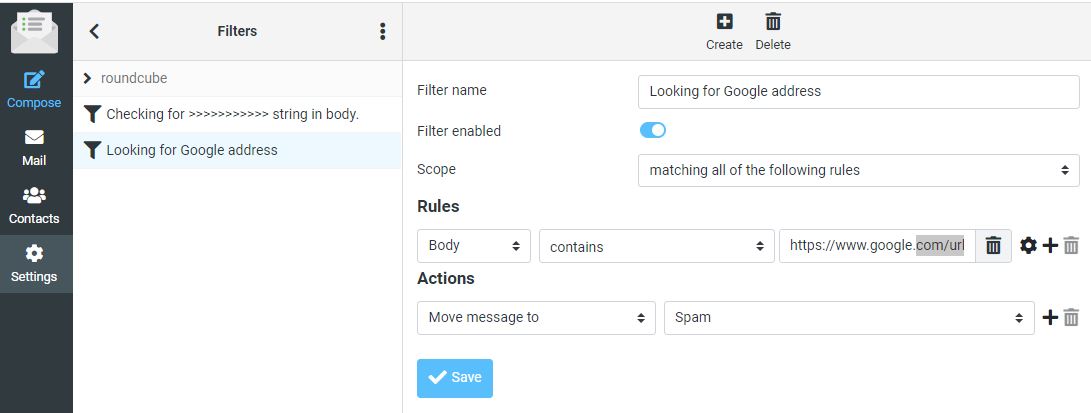
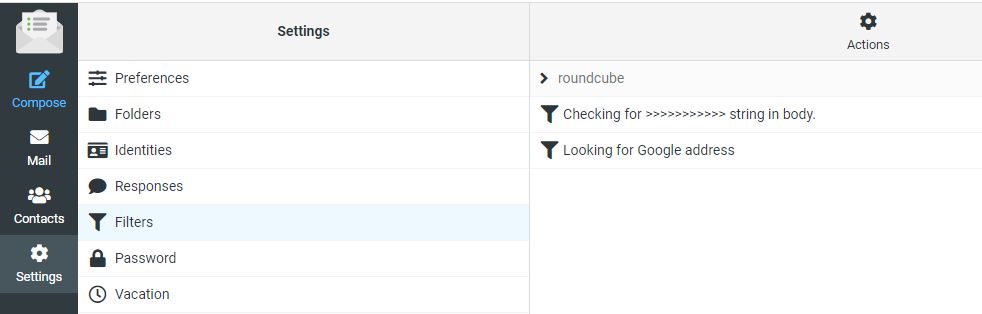
I logged into the email account via webmail and chose Settings and then Filters and set up a couple of filters.


In the example above you can see I have set two filters up. Lets look at them to see how they work, and what limitations they may present. 

Filter 1 Looking for this sequence “>>>>>>>>>>”

All of the email had two sequences of greater and less than symbols to draw the viewers attention to a web address they wanted you to click on. 

I set up a rule which says check all incoming email to this account and look in the body of the email. If you find “>>>>>>>>>>>>”  as a sequence in this email move the message to the Spam folder.  Here are the settings.

You can see from this layout that you could build a very complex filter and have lots of conditions that need to be met before deciding what to do with the email. I could have refined it further, but I was under pressure at the time to regain control of the account. So I created a second filter on the Web address in each message. 

Filter 2 Catching a web address

In this case all of the messages had a different email address. They all started as https://www.google.com/url?…..     followed by a series of random characters. This is a method of hiding the destination address. But because all of the messages contained this common sequence I could use it. Here is the second filter. 

What happens now?

With these two filters set up any messages coming into the inbox that contained either “>>>>>>>>>>” or more in a sequence OR a message carrying “https://www.google.com/url?” were now automatically sent to the spam folder.  While this might look like success it was not the whole story. 

Messages like the one below were now going into the spam folder, all of them were being trapped. However the computer was still hitting the website 4 x a minute.  While email was now usable, the problem had not gone away. 

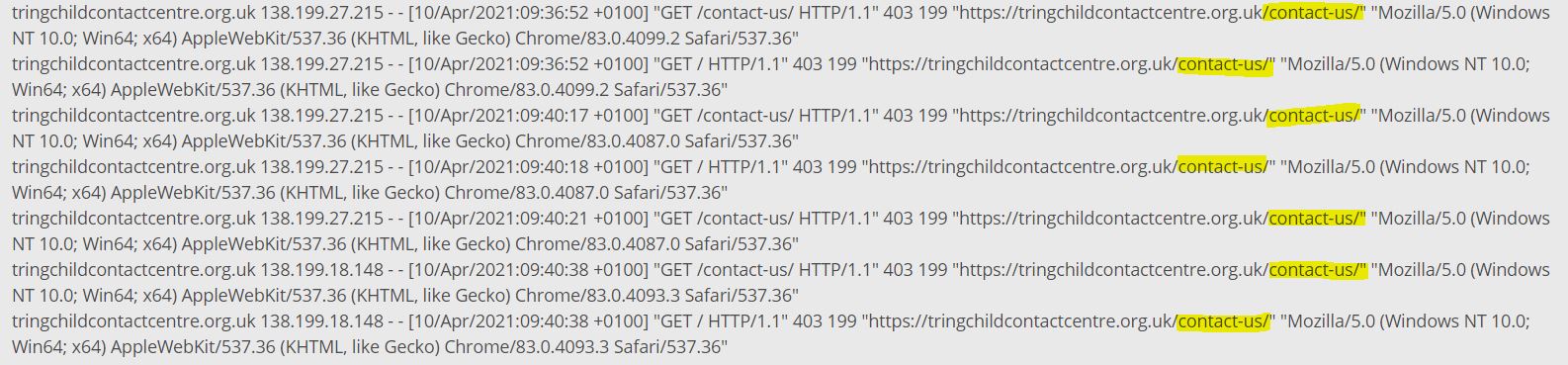
The hosting company keeps a log of activity on the website. It is not an endless log, but it will show you maybe the last 3-4 hrs of activity. I decided to take a look there. This would tell me if it was a network of computers from around the world (which has happened before too), or a single computer running some sort of automated program. 

Here is an example log with an access to the contact form highlighted. 

The access log shows that something(s) are constantly accessing the contact us form on this website. The time stamps of the log show as high as 5 time per minute.  These accesses are coming from two sources: 138.199.27.215 and 138.199.18.148.  When I did this the first time through I only saw one IP address. 

In the hosting you can block accesses to the website by country, by IP address or by IP address range. The country block is not fool proof because people can appear through IP addresses which are not listed, or pop up through a VPN somewhere. 

Where is the spammer located?

Can I block by country?  I went to this website and entered the IP address to see what it came back with.  https://www.iplocation.net/  It came back with the following information:

This tells me several things. There are actually several entries from various databases, I have shown 3 here. It tells me the computer is located in France, in Paris at Ile-de-France. It also tells me that the service provider is a UK based company called Datacamp Limited.

Block France and then the whole world!

I next went back into the hosting and looked at the filtering options. This client only has clients local to their area, and certainly in the UK. So there is probably no need to have this website visible in other countries. At least for a short period. So I first blocked France, then blocked everywhere apart from the UK.

This action did not immediately work. Possibly because the block is not instant. The logs showed continuous accesses to the site. There is another reason, just speculation; the account was being served through a CDN (Content Delivery Network) and it might take some time for the content to age and be replaced. I tried clearing the server side cache but it had no effect. So what now?

Block by IP address

As I knew the IP address of the computer sending the messages into the website, it is possible to block based on the IP address which I did.

That stopped some of the accesses but then another IP address popped up. I have been here before, and traced a network of compromised servers around the world that were sending spam several years ago. The new address was 138.199.18.148. So there were either two computers, or more likely one computer with two ports attached to the internet. 

The second IP address is similar to the first (first two number are 138.199) and are also with the hosting company Datacamp Ltd. 

There is another type of block where you can block a series of IP addresses on the basis that hosting companies will acquire blocks of IP addresses which are in sequence. I set up a filter in the hosting which blocks 65,535 addresses all of which start with 138.199.

This blocks any computer working on this range of addresses:  138.199.0.0 to 138.199.255.255.  

Here are the blocks in the hosting control panel. 

In this case the entry 138.199.*   overrides the other two entries which were specific to two locations.

This prevents these computers from seeing the contact form. So if they cannot see it they cannot post data into it. The website is not visible to them.

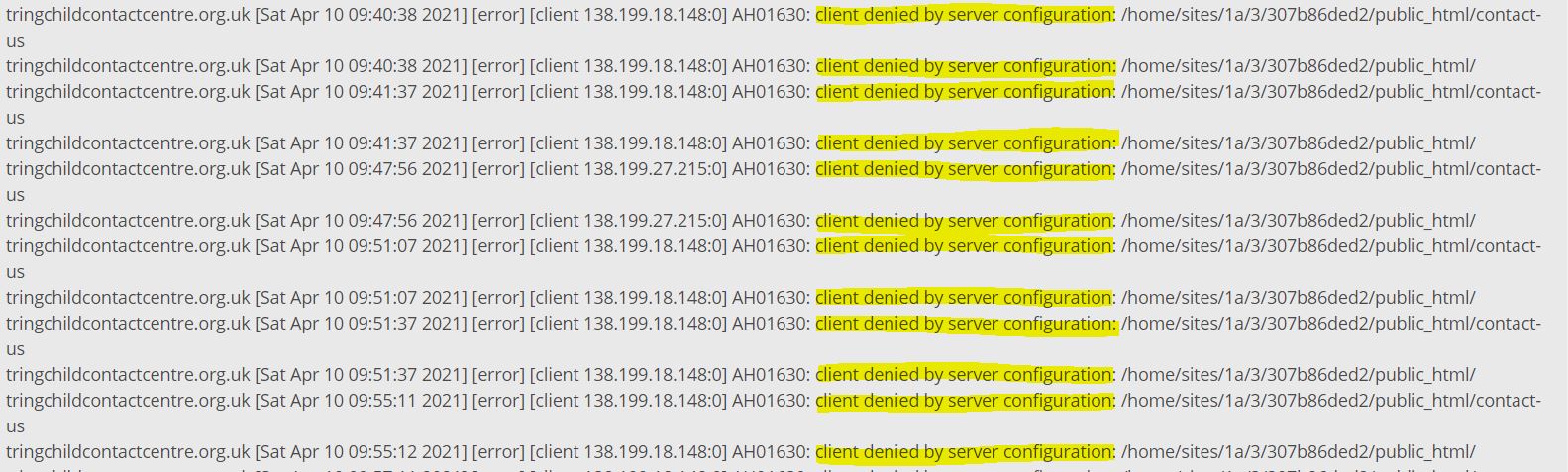
There is a second log in the hosting which records errors. You can see that each time the automated computer attempts to access the form it receives a 403 response from the website which means “Forbidden”. Their access is denied.

At this point the automated spamming computer cannot reach the website and cannot send any messages through the contact form.  But it is still trying. It is still trying to do this 3 days later. Someone has left it on to keep attempting to hit this website.  So what else can you do?

Contact the Hosting Company

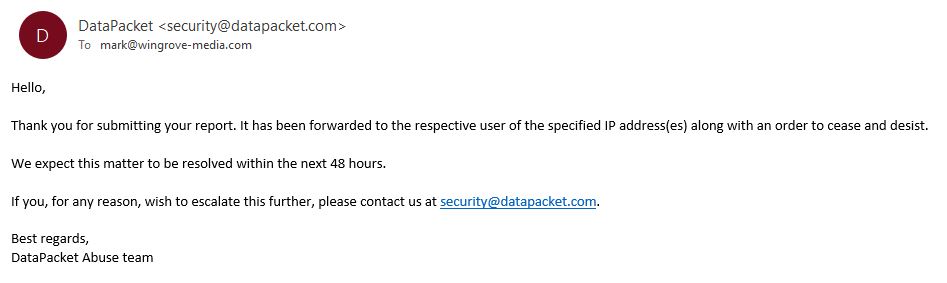
People connect to the internet through a service provider or hosting company. In this case I had strong evidence that the person doing this was accessing the internet through a connection provided by Datacamp Ltd. So I tried to reach out to Datacamp through their website: https://datacamp.co.uk/  The website has a single email address visible and a telephone number. I sent an email to datacamp@datacamp.co.uk to advise them of the problem and request that they shut down the connection. Nothing happened, no response. So then I phoned 020 3808 5949 and left my number. No reply.  I then did some searches on Datacamp Ltd and found that it is a parent company for CDN77. I went on that site and got on a chat with a representative of that company. They gave me another email address: abuse@datacamp.co.uk which finally did get a response. 


At the time of writing the offending computer in France is still trying to hit the website contact form. Tomorrow I will escalate it yet again. 

Whose fault is it?

It is unlikely that we will ever know who was behind this. There was probably no malice or directed attack at this particular charity other than they were testing something.  A similar case a few years ago involved around 20 computers that were around the world doing something similar. They were less sophisticated than this attack, because in this case it defeated some tests in a form. I also changed the tests by replacing some different questions and it was still able to defeat it.  I will look for some alternative methods to keep automated machines out. 

It may well be the case that the computer this process is running on is a highjacked server someone has taken over, or has infiltrated. The owner knows nothing about it, and the service provider has no relationship at all with the people behind the attack. We will never know. 

Sadly dealing with this type of thing is a fact of life. It goes on all of the time. But if it happens to you, we have some tools available in the hosting to minimise any loss of service. 

If anything else happens here, I will update this. 

Update 15/04/21

We are now a week later after this was first reported. The senders IP address has changed twice over the past week, but the messages continue. If it had not been detected, this account would now have 50,000 junk emails in it!

Over the course of the past 5 days I have contacted the service provider’s security team, and they have passed the message on to their customer. Their customer is a VPN provider. People use VPNs to hide their identity or the source of the message. The computer that is sending the messages is an unmanaged system in a data centre which is subcontracted out to their client. It is their client’s customers, or even their customer’s customers causing the problem. Nothing can be traced. Frustrating isn’t it? 

I have contacted Action Fraud, and it seems the only thing I can do short of taking a private legal action against the company under the Computer Misuse Act 1990 for denial of service. There is nothing anyone can do, even though this is obviously wrong. It is also outside of the area that OfCom is responsible for.   I have been advised to raise a case with Action Fraud which I will probably  with the amount of evidence I now have.  

Need a bespoke CRM system? – Call Graeme Neale

If you have either reached a point where you might benefit from a CRM System (Customer Relationship Management) or your old one has fallen into disrepair or has been withdrawn from the market then you might like to check out Graeme Neale, (Email address: gnh@pmvideos.com )

I have virtually met Graeme through the website redevelopment for Home-Start North West Kent where he has been building a new CRM system for them to replace MESH which is withdrawn later this year.

Graeme charges a flat fee for the development of the system, provides training and maintenance for a year, after the initial period; ongoing maintenance and support is negotiable.

If you are looking around, or considering just using spreadsheets, it might be worthwhile sending Graeme a message to see if he can help.

Another Scam, how it works

I don’t know whether it still happens but there used to be a method for a hacker to steal your address book from your computer as a result of you clicking on a link in an email, or on a website. Once they have that, they can send out messages appearing to be you to the people in your address book asking for help. One of the clues it has happened is finding a copy of your address book on your desktop and wondering why it is there. 

The following is an example of a spoofed email address where someone substitutes another email address for their real email address and sends a message. In this case I have substituted the real email address for another one to retain privacy. 

The person whom this relates to, I know vaguely, they used to be a client several years ago. The hacker/ spammer in this case knows there is a relationship between me and the person whose address book he has acquired. But he does not know the depth of the relationship. 

I knew this was not real from the first email, because I have seen them before. As you can see, they wanted money, so I played along for a bit. 


Email 1. The Bait

I receive the message, recognise the email address and the person, but as you can see the message does not have any more info in. I suspect it is not real, but I respond anyway, note my response is also very short.  But note what has happened with the email address. It has changed from barnaby97@yahoo.co.uk to barnaby97@hotmail.com this confirms that someone was spoofing the real email address. Now all mail will go to an email account the hacker controls. 


Taking the Bait

Reel ’em in

Acknowledge the news

The response: Spelling out what they need….

It is easy to see how people can get pulled in by this type of scam.  If you ever get anything remotely like this, always pick up the phone and call them direct to check if the message is genuine. In this case, I could not send a message to the (original) email address in case it was compromised by the hacker. I did not have a telephone number I could use to call them independently. 

Take care, especially during these times where we are very dependent on electronic communications. 

Watch out for Boris & his friends

This Boris comes from the USSR and other states that have no interest in your website other than abusing it. This is a short case study on why it is wise to remain alert.

Invitation to make some changes

On a few sites where I know there is very little annual activity on the behalf of the website owners, I help out from time to time adding a message here and there. Typically this year it has related to coronavirus shut down/ reopening messages. I received a message from one of my clients and proceeded to make the changes yesterday.

On entering the website there was an exclamation mark next to a plugin warning me there was a problem. I investigated, it related to an SMTP plugin which is used to handle sending messages on behalf of the website. This is usually more reliable than sending via PHP the native method in WordPress. By using an SMTP plugin the website connects to an SMTP (outgoing mailserver) and sends the message out through an email account.

In this case it warned me that error messages had been returned from the mail server. It invited me to send a test message to check it. Which I did. The first attempt returned an error, the second attempt a few seconds later was successful, the third attempt returned an error.

What was happening?

I have been down this path a few times, and suspected that the hosting company was limiting messages coming through the mail box, probably because of spam like activity. I raised a ticket with the hosting company and asked them to check and verify.

They never answered the question but requested access to the website to see the fault for themselves. They missed key points in the questions I had raised to them, so I tried again.

Second time around they blamed the plugin for the problem claiming there were no error messages in the hosting relating to failed email attempts. (But still did not answer the question whether they were blocking it or not).  So I tried again.

On the third request they did find error messages in the email log which also mentioned suspected spamming activity through the contact form on this website.

Website Log

At this point I checked the log of website accesses to see if I could spot anything there. Sure enough something was probing the website 4 times a minute over less than a 2 second period. Humans do not work that fast, so it had to be a bot (computer program running on a compromised server somewhere).

All accesses were from this IP address: 5.188.210.4. Checking that IP address it turns out to a server in Russia. Probably a legitimate server that has been compromised by someone.

Why should you be concerned about this?

From the first time around 7 years ago now, when I started to turn on security monitoring and you could actually see beyond normal website usage, I was surprised to see the volume of illegitimate attempts to access websites.

One of the most common is sledgehammer approach password guessing routines which try to get into your website. 

In this case, something was probing the contact us page and attempting to use it to send spam.  It later turned out that the website owner had received 257 spam messages, but they had all been trapped in the email program they were using. 

Whatever it was trying to do, it was triggering a safety function in the hosting which was stopping or rate limiting messages from this website. So while it may have tried to send thousands of messages, only a few got out. BUT…. it also means that this Russian computer was hitting the website so hard, that it would have affected any legitimate messages coming in through the contact us page. 

When I did my test, it failed, then passed, and then failed for another 10 attempts. 

So, if your junk mail rises for any reason beyond a few messages a day, be suspicious. Someone may be targeting your website, and they may be impacting your website’s ability to send messages. Or said another way, your clients to reach you through your website. The main problem here is there is no warning given, no messages of failed delivery. 

How to fix it

In all of my cases, I work locally in the UK, the audience with a few exceptions are all UK based, and in most cases probably within 50 miles of the location of the entity or charity.  Therefore your website would not be of any interest to someone in India, China or Russia. 

The hosting control panel has some country blocking options. You can block by country. In this case I blocked several countries including Russia from this site.  It is not a bombproof solution, there are ways around it from the attackers point of view, they could return through a VPN or some other path from the dark web. But in most cases it will work. 

In this case some 12 hours later, the server in Russia is still probing the website every minute, which just goes to prove it is a hackers program that is doing this running on a remote server, and probably probing hundreds of sites. However in our case it is blocked at the server before it reaches the website. 


IP address is now blocked from accessing the hosting

If you are affected…

If you suddenly see an uptick in spam messages, and they all seem to be related (Russian or Chinese for example) send me a message and I will check. They are a nuisance, but there are ways of stopping them, both at the hosting, preventing access to the site, and adding spam filtering if there are some common themes if you are affected by direct email.

However do not ignore it. If the spam is originating via your website contact form, this may impact your other users.  Send me a message through the contact us page if you want me to check.

Phishing Woes

I would like to raise everyone’s attention to a series of official looking Phishing attempts on one of my clients. Having alerted the relevant people, one more came forward to say that they had received a message as well.

This is how it works

You receive a short email to say that your email account has been suspended due to security issues that have been detected. Of course you would wish to rectify this so would read it.

The email is personalised and appears to be addressed to you, because the first part of your email address contains your name. They harvest this part and place it as a field in the email. So you might see something like Dear mark.wingrove, ….

Note the lack of capitalisation, and the “.” in the name. That is a giveaway.

Within the message body is a statement which claims the IT/ Support department for your organisation has detected a problem with the security of your email address and you need to act within the next 48hrs otherwise your email address will be permanently disabled.

There is a link you need to click on to resolve the problem.

What is Phishing

Phishing is a method used by hackers and other bored people to present a form to you and invite you to enter your email address and password into the form. I wrote about this a few years back with an example and how it all worked. You can find it here.

You assume the website/page you are taken to is legitimate and enter the information into the form anticipating you will resolve the problem mentioned in the email.

What actually happens is the form data is forwarded to an anonymous (meaning difficult to trace) email account which the hacker is using. They will then use your email address and password to access your account and take it over.


Take care of your security

Once the hacker has got into your email account, now consider how you use your email account and how it is connected to everything else, and you will get an idea why they do it.

I have had examples from a a few years ago where a gmail account was compromised in this way, and the hacker got into a website because the gmail account was associated with a website.

About this particular case

In this instance, it looks like there was a small number of personalised email account addresses on the website. These are under links encouraging people to contact an individual directly. So someone or something had harvested these from the site.

Normally a generic email account is used and mail goes to this mailbox for sorting later.

What to watch out for

If you receive any email, expected or not asking you to follow a link to set up your account, unfreeze your account, or anything to do with entering your account details somewhere do not click on it.

If you were expecting an email like this (for a legitimate reason) then independently go to your account and check it. Do not trust any links sent to your email account in emails especially if they are not solicited. They are likely to be fraudulent.

About your IT department

I am not your IT department, but if I was aware of a problem with your account I would contact you directly. Even if you have a third party looking after your email accounts, they will probably contact you directly, or through their contact in your organisation, it would be very unusual to receive an automated message.

Free Account users

For those of you using Gmail (Googlemail), Yahoo or Hotmail, you are particularly vulnerable. If you loose control of your account, then you will probably lose it for a month or more. Because you are not paying for your email account, it not so surprising that there is not a human you can call to resolve it. You enter an automated process which takes some time to resolve. If that was your only account, or main account, you are now in trouble because you can no longer send or receive mail once the account is suspended. I recommend that if you fall in this category you look at adding 2 factor authentication on your account which will help prevent any third party from taking it over.

If you are using an email account associated with your hosting or domain name, then if it is taken over, it is easy to grab back again. If it happens to you, tell me or your email partner immediately you are aware of the event.

Apple Woes

Family Sharing and Subscriptions

I thought I would share this with you because I have recently been caught out. For those people that regularly read my articles on scams and things to be aware of, this one is particularly embarrassing. I have been trying to figure out how it happened. 

I am fairly meticulous with anything to do with credit cards, banks and subscriptions. Like many of you I have an iTunes account and have purchased music, video and apps in the past. In my case I have one account which is shared with the family. That means we can share most things, even across platforms onto Macs as well as Apple mobile devices. 

I have never had any cause for complaint with Apple. Their service has always been exceptional compared to many other service providers until the following happened. 

Set up notifications

When I set up my Apple ID associated with iTunes, I used to get email messages if anyone downloaded anything. That worked brilliantly, I always knew what was going on. The problem here though is for some reason, which I have still not fathomed out yet, they stopped. 

So point one is make sure any purchase, even if it is £0, you get an email, so you know it has happened. 

The Perfect Storm

I cannot remember why I checked, but I looked at a credit card statement to see two monthly payments coming from Apple which were for subscriptions. I knew I had only one subscription with Apple, and that was an annual one. So I started digging.  One was for Amazon Music, the other was for Dropbox. These are both Apps on an iPhone. 

I already pay Amazon for an Amazon Music Family Account. I pay that directly. I already pay DropBox for a DropBox Professional Account. When I downloaded these apps, that was how I used them, so I did not anticipate any additional charges. 

I went to Amazon and asked why am I paying twice for this? They did not know why, they could not find another account, only the one I had. Then told me that they don’t have any visibility of what Apple does as Amazon Music is provided via iTunes. I would need to contact Apple. 

I got the same story from Dropbox. Whatever the mechanism is, it is controlled by Apple. Dropbox has no visibility of what Apple provides to clients. Contact Apple.  I don’t believe either of these, but you can only complain so far. So I contacted Apple. 

Apple started out as their usual polite selves. I guess it is fair to say that I was less polite, having found out that £21 per month had been going to iTunes for probably 2 years. The interesting thing was I was immediately refunded 2 months worth of subscriptions with little debate. However Apple could not go any further back than that. I escalated it and got the same response from the supervisor, who said it could not be taken up any higher. But I should contact Dropbox and Amazon Music. 

And there I was left spinning. Amazon Music points to Apple, Dropbox points to Apple, Apple points back at Amazon Music and Dropbox. As for the guy in the middle, nobody can help you other than directing you to someone else that cannot help you. 

So what happened?

The missing connection, which I am still to resolve, is the messages about purchases stopped coming through. I never changed anything, but when I realised it, I had not seen anything about purchases or subscriptions for some time. Years in fact. When you make a purchase a confirmation email is sent out to the account holder even if you are using Family Sharing. 

Check your subscriptions

I am guessing that this is unique to me, I have not seen lots of other people complaining. However I recommend that you check on your smart phone and your iTunes account to make sure that a) there are no subscriptions you do not know about, and b) you have a recognised email address where purchases are being forwarded. 

Further checks show that my son had used Dropbox and Amazon Music accounts, and this is the point where these charges started to occur. The safety net of sending an email to me to advise of the charge was no longer in place, so I was oblivious to it.  Ho Hum!


And then there was this…….

While on the credit card trail, my wife commented on a different card and asked why it was so high. I had no idea so took a look. Guess what?  Over 14 days £401 worth of debits by Apple. In one day £250. So on the phone to Apple again!

This turns out to be totally unrelated. Looking back at various transactions, it looks like someone somewhere had intercepted my card details from another transaction. 

To cut this story short, someone had my credit card details, took out an iTunes account and an Apple ID and started spending. Checks were made by Apple to verify that the payments were not made against any of the Apple IDs used by the family. They were not. Apple could see they were fraudulent actions and said they would recommend a refund and it would be sent for review over 48hrs and to check back later. 

48hrs passes ……..

Yes we have reviewed these payments on your credit card and will refund you £4.97. The rest of the payments were made against consumables apparently. Here Apple becomes extremely unhelpful. I point out that there must be another ID associated with my credit card, who is it?  “Can’t tell you that”. “Can you tell me what the transactions were for at £48.99 each?”  “nope, can’t tell you that”. “But you can see that they are fraudulent?”  We went around and around on this one, they could not tell me anything else due to privacy issues. Apparently you have to keep fraudulent activities secret. 

I eventually went back to my credit card provider who has refunded the balance. However some learning points here too.

Always use a credit card, if I had used a debit card with Apple, I would have not been able to recover anything. Secondly, periodically check your accounts for unauthorised activity. 

I was left somewhat dismayed with Apple in this second unrelated case, as it was clear they had all of the clues as to how it was done, and who was behind it. They were not very helpful either when I asked for the reason why only £4.97 would be refunded against a total debit of £401. While the claim had gone to some group sitting in an ivory tower somewhere, and they determined they were not responsible; it would have been useful to see exactly what they determined and why. 


Website unavailable and other messages

Over the past six months there have been around 4 or 5 cases where websites have stopped working. This can invoke panic if you have never seen it before. There will be a white screen and some short message on it which will not mean a lot to you. 

Firstly do not panic

Your website is still there, but cannot run. WordPress introduced some measures around six months ago which ran some diagnostic and other tests and reported on the health of the website. It is since this change some sites have failed, probably because one of the trapping mechanisms trying to identify problems has kicked in. 

Generally what has happened is the website may have been upgrading itself, the upgrade has caused a temporary conflict, and this or some related event has caused it to crash. What you see is the white screen. It can sometimes be falsely triggered by security plugins. 

How bad is it?

The first thing to check is whether you can still log in to the site. Try to login as an administrator. If you can get into the site, there may be a warning message there. If the problem is down to a plugin (it normally is) try turning some of them off and see if the website returns. If the site does return, delete the broken plugin, and try reinstalling it. 

If you cannot login and have access to the hosting

Normally the way I have to handle these problems is to log into the control panel, use a file manager to locate the plugin directory for the website. I then work my way down the list renaming the directories by adding some text at the end of the directory name. For example if the directory was called wordfence, I will rename it wordfence-off. When I do this, the plugin can no longer load. If it was the one causing the problem, then the site will return. 

I would then delete the plugin and reinstall the latest version, that normally fixes it. 

Can’t fix it?

If you cannot resolve the problem, send me a message, better still call me on the phone, and I will take a look as a priority.  But you may find you can resolve this yourself. 

Why?

I use a very limited set of proven plugins across the websites I build. They are all well maintained, and if a problem exists, and I can identify it (usually takes around 30 mins), so far removing and reinstalling them has resolved the problem.  You may however have added in your own selection of plugins. Not all plugins are equal. Yours may be causing the problem. 

If you are stuck, and have refreshed your browser, or tried a different browser and get the same result alert me immediately and I will try to get it resolved for you quickly provided I am near a computer. 

If the worst happens

We always have a weekly backup we can rely on for website recovery if we run into a problem that cannot be resolved. 


Coronavirus and working remotely

Right now it is worth considering if you had to work remotely, could you access your email and other systems? It is likely at some point in the near future, if the virus takes hold people may be asked to work from home. Now might be a good idea to give that some consideration. 

The following is specifically for those people that access their website and email through my hosting. However it applies to anyone. Some of you I know use Outlook 365 too.  What might you need to effectively work from home, and where do you get it from?

Communications

Email

Most email systems offer an online version through a browser as well as through an application like Outlook. The first things you need to know is how to access these systems from a remote location. If your organisation has assigned a laptop, then it is easy, just hook up to the internet at your new location. But if you have a desktop you are probably not going to take that away from the office.  To access your email on a different system you need to know the portal or web address for email.  For the websites I have built, if you are using the email systems I provide then just go to your website and look in the footer, you will find a link there to webmail.  Go there, then you need to enter your full email address and your account password.  This will give you access to the same account you used on your office computer.  

Other considerations

The email accounts I provide are all 10GB in size. With such a large inbox, you can create folders and move important email into the folders. If you do that on your desktop, those folders are also created on the server if your email is set up as an IMAP account (this was the recommendation I made when issuing instructions). It means the folders you set up are visible on all devices that connect to the same mailbox.  If you know you are going to be out of the office, set up a folder and write yourself a few emails with important info on such as:

  • IT support person and telephone number
  • Colleagues email addresses, telephone numbers
  • Important documents
  • Whatsapp Group (good idea to set that up now). 
  • Key procedures if those are not available online

Think about what you take for granted today because it is to hand. Save a copy locally in your email. 

Website

Is your login tied to your browser at work? If it is then you may have difficulty logging in from home. Passwords can be recovered from WordPress websites provided you have access to the email account tied to your login. Make sure you know these three things:

  • Your user name in the wordpress website
  • The email address which is tied to your account
  • Optionally keep a copy of your password discretely without noting in the file name or content what it is for. You do not need to do that if you can access your email account.  Because you use your email account to recover your password. 

GDPR

Don’t forget about GDPR and your responsibility to keep confidential and personal information safe. This aspect is also worth considering before a crisis forces everyone to work remotely. While in the office you are within a controlled environment. When you are working from home, particularly if the data you are accessing is no longer on the organisation’s equipment, additional care will need to be taken to keep the information secure.  An annex to whatever policy is in force to cover such circumstances might be worth considering including the responsibilities of employees and volunteers.  Once we are the other side of coronavirus all of the data which may may have been more distributed than normal needs to be brought back under local control.  

Portable Drives

While it may be possible to use Cloud based storage, or even remote access to the usual data you access at work, you could also consider portable hard disk drives or USB memory sticks. If you use these make sure they are encrypted. If a drive or file is encrypted then if it falls into the wrong hands it will be virtually impossible to decrypt. 

Make sure a nominated person is issuing passwords, and these are recorded somewhere centrally and securely with access provided to the chair or another backup responsible person. This ensures you do not get locked out of your own systems. 

Remote Access

For any remote access to your systems make sure the passwords are changed regularly, and you know who has access. Personally I find the idea of having a backdoor into a system dangerous. But they are frequently used, and often left open, particulary where you have a remote IT support person. Make sure you have a policy where access can be turned on and off when required, passwords and user combinations are under very tight control, and used on a need to know basis.  You should be in control, not your external IT support company. Your organisation is ultimately responsible for the safeguarding of your data. 

Wingrove-Services
Privacy Overview

This website uses cookies so that we can provide you with the best user experience possible. Cookie information is stored in your browser and performs functions such as recognising you when you return to our website and helping our team to understand which sections of the website you find most interesting and useful.

You can adjust all of your cookie settings by navigating the tabs on the left hand side.

My privacy policy can be located here: Wingrove Media Privacy Policy (opens in a new window)

My Cookies Policy can be found here: Wingrove Media Cookies Policy (opens in a new window)