Sometimes you can see a small symbol where an image should be located, why is it broken, what does it mean, and how can I fix it?

What this symbol means is that there was an image referenced here and it is now no longer available. It displays this small icon to indicate it is missing.
Why is it missing if it was there before?
In this case the image came from another website. It was part of a set of marketing assets on the EasyFundraising.org.uk website. The problem though is when you take assets from a 3rd party website (which they are often offered) you do not control them. In this case Easyfundrasing.org.uk have deleted the directory or files and probably screwed up hundreds of websites.
I actually created this error, because this component was added in 2014. A few years ago I changed my process. If an asset was offered to help me on a site, such as a fundraising logo, I grab a copy of it now, put it in the library so I know it is on the website. If the partner company decides to change their website then it will no longer affect the client’s website.
Other reasons why it has disappeared
If it was on your website AND in your library, it has been removed from your library if it cannot be displayed. Possibly as a result of a website haircut.
How to interpret what is missing
If you examine the code relating to where the image should be there will be a reference to it. In this case here is a screen shot of the code. I had no idea what should be there because I built it so many years ago.
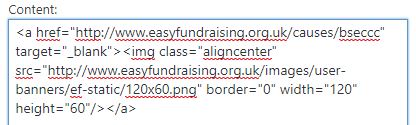
While I don’t really expect any of my clients to fully understand what this means, you can see www.easyfundraising.org.uk in the code. There are two references in here. One to an easyfundraising account, the other to an image (identified through <img …. >) which was located at http://www.easyfundraising.org.uk/images/user-banners/ef-static/120x60png This is what they deleted.
From that I can tell that an image should have been present in the side bar and it was active. Someone clicking on it would have been taken to this address: http://easyfundraising.org.uk/causes/bseccc/ the account for the organisation.
How to fix it?
This really depends on what happened to whatever was there originally. If the image was referenced to a source off of your site, a third party has either removed it, or moved it somewhere else. Personally, I don’t want to be reliant on the whim of someone I don’t know in a marketing department somewhere. I will always advocate locating the image, copying it and putting it in your wordpress media library on the site and then adding it to the page. You remain in control. (I will assume here that you have the rights to use it of course!).
If you cannot locate it but know what it was, try doing an image search on Google. You will be surprised what comes up. I have resurrected old images that way before.
If you cannot locate it, add something new there that achieves an equivalent result.
If you have one of these on your website and are not sure what to do contact me.