From time to time I get asked the question whether the website is broken because a strange message has come in from a contact form.
Invariably they contain links to somewhere else, usually obfiscated links so you cannot tell where they will go, without going there. They also have completely random text, sometimes just random sequences of characters, and sometimes a passage of text which has no bearing to the function or purpose of the charity website. The text is added to try to get around various spam detection mechanisms.
Why do we get them?
They are sent through comment boxes and forms, and often get around form checking methods. The reason they are being posted on your site is because the settings on your site may instantly publish it. If that happens then the person responsible for sending it have just got some free advertising through your website. Some sites automatically publish comments or form content. In your case this is deliberately disabled when I publish your site.
here is one example you may have seen:
The White Hat SEO
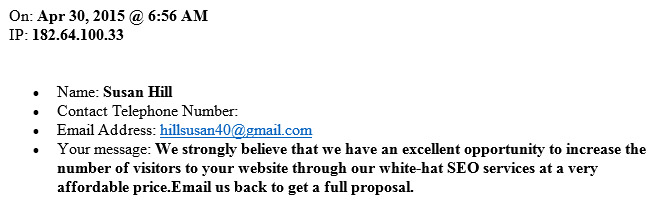
Susan Hill, along with several of her colleagues appear with regular monotony. I did reply once because I was curious about the “scam” they were running. I was unsure how Susan Hill could possibly know how many visitors I was getting on a site. So therefore it must be speculative. This is an example of a computer entering the information into the form. But appearing to be human. In this case they have to supply a contact email address, otherwise you would not know how to reply.
I eventually got a reply back from an organisation that offered to get my site on page 1 of Google by performing SEO (Search Engine Optimisation) on the site and no doubt doing a few other things that will grow the volume of visitors for the princely sum of £150 per month!
Some things to consider here: Just because my site is at the top of Google, does not mean I will get a lot of visitors. (Most the sites I produce are at the top of Google anyway). So where will all of these visitors come from? And can I turn these additional visitors into prospects? I cannot comment with regards to Susan Hill and her service, but I can from others.
I have also seen other similar schemes that will send a lot of traffic to your site to inflate your statistics. In this case, these are people that receive some payment for visiting your site. So it is all artificial, and unlikely to bring any new leads.
Why?
A web developer working for a client can inflate the value of his/her work through Google Analytics. The client is impressed because 10,000 visitors a day visited their site. They may be suspicious if the volume of those making a sales enquiry compared to those that have visited is very small. (<0.01%). But the client would not know what is really going on.
There are some genuine SEO specialists out there, and they charge a lot of money, and get results. However if someone anonymously places an enquiry like the Susan Hill one without stating who they are, and which company they come from, it is highly likely that you are going to enter into a relationship where you will be spending a lot of money with no really tangible benefit. If it was a genuine service then the company name and website would be in the message. Therefore I treat this as a scam.
One last thing about Susan Hill. It sounds like a British name, but did she send this from her quaint cottage in the Cotswolds? Well no. In the message is an IP address. 182.64.100.33. It is possible to search for the location of an IP address. The precise location is generally not accurate, but getting it to a country is.
Susan Hill’s service provider is Bharti Airtel in India. A further check tells me she is based in New Delhi. So unless there is a very long cable or VPN set up between the Cotswolds and New Delhi, then I suspect she is not really Susan Hill, and probably not a real person at all…..
Anyway back to the forms……
Who is sending them?
Most that I have traced are coming from China and India. China in particular is a major culprit. If you get a message to your local charity and you are not sure. Take the IP address from the message and Google the following (I will use Susan Hill’s IP address in this example): “where is 182.64.100.33” this will produce a lot of results, choose one that lists either the specific address, or a block of addresses, then look for the specific entry. That is how I found out where the message originated from.
If you are a local charity in Suffolk and a message comes in from anywhere outside of the UK, the chances are it is a spam message.
How can I stop them?
Most of the messages are based on something called Form Blasting. This is where a computer, or a network of computers will work their way around websites looking for forms they can post their data in. Because they are computers and not people, there are methods that can be used to detect them, and stop them. Or perhaps at best significantly reduce them.
The simplest thing to add is Google reCaptcha. This requires someone wishing to submit a message to interpret some characters in an image and enter them in a box. The image is generally blurred, or distorted in some way, so character recognition software cannot be used by the computer.
Other methods are to have hidden fields in a form. A visiting computer detects a form is present on the site, then it attempts to fill in all of the fields on the form. However if one field was hidden from the user, and therefore it carries nothing in that particular field. If the website detects that there is something entered into the hidden field, it could not have been added by a human, so therefore it must be a computer and a spam message, so it is deleted.
For most sites I use Form Manager. More recent sites may use something else, and if so there is something similar to Google reCaptcha added in already. If you would like to add Google reCaptcha and you use Form Manager please follow the steps below.
Form Manager users
Look for Forms in the sidebar of the Dashboard. Go to Settings
Scroll down the screen and look for reCAPTCHA Settings.
If your site has some long sequences of random characters in there, then it is likely that your site already supports Google reCaptcha. If not click on the link for API keys for reCAPTCHA.
This will take you to the Google reCAPTCHA website. You can sign up, generate your own keys and add them to the form.
Once you have done that go to your form(s) and insert a NOTE element followed by Google reCAPTCHA.
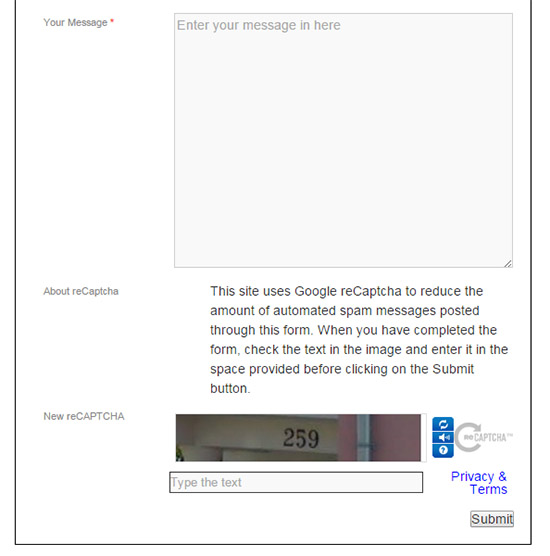
Edit the form NOTE with the title; About reCaptcha. In the text box provide some guidance as in the example below. Once this is set up spam messages, if you are plagued by them, will reduce significantly through your forms.
If you are stuck, or having some difficulties, contact me and I will see if I can help.