News & Alerts

Reminder on handling images on your site

There is one recurring theme as I work my way around various websites, handle support issues, or work with new clients on importing old websites to a new framework. It relates to images. To ensure your website runs quickly, and does not waste bandwidth you need to optimise your images before they are placed on the website.

Over the years I have offered various guidelines on sizes, it often depends on the size of your template. But the core guidance remains the same. Do not upload an image to your website without scaling it down first.

Images are getting larger and larger with high resolution sensors. Your camera may well be able to produce an image which is 5000 pixels wide. However your website is only 1000 pixels wide, and the available space for an image in some cases may only be 500px wide.

Please check out this video which I put on the site a couple of years ago. It talks about free image editing software called IrfanView and how to use it.
Get me started Mark…

For the past year I have been building an editing support page which is set to private, so only you can see it. Within this page is a guide for editors and lots of additional resources, all online and built into your website.

With the changes in the Divi template (Visual Editor), I have made some changes to one of the guides I have been placing on sites.

If you are familiar with guide, you can download an updated copy here. This will tie into a template that is built into your site which is the first step for creating a news item.

Get your copy here: Get me started guide (Revised)

For those of you that would like something like this in your site, download a copy and see if you think it would help. Drop me a line and I will see if it is feasible to add in.

If you already have an Editor or equivalent page, locate the page, open it in the editor and attach this version to the button for the Get Me Started Mark guide. If you are one of the recently upgraded Home-Start websites, I have already added it in.

Cautionary notes about email and your website

I have had a few cases where mysteriously the website is suddenly not sending emails out allegedly. Further investigation shows it is sending emails out, but the recipient is not receiving them, so what is going on?

Local IT at work?

Inevitably it is because a local IT company has installed Office 365 for you and you are now running over Microsoft Outlook servers. Your local IT person who works with you in your office, had been granted access to the hosting settings to redirect email to the new servers. However the they have omitted to test something.

Continue reading Cautionary notes about email and your website

Are you tied to your service provider?

If your primary email address for your website does not end in your website name, then the chances are you are tied to one of the email addresses issued by your service provider, or perhaps you are using a gmail, hotmail or yahoo free address? Here are some things to think about…

If your email address is one issued by your broadband supplier, this means your organisation is tied to your broadband supplier, you cannot move to a lower cost provider because you will lose your email address. Then how do people contact you? You may be paying extra for additional email addresses. Those default email accounts issued by BT tend to be 1GB in size too which is not a lot of email.

What should you do?

If you have a website and it is your intention to retain the website address, and it is associated with the business or charity then you should use your domain name for your main and any subsequent email addresses. For example if you have a website called www.mycoolsite.co.uk then you can have an email address called info@mycoolsite.co.uk. If you do this and I am hosting you, you can have 10GB email boxes, as many as you need and at no additional cost. It also means you can review your broadband supplier prices and see if there is anything better around. I changed from BT to John Lewis, a better package and saved over 30% of the cost just over a year ago. I could only do that because my primary email address was not a BT one.

Continue reading Are you tied to your service provider?

New Divi Guidance PPT

For the past six months I have been building in help pages into the websites to enable novice editors to manage their sites themselves without having to seek external help. Following some recent changes in the way Divi works, I have revised that guidance to include new methods of editing.  I am going to use the attached guidance from now on, and develop this futher with accompanying videos.

For now, if your site is based on Divi (If I built it over the past three years, it probably is), then this is for you. Please take a copy. But do note that unless I have already done so, there is something you need to change in your site before you can follow the revised guidance. The PPT contains a link on what to change.

Don’t procrastinate, these changes are significant and will make your casual editing process much easier, so it is worth doing now. Click on the button below to download your copy.  If I make any changes I will note the revision on this page and update this page. So come back if anything looks broken.

Auto remove old posts

From time to time people ask if it is possible to automatically remove old posts. While it is possible to add a post in the future by setting the publish date in the future, I am not aware of anything that allows them to be automatically removed. At least not without adding something to your website to enable that to happen.

Post Expirator

This is plugin which is developed by Aaron Axelsen. You can find out about it here:https://wordpress.org/plugins/post-expirator/. I generally look at the star ratings and number of installations to judge whether something is any good. In this case it scores 4.5 stars (out of 5) and 90,000+ installations. 

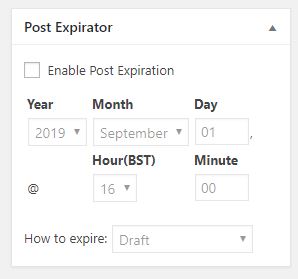
I have installed this on several sites now, and will use it as standard with the plugins I normally use. Once installed the plugin adds a field to pages and posts which allows you to set an expiry date and time. 


With the plugin enabled, everything in the site has this panel in the editing view from the dashboard. To get it to work all you need to do is check the box Enable Post Expiration and then set a date and a time. 

There are different ways of expiring a post. I recommend you leave it on the default which will hide it from view by changing the status from Public to Draft. That way you do not lose it if you make a mistake. 

The only problem with this approach is you have to remind the editors to set the parameter. But if you do that the site will ultimately look cleaner. You might only wish to do this for events that have expired. 

How do I add it in?

Log in, go to Plugins in the side menu. Go to Add new, and search for “Post Expirator” by Aaron Axelson. Install it and activate it. Then take a look at a post and will see the new field added. 

Home-Start Rebranding

Timeline: 17-08-19

I have been working on rebranding Home-Start sites over the past 10 weeks. At the time of writing I have redeveloped 17 of them, these are all live sites now.  I have a further 3 sites which are complete and under review ready to be published.

While I have contacted everyone, not everyone has responded back. So if all of this is news to you, and you are looking for a rebranded website please do get in contact with me. I decided while going through this exercise that I was not going to keep chasing people, just let them know it was happening.

Get in touch if you wish to be added to the list. I have some free time over the next six weeks. So turnaround should be quite quick.


Updraftplus

We are all reliant on a premium backup plugin I use on all of my sites called Updraftplus. I have used this without any issues for around 3-4 years. It runs in the background and backs up your website to an external dropbox location off hosting once per week. If there was a problem with your site, I have around 6 weeks worth of backups that I can use to restore the site, and get you back on line.

Backing up your systems

The problem here is we set these things up and unless there is a problem we never have to use them. So how do we know they work? Well fortunately in this case I use Updraftplus multiple times a day to backup and restore sites as I move them around to and from development areas. Two weeks ago for the first time in 4yrs a site failed to restore. In fact it was worse than that, it had failed to restore over a live site. So I was left with a broken website that had effectively crashed. The only saving grace here was it did not happen at peak viewing times.

This raised the question of complacency on my part, because it had always worked without any problems, I frequently overwrite a live website with a new website and never think any more about it. It takes around a minute to do it. However when it fails you have a massive problem: You cannot get the old site back because you just overwrote it, and you cannot install the new site because it does not work! Continue reading Updraftplus

Time for a tidy up?

I have spent most of my time over the past 10 weeks redeveloping Home-Start websites from old branding to new branding. In all of these cases they were websites which I released 2-5 years ago. So some were quite old. My general philosophy for editing websites is that I will provide you with the knowledge and skills for you to edit your own website so you can keep your costs down.

Many of the sites have had multiple editors, a few have had a single editor over that time. I found in some cases that sites had content added but had not followed some of the simple guidelines I put together when the sites were first set up. Additionally links which leave the site, did not open in a new tab or window, so anyone clicking on one and not realising, would not be able to get back. Large text was used where headings should have been used (vitally important for effective SEO).

Fix as you go

While reworking the Home-Start sites I have gone through each and checked the contents, reformatted it, and reorganised it to optimise it for the various screen sizes. I have fixed links that did not work properly, or had failed completely.

For each of the Home-Start rebranding projects, I am offering training through a variety of mechanisms, most are on site and face to face, but I also have video tutorials as well.

How is your site looking?

If you have new editors, or your site is looking a little fragmented, do get in touch. I can do several things from remotely going through your website and checking it, fixing things on the way, to conducting training for new people. It may be worth considering an annual tidy up to identify and fix any problems, and most importantly some tips to correct the editing process so that they do not reoccur. 


Artwork for a banner

I sometimes receive requests for artworks for printers. Examples are business cards, banners, flyers, posters, even headed notepaper. Because I have created your website, I am familiar with the colours and designs that have been used, and have these to hand. If there are some dominant images, I will have these too, generally in high resolution.

Quick Case Study

The owner of Fighting-Fit.org.uk; Peter, contacted me to ask if I had any advice on creating a roll up banner. I have had one recent bad experience with one company local to me, who managed to screw up a £120 flag artwork (after 20hrs of development of an artwork with multiple iterations for a white flag, they printed it with a massive black border on one side). So my experience todate has not been good. However I know through the graphics programs I use (Affinity Photo and Affinity Designer) that I have the capability to produce large print ready artworks so offered to help. I also gave him some advice on questions to ask.

I suggested that he shop online to find out where he could source one from. There are many places you can go to. He came up with this company: Solopress (website is here).

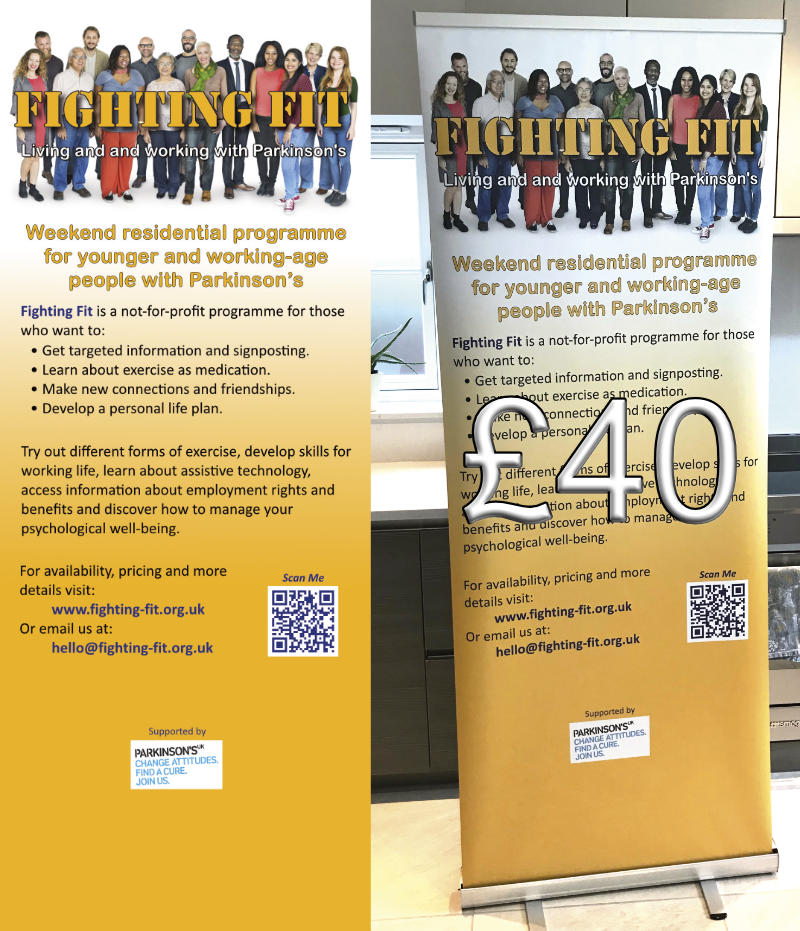
Peter had an idea for what he wanted, provided it to me in a Powerpoint file. I built it using my graphics program. These things are never right first time, so we went through three iterations. It took me personally about 1hr to take the concept, build the first iteration and then develop it from there. Below is a small version of the artwork, and the final product.

Remarkably the turn around time was incredibly quick, and the total cost was around £40! The artwork to produce this was 2 metres high and 800mm wide at 300 dots per inch. This generates very large files. Continue reading Artwork for a banner

Wingrove-Services
Privacy Overview

This website uses cookies so that we can provide you with the best user experience possible. Cookie information is stored in your browser and performs functions such as recognising you when you return to our website and helping our team to understand which sections of the website you find most interesting and useful.

You can adjust all of your cookie settings by navigating the tabs on the left hand side.

My privacy policy can be located here: Wingrove Media Privacy Policy (opens in a new window)

My Cookies Policy can be found here: Wingrove Media Cookies Policy (opens in a new window)