Pop Ups

A pop up on your website might be useful to tell the world about something. When used sparingly they can reach out to your viewers and encourage them to take some action.

From the time you entered this site a timer has been working in the background counting down. At the point a certain value is reached a message will appear on the screen inviting you  to sign up to my site providing you are one of my clients.

How is it done?

I have located and used the plugin WordPress PopUp by WPMU DEV

Things to bear in mind when using pop ups, not everyone will see them. This is because some browsers have pop up blockers. So don’t assume everyone can see them. Most will however.

How to set up a pop up

Log into your site, go to the plugins page and locate and load WordPress PopUp. Once it has loaded activate it. It will appear in the menu on the left hand side.

Continue reading Pop Ups

New Home-Start Template Available

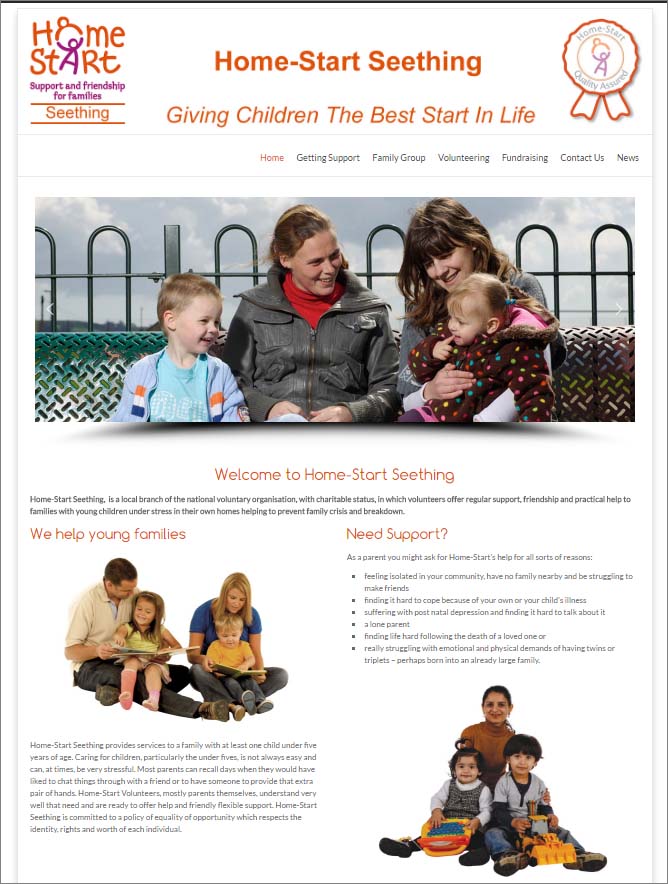
Following some work on another project I have developed a new low cost framework for Home-Start sites. This is now the 5th generation for Home-Starts from when I started around 5 years ago.

Responsive site
Desktop/ Laptop display
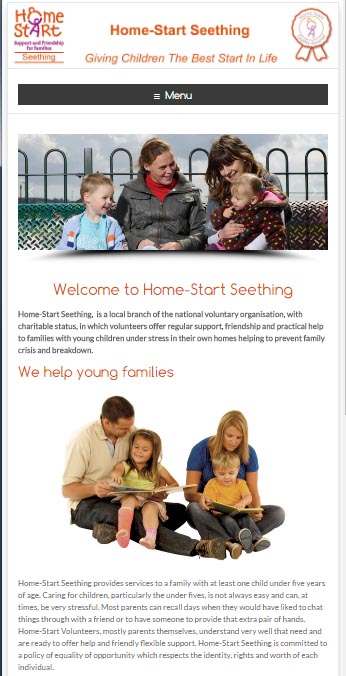
Responsive display
Same site displayed on a phone

Some people do not like the heavy dominance of the orange sidebar in the old Home-Start Lite site template. The new design is cleaner and brighter with more white in the background, and more open than the former design, although the former design is still available  if anyone wishes to use it.

This has been built largely because of the demand for low cost responsive websites. It also compliments the premium Home-Start websites I have been building over the summer and autumn period. The premium sites have a lot more work involved in creating them, so I felt it was necessary to continue to provide an entry level solution.


The new template is available to existing Home-Start websites for a single fee starting from £60  (up to ten pages) to swap the templates over and change some of the layout to fit the new style. Your content can be retained in this framework. Higher page counts will be based on £5/ page.

I also upgrade the contact form to a new style of form.

I can also import an old website, even those not built in WordPress to this new framework. Contact me for more details if this is of interest.

In case you are curious there is no Home-Start Seething, this is a demonstration website only for the purposes of displaying this example. 


New Child Contact Centre Template Available

October 2016

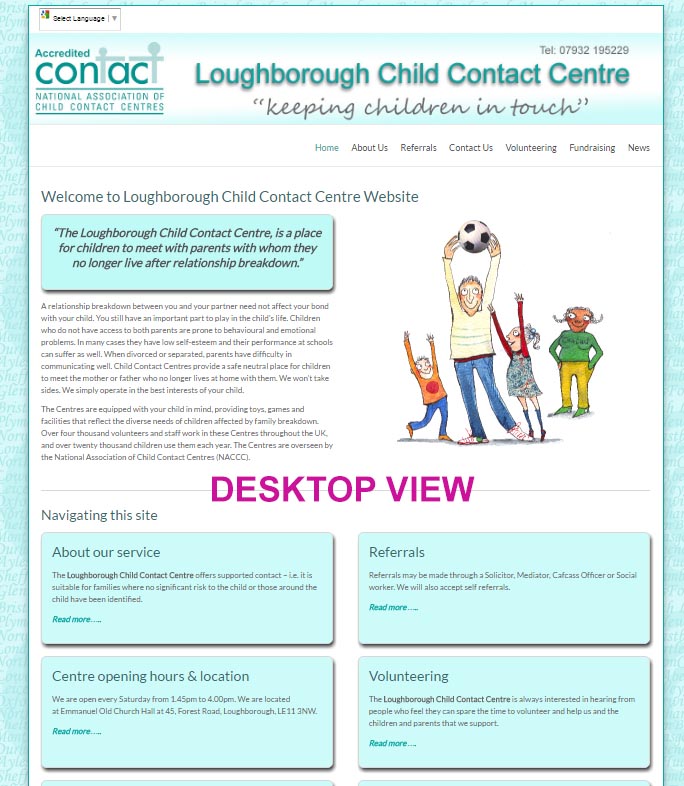
I have developed a new template for branch offices of the National Association of Child Contact Centres. The main difference between this template and the former one is that it is responsive. The former one was not.

What is responsive and why is it important

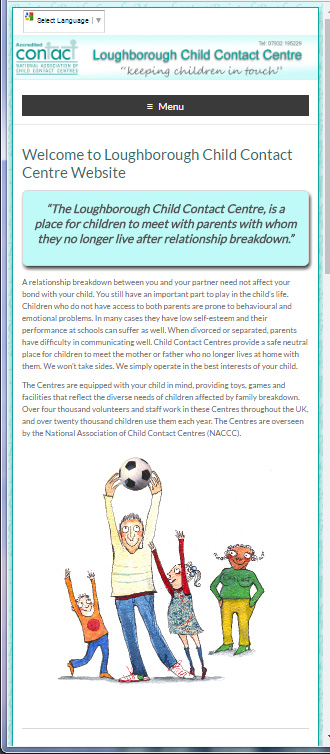
A responsive site adapts itself depending on the screen size of the viewing device. It is mobile friendly, so it works well on smart phones and tablets (iPads). The earlier site which was originally developed in 2012 was a fixed layout which does not adapt the layout for mobile devices.

Around 2 years ago Google commented that there were now more mobile web users than those operating from a laptop or desktop.  Google now rates responsive websites higher than unresponsive ones. Google also annotates your site to indicate whether it is mobile friendly or not in some searches.

lccc-desktop

mobile-display-ccc
Mobile view of the same site

The new design is available as a template upgrade for existing users of NACCC websites for a one off payment of £65.

I have to modify some artworks, the application of the template involves adapting the home page to a different layout, and a redesigned sidebar and footer area.

The rest of your content remains as it was. The template also features a special style that can create buttons for links, and a highlighted panel if you wish to promote something. These are used on the front page of the website.

Contact me please for more details.

You can see the Loughborough Child Contact Centre site here.

If you make the width of your browser narrower, you can see how the site adapts to a narrower screen.

Promotional Landing Page

Sometimes you need to run a promotion through your website, perhaps you are seeking a new trustee, volunteer, or you are recruiting for an important post. In several recent cases it has been needed to help promote a fund raising campaign.

How do you make sure people see it?

The obvious method of making sure everyone sees something that is both new and important is to modify your site’s home page.  Most people land on a home page. However this can make the home page a little messy depending on your website. There will not generally be enough space for you to highlight the event or opportunity without radically altering the home page for the website.

Another very simple way

There is a very easy way of highlighting something to all of your visitors; create a temporary landing page. This means everyone landing on your former home page will instead be directed to a temporary landing page with your key message on it. Apart from delivering your marketing message, you also need to let people know how to get to the real home page. Once on the main website people can navigate normally and would not typically see the landing page again until they choose to go to the root address of your site (the root address of your site is your domain name: http://www.wingrove-services.co.uk  without anything after the .co.uk).

How to create a temporary landing page

  1. Create a new page call it campaign or whatever title you wish to use. I will use campaign in this example.
  2. Create the content for your page. Keep your messages short, and simple. Limit the text to say one or two paragraphs and have an image on the page as well which is eye catching. A good guide here is that most people do not need to scroll to read all of the content.
  3. Make sure there is a call to action, for example a link that will take the person to a more detailed explanation of what you are asking people to do or to a fundraising page. More detailed explanations or “sales pitches” can be somewhere else, you don’t want to put it all on the landing page.
  4. At the bottom of the page add a link to the normal home page. This is so people know where to go to next. It is very important to cater for those that may not be interested in your promotion, or have already seen it.
  5. Test your page by saving it and viewing it. Does it work? Is it eye catching enough?  Make any edits to maximise the impact, and most importantly ask a 3rd party to check it. Many people are too close to what they are trying to achieve, so do check your interpretation of a mini sales pitch on your colleagues and friends.
  6. Once you are happy with the page the next job is to reconfigure WordPress so that your page called “campaign” becomes the new landing page for the website.
  7. Go to the menu on the left and choose Appearance, and then select Static Front Page.
  8. Most sites I have built have a separate Posts page which will be called News or News and Events or something similar. The front page will be called Home or Welcome or something like this. Your screen will look similar to the image below.front-page2
  9. Click on the small triangle to the right of the box marked as Home. From here you can select a new Front page, in my case it would be the page called “campaign“.  Once you have done this save your settings.

What has changed?

Your old home page is still on the site and works through the menu in the normal way. However anyone going to your website will now land on the campaign page BEFORE they get to your home page. So they have to read the content on this page before they can read the content on your site. So everyone will read it that visits your site.

Caution!

It is best to run these for short periods, and better still to change this landing page content moderately frequently. Typically marketing campaigns warn people to expect that something is coming up without revealing all of the detail. These messages are often referred to as teasers.

Timeliness

One common problem I see with campaigns run by charities is they often leave it to the last minute. Plan your campaign, and depending on how important it is make sure they you are giving people plenty of notice. If you have a dinner dance fundraising event or a quiz night you should be looking at advising people 2 months in advance with a refreshed message 2-4 weeks before.  Remember that your visitors may only visit your site once a month or less.  The best campaigns are supported by a communications plan. This includes what you are going to say, and when you are going to say it, and what you expect to happen as a result. It is a document, it does not need to be complicated, but set your expectations here and check that you are meeting them.

Tie in with social media

If you have gone to the trouble of placing a special page on your site do consider using social media too, to connect to it. Simply copy your URL (website home address) to Facebook or Twitter. So people can go directly to it, and share it with colleagues.

Check Success with Google Analytics

All sites I have built are attached to a Google Analytics account. This is free and you can have access to this information. It has been set up for you, not for me. You can use Google Analytics to check how many people have responded to your campaign. This is a very useful step, and one that should be encouraged, because through this method of testing results you can quickly see if a visitors behaviour has changed. If the visitors behaviour has not changed, then check to see why. Amend your solution to get the results you were aiming for.

Removing it

Don’t forget to remove it after the event or the marketing period has elapsed.

Log back into your site. Go to Appearance and Static Front Page and change the Front Page to your normal Home Page.

Help?

If you need help simply contact me and I can check what you have done.


Marketing through your website

We all know that a website is a great place to market what you are doing or going to do. One of the biggest problems is time. It sits there like an elephant in the room, you know it is there, and you have not done anything about it.

Well, don’t despair, here are some tips on how to approach the problem and how to maximise the benefits on your site while using your time efficiently.

Problem #1

You have an event coming up, it is major event will have an audience of > 200 people.

Solution #1

AT LEAST THREE MONTHS BEFORE THE EVENT

  • Develop a plan, when is the event and work backwards. Plan at least three releases of information to your news page, say 1 week before, 1 month before and 2 months before the event.
  • Three months before the event start collecting all of the information you need to communicate to people.
  • Write a document that contains the following information: What it is, Why you are holding it, Where it is, and When it is, Who is participating in it. Those five questions are important. The finer details are not important three months before. Use this as a live document which you update as new information is available and the detail will eventually grow.
  • At the point you are ready to communicate this you create a page on your website and link it to one of the menus so users can find it. Copy your live document contents to that page. This now represents the main page for all of the information.  If you are seeking sponsors, stall holders, participants you could have sub pages that discuss the requirements for each group and have downloadable forms available from the site, and more importantly contact us links back to your contact page if anyone has any questions.
  • At this point you have ALL of the significant details buried in your website.
  • If you have a calendar (I recommend the Modern Tribe Calendar plugin if you have not got one), then add your event to the calendar. Within the calendar entry add a link to your page which carries the detail. So anyone finding the calendar entry can be taken to the detailed page by following the link.
  • Now add a Post to your news page that is short, contains a summary of the detailed page (say 3-4 sentences). Remember that it is better to have one source of information on a website, rather than duplicate it everywhere. If you duplicate it you need to edit multiple copies and remember where you left them. This is why you do not need to repeat everything that is on the detailed Page. A post is just a summary in this case with a link to the detail.

Continue reading Marketing through your website

Getting Social

Social Media is really something we all need to embrace, even though there are some groups I work with that do not want to have anything to do with it. Using social media such as Twitter, Facebook and Linked in is very important, particularly in the 3rd sector. It is essentially free marketing if used carefully.

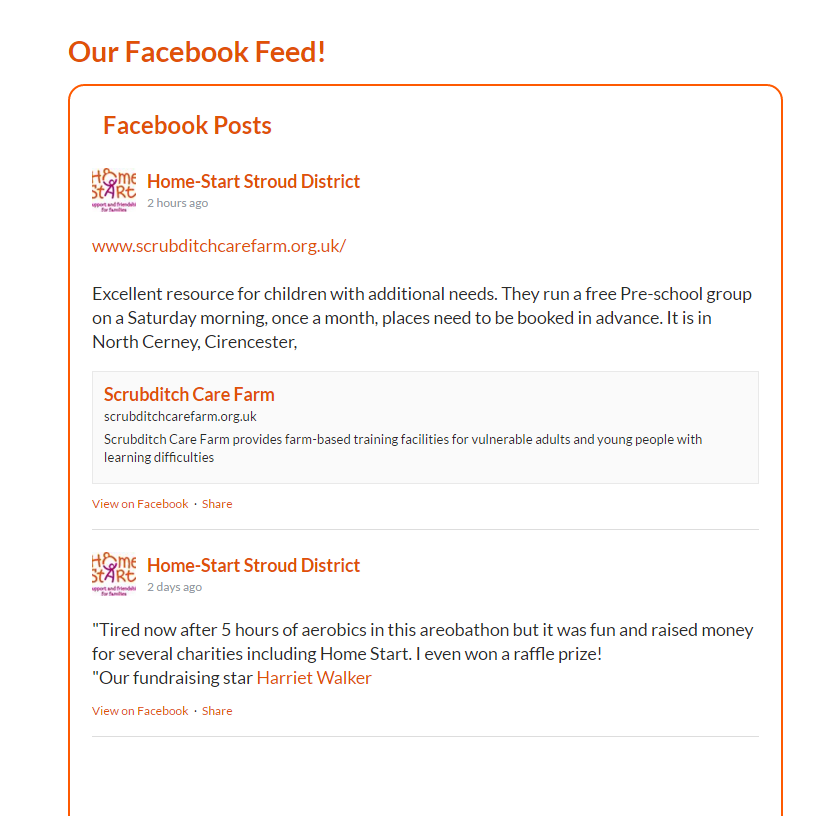
Some groups, for example those with employees or volunteers in their 20’s and 30’s tend to be more proactive driving facebook than their website. Here is a plugin you can add which puts your Facebook stream on your home page.

Social Media

It is quite simple Continue reading Getting Social

New range of premium templates available

Over the course of this year I have had feedback from various sources that there is a new style of website around that is more aimed at mobile users and optimised as such. This class of website is more dynamic and has a lot more features in than the free ones I generally use. I use free ones to keep the costs of production down.

Over the past year there has been a shift from the traditional desktop fixed computer configuration when accessing the web to mobile users. These changes reflect this.

Last year I introduced some responsive templates to some organisations, notably Home-Start users. These adapt the presentation of the site to mobile users Continue reading New range of premium templates available

Closing down? – Some things to think about

As 95% of my client base are charities or not for profit groups who may have a dependency on local government funding; it is not too surprising to learn that some groups are merging, and some groups are no longer able to function due to the cuts in funding and are ceasing to provide services and closing. Some of these have been established for over 20 years.

When a board makes a decision to close down a service or entity, there are some things that are worth thinking about as part of the close down plan on the IT side. I have had to deal with some of these issues with one group over the past month. I am noting them here, in case this applies to any other groups.

Turn out the lights

When an organisation closes, what happens after it closes is generally not foremost in people’s minds; understandably so. Particularly from the employees, or volunteers perspective. You don’t simply turn off the lights and hand over the keys on the last day. Continue reading Closing down? – Some things to think about

Post Launch – things to do

What I have provided

The following guide is just an opinion on how to handle the propagation of your site to your target market. There are many ways of doing this, and you can spend a lot of money doing this through a third party. The approach below is targeted at the local charity with little to no budget, so it assumes that you are spending nothing except time in doing this and perhaps a few phone calls.

The following steps will have been taken by myself in the late stages of developing the site and publishing it under your domain name.

  • Site map generation
  • Registering with Google and Bing search engines
  • Google Analytics account set up
  • Useful Links page creation
  • Newsletter*
  • Social Media*

(*optional)

The first two items are processes which firstly create an index of the content of your website in a series of files that are held on the server and used by search engines when they visit your site. The importance of registering with Bing and Google ensures that these search engines visit your site and learn about the content on the site. Once this process is completed you will start to appear in searches on the Internet.

There are some things you can do which require only a small amount of effort, but can make a big difference. Read the full guidance here.

Wingrove-Services
Privacy Overview

This website uses cookies so that we can provide you with the best user experience possible. Cookie information is stored in your browser and performs functions such as recognising you when you return to our website and helping our team to understand which sections of the website you find most interesting and useful.

You can adjust all of your cookie settings by navigating the tabs on the left hand side.

My privacy policy can be located here: Wingrove Media Privacy Policy (opens in a new window)

My Cookies Policy can be found here: Wingrove Media Cookies Policy (opens in a new window)