Hacked Site

While nobody wants to have a hacked site, and we all take lots of precautions; one occurred in December. We are unable to establish what precisely had happened, but it looks as though the hacker got into the hosting space rather than into the website.

There are several ways to get into the hosting space, via the hosting provider, through my master account which can access everywhere, or through a username and password combination to something called cPanel. This controls the hosting and email.

In this case the hack was fortunately benign and quite clever. Around the website were additional menus that related to the content on the site. So to someone arriving on the site, it looked a little odd but related.

There were menus that related to families and young children, and these invited you to go to other related sites. What is happening here is that the hacker will probably receive referral fees by steering people to these other sites. This would be the motivation for doing it. So it was not a more typical defacement. Continue reading Hacked Site

Sucuri Plugin – Slow site?

All of the sites use a Sucuri plugin which monitors and hardens the site against security threats. I have had several reports and have witnessed myself that editing the sites are slower than normal, and you may see an error like this:

Sucuri: (1452076628) Send_log: SSL connect error.

This message is indicating that a message was sent to a site that logs activity on your site. When you edit something, I generally get a message to indicate at a high level that something has happened on the site. 99.999% of the time it is normal activity, so I dismiss the items. It is this function that does not seem to be working predictably.

If you site is slow to respond to editing, and/ or you see a message from Sucuri, then go to the Plugins menu item. Locate the item (see image below) and temporarily deactivate it.

sucuri

This will stop the problem from occurring. When you have finished your editing turn it back on.

Continue reading Sucuri Plugin – Slow site?

Closing down? – Some things to think about

As 95% of my client base are charities or not for profit groups who may have a dependency on local government funding; it is not too surprising to learn that some groups are merging, and some groups are no longer able to function due to the cuts in funding and are ceasing to provide services and closing. Some of these have been established for over 20 years.

When a board makes a decision to close down a service or entity, there are some things that are worth thinking about as part of the close down plan on the IT side. I have had to deal with some of these issues with one group over the past month. I am noting them here, in case this applies to any other groups.

Turn out the lights

When an organisation closes, what happens after it closes is generally not foremost in people’s minds; understandably so. Particularly from the employees, or volunteers perspective. You don’t simply turn off the lights and hand over the keys on the last day. Continue reading Closing down? – Some things to think about

Hosting Review

I currently use two reseller accounts located at different hosting companies. This was a deliberate choice to ensure that if something went wrong at Hosting Company A then I could switch to Hosting Company B.

As with all major decisions like this I did some extensive testing during the approval window before making the commitment.

Some six months later I can see a significant difference between Hosting A and Hosting B. One is faster than the other. The slower one also seems to be subject to some variance on performance. There are many reasons why this may be the case, some I know about, others may remain a mystery.

As I am working mostly in the new hosting space I tend to notice this before anyone else does. Those that have hosted with me for over a year will know that I pulled all of my sites out of HostPapa for this reason. The UK performance was very poor following some changes made by HostPapa to the MySQL database server. It never got any better after the changes and following some extended dialogue with the hosting company, I decided to move everyone out.

Towards the end of this year I will review things again. I tend to have several support cases going on with my hosting suppliers, there have been several events over the past month which indicate the slower of the two hosting packages I use have been experiencing technical problems.

One issue was caused by the hosting company deliberately disabling the newsletter plugin on a site. I only found this out after 4 hours of trying things. Only when I moved the site in question to another location did I find out it all worked. Following a rather heated technical support exchange and asking them to check for certain things, they found an automated function kicking in and causing the problem. I frequently find that the 1st level support people, and sometimes the 2nd level too, know less about there systems than I can ascertain looking from the outside. I would hope for better, but this seems to be the case in many areas outside of IT too.

It is quite likely I may move around 15 sites to alternative hosting later this year or early next year if things do not improve. As things stand right now, all of the sites are up and running, a small number of them are running slower than the rest.

If you are concerned about the performance of your site, please contact me, I can then check it, and take it up with the hosting company. Do however bear in mind that the SLA (Service Level Agreement) that the hosting vendors offer is something like 99.9% systems availability. That .1% equates to 525.6 minutes of downtime per year or 8.8hrs. As far as I am aware both hosting suppliers are currently operating within those levels.

New features added

While working my way around all of the sites over September I have added in Social Media Feather, which is an excellent plugin which is not too difficult to set up. In all cases I have this set up, (if you cannot see it please contact me), it appears as a set of icons below your posts and pages.

If you also have a Facebook account and/or Twitter, then I have added these in too.

The major benefit of this plugin is that it supports a lot of social groups and is easy to configure. Once set up, your specific content can be shared through the social media group; that is right down to the page and/or post level. So any campaigns you choose to run can now be more easily shared by people.

You can see these icons at the bottom of this post.

Memory Management

All WordPress installations are set up to run in 64MB of memory by default. I found one case where the memory allocated through the hosting company (apparently it was a glitch), was only set to 32MB.  I have added a plugin which can be configured to increase this memory. All sites are now working with a minimum allocation of 128MB, and in some cases 256MB.

With one of the reseller accounts I use, there is little difference because the hosting is fast anyway, in the other there is a small improvement of speed. Largely because the memory allocated was small before it was extended.

The Plugin is called Change Memory Limit.

Reducing the Noise

On all sites I have some security plugins which send me messages about activities on the website. These will generally tell me about login failures and other problems, as well as changes to sites. I know who the editors are and can detect activity that is outside of “normal activity”. For the most part, this is hackers trying to get into a site. The volume of traffic has got so high over the past 3 weeks I have had to go in and reduce the frequency of emails to an acceptable level. On some nights (over a 6 hour period) I would get 100+ emails advising me of failed login attempts. Each one represents many failed attempts.

It seems to be a fact of life that hacker activity is increasing. I guess we just have to accept it, and keep an eye on it. Do however maintain and change tough passwords. Remember that hackers often work to password libraries, and if you are using a simple password, then it is likely they may try to use it too.

Housekeeping

I have been around all of the sites I am hosting over the past 28 days and backed them all up and retained a local copy. All of the sites now have a new plugin installed called UpDraftPlus, this is a premium plugin which automates the back up of websites.

I mentioned this a few months back, I have now installed it everywhere. The plugin can be located under Settings and UpDraftPlus Backups.

It is possible to create an instant backup, however all sites should be backing themselves up and retaining the last 6 weeks’ worth of backups automatically. Bear in mind that if you have a large site, this will take up a lot of your hosting space. So in some cases you may have fewer than 6 backups.

If anyone is close to the limits I have extended the space at no extra cost.

Using Dropbox

In a few cases I have also set up Dropbox for new websites so that they back themselves up and keep a copy of the website somewhere else other than the hosting. It is free to open a DropBox account and you can use it for up to 2GB worth of space. If you are interested in having your site backed up to an independent location please let me know.

Helping yourself

Continue reading Housekeeping

Some sites may be slow or intermittent

Reported at 16:00hrs on 10th of September 2015.

I have been working on some sites in one of the hosting locations I use. I have noticed slow and intermittent performance today. If you have a website created over the past 5 months then it is possible you are affected by slow and intermittent performance from one of the servers from around 11am today.

I have contacted the support desk, (several times) and they are looking into the issue.  I will keep an eye on it over the next day or two. I expect this will be resolved within the next 4 hours.

– Mark

The Favicon and it’s friends

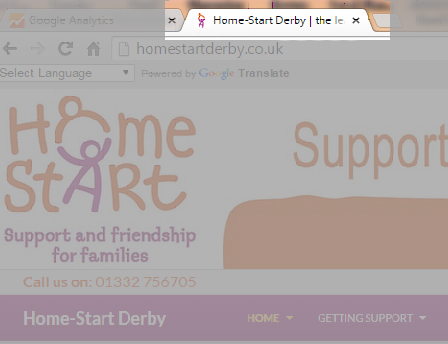
What is a Favicon?

favicon generation

A Favicon is a small image which may appear in the browser tab as in the example above to the left of where it says Home-Start Derby…. It is created from a logo. I have created these for many sites in the past, they are nice to have but not essential.

However there are other related icons that are requested from a website for “favourites” on devices such as the iPad and iPhone. These are larger, but can be based on the same image. They frequently come up as “page not found” in error logs on websites. I do not generate these because it has not been particularly important to do so. Most of you will be unaware of them.

Part of the issue is how long these things take to create and add to a site, which is why I have not created all of them in the past. Continue reading The Favicon and it’s friends

Changes in WordPress

Some of my videos are now out of date following some changes made by the WordPress development team in the latest version of WordPress.

All of the sites I have built should update themselves to the latest version. There are one or two exceptions where I have a template that has not been upgraded, but for the rest of you, you should be on the latest version now.

The key changes that I have noticed are listed below. They are all improvements on the way WordPress works, so do check them out.

Password changes

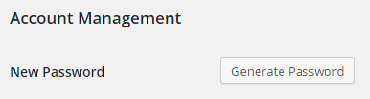
You used to have to create your own password in WordPress. This was a weakness because people could enter password123. (Which is obviously a weak password!). One of the plugins I use forced any new passwords to be strong, which got around the problem. WordPress has gone a step further.

If you wish to change your password you now get a screen like the one below.

newpassword1

Continue reading Changes in WordPress

Wingrove-Services
Privacy Overview

This website uses cookies so that we can provide you with the best user experience possible. Cookie information is stored in your browser and performs functions such as recognising you when you return to our website and helping our team to understand which sections of the website you find most interesting and useful.

You can adjust all of your cookie settings by navigating the tabs on the left hand side.

My privacy policy can be located here: Wingrove Media Privacy Policy (opens in a new window)

My Cookies Policy can be found here: Wingrove Media Cookies Policy (opens in a new window)