Hosting Enhancements

I am on a permanent quest to find out the magical set of values that will help a website perform more quickly. I have noticed at various times that some websites are quite quick, and the same ones can be slow on other occassions. 

I had reason to spend some time over the past month and explore why a site was not particularly quick to find that there are some tweaks that can be added. I was a little surprised about this because the hosting company claims that the hosting is optimised for WordPress. Yet it seems we can do further optimisations as well. 

I am going to list them in this post for those of you that have access to the control panel you will be able to make these changes yourselves. If you site is running slowly, it can be for many reasons, but if you are concerned drop me a line and I will check your site out and if appropriate make the following changes. 

Memory size

I have noted at various times that the memory in use in a large site has been quite small. No idea why other than it appears to be much smaller than the available memory. In our case in this hosting we can reset the default from 128MB to 512MB. It needs to be done in two places. One is in the wp-config.php file as a directive, and the other place is in the PHP settings. 

The additional directive in wp-config.php is: 

define( ‘WP_MEMORY_LIMIT’, ‘512M’ );

Number of Vars

All websites and applications use Vars or Variables to store things. In the default case this value is set at 2,500. Many new sites including those based on Divi may have more than this. I found that we can increase this figure to 6000.  This can be found in PHP settings. 

Output Buffering.

This is set to off by default. It should be turned on. This can be found in PHP settings. 

PHP version

Many of the plugins and templates require PHP to be at version 7.3 or above. This is worth checking as when I started we were at verson 5.6. This can be found in the control panel. 

CDN Turned on

The hosting we use has recently added a feature called a Content Delivery Network which can be turned on. This will offer cached versions of pages available to people wishing to access your site. This can be found in the control panel.

Web Optimisations

There are settings in the site which can be optimised and are low risk by the click of a button in the hosting. This can be found in the control panel. Use the least risk set of options. 

CRON

CRON is a timer that launches functions at certain times. It is a scheduler. WordPress uses a crude type of scheduler triggered by a user or bot visiting the website. That one is called wp-cron,  It works most of the time, however on some sites there may be queues of tasks waiting to be completed. This is particularly true if the site is not visited that frequently. There is another catch in the hosting which limits the time available for execution. So if there were five tasks waiting to complete, only one of them may be completed. You can get around this problem by configuring a CRON job in the control panel which is more reliable and will execute whether people are visiting the site or not. It is easy to do. You set this to run every minute. This means tasks do not queue up due to lack of visitors.  While I do not profess to know a lot of detail here, I suspect that if the queue gets too long the sites slow down because basic housekeeping functons are not being carried out. 

The cron job you need to add (once per minute) is below. Replace the domain name with your domain name. 

wget -O/dev/null https://yourwebsite.org.uk/wp-cron.php

 

Ripping off Charities

I was approached by someone requesting help with their charity’s website. She was the chair of the organisation. As with most of my connections with people it was largely word of mouth and recommendations. They connected through my website.

This was also significant in that I was using the Tawk.to app on my website and cell phone, and while sitting watching TV they popped up and started to ask questions.  (Check out Tawk.to on your site).

Anyway it transpired that this organisation had their website rebuilt by a commercial organisation. The fees were high, and it was very difficult to edit the site, and they were seeking more control.

I offered to look at the site to get a feel for what might be involved before making any commitment.

It turns out that the developer had charged them £750 for a FOUR page website. Plus there was nothing notable about the design, it was based on a template that cost around $28. There was more….   The developer had a minimum charge of £105 whether it was a 5 minute job or a 3hr one. (They charged £35 per hour).  In correspondence it was clear that the developer was offering to update the website as it was running on old plugins and an older version of WordPress. They would not click on the update button for free, they would charge the client for that service.

I requested access to the website to find that all of the editors had “AUTHOR” rights and were very limited on what they could do. This would mean they had to go through the developer to get anything done. And of course pay a fee.

This is one of the reasons I work with Charities. I thought it was absolutely appalling that a developer could charge £750 (for an at best £100 website) and the website could be locked down in this way, with the client having practically no control and having to do everything through a developer whose charges started at £105.  This is the worse example I have come across in the past 9 years of doing this.

Solution

This charity is my most recent addition to my client list. As I did not have full access to their website I rebuilt it externally, using a new template in my hosting. I increased the pages to incorporate GDPR, Terms and Conditions, Accessibility and a few other things. The site is now around 12 pages and has a more robust structure and is more mobile friendly than the former site.

All of the editors now have Administrator level access and can see all of the site and change it all. They also have multiple 10GB mail accounts available, training built into the webiste, and I will run a Zoom session with them shortly to show them how to develop the site further.  The cost?  £0 for the development work and £60 per annum for the hosting. I cannot do that for everyone that approaches me, but this was an awful case of a small charity being ripped off by a commercial and allegedly professional developer. I have spent a lot of my time in the commercial world, some of it in very high margin businesses, but even based on my experience, this was an excessive case of profiteering.

You should always be in control

My philosophy is very simple. I give you the same level of access rights as I have. Which also means you can break the site if you do not know what you are doing. All of my clients are free to take their websites somewhere else and have access to the hosting control panel and domain name. I provide free training to ensure that you can edit your site and not incur any editing expenses if you wish to do that. Which ultimately means you can spend more of your budget on the services you provide to your clients.


Did Nominet contact you?

(Date March 23rd 2020)

I have recived several enquiries about messages from Nominet contacting domain name owners telling them that their domain name is about to expire, do they want to renew it?

This applies to anyone using a domain name ending in .uk. First point is if I am looking after your domain name, it will auto renew even if I have not raised an invoice for it yet. So continuity is always assured. The only exception to that is where you have told me that you are moving, or you are closing. 

With regards to the messages from Nominet, if you read them carefully they are not actually for your domain name, but they are genuine messages from Nominet, here is what has happened:

myorganisation.org.uk vs myorganisations.uk

A year ago Nominet started issuing free domain names to anyone that held a .org.uk or .co.uk domain name. These were issued and added to your accounts without your (or my) permission by Nominet; the body which manages these things. I guess it was an initiative for making money, if we had used it, then people would have been coming to your site at the location, and now they would be asking you for money!

The domain name was the same as the start of your current domain name but just ended in .uk  (so no .co.uk or org.uk). 

I never used any of them, but had to go through my master account and set every one of them to auto expire, otherwise I would be charging you for two or more domain names. 

Do I need it?

Short answer is no, you do not, and don’t feel you have to protect your brand by securing it. As things stand all domain names are well established in Google and Bing already. If some third party picks up your equivalent domain name but ending in .uk vs .org.uk or .co.uk and starts pretending to be you, then you can take legal action against them. I have never heard of it happening, but I guess you can never tell. 

If you do want to secure it, let me know very quickly.  

Exact Metrics!

On many websites I have previously installed a plugin called GADWP which allows you to view Google Analytics data within your dashboard. It is a very useful plugin which once set up provides an instant insight into the performance of your site and how many people are reaching it.

But…..

All good things come to an end. It looks like the author of the GADWP plugin sold it to a company called Exact Metrics. I suppose they were purchasing a very large base of registered users. It does happen from time to time. It is a relatively quick way of reaching a lot of people who share a common interest.  Exact Metrics look as though they want to monetize the GADWP plugin, there is nothing wrong with that, however what they appear to have done is removed a lot of the free functionality and now charge a fee. When I first came across this, I set up the new version which replaces GADWP and registered on their site. However all of things I could do before (which btw are free anyway within the Google Analytics account) I now have to pay for. Which is a shame. I think their installed base has shrunk considerably. As you are all charities or not for profit organisations, I know that this is functionality you would not be willing to pay for. I certainly would not either when it is already free. 

But there is another but……

It appears that the original author, or at least the original code is available under a new plugin called GAinWP. While going around websites I have been removing the Exact Metrics plugin, replacing it with GAinWP.  It works in the same way as the old plugin and gives some very simple views into the Google Analytics Data.

If you want to see Google Analytics data on your site dashboard and have the Exact Metrics panel there now, please do the following:

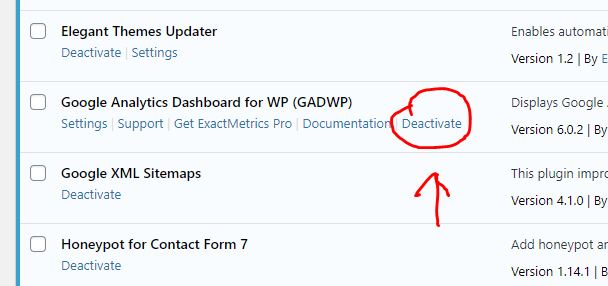
Go to the Plugins page. Locate GADWP and deactivate it. On the next screen choose other, then deactivate it. This will return you to the plugins page, click on delete to remove the plugin from the installation. 

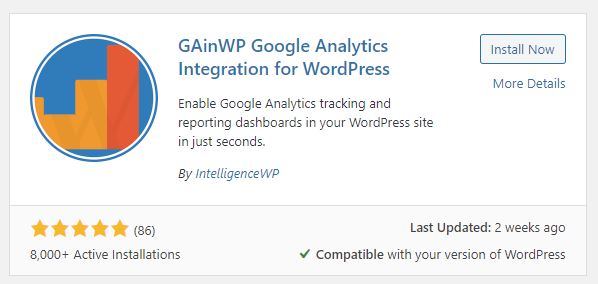
Next, at the top of your plugins page you have an “add new button”. Click on that. In the search box enter GAinWP. You will see two things come up. One is the plugin you are looking for, the other you can ignore. Click on Install Now.

Click on install now.  Once it has installed, activate it. If you have independent access to your Google Analytics account for your website you can enable it yourself. If you are not sure, drop me a line and tell me you have installed it, and confirm your website and I will get it back up and running.

Coronavirus and working remotely

Right now it is worth considering if you had to work remotely, could you access your email and other systems? It is likely at some point in the near future, if the virus takes hold people may be asked to work from home. Now might be a good idea to give that some consideration. 

The following is specifically for those people that access their website and email through my hosting. However it applies to anyone. Some of you I know use Outlook 365 too.  What might you need to effectively work from home, and where do you get it from?

Communications

Email

Most email systems offer an online version through a browser as well as through an application like Outlook. The first things you need to know is how to access these systems from a remote location. If your organisation has assigned a laptop, then it is easy, just hook up to the internet at your new location. But if you have a desktop you are probably not going to take that away from the office.  To access your email on a different system you need to know the portal or web address for email.  For the websites I have built, if you are using the email systems I provide then just go to your website and look in the footer, you will find a link there to webmail.  Go there, then you need to enter your full email address and your account password.  This will give you access to the same account you used on your office computer.  

Other considerations

The email accounts I provide are all 10GB in size. With such a large inbox, you can create folders and move important email into the folders. If you do that on your desktop, those folders are also created on the server if your email is set up as an IMAP account (this was the recommendation I made when issuing instructions). It means the folders you set up are visible on all devices that connect to the same mailbox.  If you know you are going to be out of the office, set up a folder and write yourself a few emails with important info on such as:

  • IT support person and telephone number
  • Colleagues email addresses, telephone numbers
  • Important documents
  • Whatsapp Group (good idea to set that up now). 
  • Key procedures if those are not available online

Think about what you take for granted today because it is to hand. Save a copy locally in your email. 

Website

Is your login tied to your browser at work? If it is then you may have difficulty logging in from home. Passwords can be recovered from WordPress websites provided you have access to the email account tied to your login. Make sure you know these three things:

  • Your user name in the wordpress website
  • The email address which is tied to your account
  • Optionally keep a copy of your password discretely without noting in the file name or content what it is for. You do not need to do that if you can access your email account.  Because you use your email account to recover your password. 

GDPR

Don’t forget about GDPR and your responsibility to keep confidential and personal information safe. This aspect is also worth considering before a crisis forces everyone to work remotely. While in the office you are within a controlled environment. When you are working from home, particularly if the data you are accessing is no longer on the organisation’s equipment, additional care will need to be taken to keep the information secure.  An annex to whatever policy is in force to cover such circumstances might be worth considering including the responsibilities of employees and volunteers.  Once we are the other side of coronavirus all of the data which may may have been more distributed than normal needs to be brought back under local control.  

Portable Drives

While it may be possible to use Cloud based storage, or even remote access to the usual data you access at work, you could also consider portable hard disk drives or USB memory sticks. If you use these make sure they are encrypted. If a drive or file is encrypted then if it falls into the wrong hands it will be virtually impossible to decrypt. 

Make sure a nominated person is issuing passwords, and these are recorded somewhere centrally and securely with access provided to the chair or another backup responsible person. This ensures you do not get locked out of your own systems. 

Remote Access

For any remote access to your systems make sure the passwords are changed regularly, and you know who has access. Personally I find the idea of having a backdoor into a system dangerous. But they are frequently used, and often left open, particulary where you have a remote IT support person. Make sure you have a policy where access can be turned on and off when required, passwords and user combinations are under very tight control, and used on a need to know basis.  You should be in control, not your external IT support company. Your organisation is ultimately responsible for the safeguarding of your data. 

Staying in control

The primary reason I help charitable and not for profit groups is because they have the least resources and are often limited on what they can achieve with their budgets through the normal IT channels such as web design and development. They are all largely dependent on external help either through volunteers or through contractors. 

When I first enter into a relationship with a client, there are a few questions that get asked to establish how much control they have over their current website and IT systems. Often I find that they do not know the answers, or there is someone else that knows the answers. In one case some years ago the person that owned their domain name had passed away. So it was likely with no action taken their website and email systems would fail when the domain name was not renewed. 

Tips on what you need to know 

Make sure you know the answers to these questions, if you don’t and cannot find anyone that does, it represents a problem for you that may be part of a crisis later. So, make a note of them, and store them somewhere safe, and reference them from your IT policy. 

1). Where is my domain name held?

Why?

The domain name is like the golden set of keys to everything. You should know where it is located, and have access to it. If for any reason you needed to leave a relationship with a developer or hosting organisation, it starts with moving the domain name out to somewhere else. You need to know the web address, the password and the email address/ user account. If you do not have access to the email account associated with the domain registration, change it to one you do have access to. 

Continue reading Staying in control

Handling Junk email

Annoying Spam Messages

I read somewhere last year a scary statistic which suggested that 95% of the email circulating the internet is spam. I don’t know whether it is true or not, but sometimes it can feel that way.

What can you do about it?

Usually the first line of defence is to have some spam detection in forms. This can be a question, or image where you are asked to identify something. These rely on human interaction and image recognition. They can be annoying too, arguably more annoying than the spam they are supposed to prevent. Google has a function called Recapture that is used on many sites. The latest version is very good, but it appears to work most effectively if the user is accessing your site or form using Chrome. If they are not then the images pop up and you are asked to match things. We cannot guarantee that visitors are using Chrome of course.

Another method is a hidden field in a message that a computer can see, but a user cannot. The form logic detects whether some data has been added into the hidden field, and does not send the email if the form has been filled in by a computer.

Personally I tend to try to avoid quizes and image recognition, I think they put people off. But sometimes you get a persistent message coming through your website. I have one case like that now.

Continue reading Handling Junk email

Changes in WordPress

There has been a recent upgrade to WordPress over the past month. I am not sure if the “new features” in this release, or whether it was the one before have introduced some monitoring functions on the installation. WordPress continues to improve all of the time. There is a large network of people across the world who develop and test new releases. 

Careful with that axe Eugene

I have some websites which are centrally controlled. I hit an update button and the websites update. It is not perfect, it sometimes stalls and often leaves a trail of error messages that I need to follow up. After coming back to the UK following a 4 week vacation, I opened the application and ran it and got a screen full of errors. It is fortunate I did not do this while I was on holiday. Starting at 4am on the 11th of November when I hit the button it took me 5 hours to go through 15 sites which had now broken. (I started at 4am because my head was still in a differnt time zone!). 

What happened?

When I went around to look at each site, some or all of the updates had failed to update. The controlling program had reported that the websites were “unresponsive”. I logged into them and checked them, then ran the updates from within the website. I updated the plugins first. Then the template. After updating the plugins I received a message that “The site is experiencing technical difficulties……”  It turns out there is also an email which outlines the technical difficulties. I had not seen this before. The message in the email turns out not to be directly related to the cause. In all cases the sites eventually came back online. 

New Health Checking Features

It looks like I had triggered a recently introduced function in the wordpress core which monitors exceptions (crashes) of processes. It had identified something was wrong and halted the site. While it is good to have such features, it turns out they were not wholly reliable in identifying the problem. 

It looks like an upgrade in some but not all cases may trigger this event to happen. What follows is a white screen for around 5-10 minutes with a message on it saying this website is experiencing technical difficulties. It will eventually clear down. If you initiate your own updates and see this, don’t panic. In all cases where this happened to me, it was resolvable. I have already taken action to upgrade the PHP Scripting language the websites run on to the latest version (a possible reason).

I am talking to the hosting company about this as well, as it is not entirely clear why it is happening. It may be because of some housekeeping function which has not triggered, and that needs to run before the website becomes stable again. It may just be a new “feature” in wordpress.

If you see a white screen at any time with just one line of text in it, send me a message and note the time, and what you did at the time. I will check it. These should only be transient events. All sites are set up to upgrade themselves, they usually do this without any problems, but they do not do it immediately the upgrade is detected.  

Hosting Infrastructure

I have been through all accounts in the hosting and made some changes to the infrastructure that the websites run on. If you see anything broken, or any odd behaviour please bring it to my attention ASAP. These changes will impact your website and email handling (in certain cases).

PHP7.3

PHP is the scripting language which is used on the server to support the websites. It is a type of operating system for servers. The wordpress websites make requests to the operating system for various support functions. Up until yesterday (12/11/19) we had quite a large range of versions in use. I have upgraded all of them to above version 7.1 most are at version 7.3 the highest version available.

Why is this important?

I saw some reports coming from WordPress installation monitors that advised to update above version 7 because there were some security vulnerabilities in the PHP 7. That was the motivation to make the changes. Continue reading Hosting Infrastructure

Get me started Mark…

For the past year I have been building an editing support page which is set to private, so only you can see it. Within this page is a guide for editors and lots of additional resources, all online and built into your website.

With the changes in the Divi template (Visual Editor), I have made some changes to one of the guides I have been placing on sites.

If you are familiar with guide, you can download an updated copy here. This will tie into a template that is built into your site which is the first step for creating a news item.

Get your copy here: Get me started guide (Revised)

For those of you that would like something like this in your site, download a copy and see if you think it would help. Drop me a line and I will see if it is feasible to add in.

If you already have an Editor or equivalent page, locate the page, open it in the editor and attach this version to the button for the Get Me Started Mark guide. If you are one of the recently upgraded Home-Start websites, I have already added it in.

Wingrove-Services
Privacy Overview

This website uses cookies so that we can provide you with the best user experience possible. Cookie information is stored in your browser and performs functions such as recognising you when you return to our website and helping our team to understand which sections of the website you find most interesting and useful.

You can adjust all of your cookie settings by navigating the tabs on the left hand side.

My privacy policy can be located here: Wingrove Media Privacy Policy (opens in a new window)

My Cookies Policy can be found here: Wingrove Media Cookies Policy (opens in a new window)