The following applies to everyone that is using mail under your domain name that have not outsourced this function elsewhere. You will know if your mail comes from another provider, if you are using Office 365 for mail you are hosted elsewhere and this does not apply to you. The majority of people I host have their mail with me.
A reminder of how you should be using your mail
All mail accounts that are supported through wingrove-media should be configured as a POP3 account and not an IMAP account.
Why?
POP3 allows your mail box at the hosting to provide temporary storage of your email. Meaning mail is sent to you 24 x 7. It waits in your mail box on the server until you download it. At the point you download it, it should be removed from the server. So in other words your mail box will never fill up if you download it from time to time.
IMAP in its’ default configuration allows you to download mail to multiple devices and your mail is not stored locally but on the server. If you allow this to happen your mail box will rapidly fill up and cease to function. Worse than this, it may also affect your website if there is no more space in your hosting.
How I use my mail
I use the mail systems in the hosting as well. In my case I have the following requirements:
I pick up mail on any or all of the following devices:
iPad, iPhone, Desktop, Laptop & MacBook. So 5 devices! I am clearly on the lunatic fringe. However my mailbox on the server does not fill up, but I can generally see the most recent mail on all devices.
How do I do this?
I have one golden master account for everything. That is Outlook on my desktop PC which is what I use for most things. This account has Outlook set up so that it copies mail from the server and deletes it once it is 14 days old. It also deletes any mail I locally delete the next time I hook up.
All of the other devices are set up in the same way. This means that for most applications I have at least 2 weeks of mail on any device so even if I am on the road I can locate the most recent communications.
Some of you are leaving mail on the server
The hosting space allocated to you is not infinite. You are generally operating in 2-3GB of hosting space, and if anyone gets near to the limits I extend them to 4-5GB for free. However some people now have mailboxes that are full, or nearing full. When I advise you of this, you need to take action, if you do not take any action I cannot keep increasing the space available, you also run the risk of your website failing as there will not be enough space available for your site to run in.
Why is this happening?
One of the reasons this is happening is because you have used 3rd parties to set up email for you and they have used the wrong local configuration. They have set your local mail configuration to IMAP rather than POP3 which were the instructions I sent out when your account was set up.
What can you do about it?
Firstly check in Outlook to see what sort of account your mail is going to. Typically you can do that by doing the following depending on which version of Outlook you are using:
Go to File, Account Settings, (and Account Settings again) this will provide you with a list of the email accounts active on your system.
It will list the name and the TYPE of account. If your account is set up correctly it will show POP/SMTP if your mail is hosted with me.
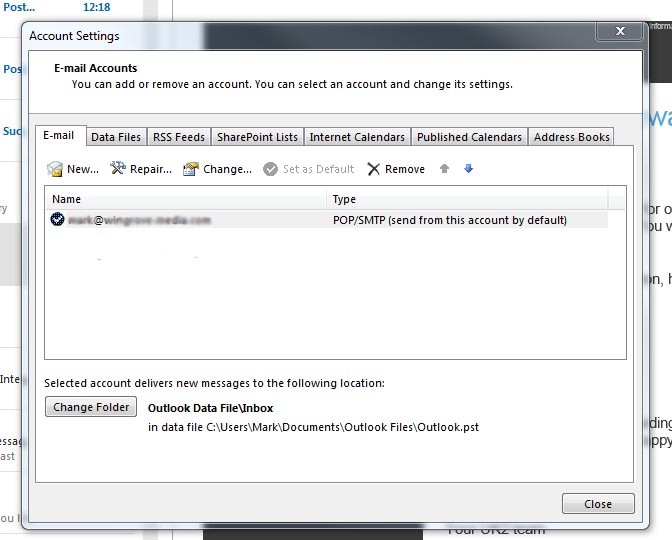
Next you need to check if your mail is being deleted from the server. You can do that by first selecting the email account you want to check in the list if there is more than one. Then clicking on Change Account.
You will see three tabs present above a form. Click on the tab that says advanced and you will see a form similar to the one below:

The settings on this form should look similar to mine. However they are often overlooked. Pay attention to the items under delivery towards the bottom of the form.
After you download the messages to your selected mail client, if you want other devices to pick up a copy then check the box Leave a copy of the messages on the server. However do ensure that Remove from server after 7 or 14 days is checked. If you do not check that, the mail box on the server will fill up.
Also check the box Remove from the server when deleted from “deleted items”
These last steps are often overlooked by local tech support.
I have POP3 and it is full
If your settings have now been corrected, but I have asked you to check your email please login to the webmail interface (http://mydomain.org.uk/webmail) in other words your home page plus /webmail/ added to the end. Login with your full email address and password.
Proceed to your mailbox and delete any unwanted mail in there. Start at the oldest mail first. This should resolve the problem.
I have an IMAP Account what do I do?
It is possible to set up IMAP to keep most of your mail locally and not on the server but it needs setting up that way. You will need to seek support from the person that set it up for you. This is a local IT issue and nothing to do with your hosting. Better still seek support to convert your IMAP account to a POP3 account.
Pass the following to your local tech support person:
The email hosting provided for my account is limited to between 250MB and 500MB per email account. Please set up my email so that I can download it locally to my desktop/ laptop computer and confirm my account is configured as a POP3 Secure mail account and is removing mail from the server and not leaving it there.
Extensive resources exist on this website.
To find out more about how your mail is set up and how you should be using it please start here: http://wingrove-services.co.uk/email/
If you are stuck please do contact me, but please bear in mind that my responsibility to you and your organisation does not extend to your local desktop support and generally speaking this is a desktop (mis)configuration problem.
I need more space
I can provide more space, and if you find yourself in this position let me know. However I do not have unlimited resources. One thing to check is that it is possible to have several GB of storage with Gmail (Google Mail) and use your mail system with Google. If you do that I need to change some of the server settings for your domain. Everyone’s accounts will need to be running in Gmail. However you could then use this as an IMAP account if this is what you need. You will need to have a local technical support person available to you if you need to use this. I can look after the settings associated with your domain name.
In this case your mail is no longer provided by me.