Captcha Solution for Contact Form 7

I have been using contact form 7 on many websites for the past few years. I have noticed that there are some anti spam measures which are being defeated by spam bots (computers that post spam into forms).

I am reluctant to use Google Captcha because I think that while it is undoubtedly effective, it also presents a barrier to some users, particularly elderly ones. I have also seen preferential treatment (aka easy access) when a user is using Chrome, but other browsers they may be stuck answering questions makes bypassing it frustrating to say the least.

I have just found Contact Form 7 Image Captcha by KC Computing (Kyle Charlton) which is very elegant, simple and works fine. It asks the user to click on an image which matches some text. A user has to complete this step before submitting the form.

If your site is using Contact Form 7, you can load this plugin into the library and then insert the following shortcode into the form: [cf7ic “toggle”]

If your website uses the form in a dark coloured panel, the formatting of the text may not work very well. To get around that problem you can add the following text into the CSS for your site. For Divi users this can be found on the Divi settings page at the bottom. There is a space to add CSS in there. It will change the selected text to yellow.


.captcha-image .cf7ic_instructions span {
color:yellow !important;
}

Dangerous Spam in Circulation

I subscribe to a number of websites that report on vulnerabilities and various scams as they emerge. One in particular caught my eye as we currently have at least one site under constant bombardment  (4 per minute for 8 days now) with a spam email that carries a highly suspicious link. In that case no damage has been done other than wasting a lot of my time. The sending VPN node is blocked (the actual sender is hidden from us) and the content of the email has been analysed and if any get through they are sent to a junk email folder.  The problem here is detecting it when it happens to minimise disruption. 

One such publication is called Hacker News. I get that daily, and there are all sorts of reports of problems in major systems. I want to bring your attention to just one of them. 

IcedID

There is a particular email circulating right now which will come most likely through your contact form, will look official and will advise you that are using images on your site which are subject to copyright. Practically speaking, while I know some organisations are not particularly careful where they pick images up from, I have only ever come across one legitimate case. 

The email carries an obfuscated link (you cannot tell where it is going to take you to) this is really the first warning sign. Never click on anything that does not look right particularly if it is an unsolicited email. In this case the email states that the link will lead to evidence of copyright infringement and you need to take action now or legal action will be taken against your organisation. This type of email is likely to panic someone into clicking on the link.  If you see anything like this relating to your website forward it to me and I will check it. 

If you do click on the link it will lead to downloading “IcedID” an information stealing malware. If you do not have strong security on your system with AV and Security software the download may not be detected. 

You can read about it here: Hackers Using Website’s Contact Forms to Deliver IcedID Malware (thehackernews.com)

Most junk email is easily identified, there are a few around that can scare people into taking action. Don’t become a victim of that. Send it to me, I will check it out for you. 

Case Study – Extreme Spam!

I had an email from one of my clients informing me that they had 4000 emails in their inbox which had suddenly appeared. There were more being added every minute. Typically this charity received 3 or 4 a week.

What happened?

It appeared that someone was directing spam messages through the website at a rate of 4 per minute. Analysis of the emails coming in was interesting. They all came in through a contact form which had several anti spam measures included which had been defeated. Perhaps this was their goal to write an automated program which defeated the forms anti spam measures and fill the inbox. Which is a sort of denial of service attack.

Every email was different. They allegedly came from different email addresses, and the payload in the message was also different. So spam filtering could not work on a sender address, or easily by looking for some keywords or domain names.

The message encouraged the viewer to click on an obfuscated link (the destination of the link is coded so you cannot tell where it is going to). The coding for each link was also different.

Meanwhile while looking at this the volume of emails had now hit 6000.  I had seen this once before, but I guess it happens regularly, because much spam traffic is automatically generated through forms.  The question was what to do?

Start by looking at the emails

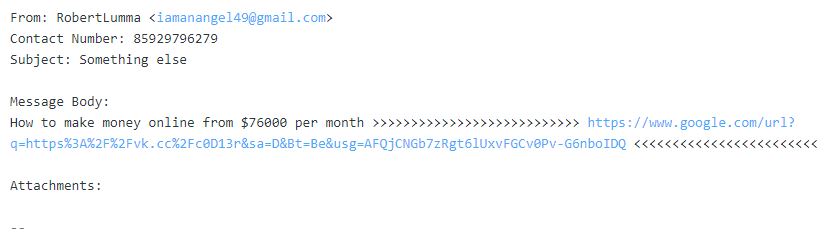
Each email had a couple of common elements in it. There was a brief message followed by a varying number of: >>>>>>>  then a web address (always different) and then a varying number of:  <<<<<<<.

If you look in your hosting, or through your webmail account you can set up filters for incoming mail. The filters work at a very detailed level per email account. I had not used them before.

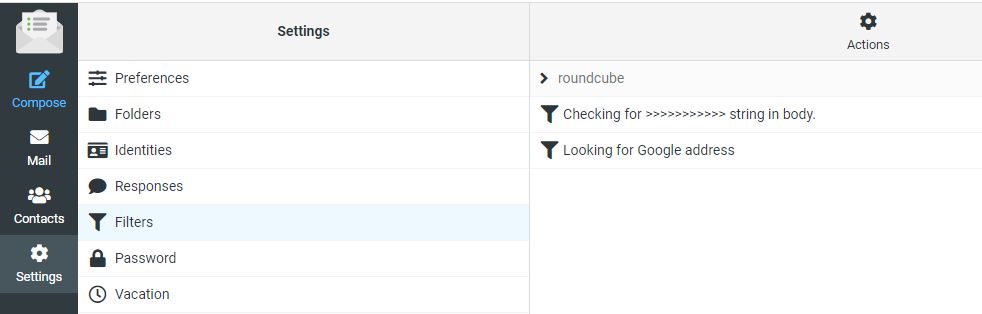
I logged into the email account via webmail and chose Settings and then Filters and set up a couple of filters.


In the example above you can see I have set two filters up. Lets look at them to see how they work, and what limitations they may present. 

Filter 1 Looking for this sequence “>>>>>>>>>>”

All of the email had two sequences of greater and less than symbols to draw the viewers attention to a web address they wanted you to click on. 

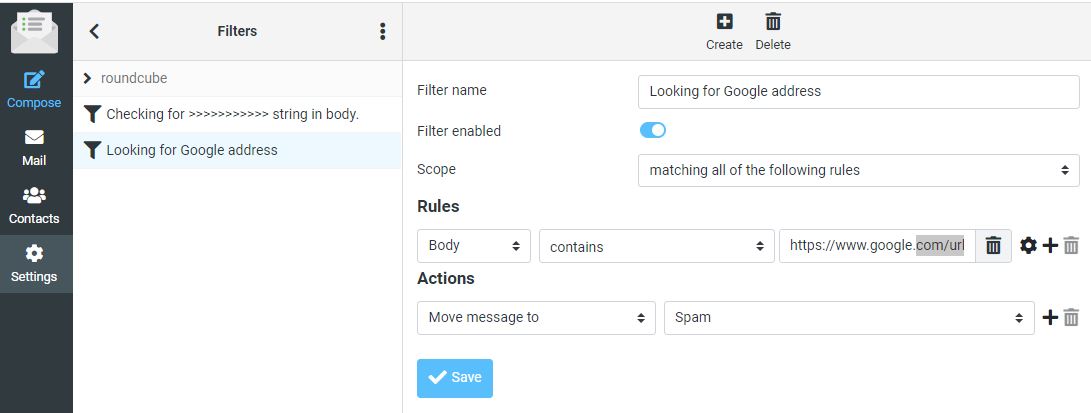
I set up a rule which says check all incoming email to this account and look in the body of the email. If you find “>>>>>>>>>>>>”  as a sequence in this email move the message to the Spam folder.  Here are the settings.

You can see from this layout that you could build a very complex filter and have lots of conditions that need to be met before deciding what to do with the email. I could have refined it further, but I was under pressure at the time to regain control of the account. So I created a second filter on the Web address in each message. 

Filter 2 Catching a web address

In this case all of the messages had a different email address. They all started as https://www.google.com/url?…..     followed by a series of random characters. This is a method of hiding the destination address. But because all of the messages contained this common sequence I could use it. Here is the second filter. 

What happens now?

With these two filters set up any messages coming into the inbox that contained either “>>>>>>>>>>” or more in a sequence OR a message carrying “https://www.google.com/url?” were now automatically sent to the spam folder.  While this might look like success it was not the whole story. 

Messages like the one below were now going into the spam folder, all of them were being trapped. However the computer was still hitting the website 4 x a minute.  While email was now usable, the problem had not gone away. 

The hosting company keeps a log of activity on the website. It is not an endless log, but it will show you maybe the last 3-4 hrs of activity. I decided to take a look there. This would tell me if it was a network of computers from around the world (which has happened before too), or a single computer running some sort of automated program. 

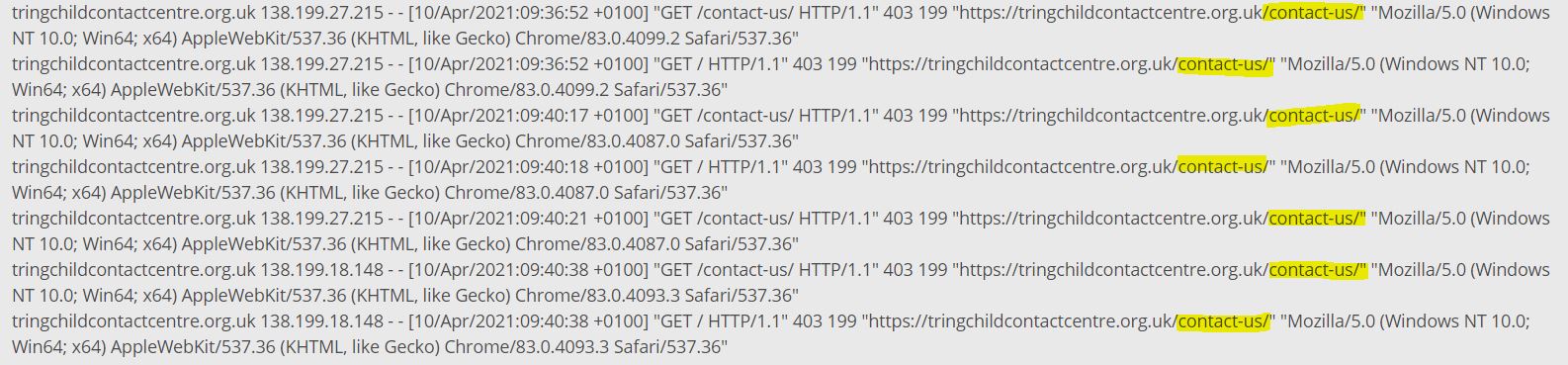
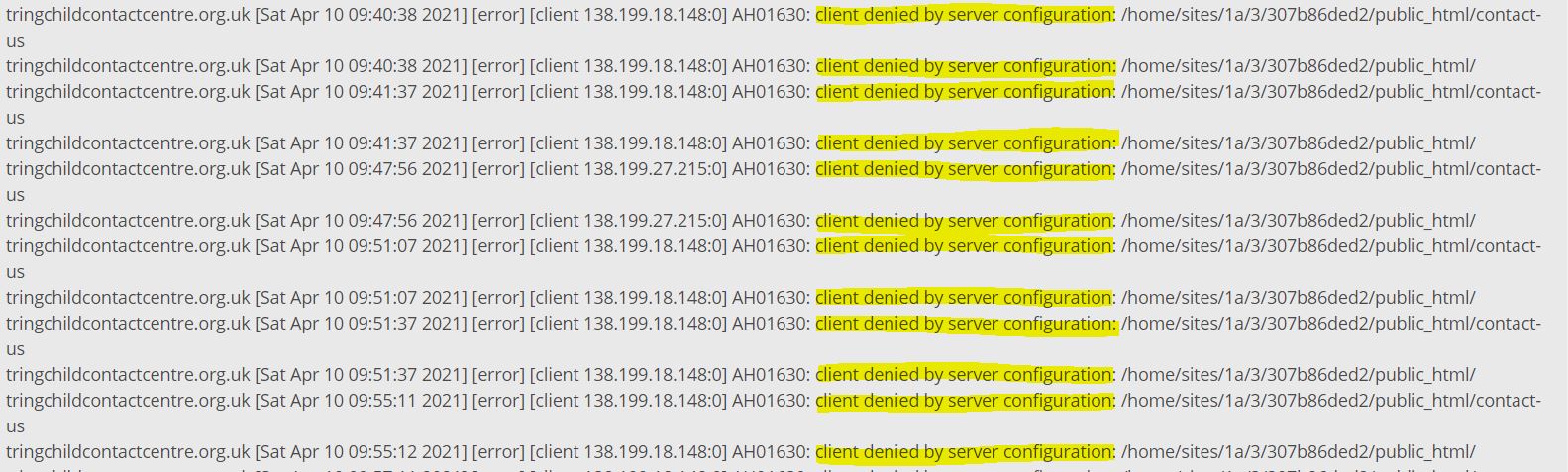
Here is an example log with an access to the contact form highlighted. 

The access log shows that something(s) are constantly accessing the contact us form on this website. The time stamps of the log show as high as 5 time per minute.  These accesses are coming from two sources: 138.199.27.215 and 138.199.18.148.  When I did this the first time through I only saw one IP address. 

In the hosting you can block accesses to the website by country, by IP address or by IP address range. The country block is not fool proof because people can appear through IP addresses which are not listed, or pop up through a VPN somewhere. 

Where is the spammer located?

Can I block by country?  I went to this website and entered the IP address to see what it came back with.  https://www.iplocation.net/  It came back with the following information:

This tells me several things. There are actually several entries from various databases, I have shown 3 here. It tells me the computer is located in France, in Paris at Ile-de-France. It also tells me that the service provider is a UK based company called Datacamp Limited.

Block France and then the whole world!

I next went back into the hosting and looked at the filtering options. This client only has clients local to their area, and certainly in the UK. So there is probably no need to have this website visible in other countries. At least for a short period. So I first blocked France, then blocked everywhere apart from the UK.

This action did not immediately work. Possibly because the block is not instant. The logs showed continuous accesses to the site. There is another reason, just speculation; the account was being served through a CDN (Content Delivery Network) and it might take some time for the content to age and be replaced. I tried clearing the server side cache but it had no effect. So what now?

Block by IP address

As I knew the IP address of the computer sending the messages into the website, it is possible to block based on the IP address which I did.

That stopped some of the accesses but then another IP address popped up. I have been here before, and traced a network of compromised servers around the world that were sending spam several years ago. The new address was 138.199.18.148. So there were either two computers, or more likely one computer with two ports attached to the internet. 

The second IP address is similar to the first (first two number are 138.199) and are also with the hosting company Datacamp Ltd. 

There is another type of block where you can block a series of IP addresses on the basis that hosting companies will acquire blocks of IP addresses which are in sequence. I set up a filter in the hosting which blocks 65,535 addresses all of which start with 138.199.

This blocks any computer working on this range of addresses:  138.199.0.0 to 138.199.255.255.  

Here are the blocks in the hosting control panel. 

In this case the entry 138.199.*   overrides the other two entries which were specific to two locations.

This prevents these computers from seeing the contact form. So if they cannot see it they cannot post data into it. The website is not visible to them.

There is a second log in the hosting which records errors. You can see that each time the automated computer attempts to access the form it receives a 403 response from the website which means “Forbidden”. Their access is denied.

At this point the automated spamming computer cannot reach the website and cannot send any messages through the contact form.  But it is still trying. It is still trying to do this 3 days later. Someone has left it on to keep attempting to hit this website.  So what else can you do?

Contact the Hosting Company

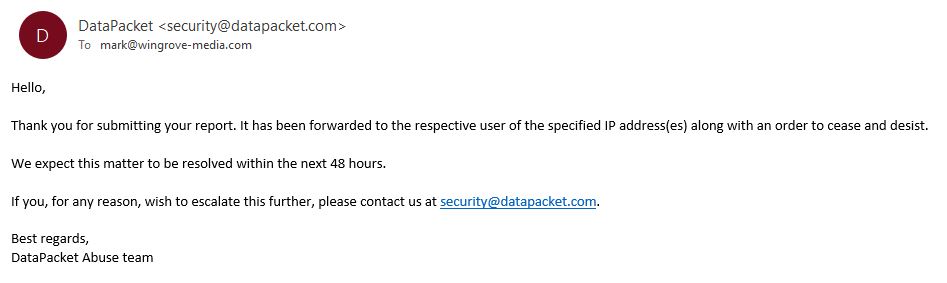
People connect to the internet through a service provider or hosting company. In this case I had strong evidence that the person doing this was accessing the internet through a connection provided by Datacamp Ltd. So I tried to reach out to Datacamp through their website: https://datacamp.co.uk/  The website has a single email address visible and a telephone number. I sent an email to datacamp@datacamp.co.uk to advise them of the problem and request that they shut down the connection. Nothing happened, no response. So then I phoned 020 3808 5949 and left my number. No reply.  I then did some searches on Datacamp Ltd and found that it is a parent company for CDN77. I went on that site and got on a chat with a representative of that company. They gave me another email address: abuse@datacamp.co.uk which finally did get a response. 


At the time of writing the offending computer in France is still trying to hit the website contact form. Tomorrow I will escalate it yet again. 

Whose fault is it?

It is unlikely that we will ever know who was behind this. There was probably no malice or directed attack at this particular charity other than they were testing something.  A similar case a few years ago involved around 20 computers that were around the world doing something similar. They were less sophisticated than this attack, because in this case it defeated some tests in a form. I also changed the tests by replacing some different questions and it was still able to defeat it.  I will look for some alternative methods to keep automated machines out. 

It may well be the case that the computer this process is running on is a highjacked server someone has taken over, or has infiltrated. The owner knows nothing about it, and the service provider has no relationship at all with the people behind the attack. We will never know. 

Sadly dealing with this type of thing is a fact of life. It goes on all of the time. But if it happens to you, we have some tools available in the hosting to minimise any loss of service. 

If anything else happens here, I will update this. 

Update 15/04/21

We are now a week later after this was first reported. The senders IP address has changed twice over the past week, but the messages continue. If it had not been detected, this account would now have 50,000 junk emails in it!

Over the course of the past 5 days I have contacted the service provider’s security team, and they have passed the message on to their customer. Their customer is a VPN provider. People use VPNs to hide their identity or the source of the message. The computer that is sending the messages is an unmanaged system in a data centre which is subcontracted out to their client. It is their client’s customers, or even their customer’s customers causing the problem. Nothing can be traced. Frustrating isn’t it? 

I have contacted Action Fraud, and it seems the only thing I can do short of taking a private legal action against the company under the Computer Misuse Act 1990 for denial of service. There is nothing anyone can do, even though this is obviously wrong. It is also outside of the area that OfCom is responsible for.   I have been advised to raise a case with Action Fraud which I will probably  with the amount of evidence I now have.  

Complex Referral Forms

I have had several requests for complicated online forms from people over the years. The problem is if you try to copy all of a typical referral form and build an online one it just looks as intimidating as the paper copy. 

I have been working with Home-Start North Somerset over the past 8 weeks to develop an online referral form. This is now live, it does not cater for all of the fields in a referral form, but it does capture a lot of it, which will help in handling the referral. 

The forms (Professional and self referral) generate an email and package the data up in an easy to use format. If you think you might benefit from something like this, or need a custom form, please get in touch. 

You can see the launch page here: Referrals Page on Home-Start North Somerset.

There are two buttons on the page which will guide the user to one of two forms. 

As described last month, or was it the month before??  I have a page here which demo a version of a complex online form, you can try it out for yourself and see what it generates by going to here: https://wingrove-media.uk/generic-application-or-referral-form/ At the bottom of the form you can send the email to yourself. 

Spring Clean?

How is your website looking?  Does it still do what you want it do?  Is it being used how you anticipated it would be used?  Do you know how it is being used?

Over time sites tend to end up with a few problems, it is inevitable, I have have many years experience building them now, and you are only going in maybe once a month or less and adding things in. You may have forgotten some of the editing basics, or carried out some significant editing on a page and created an imbalance in the columns. 

Anyway I have a broom and a duster and my trusty can of Mr Sheen, so give me a call to visit your site and straighten things out for you again. 

I have had a couple of calls over the past month to add in a Meet the Team page, as an example. Building that from scratch could be a bit intimidating. 

Another angle here, is how are people using it? It is also worth stating how you hope people are using it, and I will go to Google Analytics and tell you how people are using it. Then we can figure out if there is a gap and how to close it. 

Websites are never completed, things change all of the time, don’t let them pile up, I am generally around if you need help. 

Higher Specification Hosting Available

With effect from 1st April 2021 I will be offering website hosting on a higher performance hosting platform based on a Virtual Private Server (VPS). This means I have total control over the memory loading, processor loading, disk input/ output, network bandwidth for the VPS.

Where you are located currently this is in shared hosting which can be affected by other websites and functions sharing the same platform.  I can now offer an upgrade path to higher performance. 

The difference is faster access speeds and responses. Editing is notably faster too, I am developing all of my new sites in this space now. 

The current fees for shared hosting with me, is £5/ month per account paid annually in advance. 

If you wish to move to the higher performance hosting with dedicated resources the cost will rise to £10/ month paid in advance. Should anyone wish to move back to shared hosting, I will move them back within 28 days and refund any balance. So migration to and from the higher performance system is risk free. 

Owncloud private cloud file sharing platform

If you move over to the VPS high performance hosting system I will also add in an OwnCloud file sharing platform into the hosting as well. I cannot do this in shared hosting, but because I effectively purchase disk space, I can use it for other things. 

Why might file sharing be important?

We have all been locked down for pretty much 12 months. We have had to learn to work remotely, so people that used to touch base every now and again, or visit an office have not been able to do that. 

OwnCloud provides a private and secure storage area on the server within your account. The nominated person in your organisation will access it to configure it and manage it, or I can do this for you. For your staff, or your trustees, or your volunteers; each person will have an account on the system. They download a free program on their computer, run it and log in. What happens now and subsequently every time they turn their computer on; a directory on their disk drive synchronises with a virtual folder in the cloud, and subject to access permissions, synchronises with it. It remains in synchronisation with the server while the computer is powered on. It works with Windows and Mac computers. 

This means all of the nominated people can work locally on shared documents. Any changes are copied back to the cloud, and then sent to everyone else automatically. 

Each account has a password and user name which is private to the person accessing the system. So you have complete access control.  This system is much more robust than having a password protected page, because in this case it is much more secure, and depending on write and access permissions everyone can both read and write to the common storage area. 

I already use a password protected page on my site 

A password protected page limits the ability of the public to view something in a website, but it is a common password shared by a lot of people. Apart from the administrator, all participants are read only. It works fine, but it has limitations. 

If you are in a group working on and sharing documents, this system is much more effective and secure. 

A practical example of how it works

Many of the people I provide support to are worried about their IT skills. One of the benefits of this system after it is installed, is it works in the background.

Let’s assume we have Fred who is the chair, working with Sarah and Peter who are Trustees. Sarah owns the task of revising a policy. Peter and the Chair have signoff on it.  If they have this system installed on their computers, it will work as follows: 

Sarah starts working at 6pm, loads the old version of the policy into MS Word and starts to work on it. As she is working she adds notes into the document suggesting things to change. She saves the document locally on her disk drive in a special “OwnCloud” folder. When she saves it a copy is also passed back to the server on the internet as her copy is re-synchronised with the server automatically. 

At 7pm Fred turns on his computer. A short time later his OwnCloud folder has synchronised with the server and a copy of Sarah’s working document has been downloaded. He can now review this. Make his own copy of the document, add his comments in and save it locally. When he saves it locally it also resynchronises with server and the file is uploaded back to the cloud. 

At 8pm Peter turns on his computer. It synchronises with the server and finds two new documents. One from Sarah and one from Peter. He can open both and see Sarah’s original comments, and another version with the chair’s comments. 

Peter appends his comments to the version that the chair raised and saves it locally. It is automatically synchronised with the server again. 

Meanwhile Sarah left her computer on the whole time. As the variants were uploaded to the cloud, they were downloaded to Sarah’s disk drive, so she can see other people are working on the files. 

Summary

OwnCloud is a very powerful system with lots of parameters which can be controlled by the administrator, including who can see and edit what. It will significantly help with remote collaboration.

Owncloud Provided with VPS hosting

If you move your website into the VPS hosting, I will add in an Owncloud private storage area and set it up for your users. You will have initially 3GB of storage space on the server. So this system is really for documents, not images. Things like Policies and Procedures are a good example of where this system can provide benefits. More storage is available if you need it, but it will be priced in increments. 

There will also be a non refundable fee of £50 for setting up the OwnCloud system and documenting how it is configured. Training will be provided to your administrator. 


Virtual Private Server

Following a request for faster performance, I have taken out a new account in February, and have been experimenting with it. It is called a Virtual Private Server (VPS).

When you look at the range of hosting services available they start off as shared hosting where there may be several hundred, or even over 1000 websites all sharing the same server platform. 

I am a reseller, so I purchase a block of resources on this shared platform and add websites into this system. The hosting company monitors the performance of the servers and makes sure they do not crash, or fail, or run out of hosting resources. 

However this model means that while each website is physically separated from the next, you can be affected by the overall operation of the server. I know from my dealings with the hosting company that they are pretty good at managing this, and it is very rare for a website or server to go down. If it does, by the time I have alerted them, they are generally already aware of the situation and have some remedial process underway. 

I spent a lot of time in January and February trying to identify why some sites ran more slowly than others, and what could be done to speed them up. I have a series of support threads in this area with the hosting company. Your sites have many local tweaks on them to help them to perform well.  But sometimes there are server related issues where a site might be slowing down, or less responsive because of something else going on, on the server. You are also spread across many different servers, not everyone is on the same one.

There are also some complexities with the caching system used and what it does with code used by the website. Sometimes deleting the server side cache (Stackcache in your dashboard) can clear things up. 

Checking out some competition

I took out some hosting with another UK based company in early February to establish if we were seeing “good performance” compared to a competitor. I tried several sites there and recorded the difference in speeds.  It turned out that where we are now for this class of hosting is very good. The cache provided by the server is also effective in giving each site an edge over competitive shared hosting. 

The Next Level

When you look at hosting plans, the next level up from shared hosting is Virtual Private Hosting. This is where an instance of the operating system runs on platform where you have finite resources such as processor cores, memory, disk space, disk input/output and network bandwidth. Unlike the shared model, you are not sharing this model with anyone unless you choose to do so. There are several levels of performance, and you can scale up (or down) as required. 

Wingrove-Media VPS

I have taken out a relatively small configuration, but it is almost as expensive as the shared reseller hosting on an annual basis. It is based on a two core processor, 50GB disk space, 100Mb/s network speed and 2GB of memory. I have been running several websites in this space over the past 3 weeks. 

Site access speeds are notably faster, editing is much faster, which tends to indicate that the Divi editing system is quite processor and memory intensive on the shared platform. 

I can scale this area up from 2 processors to 10 processors and over 400GB of space 1000Mb/s port speed at £250 per month!  Well that is a long way off.  How this all goes is highly dependent on people moving their sites into this space. 

For now this platform is available for the next 3 months and under review. I will provide more information on pricing and terms and conditions a little later.  

If you are concerned about your site speed, and would like it all to run faster, I can demonstrate the benefits by moving your website into my VPS account for 2 weeks.  Contact me for more details. 

Slow site? Check your browser

One notable thing I did find out during this exercise was that Chrome was not as fast as I expected it to be. I ran multiple tests by working my way from left to right loading the top level pages on a website, and timing how long it took to load every page at the top level.  I did this with Chrome (my normal go to browser), Microsoft Edge and Firefox. Chrome produced consistently lower results than Firefox and Microsoft Edge. (This was on a Windows 10 Professional platform). 

I have started to use Microsoft Edge as my go to browser, and this has increased editing and browsing times. I would also add here unlike your Chrome Browser I have a few plugins loaded into mine, so these may have contributed to slowing it down. I did try unloading most of them, it was still slower than MS Edge and Firefox. That all said, I would recommend giving them a try. Unlike MS Explorer, which did have issues in compatibility with Web Standards, MS Edge seems to work fine. 


Need a bespoke CRM system? – Call Graeme Neale

If you have either reached a point where you might benefit from a CRM System (Customer Relationship Management) or your old one has fallen into disrepair or has been withdrawn from the market then you might like to check out Graeme Neale, (Email address: gnh@pmvideos.com )

I have virtually met Graeme through the website redevelopment for Home-Start North West Kent where he has been building a new CRM system for them to replace MESH which is withdrawn later this year.

Graeme charges a flat fee for the development of the system, provides training and maintenance for a year, after the initial period; ongoing maintenance and support is negotiable.

If you are looking around, or considering just using spreadsheets, it might be worthwhile sending Graeme a message to see if he can help.

Evening Tutorials

  • Would you benefit from more training on your website?
  • Would you like to get some more of the cool features to work on your site?
  • Do you need a refresher on common problems?
  • Would you like to participate in a forum?

Just thinking outside the box here. I know from working with some of you, you have picked up the concepts behind editing your websites and have done really well. If you would like to become advanced users and learn how to do more,. why not consider signing up for a once a month (free) or ad hoc online Zoom Tutorial? I could run this as a forum and have multiple attendees. 

Let me know if you are interested in going that extra mile. Use the contact us page to send me a message. 

From website referral form to CRM

Mainly for Home-Start organisations, but it can apply to any group with online referral or application forms. 

I have built a proof of concept which has a referral form online which is quite complicated. 

The user inputs data into the form and then sends it to the recipient. 

The recipient has a very easy form to read. The form formatting can be applied to user requirements. 

Within the form the data is duplicated as a CSV string of characters (Character Separated Value). You can copy this block of text and paste it into an Excel spreadsheet and then apply Text to Columns command. Now each cell has a data field contents in it. You can manipulate it further from here, or even import it into your CRM system. 

To find out more and look at a working example with documentation that you can try online, go to here:  http://wingrove-media.uk/generic-application-or-referral-form/

Follow the link above to visit the page with the form on and try it out for yourself. 

Wingrove-Services
Privacy Overview

This website uses cookies so that we can provide you with the best user experience possible. Cookie information is stored in your browser and performs functions such as recognising you when you return to our website and helping our team to understand which sections of the website you find most interesting and useful.

You can adjust all of your cookie settings by navigating the tabs on the left hand side.

My privacy policy can be located here: Wingrove Media Privacy Policy (opens in a new window)

My Cookies Policy can be found here: Wingrove Media Cookies Policy (opens in a new window)