Phishing Example

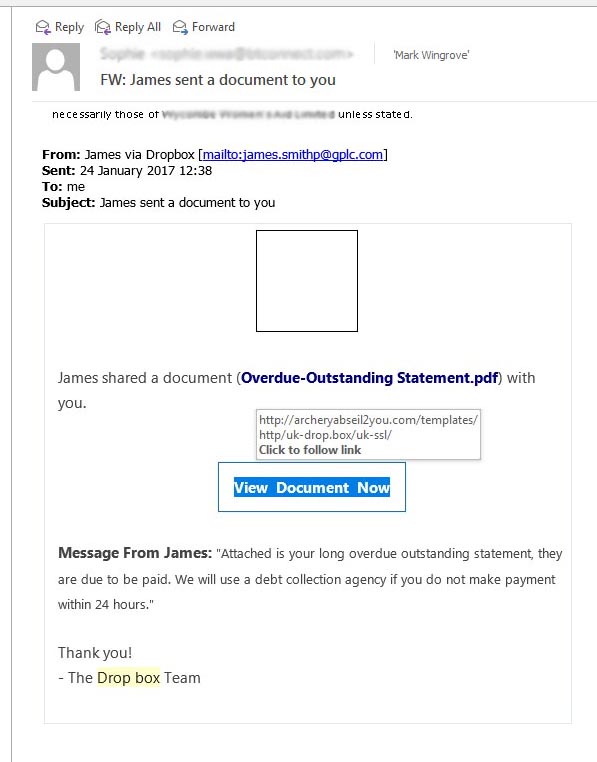
A client sent me an email about  someone claiming to be a supplier of services aggressively demanding payment or if the payment demand was not met further action would be taken. They asked if it was genuine. The problem with many of these is they may appear to be credible, and that is what the scammers behind these things try to do.

See the image below and what to do to check for yourself:

Continue reading Phishing Example

Wordfence dashboard

Wordfence is a plugin which I am using on all sites now. I have used it before, but stopped using around 18 months ago after the authors managed to reset the local configuration on all of the sites it was installed on. It became very verbose sending me over 10,000 emails on security matters across all sites over a three week period when I was out of the country.

Having looked at other solutions, I have returned to it and reinstalled it on all sites, and removed some alternatives I was using. It provides a number of security functions including a firewall, and can also scan an installation. I am not a huge believer in all of their claims for security, there is an element of marketing hype going on, but they are about the best that is out there. Continue reading Wordfence dashboard

Disaster Recovery Process

I have spent quite a long time writing and documenting a process that you can follow which would help you to recover a failed or worse still a hacked site. Contingency planning is something non IT professionals don’t worry a lot about, a particularly in charities. There isn’t time, or it is not a priority. Or in many cases people just do not think about it.

From time to time I get questions about what if I am not available, or I am run over by a bus. All of you can and should have access to the essential information to allow you to move your site should the need arise. You are not tied in any way to me, and I don’t prevent you from leaving. I am not running the Hotel California of web hosting. I have come across a few that make it difficult though.

Disaster Recovery

It would be wise to take a quick look at the following while you do not have a disaster on your hands. Then at least you know the information is there.

You will need the following information if you don’t have it then now is a good time to ask.

  • Control Panel User Name and Password.
  • Your own backup of your website loaded on one of your systems so you can readily access it.

The full article is password protected and accessible from the main menu but can be located here: Disaster Recovery

Security Update 6th Jan 2016 – All sites

I have spent the last week going through all websites and making sure they are updated and stable. Each has also been independently backed up.

With immediate effect I am going to set up a location on this site to describe the security set up for all sites I am hosting, and keep this up to date to reflect the current set up. You will need your password to access this space. Click on the button below.

Security Configuration

Obfuscating Email Addresses

There are several schools of thought about having email addresses present in your website in a form that a computer can read and subsequently harvest, and then you find yourself on a junk email list.

My email address is all over the place, and while I do receive a lot of spam, it is manageable. I also used to receive a lot of spam before my email address was all over the place. So unlike some people that treat the subject as one might a religion, I am not entirely convinced it is a massive problem based on experience.

However I noted on one of the sites I developed a client has located and added a plugin which obfuscates (make obscure) the email address by encoding it in such a way, that we can still read it and see it, but a computer looking for the @ symbol will not see it.

I have not tried it yet, and perhaps arguably it is like shutting the gate after the horse has left the stable (on the basis that this will not remove you from any spamming lists!) you can locate it and try it yourself.

The plugin is called EMail Address Encoder by Till Kruss. It has been downloaded 60,000 times and it is also rated at 4.5 stars.

To locate it and add it, log into to your site and go to Plugins, Add New and enter Email Address Encoder and you will probably find it at the top of the list.
PHP Mailer

Around 1 week ago a vulnerability was reported in a block of code called PHPMailer which is a component in all WordPress websites. A fix has been published and most sites will have picked it up by now.

I have noted an increased volume in the number of spam messages coming through websites probably because hackers are testing the mail send function to see if they can use it.

Am I affected?

I am currently working through all of the websites, but I may have missed doing this on the first 20 or so because it was not a problem at the time I visited.  Continue reading PHP Mailer

IP Geo Block

I have found a WordPress plugin which looks quite interesting. I am currently evaluating how it works, and whether it makes any difference. What it does is blocks access to your site from countries that are not listed as acceptable.

Why would you want to do that?

Hackers control things called Bot Nets. They are computers based all around the world. In many if not most cases the owners of those computers are unaware that they have been infiltrated. What a hacker may do with a compromised server is use it to launch attacks on other sites and servers.

With the security used on your sites there is a mechanism which will detect failed logins. If more than three failed logins occur over a set period (generally 30 minutes) the device that is attempting to login will be blocked for a period of time.

At the point the login is blocked another computer comes on line and attempts to login too, and so the process repeats itself. It is called a Brute Force Attack, they occur all of the time, and sometimes for extended periods of time. Continue reading IP Geo Block

You don’t want one of these….

I was passed the following message in a text file from a small regional charity. It was on the start up screen when the computer was turned on.

ATTENTION!
All your documents, photos, databases and other important personal files
were encrypted using strong RSA-1024 algorithm with a unique key.
To restore your files you have to pay 0.49965 BTC (bitcoins).
Please follow this manual:1. Create Bitcoin wallet here: https://blockchain.info/wallet/new2. Buy 0.49965 BTC with cash, using search here: https://localbitcoins.com/buy_bitcoins3. Send 0.49965 BTC to this Bitcoin address:1FkFRVWCvTyimcAAxq19dhYGspQ4KaeoabL4. Open one of the following links in your browser to download decryptor:

http://tt-metall.ru/counter/?a=1FkFRVWCvTyimcAAxq19tidShQ4KaeoabL
http://technocooks.com/counter/?a=1FkFRVWCvTyimcAAxqsHyiLppQ4KaeoabL
http://projectdare.co.uk/counter/?a=1FkFRVWCvTyimcAAxq19ssHppQ4KaeoabL
http://grutorax.com.br/counter/?a=1FkFRVWCvTyimcAAxq19mITppQ4KaeoabL
http://www.wordbaasoverdebal.nl/counter/?a=1FkFRVWCvTyimcAAxq13SDppQ4KaeoabL

5. Run decryptor to restore your files.

PLEASE REMEMBER:

– If you do not pay in 3 days YOU LOOSE ALL YOUR FILES.
– Nobody can help you except us.
– It`s useless to reinstall Windows, update antivirus software, etc.
– Your files can be decrypted only after you make payment.
– You can find this manual on your desktop (DECRYPT.txt)

(In the above example I have edited all of the links to make them void just in case anyone was curious to take a look and land in more trouble.) 

Is it real what should I do?

First, tell your manager. It may represent a risk to the office and everything connected to the local area network.

Continue reading You don’t want one of these….

Lazy Sunday Afternoon

As most of you know I use several security plugins on sites to monitor and prevent certain types of common attacks on websites. This short article shows you what happens all of the time 24 x 7, 365 days a year, and from all around the world. So while you may think you are a small local charity based in a sleepy suburban town; something in Dhaka, Pakistan is trying to log into your website, in fact from all around the world!

This is a 12 hour snapshot

Follow this link to open this map in a new browser window. 40 locations were used in 12 hours. Continue reading Lazy Sunday Afternoon

Wingrove-Services
Privacy Overview

This website uses cookies so that we can provide you with the best user experience possible. Cookie information is stored in your browser and performs functions such as recognising you when you return to our website and helping our team to understand which sections of the website you find most interesting and useful.

You can adjust all of your cookie settings by navigating the tabs on the left hand side.

My privacy policy can be located here: Wingrove Media Privacy Policy (opens in a new window)

My Cookies Policy can be found here: Wingrove Media Cookies Policy (opens in a new window)