Support via Zoom

Like most of you I have become a Zoom convert and have taken out s subscription. I can provide ad hoc support if you are stuck, free of charge, just drop me a line and I can give you a hand. Training is also available delivered via Zoom if you need a refresher, or never got any training because of the coronavirus pandemic. So no excuses for not knowing how to do something. 

Remember no such thing as a silly question. So if something is bugging you, stopping you from updating your site let me know. 

Online Chat App

I have recently come across an online chat feature which you can install on your website(s) and chat with visitors. It does not cost anything and is entirely free. The company that provides it make their money through additional services should you need them such as providing a chat agent for you. If you go for the basic package then it is an excellent way of “being their” virtually for your website visitors.

You don’t have to sit at your computer and wait, you just leave it running in the background, and if someone clicks on the button, then you will get an alert, and they can talk to you using a local instant messenger type interface.

At the time of writing (21/03/2020) I have been using it a couple of days and have installed it on 4 websites and been on two chats in that time.

There is a further way of using this, if you install the app on your smart phone or tablet, you can chat at any time.

Now, I know that this system could be quite intrusive, especially if there was only one person acting as a chat agent. However if you had multiple people, or volunteers on this system, then it could be quite a powerful tool enabling you to continue to provide advice, guidance and support online in these difficult times with Covid-19 prevalent at the moment, and social distancing in place.

How do I install this?

First you need to go to this website: https://tawk.to  and take out an account. All they need is an email address, a name and a password. For first time users they will also ask for a website address where you intend to install the other end of the solution. This is known as a “Property” in their language. You can be signed into more than one.

Somewhere in this process you need to acknowledge an email they will send to the email address you provided to them as a means of verifying you are the right person.  As you work through this check your mailbox for an email from them and acknowledge it. Mine came in quite late in the process. 

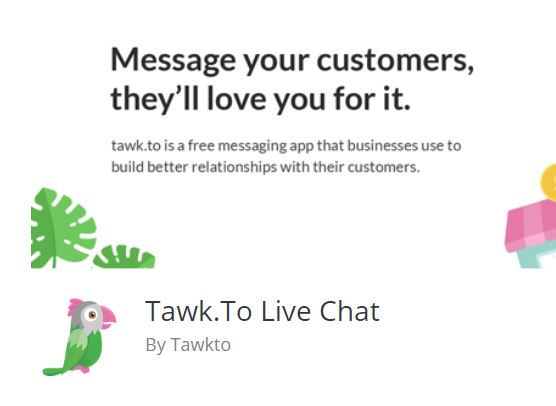
Login to your website and go to the Plugins option. Click on add new and search for Tawk.to  you will find there is more than one. The one you need looks a bit like this:

You can follow this link to find out about the plugin: https://en-gb.wordpress.org/plugins/tawkto-live-chat/ When you have located it in your plugins selection, install it. Then activate it. Once activated there is an option to access settings. All it needs to know is your account name and password. (Email address and password you used on the main Tawk.to website) and you will need to select the website you are using as well in a box for the settings.

Once enabled, switch your view so you are looking at the live website rather than the dashboard.  You will see there is a message in the bottom right of your website. If you are online and logged into the tawk.to website and have their dashboard running in another browser window, anyone visiting your site can chat to you.

Extending the service

Being dependent on one person is going to be a bit of a drag, and if it comes to that, they will disengage. From a practical standpoint, you can leave this running in the background on a computer (or smartphone / tablet) do something else, and only engage when there is someone to chat too. That may or may not be convenient.  However you could invite volunteers to be your chat agents. If there was a group of people, willing to be online as a pool of resources on your behalf, you are more likely to be successful with this system.

Anyway if you are even remotely interested, it is worth taking a look. With everyone socially isolating currently this would be a useful tool to continue a service remotely, even if it is at 15% of what you were doing before, that will be a huge help to those that have no help whatsoever, and are now feeling more isolated than ever.

Online 24 x 7

Not necessarily recommended for just one person, but it is possible to put the Tawk.to app on your smart phone or tablet and be logged in 24 x 7. So you do not need to be sitting in front of, or near a computer all of the time.

Interested but not sure what to do?

Drop me a line and I will get you set up on it.


Processing Form Data

I was asked if it was possible to add a form to a website for an event dinner, collect the responses and place them into a website to reduce the laborious activity of copying feedback in forms by hand. Other examples of where you might want to do this are with a census, or survey. In the past I have helped to set these up and created the associated form, the responses come back as emails. These then need to be processed by hand. 

Having given this some thought, there is another way you could do this to simplify the data collection and processing. The problem is getting the responses into a spreadsheet. Once it is in a spreadsheet, then it is relatively easy to write formulae to process it, or extract the data you need. 

There are several aspects to this, some may not be that obvious:

1). The form data can present the options, and the form can only respond with a single selected option. So for example we can say you have a menu choice: Rolled Pork, Rolled Brisquet, Vegetable Stack. You can only select one of them. What is selected and returned in the form is the precise choice of words. If it is precise, then it is unique. You can process it in a spreadsheet. 

2). While you can have forms that say Enter A,B,C,D, E, F where A is strongly agree, and F is Strongly disagree. What you get back is A, B, C, D, E, or F. But this is not easy to process. Whereas “Strongly Agree” is easy to process. So use the language that humans understand. You can abbreviate it later in a spreadsheet. This is of much greater importance if you are not a computer programmer, or software engineer. Those people can think in terms of variable names, and values. If you are not used to thinking that way, keep it simple. 

3). If the website uses Contact Form 7 (one of the most popular contact form plugins and one I have been using for several years now), you can build the response email up very precisely. So much so that you can create the top part of the email in a human readable format, and the bottom part in a computer readable format which you can use in a spreadsheet. 

4). Send a copy of the response back to the person that sent it to you. It is good manners really, and in the case of a Dinner Dance, you have a hard copy of what you ordered for dinner. 

Processing the Data

You will see examples later in this article, let’s assume that I am collecting feedback on dinner choices. I have created a form which I can collect information from people. In this case I have received the following:

Starter: Smoked Salmon with Celeriac and Prawn Salad

Main Course: Slow-cooked Rolled Brisquet with gravy

Dessert: Summer Pudding

I can format the responses in the email which comes back to the organisation like this for human consumption, and like this for adding to a spreadsheet:

Smoked Salmon with Celeriac and Prawn Salad,Slow-cooked Rolled Brisquet with gravy,Summer Pudding

You will hopefully agree that the first version is easy to interpret, but the second version on a single line you have to look more carefully at to interpret.  So we provide both. 

CSV

The second version is the data presented in a CSV format or Comma Separated Value format. If you look closely the three values are separated by commas. 

I can paste that second CSV formatted row into a spreadsheet row for later formatting. 

Wait while collecting form data

If I use a special email box for all of those responses, I can set up the form and forget about it until I need to do some processing. All of the data will go to a special email account. I just work my way down, open up each one and paste the CSV formatted line to a new row in the spreadsheet. 

Convert the CSV rows to columns

Next I choose Data in the spreadsheet, highlight the rows of responses and convert the rows of CSV data to columns. After this is done, all of my First Course, Main Course and Desserts are all in aligned columns. 

Plus I know that the content in the columns is predictable and finite, I am not going to find Jelly under Dessert because it was not an option to start with. 

Add in some formulae

Choose a location at n+1 rows down your sheet where n is the maximum number of responses you were expecting. 

If I choose a range for say the Dessert column on the spreadsheet and I carefully look at the available options I will find that there can only be four possibilities. In this case none, Summer Pudding, Chocolate Tart or Lemon Cheesecake. I can now set up a formula which will count the total number of instances of “none”, “Summer Pudding”, “Chocolate Tart”, “Lemon Cheesecake”.  In other words I have created an automatic way of counting the instances of a given response in a single column. 

Summary

If you have something moderately complex you wish to achieve, it is possible to build CSV based response and paste these into a spreadsheet, convert them to data in columns, and then process the columns. It can make the tedious steps of processing information a lot easier.  

I am looking at this right now as an example for someone, so I will come back and provide a downloadable guide here once I have progressed it further. (January 2020). 

Update Feb 12th 2020: This system has been implemented and is in use with a client. It is now very very easy to collate all of the responses and run some analysis on a spreadsheet to identify, total income, total number of attendees, total plates of each type for the kitchen, and also identify special dietary needs. If the user had to paste each value from every email it would have taken a considerable longer period of time. 

Contact me to discuss further if you want to do something like this. 
 

Questionable Advice?

I have had several requests over the past two months to add “DONATE NOW” buttons onto all pages on a website. One request in particular came via a voluntary advisor which seemed totally flawed to me. However I can appreciate that most of you are dependent on “external voluntary experts” of which I guess, I fall into that category too.  So here is my take on it, like all gifts, you can choose to accept it or not. It is just an opinion. 

When you look around the web, particularly on charity sites you tend to see the Donate buttons plastered everywhere. The advice given to my client was to add a link under the button which goes directly to a preferred fundraising portal. Say for example Virgin Money Giving. That sort of sounds ok, but I disagree, for several reasons:

1). Let us assume I have arrived on your website, I am not that familiar with it, I have looked around and now I wish to make a donation to help you. So I click on the Donate Now! button. What happens?

It takes me to a completely different website, it may have your logo there, but it has someone elses logo there too, I am not sure if this is a scam or not, so I leave. Did you get your donation? No. 

There is a web standard called WCAG2.1 which states that a link that opens in a new window, or takes the person off of the website needs additional text to advise the user before they click. Think of it as a best practice. You cannot do that here. Let us look at another case:

2). I am familiar with your organisation, I have visited several times, and I can read (!). I want to make a donation. If I want to make a donation, which page would I go to?  Chances are you have a Fundraising page at the top of your menu. That is where I would go. I did not need a button plastered everywhere.  

The Donate Now button is not dissimilar to someone on the street asking you for money; they have not established a compelling case why you should give them money, but they are asking anyway. Chances are most people will ignore it. 

It is much smarter to sprinkle Donate Now buttons within the content on your site AFTER you have just made a case for why it might be a good idea to donate. It is more subtle, less “in yer face”. While I have no firm evidence to support this, I suspect it will be more successful than the former method which has the subtely of a sledgehammer. 


If you must, do it this way…

If you must put a Donate Now button everywhere, it should really link to the fundraising page, or the page in your website which lists the various methods of raising funds. In this way the user is still on your website. So within the page you can explain that by clicking on a link or icon on this page you will be sent to the fundraising partner page, specifically to your account on that page, and it will open in a new window. 

By doing it this way, you conform to best practices in WCAG2.1, and you are holding the hand of the donor and reassuring them as you take them to the appropriate website. 

I personally would be more likely to donate that way rather than the sledgehammer approach. 

Why the sledgehammer approach…

I am being disingenuous really, I don’t think people really mean to use the sledgehammer approach, but I think there is a reason why they propose to do it this way. Fundamentally the person making the recommendation is making an assumption: they love your charity, everything about what you do, and as such they are already bought into the value you provide. So in their case you do not need to engage into a sales pitch, they are already sold. So the button is all they need. Well that is fine for them.

But your adviser is not your average donor!

However the people you are hoping to donate to your organisation are not bought in yet, so you have to do that as a separate activity. Taking them to the fundraising page first is vitally important. Of even greater importance, sprinkle those donate now buttons within your content, say after a moving testimonial from one of your clients, or a case study. I think you will have much greater traction with your market. 

Do you have a Social Media Editor?

From a marketing angle, you may consider social media to be very important to your organisation, and it is of course. However it is a bit like preaching to the converted if you think about it. It is not likely someone will find you on social media unless they already know about you. So that means the audience you are sharing your social media stories with are already fans and followers. It is a way of keeping in touch.

Many organisations I work with have strong social media presence, but not such a strong presence in the news on the website. Is this a problem?  Well yes, I think it might be. Here’s why:

Do you want more people, or the same people?

Ask a marketing professional and they will always want more people exposed to a story or message. Particularly that group that is not currently engaged with the organisation. Within that group might be future; donors, contributors, volunteers, members etc. That is really what is important. Of course you do not ignore those people that have signed up or following you already. We are talking about a superset of people, not just regular engaged fans.

Work smarter not harder

So, let’s be clear here, this takes a little more effort, but over time it will be much less effort, and you will reach far more more people.

Without exception, if I look at the statistics of those sites that have a rich and varied news feed, they also have high numbers of visitors. There are some technical reasons for this in terms of how the website works. But let’s keep this simple.

Here is a new strategy

Get your social media guru to add things to the website first. Do what they were intending to do in a post on your website rather than Facebook, Twitter or Instagram.

That in itself gives you an advantage over twitter because you are not restricted on your content.  When you have added the item to your website post. Display the post in isolation from the news page. (When you view it on the news page with other posts, you need to click the image, title or read more link to open it). Now copy the URL or web address for the item in your website.

Next go to Twiter, and paste it there. Then go to Facebook and paste it there. Both systems will try to grab something from your website. So you don’t have to rebuild it all in Facebook, Twitter et al.

Now you have met the requirement to keep your fan base in touch with what is going on. However it will also drive up your website visitors as a result. For those people that happen to come across you while surfing the web, they can see it too. They would have missed it before if it is exclusively on social media. 

Check your results

Most of you have a Google Analytics panel on your dashboards, you can see and monitor the results of this change if wish. The net result in terms of effort, is you create it in one place only (your website) and do not need to recreate it any where else.  Everywhere else including feeds you simply add to, you just paste the URL. When you do this, you will see a big spike on the number of visitors to your website. Many of those will be first time visitors. Some of those will also become fans too. 


Domain Name Scam

I received the message below this morning. It is a scam, I have seen them before, but it is easy to be caught out.  You may receive one of these around the time your domain name is up for renewal. It is possible for  a third party to find out when your domain name is due to be renewed, and therefore generate this email. An unsuspecting person might assume it is to do with the domain name, and was expecting a bill. If you see anything like this and you are not sure send it to me. 

Taking it apart

When you first look at this you can see it is related to a domain name, it is something for accounts payable, and there is a line in there which says “This notice for www.domainname.com will be terminated on December 14th 2019.” At this point you may be feeling anxious. 

Looking more closely it is a proposal to add your domain name to a search engine, or “search engine registration” something I do for you for free, and only takes a few minutes anyway.  There is also the veiled threat that “……. cancellation of this proposal making it difficult for your customers to find you on the web”.

Other things to watch out for

The telephone number is a random set of characters, the link to their website is obfuscated. So you cannot tell exactly where it is going to unless you click on it. If you click on it, you do not know what will happen. At best it is someone fronting a dodgy scam that is probably not illegal, but is highly questionable designed to catch people out. With those types of links they forward to another link, but register that someone has clicked it. 

Don’t Panic

Call me, or send me a copy if you receive something like this. Other common scams are from people allegedly offering to sell you more traffic. On the basis that more traffic will yield more contacts. Chatty emails that say “Hi, I have just been looking at your website, you should be getting more traffic, I can help you…….”   No third party can know how much traffic you get without access to the hosting, or to a Google Analytics account. These are scams too. 

Looking around sites some seem to be targetted more than others, and depending when you look, they may get tired of one site and switch to somewhere else. While we can detect and stop computers posting spam on sites, there is no fix for people posting messages through forms or contacting people directly. Only where the message is a common message and it has been detected as spam, and provided you are using spam filtering will it get caught. 

I have looked at the originating IP address of many of these messages in the past. A lot of them come from India and the Philippines. Both places where people can be exploited for a few dollars a day.


Home-Start Rebranding

Timeline: 17-08-19

I have been working on rebranding Home-Start sites over the past 10 weeks. At the time of writing I have redeveloped 17 of them, these are all live sites now.  I have a further 3 sites which are complete and under review ready to be published.

While I have contacted everyone, not everyone has responded back. So if all of this is news to you, and you are looking for a rebranded website please do get in contact with me. I decided while going through this exercise that I was not going to keep chasing people, just let them know it was happening.

Get in touch if you wish to be added to the list. I have some free time over the next six weeks. So turnaround should be quite quick.


Artwork for a banner

I sometimes receive requests for artworks for printers. Examples are business cards, banners, flyers, posters, even headed notepaper. Because I have created your website, I am familiar with the colours and designs that have been used, and have these to hand. If there are some dominant images, I will have these too, generally in high resolution.

Quick Case Study

The owner of Fighting-Fit.org.uk; Peter, contacted me to ask if I had any advice on creating a roll up banner. I have had one recent bad experience with one company local to me, who managed to screw up a £120 flag artwork (after 20hrs of development of an artwork with multiple iterations for a white flag, they printed it with a massive black border on one side). So my experience todate has not been good. However I know through the graphics programs I use (Affinity Photo and Affinity Designer) that I have the capability to produce large print ready artworks so offered to help. I also gave him some advice on questions to ask.

I suggested that he shop online to find out where he could source one from. There are many places you can go to. He came up with this company: Solopress (website is here).

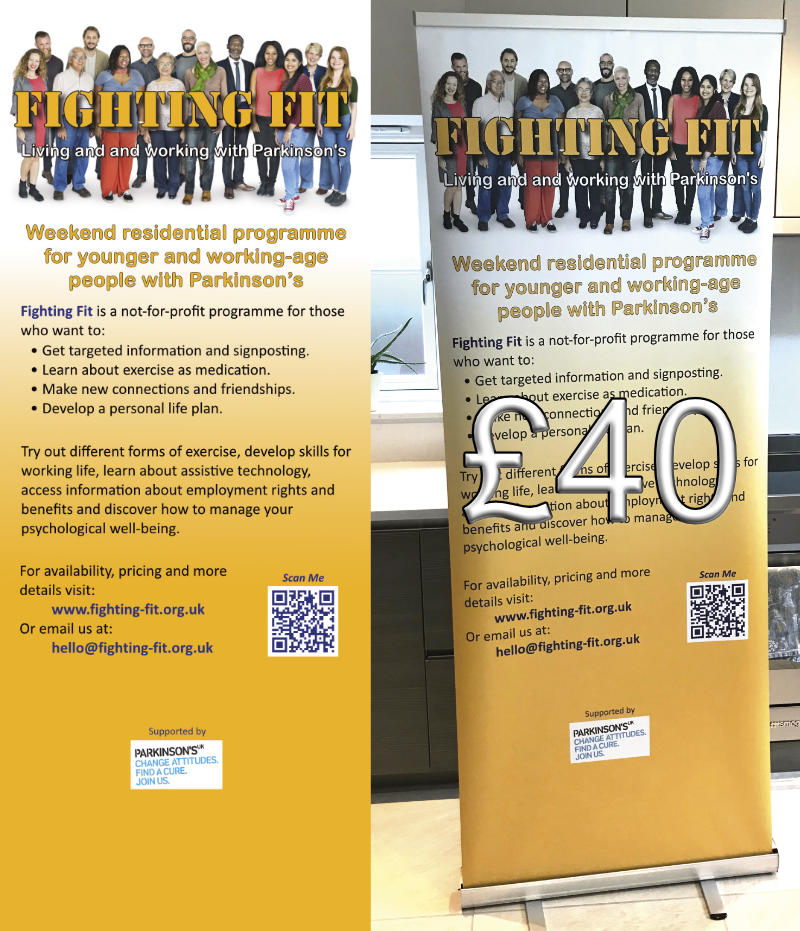
Peter had an idea for what he wanted, provided it to me in a Powerpoint file. I built it using my graphics program. These things are never right first time, so we went through three iterations. It took me personally about 1hr to take the concept, build the first iteration and then develop it from there. Below is a small version of the artwork, and the final product.

Remarkably the turn around time was incredibly quick, and the total cost was around £40! The artwork to produce this was 2 metres high and 800mm wide at 300 dots per inch. This generates very large files. Continue reading Artwork for a banner

Home-Start Rebranding

Around 50% of the Home-Start sites I host, or have built are either in a rebranding queue, or have been upgraded and released. If you don’t know anything about this, then you have missed some of my messages reaching out to you. I have only responded to those that replied and currently not chased anyone else up. 

As of 6th July, the following sites have been through the rebranding exercise. Most of these sites were in the Divi framework anyway, a few are more substantial upgrades from previous versions moving them to the latest version of the website.

If you don’t know about any of this, and need to be added to the list please get in touch with me ASAP. My queue of upgrades currently goes out to the end of July 2019. 

This is a list of example sites that have been through the process.

Home-Start Lisburn Colin
Home-Start North Down
Home-Start Spelthorne
Home-Start Bracknell Forest
Home-Start Stroud District
Home-Start Chichester
Home-Start Surrey Heath
Home-Start Guildford
Home-Start Southwark

All of these sites have retained the local messaging and content from the respective original website. I have concentrated on changing the colours, logo, images and incorporating other latest thinking on the development of these sites which also covers taking out old plugins and replacing them with new more up to date plugins. In many cases it has been a bit more than just changing the wallpaper. I have cleaned things up as well. 

Need to know more?  Contact me.  

Controlling your news

I have spent much of the past three months reworking old websites. Some have been quite old in web terms perhaps 4 years old. Because I provide you with the website, and training and anticipate you will run with this after release adding new content to the website, I am no longer involved in your day to day operations, apart from in the background.

This has revealed some interesting trends on some of the older websites. I will go over some of these below. You may find it useful to consider with your website. If you are currently in the Home-Start Rebranding Upgrade queue I will be looking for and resolving some of these things if I find them.
Continue reading Controlling your news

Wingrove-Services
Privacy Overview

This website uses cookies so that we can provide you with the best user experience possible. Cookie information is stored in your browser and performs functions such as recognising you when you return to our website and helping our team to understand which sections of the website you find most interesting and useful.

You can adjust all of your cookie settings by navigating the tabs on the left hand side.

My privacy policy can be located here: Wingrove Media Privacy Policy (opens in a new window)

My Cookies Policy can be found here: Wingrove Media Cookies Policy (opens in a new window)