Website Availability

13th / 14th March 2017 Hosting status

At 6pm through to around 8:20pm on the 13th of March access to websites became intermittent. Mail services were maintained and unaffected.

I am adding this entry at 2pm on the 14th of March. Websites have become intermittent again because InMotion Hosting, the hosting company are running some unscheduled maintenance on the server. The issues seem to relate to the MySQL database which is a critical component of WordPress websites.

As we have had several instances of downtime on this server this year I have decided to take out another Reseller Hosting account based with 20i Ltd in the UK to achieve a better service. I am currently testing this hosting. The site you are looking at now is currently running on their systems. It is noticeably faster. I will be running some tests over the next week or two.

Depending on how quickly InMotion Hosting resolves the problem; anyone wishing to move to the new hosting (provided I do not find any reasons not to move) I can move you over in approximately 24hrs starting next week. (Week commencing  20th of March). Continue reading Website Availability
Hosting Review – Your opinion counts.

Each year I review the performance of the hosting we are using. I use two centres, one in the UK and one in the USA. We use reseller hosting, which is shared hosting, this means activities on other sites not under my control may affect the performance of our sites. This has historically not been an issue, and has been well managed at the respective hosting companies. We have had two outages over a couple of hours over the past 2 weeks with one of the hosting companies which is what is prompting my thoughts here. these are exceptional, and we have not seen this over the previous year.

I am aware that in business, those seeking to be successful, may not offer the same service when they are successful, or have outgrown their infrastructure, which may be what we are seeing at one of the hosting companies. I cannot tell right now. However now is a good time to look retrospectively. Continue reading Hosting Review – Your opinion counts.

Working with your local IT consultant?

Do take care!

I had a situation several months back where an organisation bought in their local IT consultants and moved their mail system to Exchange/ Outlook 365, basically web based mail using Outlook. This in itself is not unusual, it has happened several times before and Outlook running in the cloud offers several benefits in terms of assisting people to work together, things like improved communications, shared calendar etc.

To get another mail server on line you need to change some of the settings in the hosting. I normally handle that, but in this case I passed the control panel user name and password to the consultant under the direction of the client.

Everything appeared to go smoothly, their mail came on line and we forgot about it and moved on. But……

Some months later the client tested and found out that mail was no longer being sent from the website to the email system. This had worked when it was set up but was not working now. I was called in at this point.  Continue reading Working with your local IT consultant?

New Tutorial Videos Added

I often find that I spend a lot of time going over the same things with different people. That was why I set up this website in the first place. If I get enough requests, then I can create a video. I have not added any since the site started, but I have just created some more, and bought some things up to date.

For full details go this page:  Video Tutorials (You will need your password to access it).

Of note, particularly for new clients are:

An introduction to Divi, this is the premium template I am using on new premium sites now. It is very flexible and powerful. I give an overview of a website, and show you from the inside how it is constructed. It is different from conventional editing that most of you are used to, but do take a look, it is the future! You can see it in Video Tutorial 11. Continue reading New Tutorial Videos Added

IP Geo Block

I have found a WordPress plugin which looks quite interesting. I am currently evaluating how it works, and whether it makes any difference. What it does is blocks access to your site from countries that are not listed as acceptable.

Why would you want to do that?

Hackers control things called Bot Nets. They are computers based all around the world. In many if not most cases the owners of those computers are unaware that they have been infiltrated. What a hacker may do with a compromised server is use it to launch attacks on other sites and servers.

With the security used on your sites there is a mechanism which will detect failed logins. If more than three failed logins occur over a set period (generally 30 minutes) the device that is attempting to login will be blocked for a period of time.

At the point the login is blocked another computer comes on line and attempts to login too, and so the process repeats itself. It is called a Brute Force Attack, they occur all of the time, and sometimes for extended periods of time. Continue reading IP Geo Block

Checking your site

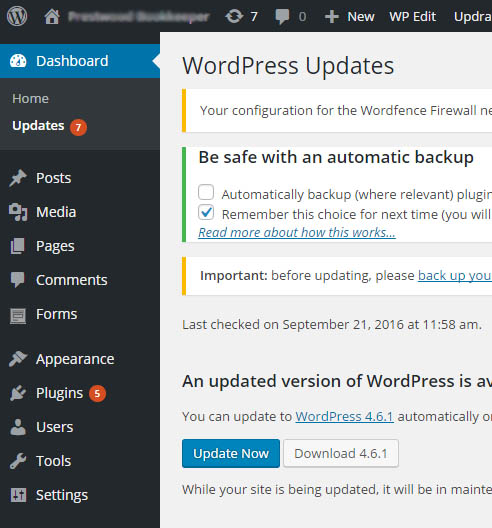
When you log into your site check the top of the screen and the side bar to see if there are any updates pending. All sites are designed to update themselves when new code is available, however sometimes it does not work for a variety of reasons. When I review the sites on a quarterly basis I look for problem, and will generally find around 2-3% of sites that have not updated.

Why is this important?

WordPress and the plugin suppliers generally update their code regularly. Your site should check daily to see if there is anything new to add. If it detects something then it will get the update, put the site into maintenance mode and install it automatically.

From time to time security problems will be identified and fixed. For this reason alone it is vitally important to ensure your site is up to date whenever you log in.

In the image below you can see several red numbers. There is a 7 in the horizontal black bar across the top of the site with a refresh circle to the left of it, next to Updates it says 7 and next to Plugins it says 5.

updating-your-website

This is an example of a site that did not update correctly. You may see one or two updates outstanding as your site will only check once per day.

In this case go to the Updates page (the link below Home above) and update your site to the latest version. This will include plugins, templates and the WordPress core itself which tends to be upgraded around every 6 to 8 weeks.

Your goal is to have no updates outstanding.

Sucuri Plugin – Slow site?

All of the sites use a Sucuri plugin which monitors and hardens the site against security threats. I have had several reports and have witnessed myself that editing the sites are slower than normal, and you may see an error like this:

Sucuri: (1452076628) Send_log: SSL connect error.

This message is indicating that a message was sent to a site that logs activity on your site. When you edit something, I generally get a message to indicate at a high level that something has happened on the site. 99.999% of the time it is normal activity, so I dismiss the items. It is this function that does not seem to be working predictably.

If you site is slow to respond to editing, and/ or you see a message from Sucuri, then go to the Plugins menu item. Locate the item (see image below) and temporarily deactivate it.

sucuri

This will stop the problem from occurring. When you have finished your editing turn it back on.

Continue reading Sucuri Plugin – Slow site?

Managing mail continued….

I mentioned a month ago that I had turned on Spam Assassin in the hosting for my personal email account. This continues to work very well, reducing the burden of filtering out spam messages. It is not 100% foolproof, but it does catch a lot of them.

I use four mechanisms now.

1). Turn on Spam Assassin in the control panel.

2). Create an account filter (affects all mail coming into your domain), to automatically delete mail that achieves 7 plus symbols in the spam bar (it is written like this +++++++). Anything scoring 7 or more is definitely spam.

3). Create a second account filter that will send any messages scoring 5 plus symbols in the spam bar (it is written like this +++++) to a specially created account called suspectspam@[mydomain.org.uk]. So all of this suspected spam is sent to a specific mail account that you can periodically check.  5 + symbols generally means highly likely to be spam.

4). In my Outlook account I use ESET Smart Security. For things that escape the spam filter but are clearly spam (I get a lot of pretend newsletters), these are detected and moved automatically.

These four steps have made processing email a lot easier. If this is of interest I can write a short tutorial on it, it is easy to set up. Let me know by making a comment below.

Additionally

If you use the filtering facilities in your hosting control panel, you can also trap and redirect certain forms of email. This can be quite a powerful tool as well.

Email Limitations on sending bulk mail

What is a bulk mail?

If you send out emails to more than say 10 people at a time, with the message “undisclosed recipients” then you are sending out bulk email. I had one instance where a group was sending out a marketing message to around 80 recipients. They received a lot of messages back that the mail was not sent. In fact it went out to the 50 people, the last 30 did not receive it.

50 Limit and 250/hr

Within the hosting we use there are two limits you need to be aware of. The first is the 50 limit. Any email you send should not carry more than 50 email addresses on it. If it does have more than 50 addresses the mail will be sent to just the first 50 and then you will get back error messages.

So break up any mailing lists into say groups of 40 email addresses which should work ok and send more than one mail. Continue reading Email Limitations on sending bulk mail

Wingrove-Services
Privacy Overview

This website uses cookies so that we can provide you with the best user experience possible. Cookie information is stored in your browser and performs functions such as recognising you when you return to our website and helping our team to understand which sections of the website you find most interesting and useful.

You can adjust all of your cookie settings by navigating the tabs on the left hand side.

My privacy policy can be located here: Wingrove Media Privacy Policy (opens in a new window)

My Cookies Policy can be found here: Wingrove Media Cookies Policy (opens in a new window)