Russian Hackers

Heightened hacker activity over the past month

I get many security messages from the sites I look after each day. Every two weeks I get a summary from one of the plugins I use called Wordfence. Below is typical of what I receive every two weeks. In this example it shows 634 attempts by some folks in Russia who have tried to get into this site by guessing passwords.  You may recall I tend to keep emphasizing the importance of strong passwords. This illustrates the point. Much of the activity below was automated, if not all of it. But be assured it is happening 24×7. By the time I have blocked these addresses, they will be popping up again on new addresses. So the best defence is to use a tough password.

Example email

This email was sent from your website http://xxxxxxxxxxx.org.uk and is a summary of security related activity that Wordfence monitors for the period July 13, 2015 to July 27, 2015.

Continue reading Russian Hackers

Photographs – another strategy!

Image file size and WordPress websites

I have commented in the past, and also cover it in my video tutorial on images that it is important to reduce the size of the image before you place it on your site. The reason why this is important is because it will take up space in your hosting, and cause your site to load more slowly. As a broad guide the image size for most cases should be around 100KB or less, 200KB for a large image. I frequently find images that are 4MB or larger. These have been uploaded to sites pretty much straight from the camera.

The preferred way…

I still advocate; do your image processing outside of WordPress. Shrink the image down to roughly the target size which for images in the content area will be around 600 pixels wide. For images in a gallery, then 1024pixels wide.  Use compression to reduce the file size, then upload it.

If you have fat files on the site already…..

WordPress introduced some new facilities in image processing in May 2015. All sites have this built in.

To access it log into your site and look at the menu on the left and choose Media (Library) and check the last few things you uploaded. Make sure they are around 100KB or less unless they need to be larger.

If you find something that is straight off of a camera and over 400KB, then do the following. Editing images in WordPress

Look for Edit image button in the bottom left of the image.

Click on it.  Look for the Scale Image option in the top right.

scaling images

Change this to something close to your target size. Remember that there is no value in having an image 4000 pixels wide if the screen space in the content area of your site is only 600 pixels. It is as simple as that.

Next change the X value (first dimension) the second one will follow to maintain the aspect ratio of the image.

Then click on Scale. A copy of your image will be created in WordPress to your settings.  It is automatically saved* (*skip down to the bottom of these notes learn about some other things you can do at this stage).

Close the window using the small x in the top right of the window.  At this stage, the original large image is still on the server. But the smaller image is now available to you for adding to pages. So half of the problem has been solved.

You can always restore it back again by going back to view the image in the image library and selecting edit. You will see a drop down which says “RESTORE IMAGE ORIGINAL SIZE”.

BUT…..

The settings built into WordPress are quite aggressive. It really depends on your images and what is in them whether this works for you or not. I generally find that any image manipulation on the server yields a smaller file (good) but the image is soft (less detailed … bad).  So use with care. This is why I think it is best to do this work outside of WordPress before they are uploaded.

Other things you can do in WordPress

While in the image editor, you can also do the following within WordPress.

  • Rotate the image clockwise or anti-clockwise
  • Flip the image horizontally or vertically
  • Re-crop the image

50% of the problem solved!

It appears that these actions create another copy of the image. I am pretty sure that there is a course of action you can take which will remove the original. While experimenting and writing this article, I could not reproduce the key/ screen sequence. But I am sure I have done it in the past.

If you are trying to scale down a large file accidentally loaded on the site, then the last step is remove the original after you have created a copy. If I can reproduce those steps, I will come back and edit this. It is however worth resizing images as this will save bandwidth at the server and to the client. Remember mobile users pay per MByte.


Crowd Funding – a source of donations?

Crowd Funding is not a new phenomena, it has been around for at least 5 years if not longer. The principle is that you advertise what you want to do and how much money you need to do it and the “crowd” (people like you and I) offer to put money up to help you to achieve your goals.

The idea originally came as an alternative method of funding compared to seeking venture capital or going to the bank to start a business. So in these cases you are seeking a share of the business or organisation. However I have seen this extended to apply to charitable causes and projects. In this case there is no return on investment for those donating.

We would like a website…. but

Each year I get enquiries from organisations that do not have a website, but would like one. I provide a summary of the costs and the process, then I don’t hear anything else. I chase it to find that they cannot afford it, even at my very low acquisition cost.

It seems to me that these organisations are stuck in a rut. They are short of funds, and are having to be very selective on what they spend them on. We all know that local government funding is disappearing for many charities providing family services for example, so I fully understand the problem. However with a website, they would have a presence on the internet, they can be located, they can seek funding through it, direct funding providers to it to establish their value proposition. So it seems to be a chicken and egg problem. Is there a way around this?

Returning to Crowd Funding

I have looked at some sites that specialise in raising capital, it would seem feasible to document a project where a website and hosting can be provided to a charity based on crowd funding for say £200-£300 in the first year. If you know of any Not-For-Profit or charitable organisation that might be interested in this approach please put them in contact with me. I would be happy to give it a try.

Crowd Funding applied to your organisation

Of course it follows that this concept could be used to help your organisation. First you need a value proposition, what is it you are going to do, or want to do? Write it up and get it on a crowd funding website as a project. Then advertise it through your website, your facebook or twitter accounts.

I suspect it is unlikely that a single benefactor will pop up from the internet, however for a given project, it may be easier to raise £200 from 40 people assuming you have the connections. Using social media to make this happen will extend your reach to more than those you directly connect to. If you look at some of the projects they are more compelling than others.

If you are interested in this area (either something that you wish to pursue for your own organisation, or as a joint venture) contact me and I will help you look into it. Use my contact us page to drop me a line.

I will be doing some research on it over the coming months, and may initiate a project to learn how it all works. If I learn anything more I will add an article on it.

Email Errors

Black lists

I have taken a lot of care in selecting hosting providers where they have systems in place that can detect spam being sent from a server. This means it is unlikely that you can end up on a blacklist. For those of you that have been with me for some time, the previous hosting company (Hostpapa), it used to happen once a month.

In selecting a new hosting partner this was one of the areas where I wanted to reduce the risk of it occurring.

What is a black list?

There are a number of services that monitor mail being sent and receive reports from monitors around the internet. They look for large volumes of mail from the same source (IP Address) on the basis that this may be a hacker who has taken over an account or server. Much of your unsolicited mail comes from sources like this.

Some organisations, in particular local government and government sites, and their agencies subscribe to blacklist checking services.

This means when an email comes into their server (or more likely while it is on the way to the server), a process will check to see where it came from, and perform some checks to establish if the source is listed in a black list somewhere.

If it is then the email is rejected. You will receive a rejection notice normally, although I have seen examples where no response is given. The rejection messages are often written in techno speak (yes, and I struggle sometimes). So not very user friendly.

Check the black lists

If you keep having problems sending emails from your domain to other sites such as council offices then check to see if your domain name is blacklisted. This is step 1.

You can do that by going to here: http://www.mxtoolbox.com

MxToolbox

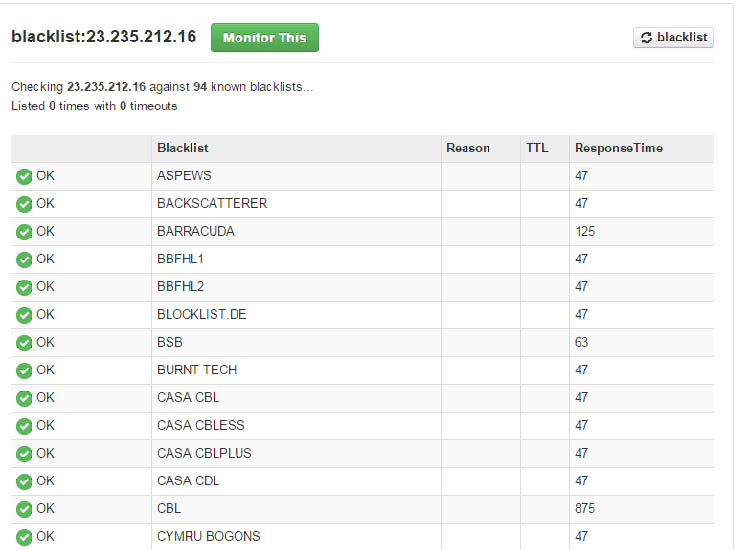
Enter your domain name and click on MX Lookup. When the result comes back click on the Blacklist check link.
blacklistcheck

The list you get back should all be green. Some may show timeouts. It is not 100% accurate, but if something has happened, it is likely that your domain will be on more than one list.

How do you get off a black list?

Once on a black list, they usually clear in an hour or so. If you find you are on a blacklist let me know. If it is to do with the server in the hosting (some of you source your mail through a third party), I will contact the hosting company and ask for it to be cleared.

What else can I do?

Use a different email address and try to send the same message to the recipient. Sometimes when these events occur they are reported erroneously. In various conversations I have had with technical support they don’t have a clue.

How did I get on a black list?

The chances are that you did not get on it through any action you took. The server is a shared resource, there will be many websites running on it.  It only needs another account to be hacked, or someone using their account for illegitimate purposes and this is what triggers it. If someone is found deliberately sending spam out, then they will probably have their account cancelled.

In both of the reseller accounts I use, they employ mechanisms that detect the presence of high volumes of emails being sent and will flag it to the support team. If the volumes are really large (50,000) then I have seen in one case that the email was prevented from being sent. So it never left the hosting.

Hosting Maintenance ( 10 minute loss of service)

I use two hosting companies for websites. One of them is where the majority of sites are located currently. They have advised me that they are going to be carrying out maintenance on their systems this morning (2nd July). There may be a 10 minute period where the website and mail is not functioning between 7am and 12:00pm today.

Referrer Spam and other ghost statistics

It would seem that the value of having Google Analytics on a website is diminishing. Prior to 6 months ago, the statistics made some sense. Now I see wild peaks in the statistics. The problem is being caused by something called Referrer Spam. This comment which I have taken from a support board for Google Analytics says it all:

“CarolleM said:
I appreciate your feedback AnalyticsEdge…I’ve been here before. So here’s my thoughts on the situation.

I know that we (the general WE) have seen this type of activity before with Semalt, dorador, alibabaexpress, iloveitaly and the list goes on. Here’s my point – we manage multiple websites and use GA as a means to measure whether our marketing initiatives increase awareness, traffic, conversions, funnel as intended, etc. These pings screw up numbers enough to effect reporting to the client. We are now in a position that we need to explain crawling, bots and pings to our clients who may be suspicious of the validity of the system to begin. Once again, this type of activity makes it difficult to track KPIs without this additional static. Since most clients are unfamiliar with reading these types of stats, we provide our clients with reports and explanations that they can appreciate and understand. With these bogus hits skewing the numbers (and I see this only getting worse) it feels more like selling snake oil than proving ROI.
Google if you want people to continue using your product as a means to substantiate website traffic, analyze visitor behaviour, track marketing initiatives, and all the other goodies you can do with this tool, then help us get clean output!!!! And if you look after numerous properties, as I do,  it would be helpful to be able to batch these functions rather than spending a day on creating filters for each and every property individually – that is a total productivity killer. Can anybody explain why we need to put up with this type of spam? Or can we insist that GA find a proper fix?”

Continue reading Referrer Spam and other ghost statistics

Best browsers to use for editing

While any browser can be used for viewing a WordPress website, I have found that Google Chrome, Firefox and Safari (Mac users) are probably the best for editing a site.

The main issue lies around Microsoft Internet Explorer and it’s various versions which have never really fully followed the web standards.

If you are experiencing any issues editing a site, first make sure you are not using Internet Explorer.

If you follow the video tutorials I have placed on this site, there are some of the steps which will not always reliably work with Internet Explorer 8,9, 10 & 11.

You can download Firefox here: https://www.mozilla.org/en-GB/firefox/new/

You can download Google Chrome from here: http://www.google.com/chrome/

Promoting Sponsors

As I pretty much exclusively deal with charities, most of you are seeking support through traditional funding sources which we all understand have been drying up during the recession, and will probably continue to do so. Some of you however are looking at novel ways of getting sponsorship from organisations.

There is currently an example at the bottom of the home page for Home-Start Gosport and Fareham based on the south coast.

In this case anyone landing on the home page and working their way down the content can see that the organisation is recognising the sponsorship of the Local Property Index. It is simple to add an image, and place a link under the image to the sponsors site. If the sponsors site is using Google Analytics then they will be able to tell how many referrals came from the website.

Some may consider an advert like this to be a little too obtrusive, it could have been added elsewhere. This is ultimately a decision made by the client.

However the lesson here is know that it is easy to do (and remove) and it can generate revenue for you with the right sponsor.

You can see the site here: http://www.homestartgosportandfareham.org.uk go to the bottom of the page to see the implementation.

Wingrove-Services
Privacy Overview

This website uses cookies so that we can provide you with the best user experience possible. Cookie information is stored in your browser and performs functions such as recognising you when you return to our website and helping our team to understand which sections of the website you find most interesting and useful.

You can adjust all of your cookie settings by navigating the tabs on the left hand side.

My privacy policy can be located here: Wingrove Media Privacy Policy (opens in a new window)

My Cookies Policy can be found here: Wingrove Media Cookies Policy (opens in a new window)