While nobody wants to have a hacked site, and we all take lots of precautions; one occurred in December. We are unable to establish what precisely had happened, but it looks as though the hacker got into the hosting space rather than into the website.
There are several ways to get into the hosting space, via the hosting provider, through my master account which can access everywhere, or through a username and password combination to something called cPanel. This controls the hosting and email.
In this case the hack was fortunately benign and quite clever. Around the website were additional menus that related to the content on the site. So to someone arriving on the site, it looked a little odd but related.
There were menus that related to families and young children, and these invited you to go to other related sites. What is happening here is that the hacker will probably receive referral fees by steering people to these other sites. This would be the motivation for doing it. So it was not a more typical defacement.
What happened next
Once I was advised of the problem I looked at the site and could see it myself. I tried with multiple browsers and the site behaved in exactly the same way. This tells me that it is not a case of a browser being taken over. (This is a common method of achieving the same thing, only it is not really on the website, it is just in your browser and is caused by a browser plugin you have picked up from somewhere.)
I next checked the site to see if I could detect how it was being done. It was not obvious that it was being done through the administrative part of the website. So it is more likely it was a file that had been added to the hosting. As there are several thousand files in a website, it is not practical to work through them all.
In this case I downloaded the last but one backup for the website. Deleted everything in the hosting, and reinstalled a clean version of wordpress, and the plugins and uploaded the content part. By handling it this way 95% of the files associated with the site were refreshed with original versions. Any code that was not part of the installation was deleted.
When the site came back the problem had disappeared.
Learning points
In this case we cannot locate the precise way that a hacker got into the site. However we can still take precautions. Passwords to the website and to the control panel were immediately changed, passwords to email were also changed.
The “salt” (a sequence of characters that are used to encode and hide passwords in WordPress) was changed, and any logged in users were forced off of the site, which means all legitimate users would need to log back in.
The information relating to the control panel had been passed to the group, although nobody had recently visited the hosting control panel.
I asked everyone to check their PCs for viruses, and asked which AV/ Security product was in use? In some cases a free anti-virus product was used. I recommend that in all cases you use a paid for anti virus product because this will offer a lot more protection than a free one. Viruses are everywhere and in several cases now over the past 4 years keyboard logging and other nasty resident programs have been found on people’s computers, where strange things have been happening.
Backup your Backup.
All sites I host now have a premium plugin installed which backs up your site each week and holds up to 6 weeks worth of backups. In some cases these are also held off the hosting in a separate location such as Dropbox. The process manages itself, so once set up you don’t generally need to do anything.
However it is wise to login into your site from time to time and go to Settings, UpdraftPlus Backups, go to the existing backups page and you will see something that looks like this:
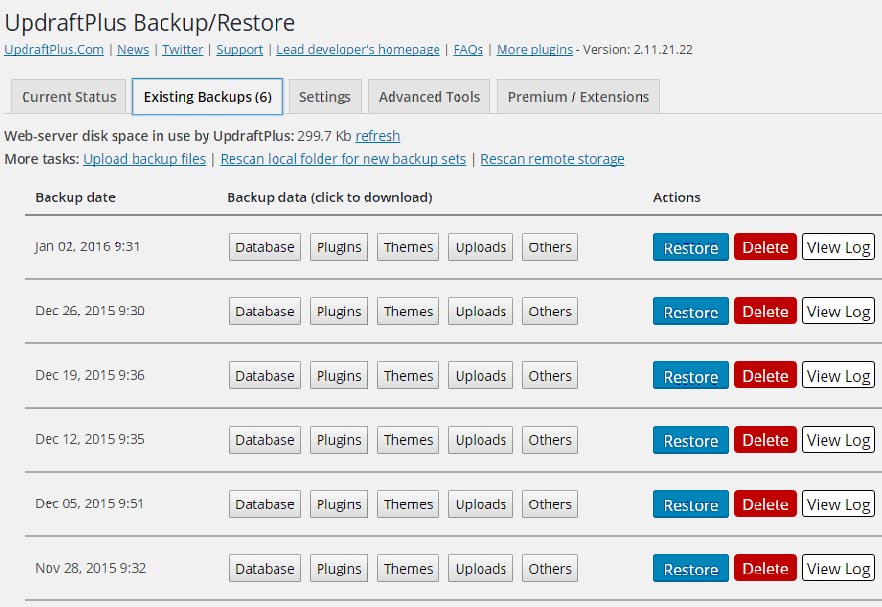
To take a local copy of a backup, click on the boxes “Database, Plugins, Themes, Uploads and Others for any given date. (You only need one row of these, not all of them).
When you click on each one it will expand and eventually give you a download link. You can then locally save the files to your local computer. Store it in a meaningful way such as the date is used for the directory name.
I used this process to restore the site back to an earlier version. It was all handled moderately quickly without any major drama other than changing passwords everywhere to maintain the integrity of the site.
Finally
Do remember to use tough passwords everywhere, and do not use the same password anywhere else. Hackers often use password libraries to hack into mailboxes as well as login’s to sites. The library comprises a set of statistically popular passwords. If you are not using a mixture of upper and lower case letters, numbers and symbols and at least 8 to 12 characters, then your password may be weak.
It is inadvisable to leave sensitive information in an online account such as gmail, hotmail or yahoo mail. I am aware of several breaches into these mail systems. They can be difficult to regain control if someone hacks into your email account. Do not leave passwords and usernames in your mail in case someone gains access to it and subsequently uses the information. It is better to delete mails that contain this information and keep the information safe somewhere else like an encrypted spread sheet for example.