Date: 1st March 2017
I have had a few issues today with people not being able to login to their sites and getting a 403 Server error returned. If you see this at all drop me a line immediately and I will take a look.
In the first support call I raised this with the hosting company. I had a client who could not log in to a site, they were given a “403 Forbidden Error”. They were experienced and had logged in before. The odd thing was I could log in to the site. Normally a 403 error is related to the server. So if it occurs for one person it would also apply to me. It may be that I was already logged in and had a valid cookie. It was not related to IP address, so not a selective block either.
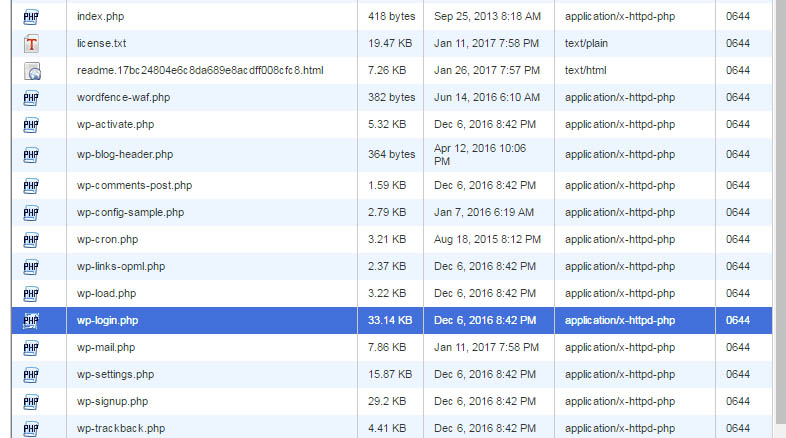
I had two more calls on the 1st of March and decided to look at it myself. I could see in both cases that the file permissions for the file associated with logging in had been reset from 0644 to 0000. This is the reason for the problem, however it does not tell us why this file only has changed. I am still looking into this. I suspect if a plugin has done this, then inevitably all sites will be affected.
It is quick for me to fix if you see this problem at all. Just let me know.
Self Help
For those who want to have a go themselves, you need to login to the control panel access for your site and launch file manager in the root of the website. Look for the file wp-login.php and note the file permissions on the far right of the line. All files should show permissions of 0644 unless they are directories, then they should be set to 0755.
If the file wp-login.php shows the value 0000 this is why there is a problem. Reset it to 0644 and it will resolve it.