A client sent me an email about someone claiming to be a supplier of services aggressively demanding payment or if the payment demand was not met further action would be taken. They asked if it was genuine. The problem with many of these is they may appear to be credible, and that is what the scammers behind these things try to do.
See the image below and what to do to check for yourself:
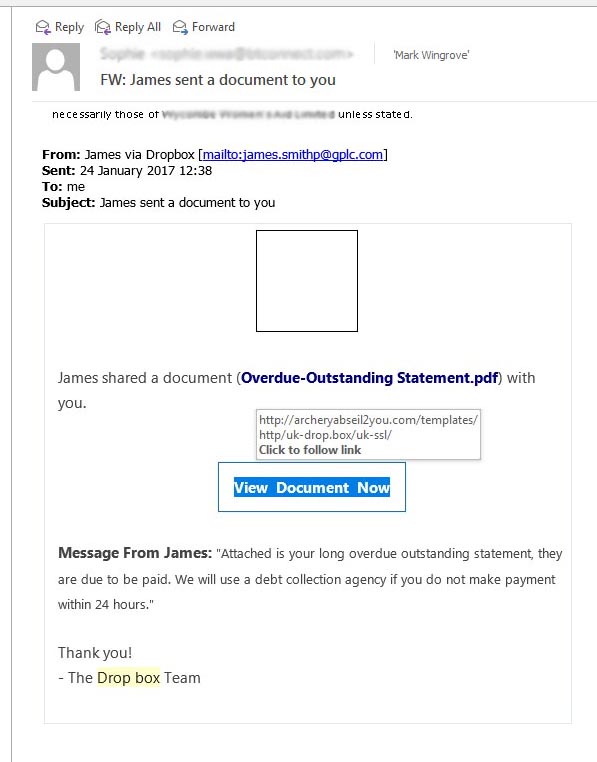
Normally I see a few of these a week and just ignore them. In this case it came into one of my clients. The installation for their website uses DropBox to back up the website. Although it is a free account so there should not be any payments outstanding.
The things that jump out at me when considering whether this is real or not is who sent it? It says James.smithp@gplc.com here is your first clue. If it was about a Dropbox unpaid bill, surely it would come from xxxx@dropbox.com?
Secondly the link in the message. Never click on one of these, however if you place your cursor over it without clicking on it, it will tell you where it is going. Here is the second clue: Is it likely that Dropbox.com would be sending you messages from the domain archeryabseil2you.com? Not really. The scammers have tried to be clever with the domain name and added in there ../http/uk-drop.box/uk-ssl/ In that format they are locations in the archeryabseil2you.com website and nothing to do with Dropbox.
What happens if you click on the link
I have not done this, and I would urge you not to do it either, but I have seen one of these in action and can speculate what will happen.
If you click on the link you will be taken to a website buried in the server that is supporting archeryabseil2you.com. Assuming this is a genuine organisation, they will not know that there is a phishing scam running on their server. Their server has been compromised by a hacker. Within it will be a set of simple screens with a form in them which may ask you to login to your dropbox account.
Sharing your password
The problem is you are not logging into your dropbox account, you are unknowingly mailing your credentials for your dropbox account to an unknown third party.
Online Payments
Worse still you may be entering your credit card details into a form in the belief you are paying the outstanding bill. So now your credit/ debit card details are in the hands of a hacker.
What you should do if you are unsure
If you receive anything that looks suspect, and there are usually some clues in there, here are some tips (and why they should be considered).
Never download any images. Why? Because you may be downloading more than images, and it also confirms this email address is real with a person on the end of it, and you may get more junk mail even if you do nothing more.
Never click on any links. Why? Because they may take you to an independent site that is pretending to be the official site. It also confirms that the email address has someone at the end of it, and you may get more junk mail. You can hover your mouse over the top of the link without clicking on it and you can generally find out where it is going to.
Don’t unsubscribe from anything you never subscribed to. Why? If it looks like someone is selling you something, and it does not look genuine, it probably means that the sender has got hold of a set of email addresses and are blasting mail out. If you click on unsubscribe, then you are confirming that your email address is a monitored one. The potential value of your email address will increase and end up on more junk mail lists. Block the mail in your mail reader, you can generally blacklist and divert repeating mails to the junk mail folder so you do not have to deal with them.
You would not appear on a genuine newsletter mailing unless you actively subscribed. This is the only way newsletter senders know they have good quality leads if the subscribers subscribe themselves.
If you are still now sure.
The important thing is do not follow the links in the email, independently search for the site using Google and then check it. Any site that is dealing with accounts and credit/ debit cards will start with https:// (note the s, it means secure). In this case Dropbox.com and login to your account and check it. If you owe anyone any money there will be an account page somewhere that will confirm it.
Alternatively do a search and call them. But do not rely on any contact information in the email you receive, look it up independently.